Binance Wallet Review 2026: Is the MPC Wallet Worth Your Time?
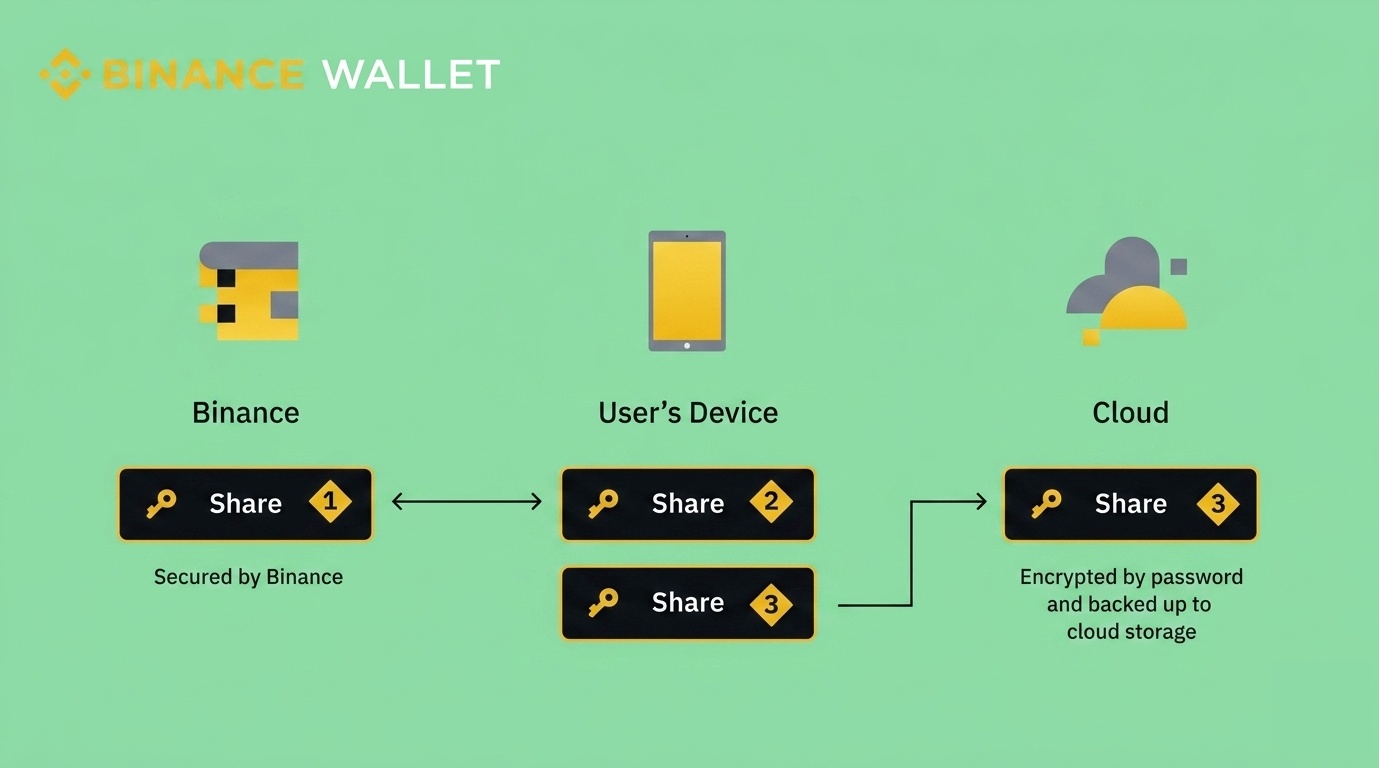
Binance Wallet is a self-custody wallet built into the Binance app that replaces the traditional seed phrase with Multi-Party Computation (MPC). Your private key gets split into three encrypted shares across your device, your cloud storage, and Binance's servers, and you need at least two to access your funds. It supports 34+ blockchains, comes packed with built-in swaps, a cross-chain bridge, dApp access, and two staking products. If you are already on Binance and want an easy way into DeFi without setting up a whole separate wallet, this removes a lot of the usual friction. The trade-off is that the experience is tightly woven into the Binance ecosystem, and recovery can become a real problem if you lose your device and forget your recovery password at the same time.
Our Verdict: 4.0 / 5
Best for: Existing Binance users who want to explore DeFi and on-chain activity without setting up a separate seed-phrase wallet from scratch.
Avoid if: You want full independence from any exchange ecosystem, need hardware wallet integration, or prefer the portability of traditional seed-phrase recovery.
Strongest points:
- Moving crypto from your Binance exchange account into self-custody takes a couple of taps. The gap between custodial and non-custodial has never been this narrow.
- The MPC setup eliminates the need to write down and protect a 24-word seed phrase, which continues to be the single biggest failure point for most wallet users across the industry.
- Swaps, bridging, a dApp browser, and two staking products (Simple Yield and Yield+) are all accessible without leaving the app, which keeps the day-to-day experience fairly streamlined.
Weakest points:
- The wallet revolves around the Binance ecosystem. If your Binance access gets disrupted for any reason, the wallet experience takes a hit too.
- Recovery relies on your device, a cloud backup, and a recovery password. Losing two of those three at the same time means permanent loss, and Binance cannot intervene.
- Hardware wallet pairing is not documented anywhere in the official materials. If you want a physical signing device as a second layer, you will need a different wallet entirely.
Bottom line: Binance Wallet makes a strong case for users who are already invested in the Binance ecosystem and want to start moving on-chain without a complicated setup. It is very clear Binance is not trying to compete with Ledger or Tangem on raw security, and it is not trying to be as open and portable as MetaMask. What it does well is shrink the gap between an exchange and self-custody down to almost nothing, and for a surprisingly large number of users, that convenience could actually be a game changer.
What Is the Binance Wallet?
Before we begin, there is a common misconception that needs addressing right away. The Binance Wallet is not the balance sitting in your regular Binance exchange account. Your exchange balance is custodial, which means Binance controls those funds on your behalf. The Binance Wallet is a completely separate self-custody product that happens to live inside the same app, and it is built for holding your own keys and engaging with the broader Web3 world directly.
Developed with Trust Wallet and launched in late 2023, the wallet uses Multi-Party Computation instead of a seed phrase. During setup, your private key is generated and split into three encrypted shares: one on your device, one in your iCloud or Google Drive, and one held by Binance.
Any two out of three are needed to sign transactions or restore the wallet, which means no single party, including Binance, can move your funds alone. The wallet is accessible through the Binance mobile app, Binance Wallet Web, and browser extensions on Chrome and Brave.
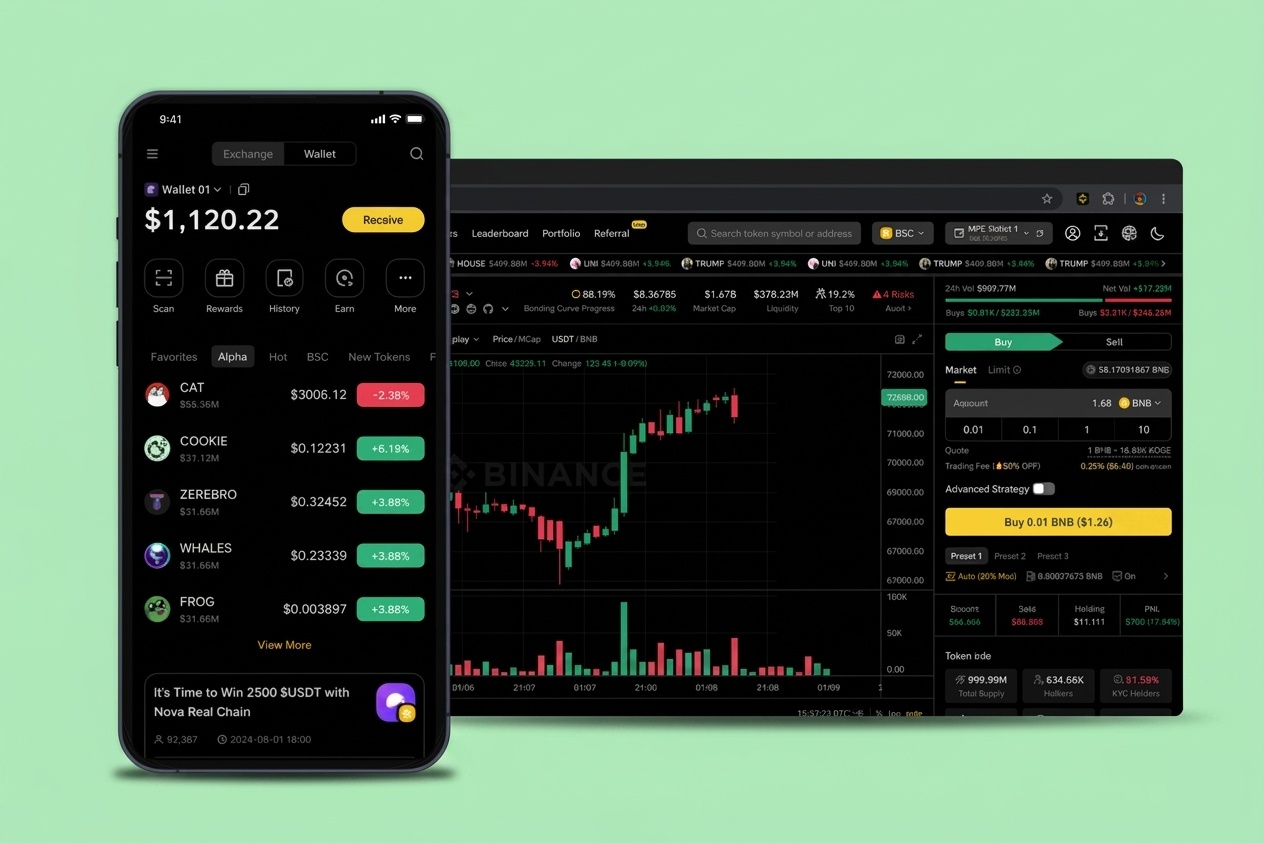
Binance Wallet Features
Multi-Chain Support and Asset Coverage
Over 34 blockchains are supported by Binance wallet at the time of writing. These cover Ethereum, BNB Chain, Solana, TRON, Polygon, Avalanche, Optimism, and SUI among others. Thousands of tokens are easily available, and you can import anything missing by contract address.
In terms of coverage, it sits in the middle of the pack when compared to its alternatives. Coinbase Wallet supports fewer chains after dropping several assets in 2023, while Trust Wallet stretches past 100 blockchains.
Built-In Swaps and Cross-Chain Bridge
Swaps run directly inside the app through aggregation services that find the best available route and price. Though a swap service fee applies on top of gas, and the exact amount fluctuates based on the pair and routing. Predicting the final cost before execution can be tricky since routing decisions happen dynamically.
Cross-chain bridging is built in as well for moving tokens between networks without an external bridge protocol.
dApp Browser and DeFi Access
Connecting to decentralized applications works on both the mobile app and the browser extension. One detail that stands out is the QR-based login flow on the extension, which uses a matching-pair code system to verify connections. Given how frequently fake dApp connection prompts are used in phishing attacks, this is a genuinely useful addition that can matter for a lot of people.
Simple Yield and Yield+ (Staking)
Binance wallet also offers two staking products that serve different audiences. Simple Yield is for users who want to deposit an asset like BTC, ETH, or a stablecoin into a vault and earn without navigating complex protocols.
Yield+ layers liquid staking and restaking across multiple DeFi protocols for higher potential returns, but the complexity and risk are proportionally greater. Knowing which product matches your risk tolerance before committing funds matters, because the exposure is not comparable between the two.
Binance Alpha
This is a newer feature that spotlights early-stage tokens being considered for the main exchange listing. You can browse featured projects and purchase them through a Quick Buy function with anti-MEV protection and dynamic slippage.
Each batch gets a 24-hour spotlight, but remains accessible afterward. This is great for those who like early exposure to these new tokens, though naturally the risk profile of pre-listing tokens runs higher than established assets.
Security: How Safe Is the Binance Wallet?
When it comes to security, the entire Binance wallet security model revolves around the MPC key-splitting mechanism. Instead of one private key that lives on a single device and becomes a catastrophic liability if exposed, your key is distributed as three encrypted shares across your device, your cloud storage, and Binance.
An attacker who compromises your phone still only has one share, which on its own cannot authorize anything. This implementation meaningfully raises the bar compared to a standard hot wallet where everything sits behind a single point of failure.
Beyond the key management, Binance has invested heavily in protective features for everyday transactions. Wrong address detection flags potentially fraudulent recipients before you send. Malicious contract warnings scan smart contract code before you interact with it. An approval management tool lets you review and revoke permissions you have granted to dApps, and the Security Center runs automated scans to catch risky interactions and incomplete backups. Compared to most competing hot wallets, the scam prevention layer here is notably more developed.
On the audit front, SlowMist reviewed the wallet in 2026 and the browser extension in 2025. Binance runs a broader bug bounty through Bugcrowd as well. One thing worth mentioning is that the security firm Fireblocks identified a vulnerability in Binance's open-source threshold-signature library back in 2023. Binance acknowledged it, confirmed the fix, and stated no user funds were impacted.
For active on-chain use like swaps, DeFi, and dApps, the security here is above average for a hot wallet. For large long-term holdings, a dedicated cold storage device remains the stronger choice.
Binance Wallet Fees and Pricing
|
Action |
Fee |
|
Creating the wallet |
Free |
|
Sending and receiving crypto |
Blockchain network fee only |
|
Token swaps |
Network gas fee + variable swap service fee |
|
Cross-chain bridge |
Network fee (varies with congestion) |
|
Buying crypto with fiat |
On-ramp provider fee + payment method fee |
|
Staking and yield |
Depends on protocol, validator, and asset |
|
Holding crypto in the wallet |
Free, no subscription or maintenance fee |
Setting up the wallet costs nothing and there are no recurring charges for holding assets. Costs build up based on activity. Receiving and holding is basically free. Swapping, bridging, and fiat purchases each add their own layers of fees from different sources. The swap service fee is a newer addition, and while Binance discloses it, the exact amount varies with routing, making it harder to predict before a transaction.
Setting Up the Binance Wallet
The setup process is noticeably faster than most self-custody wallets because there are no seed phrase screens involved.
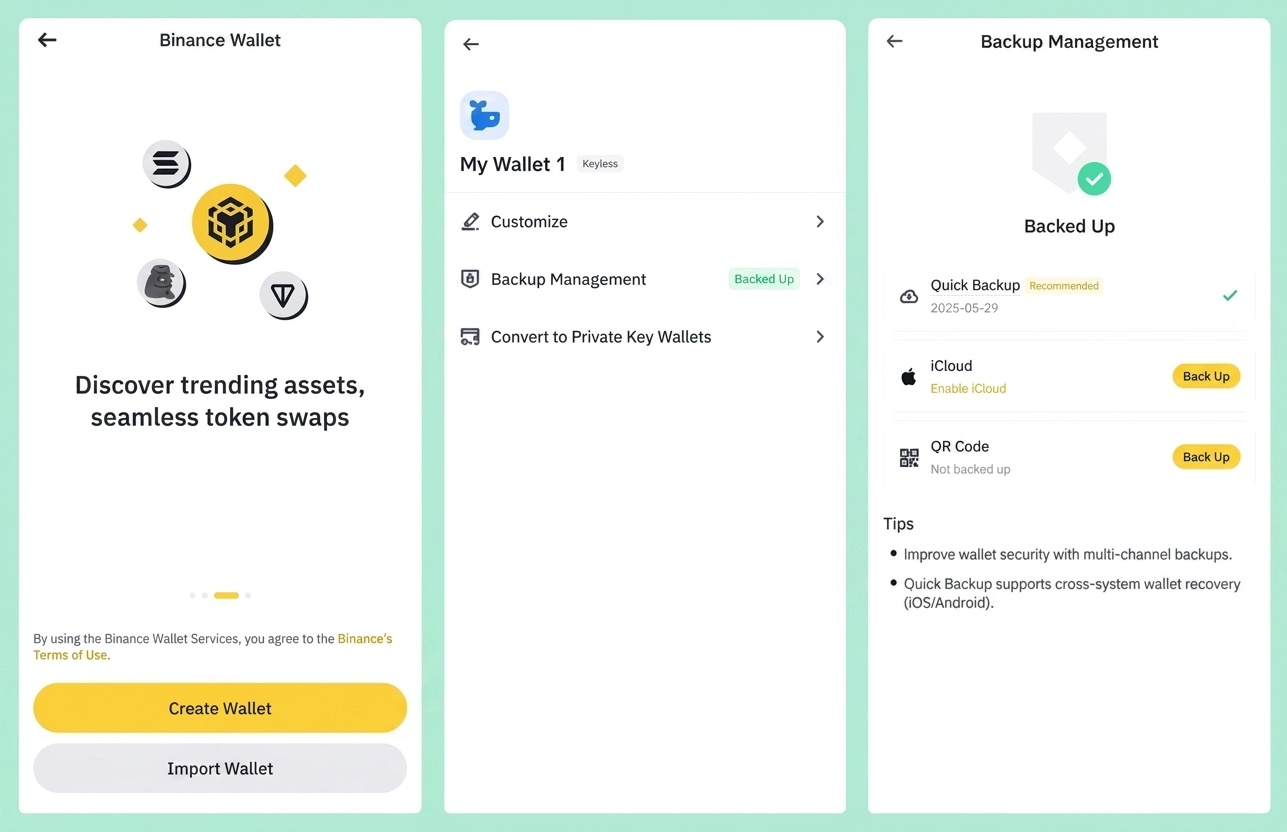
- Open the Binance app, navigate to the Web3 section, and tap Create Wallet. The three MPC key shares get generated during this step, and the app immediately prompts you to create a backup.
- You can back up to iCloud or Google Drive, or use a QR code method. Either way, you will be asked to set a recovery password that encrypts the cloud-based share.
- This recovery password is the single most critical piece of information in the entire setup. If you forget it and simultaneously lose access to the device running the wallet, there is no fallback. Binance cannot intervene.
- After the backup is complete, enable biometric authentication and the wallet is ready.
- To fund it, either tap Receive and share your wallet address with someone sending you crypto, or transfer funds directly from your Binance exchange account, which takes just a few seconds.
How to Transfer Crypto from Binance to a Cold Wallet
Moving crypto off the Binance exchange and into cold storage is a straightforward process, regardless of whether you use a Ledger, Trezor, Tangem, or any other hardware wallet. The steps follow the same logic each time.
- Open your cold wallet app (Ledger Live, Tangem, Trezor Suite, etc.) and copy the receive address for the specific cryptocurrency you want to transfer. Confirm you are on the correct network.
- In the Binance app, go to your spot wallet, select the cryptocurrency, and tap Withdraw.
- Paste the cold wallet address, select the matching network, enter the amount, and review the withdrawal fee that Binance charges.
- Confirm using your 2FA method. First-time withdrawals to a new address may trigger a brief security hold from Binance's side.
- Wait for the blockchain to process. Bitcoin transactions can take anywhere from ten minutes to an hour depending on congestion. Most EVM chains settle within a few minutes.
Important: Always send a small test amount first. Transfer $5 worth, confirm it arrives in your cold wallet, and only then send the rest. This takes two extra minutes and has saved countless people from irreversible address or network mismatches.
How to Withdraw Money from Trust Wallet Without Binance
Many people assume you need Binance to cash out of Trust Wallet because Binance acquired Trust Wallet years ago but that is not accurate.
Trust Wallet is a standalone self-custody wallet that works with any exchange or service accepting crypto deposits. Since no decentralized wallet supports direct bank withdrawals, the process involves sending your crypto to a platform with fiat off-ramps, selling it, and withdrawing to your bank.
Using an alternative exchange (Coinbase, Kraken, Bybit, KuCoin):
Create an account on any exchange with fiat off-ramps and complete their KYC. Find the deposit address for the crypto you hold, matching the network exactly. In Trust Wallet, select the token, tap Send, paste the address, and confirm. Once it arrives, sell for fiat and withdraw to your bank through SEPA, ACH, or SWIFT.
Peer-to-peer (P2P) and crypto debit cards:
P2P platforms like Paxful or OKX P2P let you sell directly to buyers with escrow protection. Services like BitPay, Crypto.com, and Wirex offer crypto debit cards that you can load from Trust Wallet for spending or ATM withdrawals. Both routes avoid centralized exchanges, though P2P carries a higher fraud risk and debit cards work best for smaller everyday amounts rather than large cashouts.
Binance Wallet vs Other Crypto Wallets
|
Feature |
Binance Wallet |
Trust Wallet |
MetaMask |
Tangem |
|
Wallet type |
Hot (MPC, self-custody) |
Hot (self-custody) |
Hot (self-custody) |
Cold (hardware) |
|
Seed phrase |
No (MPC key shares) |
Yes (12-word) |
Yes (12-word) |
Optional (seedless default) |
|
Supported chains |
34+ |
100+ |
All EVM + Solana |
85+ |
|
Exchange integration |
Binance (seamless) |
Binance (limited) |
None |
None |
|
dApp browser |
Yes (mobile + extension) |
Yes (mobile) |
Yes (extension-first) |
WalletConnect only |
|
Hardware wallet support |
Not documented |
None |
Ledger, Trezor, Lattice |
N/A (is hardware) |
|
Staking |
Simple Yield + Yield+ |
Yes (select assets) |
No built-in |
Yes (select assets) |
|
Desktop app |
Browser extension |
Browser extension |
Browser extension |
None (mobile only) |
The key differentiator in these comparisons is how tightly Binance Wallet connects to the largest crypto exchange by trading volume. Trust Wallet covers far more chains and is more portable so it gets the win there.
MetaMask remains the desktop DeFi standard with multiple hardware wallet pairings and that can be handy for a lot of people.
Tangem sits in a different security class entirely with its physical NFC cold storage.
So the decision comes down to ecosystem convenience versus wallet independence.
Who Should Use the Binance Wallet?
A good fit for:
- Existing Binance users who want to move into DeFi and on-chain activity without the friction of managing a seed phrase separately.
- People who find the idea of writing down 24 words and securing them in a safe place genuinely stressful or impractical.
- Active traders who swap, bridge, and interact with dApps frequently and prefer having everything centralized in one app ecosystem.
- Users who appreciate the added layer of scam prevention features like address flagging, contract scanning, and approval management tools.
Not the right fit for:
- Anyone who wants a crypto wallet that operates completely independently from any exchange or platform account.
- Users who consider hardware wallet integration a non-negotiable requirement for an extra physical layer of security.
- People in regions where Binance availability is restricted or uncertain, since wallet access and features can vary by location.
- Long-term holders who primarily want to store crypto safely and rarely interact with it. A dedicated cold storage device is better suited for that purpose.
Common Mistakes with the Binance Wallet
1. Mixing up the Binance Wallet with your exchange balance
This confusion happens more than you might expect. The crypto in your Binance trading account is custodial, where Binance holds the keys. The crypto inside the Binance Wallet is self-custody, where you hold the keys through MPC. They are two distinct products and mixing them up leads to confusion about where your funds actually sit and who controls them. Do not mistake one for another as it can land in your trouble.
2. Treating the recovery password as an afterthought
Since there is no seed phrase to fall back on, the recovery password you create during setup becomes the most important piece of information protecting your access. If you lose your phone and have no way to recall this password, and your cloud backup is also compromised or inaccessible, the wallet is permanently gone. Binance's support team cannot step in to restore it. Write the password down, keep it somewhere separate from your phone, and treat it with the same seriousness you would treat a seed phrase.
3. Rushing through the backup process
The wallet prompts you to back up during initial setup, and it is tempting to move past it quickly. If your device breaks or gets stolen before the backup is completed properly, there will be no way to recover it.
4. Assuming Binance can recover your wallet because they hold one key share
Binance holds one of three shares. That share alone cannot access or restore your wallet. You still need your device share or cloud backup share alongside theirs. Self-custody means the responsibility stays with you, even when the setup feels more guided than a traditional wallet.
Closing Thoughts
Binance Wallet fills a very specific gap in the market and fills it convincingly. For users already operating within the Binance ecosystem, it offers the fastest route from exchange custody to self-custody available right now. The MPC approach removes the seed phrase anxiety that keeps many users from taking control of their own keys, and the scam-protection layer is among the most thorough in any hot wallet today.
Where it falls short is independence. The experience is anchored to Binance, and if that access gets disrupted, the wallet becomes harder to work with. No hardware wallet pairing option either. For everyday DeFi activity, swaps, and on-chain trading, it works well as a daily driver. For long-term storage or anyone who prioritizes portability, a standalone hardware wallet or something like MetaMask remains the stronger pick.
Disclaimer: All content on The Moon Show is for informational and educational purposes only. The opinions expressed do not constitute financial advice or recommendations to buy, sell, or trade cryptocurrencies. Trading involves significant risk and may result in substantial losses. Always seek independent financial advice before making investment decisions. The Moon Show is not responsible for any financial losses or decisions made based on the information provided.
Please view the full disclaimer at: https://themoonshow.com/disclaimer
Ledger Wallet Review - Features, Models, and Security Explained
A cryptocurrency wallet is a software application or a physical device that enables users to st...
Exodus Wallet Review – Security, Fees, and Usability
Exodus is a non-custodial cryptocurrency wallet that lets you send, receive, store, and swap ov...
Trust Wallet Review - Features, Security, and Performance Explored
A cryptocurrency wallet is a tool that allows users to manage, store, send, and receive cryptoc...