Trust Wallet Review - Features, Security, and Performance Explored
Trust Crypto Wallet is used by over 200 million users worldwide, making it a reliable option for many users. Beginners prefer this wallet for its ease of use as well as robust security features. The wallet is compatible with multiple devices (applications for Android, iOS, and browser extension), supports over 100 blockchains, 600 million+ NFTs, and 10 million+ assets. It offers seamless crypto swapping and direct purchase of crypto within the wallet application. Trust Wallet has a rating of 4.5/5 on Google Play, and 3.8/5 on GetApp.
Trust Wallet Pros and Cons
Pros
- Beginner-friendly interface
- Integrated Buy, Sell, Swap, and Stake features
- Full non-custodial control
- Supports 10M+ Assets, 600M+ NFTs, and 100+ Blockchains
- Strong security and privacy features
Cons
- NFT management may require external platforms
- Advanced features may overwhelm beginners
A cryptocurrency wallet is a tool that allows users to manage, store, send, and receive cryptocurrencies and other digital assets. Crypto wallets secure private keys and keep the information safe, as anyone with access to them can control the associated assets. Modern crypto wallets offer features such as access to decentralized finance (DeFi), token swaps, staking, NFT management, and enhanced security. One wallet that has gained attention for combining usability, security, and transparency is the Trust Crypto Wallet.
In this in-depth guide, we will review the Trust crypto wallet, its features, supported assets, security, and overall usability.
What is Trust Crypto Wallet?
Trust Crypto Wallet is a non-custodial wallet (hot wallet) created to give users complete control over their digital assets. As a non-custodial wallet, it ensures that the users retain ownership of their private keys. It is available as a mobile application (available on Google Play Store and Apple App Store) or as a browser extension. The wallet supports multiple blockchain networks and digital assets, allowing users to interact with decentralized applications (dApps), manage cryptocurrencies, and contribute to the DeFi ecosystem from a single interface.
With over 200 million users worldwide, Trust crypto wallet emphasizes privacy, transparency, and decentralization, making it a suitable tool for both beginners and experienced users. It supports 10 million+ assets, 600 million+ NFTs, and 100+ blockchain networks. All private keys are stored locally on the user’s device, reducing risk and exposure to hacks or scams. It has an integrated DEX that enables users to swap tokens directly from the wallet without interacting with a centralized exchange.
It also allows users to stake certain cryptocurrencies and earn rewards, generating passive income with their crypto holdings. In order to protect the assets of the users, Trust Wallet has built-in risk monitoring tools, including Security Scanner. It is an ISO Certified wallet that offers encrypted cloud backups, hides and reports unsafe NFTs, and independent security audits.
Supported Blockchains
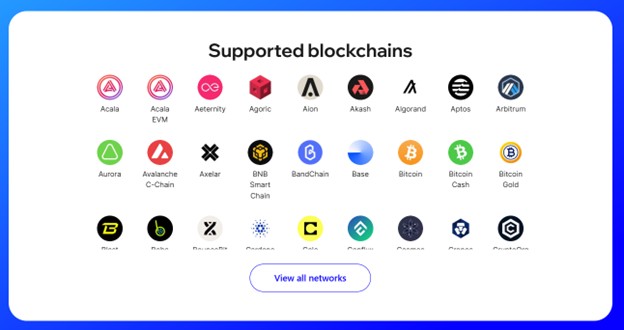
Trust Wallet supports 100+ blockchain networks, which include Bitcoin, Ethereum, Dogecoin, KuCoin, OKX Chain, Polygon, Sui, XRP, and more.
How the Trust Crypto Wallet Works
Users generate a cryptographic key that includes a private key (used to authorize transactions) and a public key (used to receive assets). During wallet setup, users are provided with a recovery phrase that is usually 12 or 24 words long. It is used to restore user access in case the device is lost or damaged.
Setting Up Trust Wallet
To set up your Trust Wallet, you will have to:
- Download it from the Google Play Store or the Apple App Store.
- Open the application and select “Create a New Wallet.”
- Add in your information.
- The application will display a 12-word phrase. Write it down and secure it.
- Verify your account by entering the 12-word phrase correctly.
- Create a 6-digit passcode, biometric login, or Face ID to access the application.
Once the wallet is set up, the users can:
- Send and receive cryptocurrencies.
- Monitor balances across supported networks.
- Connect to decentralized applications.
- Swap tokens directly within the wallet.
- Stake supported assets to earn rewards.
Supported Platforms
Trust Crypto Wallet is designed to be accessible across multiple platforms, ensuring a consistent experience, regardless of the device used.
Mobile Applications
The wallet is available as a mobile application for Android and iOS. The mobile version offers full functionality, including asset management, staking, token swaps, and dApp connectivity. The interface is optimized for touch navigation to make it easier for users.
Browser Extension
Trust Crypto Wallet also offers a browser extension with popular browsers such as Google Chrome, Brave, and more. It is particularly useful for users who frequently interact with Web3 applications, NFT marketplaces, and DeFi protocols.
Supported Cryptocurrencies and Assets
Users can securely store and manage 300+ cryptocurrencies that include, but are not limited to:
- Bitcoin (BTC)
- Ethereum (ETH)
- Binance BNB (BNB)
- Solana (SOL)
- Cosmos (ATOM)
- Tether (USDT)
- USD Coin (USDC)
Custom Tokens
Users can manually add custom ERC-20 and BEP-20 tokens by entering the correct contract address. This feature is useful for managing newly launched or less common digital assets.
NFTs
Trust Crypto Wallet supports NFT storage and viewing across compatible networks. While advanced NFT trading may require connecting to external marketplaces, the wallet allows users to safely store and verify ownership of their NFTs.
Trust Crypto Wallet Features
Trust Crypto Wallet offers a comprehensive set of features that are designed to make crypto management easy while maintaining strong security standards.
User-Friendly Interface
The wallet interface is intuitive, clean, and easy to navigate. Transaction history, asset balances, and network activity are clearly displayed, reducing the learning curve for beginners.
Built-In Token Swap
Truth Crypto Wallet comes with a built-in token swap feature that allows users to exchange one cryptocurrency for another directly within the wallet. This eliminates the need to transfer funds to centralized exchanges and reduces the exposure to third-party risks.
Staking
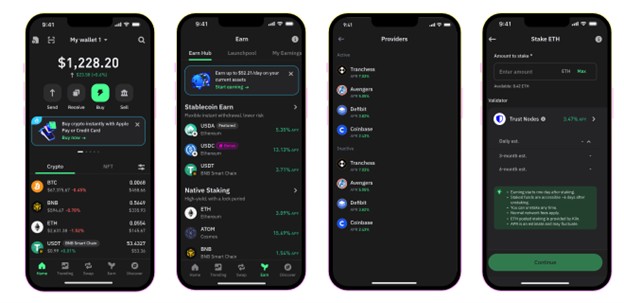
The wallet supports staking for selected cryptocurrencies, allowing users to earn rewards and generate passive income. Staking options are presented with clear information about estimated yields and lock-up periods. The wallet supports 25+ cryptocurrencies for staking, which include Ethereum (ETH), Solana (SOL), Sui (SUI), Cardano (ADA), Sei (SEI), and more.
NFTs
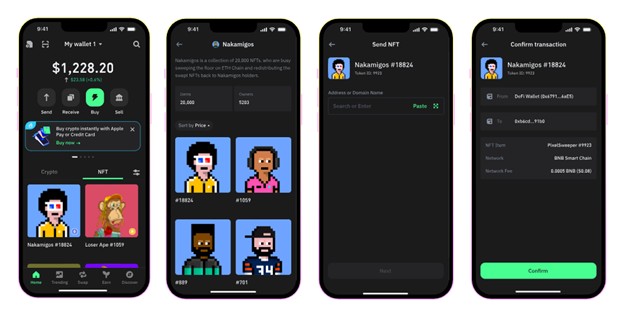
Trust Crypto Wallet makes it easier for users to access various NFT marketplaces. The application supports 600 million+ NFTs. Users can also store, manage, and showcase their NFTs across multiple blockchains. Supported NFT marketplaces include:
- Open Sea
- Rarible
- Solanart
- Axie (Infinity) Marketplace
Buy Cryptocurrencies
Users can purchase cryptocurrencies right from their Trust Crypto Wallet application. It currently supports 110+ fiat currencies that can be converted to cryptocurrencies in a matter of seconds. Trust Crypto Wallet supports the following payment methods:
- Apple Pay
- Ramp
- MoonPay
- Google Pay
- Pix
- S€PA
- Simplex
- Mercuryo
Buying Cryptocurrency with Trust Crypto Wallet
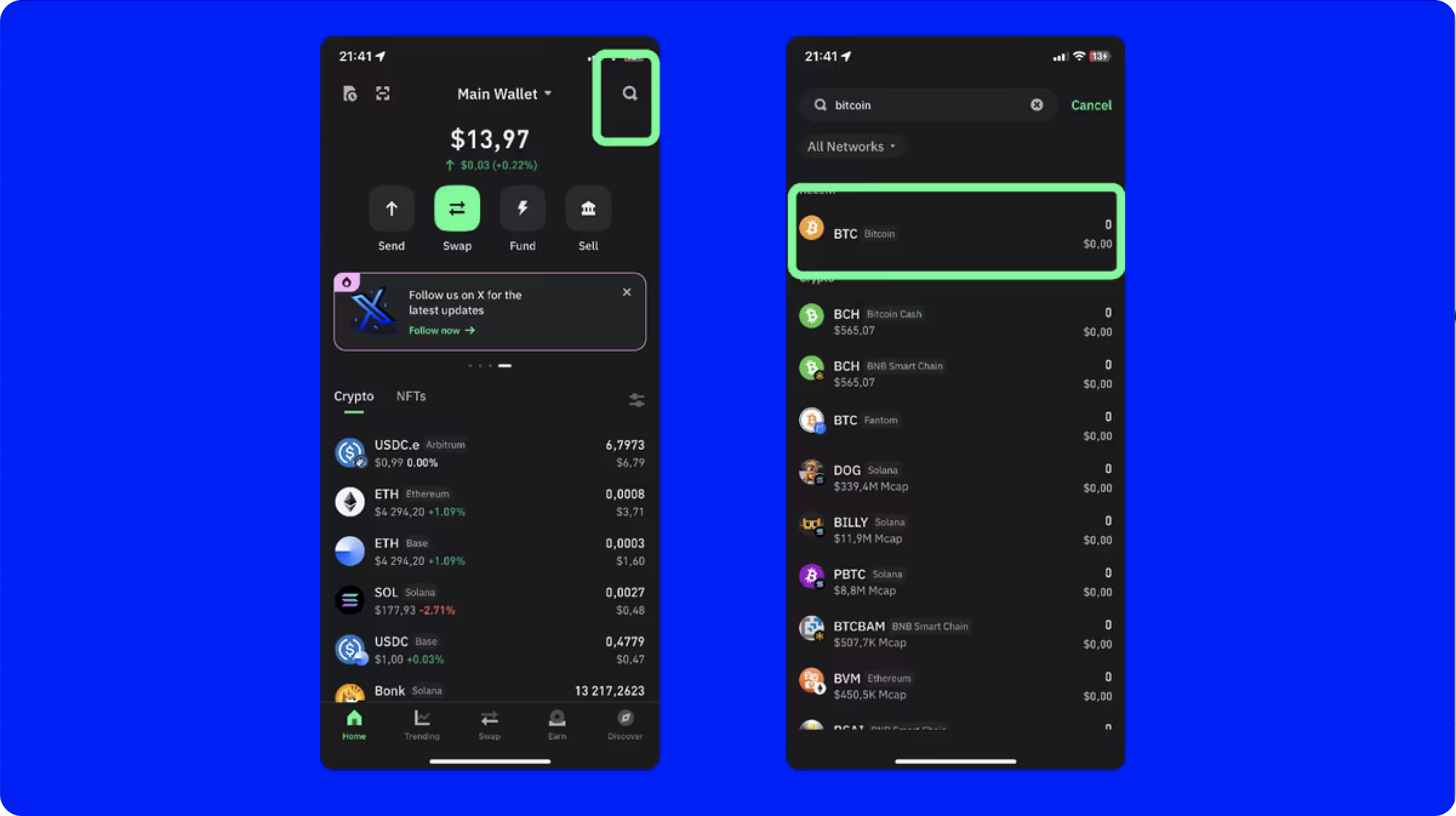
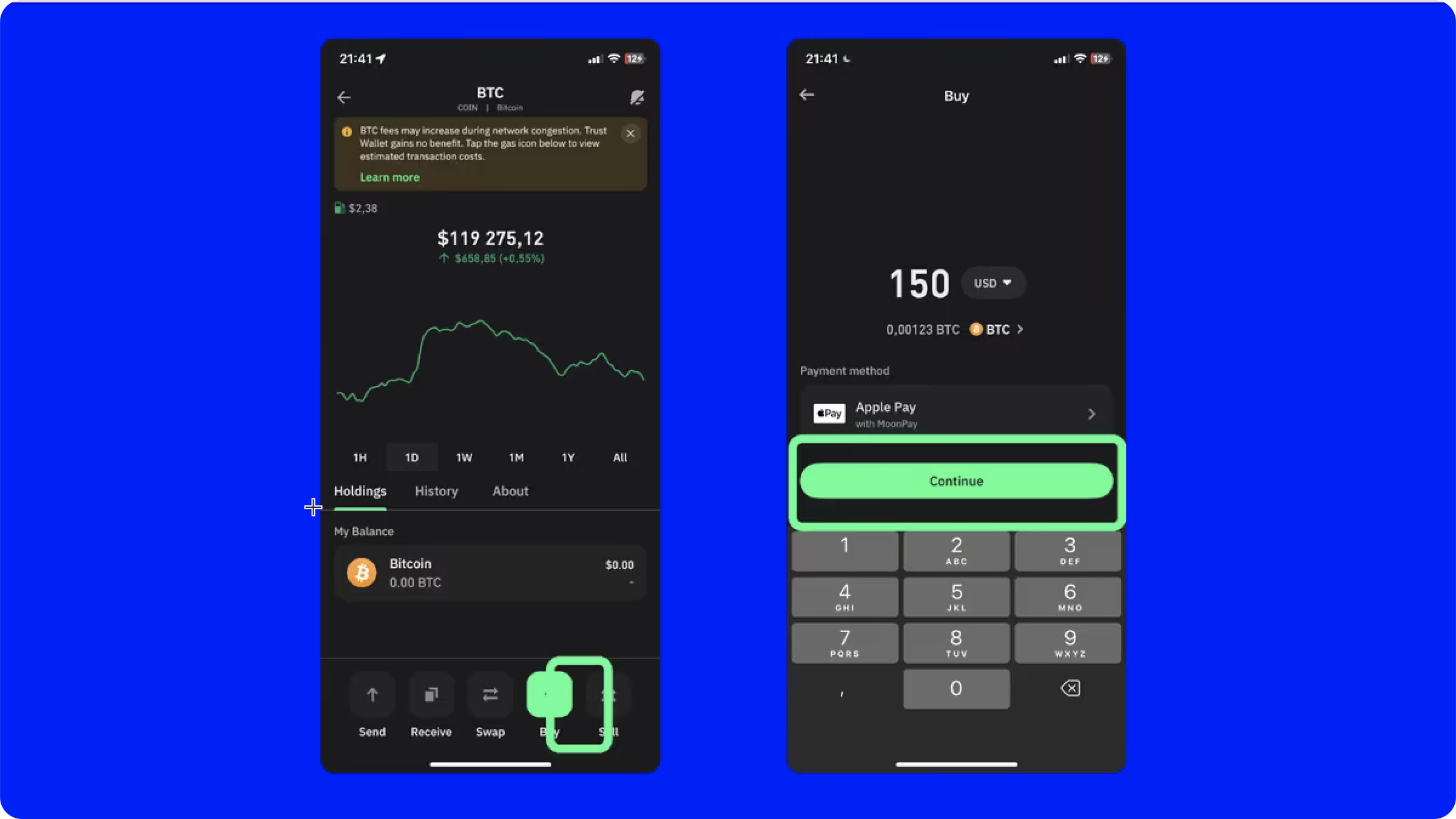
If you are using your mobile application to buy crypto, you will have to:
- Select “Buy” from the home screen.
- Search for the cryptocurrency you want to purchase and select it.
- Choose the fiat currency of your choice.
- Enter the amount of crypto you want to purchase.
- Select the third-party payment provider and the payment method of your choice.
- Tap the “Buy” button.
- Complete the onscreen instructions to finish the transaction.
If you are using the browser extension, you will have to:
- Click on the extension.
- Click on “Buy.”
- Choose the cryptocurrency you wish to purchase.
- Choose your preferred fiat currency.
- Enter the amount of crypto you would like to purchase.
- Select your preferred third-party provider and payment method.
- Tap the “Buy” button.
- Complete the onscreen instructions to finish the transaction.
SWIFT: Smart Contract Wallet
SWIFT is an Account Abstraction-powered smart contract wallet that enables users to safely and easily access the crypto landscape. With SWIFT, users can pay gas fees using 200+ tokens, complete transactions in one click, collect NFTs, explore dApps, and buy, sell, and swap cryptocurrencies.
It supports popular blockchains such as Arbitrum, BSC, opBNB, Base, Optimism, Avalanche, and more. New blockchains are consistently added to the SWIFT system.
Trust Crypto Wallet Security Features
Security is one of the most critical aspects of any crypto wallet, and Trust Crypto Wallet incorporates multiple layers of protection to safeguard users and their assets. The wallet includes built-in risk-monitoring tools, such as the Security scanner, to protect users' assets and help them avoid potential scams.
Here are some of the highlighted security features of Trust Crypto Wallet.
Security Scanner
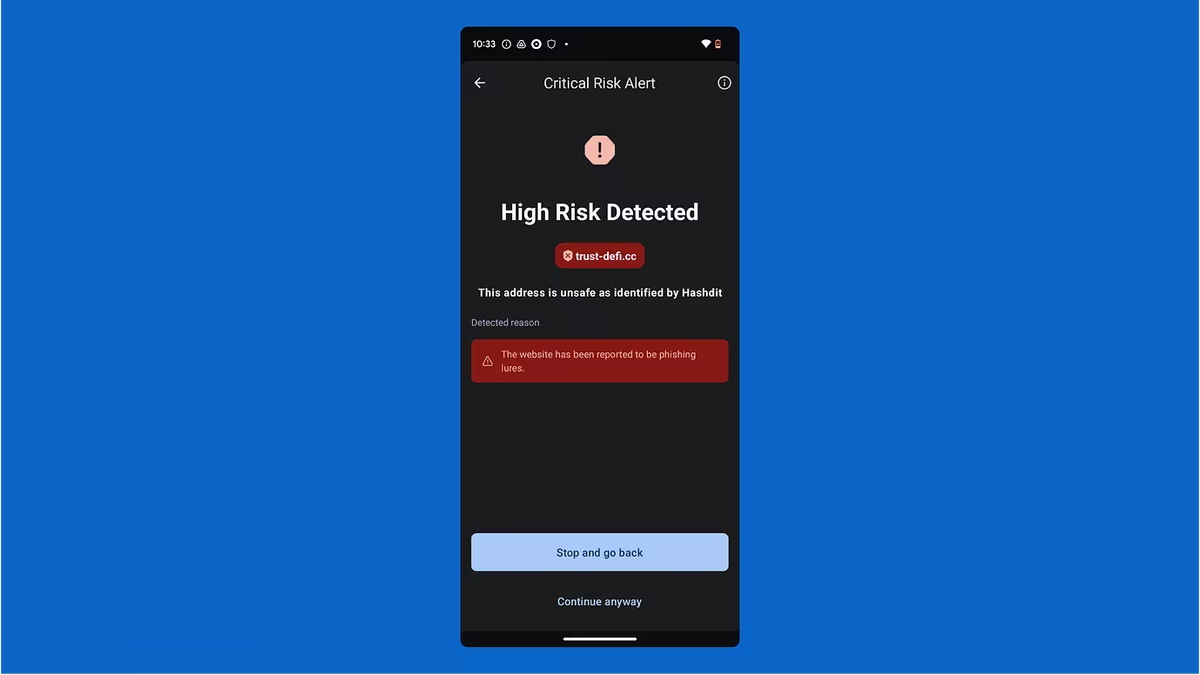
The Trust Crypto Wallet Security Scanner is a proactive security protocol that assigns a risk level to each transaction and alerts users of any potential threat. The threats can include connecting to an unsafe dApp, sending tokens to a malicious address, and more. It helps against phishing scams, keeps your tokens secure, and contributes to wallet security.
Key and Recovery Phrase Management
Trust Crypto Wallet never stores your private keys on centralized servers. All keys are generated locally and remain under the control of users all the time. During setup, users receive a recovery phrase that serves as the ultimate backup, in case users misplace or forget their key. This is why users must store the recovery phrase offline, as it is the only way to restore access if the key phrase is not available.
Biometric and PIN Security
Trust Crypto Wallet allows users to enable biometric authentication, such as fingerprint or facial recognition, as well as PIN protection. This prevents unauthorized access even if the key is compromised.
Strong Encryption
All sensitive data is stored on the device and is encrypted, adding an extra layer of protection against unauthorized access or malware. Users get access to Encrypted Cloud Backup, which enhances the wallet security. The private keys are strongly encrypted with an AES algorithm, and they are also securely stored on your device.
In-App Security Notifications
Trust Crypto Wallet consistently monitors threats in the crypto ecosystem and sends push notifications to the Trust wallet application and browser extension. When required, the notification comes with contract information and links to guides.
Independent Security Audits
Trust Crypto Wallet conducts independent security audits to improve its security and enhance the services provided. These audits are provided by top security specialists, third-party auditing firms, and the internal security team. The results of these periodic audits are shared with the users regularly.
Hardware Wallet Support
Users can connect their Trust Crypto Wallet to hardware wallets as well. Users can transfer their assets to hardware wallets using the Trust Wallet browser extension.
Privacy and Transparency
Trust Crypto Wallet does not require personal information such as email address or phone numbers to function. The wallet does not require such data for setup and gives the users the anonymity they expect from the crypto industry. Users can create and manage wallets anonymously and enjoy privacy. It does not track or store personal information, such as IP addresses. Moreover, transparency is emphasized through clear transaction data, fee breakdowns, and permission requests. Users can review exactly what they are approving before continuing with the transaction.
Fees and Costs
Truth Crypto Wallet does not charge fees for storing assets or creating a wallet. However, users should be aware of the following costs:
- Network Fees: Network fees are dynamic and fluctuate based on market demand and transaction size.
- Swap Fees: Swap fees are applied when using the in-app token swap feature.
- Staking Fees: Staking fees are applied as per the rules of the blockchain network.
All fees are displayed transparently before transactions are confirmed.
Final Takeaways
Trust Crypto Wallet combines strong security with comprehensive features to offer a balanced experience for both beginners and experienced professionals. Launched in 2017, it offers Security Scanner, dApp connectivity, token swaps, and staking to generate passive income. However, its advanced features might overwhelm beginners at first. NFT management might require external platforms as well. For users looking for a secure, transparent, and versatile crypto wallet, the Trust Crypto Wallet is a good option to consider.
Frequently Asked Questions (FAQs)
What is Trust Crypto Wallet?
Trust Crypto Wallet is a non-custodial cryptocurrency wallet that allows users to securely store, manage, and interact with digital assets across multiple blockchain networks.
Is Trust Crypto Wallet safe?
Yes, the wallet uses local key storage, encryption, biometric protection, and recovery phrases to ensure strong security.
Does Trust Crypto Wallet support DeFi?
Yes, users can connect to DeFi protocols and decentralized applications through a browser extension and application.
Can I stake crypto using Trust Crypto Wallet?
Trust Crypto Wallet supports staking for 25+ cryptocurrencies, allowing users to generate passive income.
What happens if I lose my key phrase?
As long as you have securely stored your recovery phrase, you can restore your wallet’s access on any mobile device or browser extension.
Does Trust Crypto Wallet charge fees?
The wallet is free and has no usage fee, but standard network and service-related fees may apply.
Can the Trust Crypto Wallet be used anonymously?
Yes, the wallet can be used anonymously because it does not require users to provide personal information such as names, email addresses, or phone numbers during setup.
Does Trust Crypto Wallet support multiple wallets in one application?
Yes, the Trust Crypto Wallet allows users to create and manage multiple wallets within the same application. This feature is useful in separating long-term holdings, trading funds, and managing funds across different blockchain networks.
Can Trust Crypto Wallet be connected to hardware wallets?
Yes, Trust Crypto Wallet can be connected to hardware wallets via its browser extension.
Is the Trust Crypto Wallet suitable for beginners?
Yes, the Truth Crypto Wallet is suitable for beginners, thanks to its clear interface, clear transaction protocols, transparency, and strong security.
Disclaimer: All content on The Moon Show is for informational and educational purposes only. The opinions expressed do not constitute financial advice or recommendations to buy, sell, or trade cryptocurrencies. Trading involves significant risk and may result in substantial losses. Always seek independent financial advice before making investment decisions. The Moon Show is not responsible for any financial losses or decisions made based on the information provided.
Please view the full disclaimer at: https://themoonshow.com/disclaimer
Ledger Wallet Review - Features, Models, and Security Explained
A cryptocurrency wallet is a software application or a physical device that enables users to st...
Exodus Wallet Review – Security, Fees, and Usability
Exodus is a non-custodial cryptocurrency wallet that lets you send, receive, store, and swap ov...
Coinbase Wallet Review 2026: Self-Custody Done the Mainstream Way
Coinbase Wallet review covering features, fees, security, and how it compares to MetaMask and T...