Ledger Nano S Review: A Proven Wallet That's Showing Its Age
Ledger Nano S built its reputation as the best-selling hardware wallet of all time by keeping private keys completely offline inside a CC EAL5+ certified secure element chip, the same category used in banking smart cards and biometric passports. Nothing moves without the physical device present and the correct PIN entered, which is the core reason it remains a trusted self-custody option. That said, it has been discontinued and succeeded by the Nano S Plus, which offers a larger screen, USB-C, and a higher-grade chip at a comparable price. Existing owners can continue using it without concern, but for anyone buying today, the Nano S Plus is the more practical choice.
The Ledger Nano S has maintained a prominent position in the hardware wallet market since its release in 2016. Ledger was founded in Paris in 2014 by specialists in embedded security and cryptography, and the wallet Ledger Nano S was among the first consumer-grade devices to combine a certified secure element chip with an OLED screen. It went on to become the highest-selling crypto hardware wallet of all time, with Ledger reporting over 7.5 million devices sold globally.
Ledger Nano S Pros and Cons
Pros
- Certified Secure Element (CC EAL5+) chip
- Supports over 1,000 cryptocurrencies
- PIN protection and 24-word recovery phrase
- Ledger Wallet companion software across all platforms
- Offline private key storage, never exposed online
- Compatible with MetaMask, Electrum, and more
- Compact, durable stainless-steel build
Cons
- Limited onboard storage (3-5 apps at once)
- No Bluetooth or wireless connectivity
- Small OLED screen with two-button navigation
- Discontinued with no new firmware updates expected
- USB connection required for all operations
- iOS not supported; Android needs OTG adapter
As a nano Ledger S hardware wallet, it still carries real weight in the self-custody space. That said, it has been discontinued and succeeded by the Ledger Nano S Plus, which is now the current model in its lineup. This review takes an honest look at what the original still offers, where it holds up, and where its age begins to show. Let’s take a look:
What Is the Ledger Nano S
The Ledger Nano S is a hardware wallet, a dedicated physical device designed to store the private keys that control access to cryptocurrency holdings. Unlike software wallets on computers or smartphones, it keeps private keys completely isolated from internet-connected environments at all times. This offline approach is the core reason hardware wallets are considered the most secure method of self-custody available to individual users.
Self-custody means holding your own private keys rather than trusting a platform like an exchange with them. The Nano S returns that control directly to the user, meaning nothing can move without the physical device present and the correct PIN entered.
Design and Build Quality
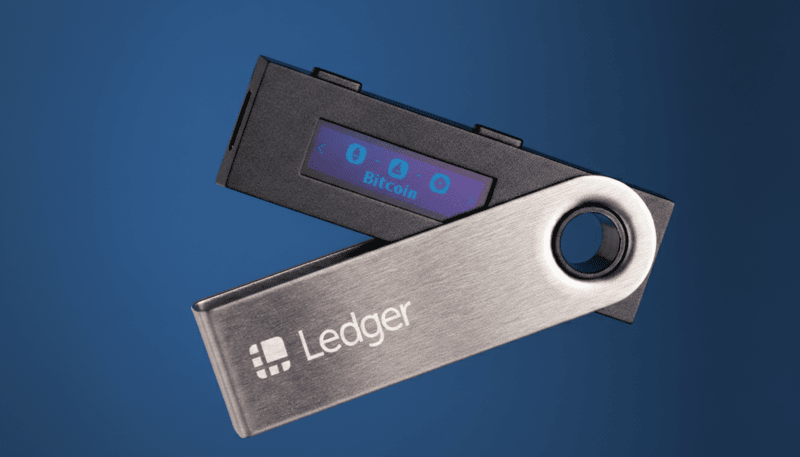
The Nano S measures 98 x 18 x 9mm and weighs 16.2 grams, small enough to fit on a keychain. Its casing is brushed stainless steel over plastic, which gives it more durability than fully plastic alternatives in the same price range without adding meaningful bulk. The form factor is deliberately compact, resembling a USB drive that carries and stores easily.
The front face features a 128 x 32 pixel OLED display for reviewing transaction details, reading recovery words during setup, and navigating menus. Two physical buttons at the top handle all inputs. Connectivity is through a single micro-USB port with no Bluetooth or wireless capability. The steel casing is also difficult to open without leaving visible marks, giving buyers a way to check for tampering before first use.
How to Set Up the Ledger Nano S
The wallet setup runs through Ledger Wallet, the official companion software for Windows, macOS, and Linux. When the device is connected for the first time, users choose between configuring a new device or restoring from an existing recovery phrase. For a fresh setup, the first task is creating a PIN of four to eight digits, entered directly on the hardware rather than the computer, keeping it away from any software that could capture keystrokes.
Once the PIN is set, the device generates a 24-word recovery phrase and shows it one word at a time on screen. Writing these down accurately is the most critical step of the process, and the device reinforces this by asking the user to re-enter selected words before moving on. Ledger Wallet then runs an authenticity check using cryptographic proof from the secure element to confirm the device is genuine. The whole process takes around 15 to 30 minutes. Buying only from official Ledger channels or authorized resellers is strongly recommended, as tampered devices have appeared in third-party marketplace listings.
How to Use the Ledger Nano S
Once the device is set up, everyday use is consistent and straightforward. Here is how the Ledger Nano S is handled for day-to-day usage:
- Connect the device to your computer via micro-USB and enter your PIN to unlock it.
- Open Ledger Wallet and navigate to the account for the asset you want to manage.
- To receive crypto, go to the Receive tab, select your account, and verify the address shown on the device screen before sharing it.
- To send crypto, go to the Send tab, enter the recipient address and amount, then review the details on the device screen and press both buttons to confirm.
- To add a new cryptocurrency, open My Ledger in Ledger Wallet and install the relevant app. If storage is full, uninstall an existing app first. This does not affect your funds.
- When done, simply disconnect the device. Everything remains secure until it is reconnected and unlocked again.
Security Architecture
Security is the defining reason to buy a hardware wallet, and the Nano S was built around a layered approach that remains technically sound. At its core sits a CC EAL5+ certified secure element chip, the same category used in biometric passports and banking smart cards. Unlike the generic microcontrollers found in cheaper wallets, the secure element is purpose-built to store cryptographic material in a tamper-resistant environment. The private keys generated on the device are locked inside the secure element permanently, inaccessible even to the device's own main processor.
Running on that chip is BOLOS, Ledger's proprietary operating system, which enforces strict isolation between every app on the device. A vulnerability in one app cannot reach the key storage of another, and transaction signing happens entirely within the secure element. Even if the connected computer is fully compromised, an attacker still cannot forge or intercept a transaction without physically holding the device and entering the correct PIN.
Further protections include PIN auto-wipe after three failed attempts, firmware integrity checks on every boot, and an optional BIP39 passphrase that adds a 25th word and unlocks a completely hidden set of accounts. The screen is controlled directly by the secure element so what it displays cannot be manipulated remotely. No Ledger hardware device has ever been remotely hacked, and the most common vulnerability in any setup remains the user, through poor recovery phrase handling or phishing exposure.
Supported Cryptocurrencies
The Nano S supports over 1,000 cryptocurrencies through an app-based system where each asset needs its own app installed before it can be managed. Native Ledger Wallet support covers Bitcoin, Ethereum, Litecoin, XRP, Bitcoin Cash, Dogecoin, Zcash, and Dash. ERC-20 tokens work through the Ethereum app in Ledger Wallet or via MetaMask, and assets like Monero require dedicated third-party software. No new apps will be added given the end-of-support status confirmed in 2024.
Ledger Wallet Software
Ledger Wallet is the software that makes the Nano S usable day to day and is available across Windows, macOS, Linux, Android, and iOS. It handles account management, portfolio tracking, app installation, and firmware updates from a single interface, and guides users through every send and receive transaction with step-by-step coordination with the device. Since the Nano S reached end-of-support in 2024, Ledger Wallet will no longer push firmware updates or new app support to this device, though all existing functionality continues working normally.
Storage Capacity Constraints
One of the most frequently discussed limitations of the Nano S is its storage. With roughly 320 kilobytes of available flash memory, it holds between three and five cryptocurrency apps at once, depending on their sizes. For users managing a small set of assets this is fine, but for broader portfolios it means regularly uninstalling and reinstalling apps as needs shift. That never affects funds since assets live on the blockchain, but the friction accumulates. The Nano X supports up to 100 apps by comparison.
Transaction Signing Flow
Every transaction follows the same reliable sequence. Ledger Wallet builds an unsigned transaction and passes it to the device, which displays the recipient address and transfer amount on screen. The user presses both buttons to confirm or one to reject before anything is broadcast. Because signing happens entirely within the secure element, a compromised computer cannot alter or intercept the transaction. What the screen shows is exactly what gets sent.
Backup and Recovery Model
The 24-word recovery phrase generated during setup is the single most important thing associated with the device. It follows the BIP39 standard, making it compatible with any BIP39-compliant wallet, and it is everything needed to restore full access to all associated assets if the Nano S is ever lost, stolen, or destroyed.
Ledger advises against storing this phrase in any digital form. Screenshots, cloud services, and password managers all carry remote exposure risk, so writing it on paper in a physically secure location is the baseline. For protection against fire or flooding, metal backup products like Cryptosteel Capsule or Billfodl allow the words to be stamped onto durable steel plates. Anyone who obtains the phrase has complete access to all associated funds without ever needing the device.
Privacy and Data Considerations
Ledger Wallet requires an internet connection, which means some data, including IP addresses and public wallet addresses, passes through Ledger's servers during normal use. In 2020, Ledger disclosed a breach of its e-commerce database that exposed customer names, emails, and, in some cases, physical addresses. That breach was strictly limited to commercial records and had no impact on device security or private keys. Users who prefer to avoid Ledger's servers can use Electrum for Bitcoin or MetaMask for Ethereum instead.
Limitations and Trade-Offs
The storage cap of three to five apps is the most cited frustration and is a genuine problem for anyone managing a diverse portfolio. The OLED display at 128 x 32 pixels, while functional, makes reviewing full wallet addresses a careful task. The two-button navigation is reliable once learned, but comes with a steeper learning curve than touchscreen-based alternatives.
The micro-USB port is dated, Bluetooth is absent, iOS is not supported, and Android connectivity requires an OTG adapter that does not come in the box. Layered on top of that is the device's discontinued status and confirmed end-of-support in 2024, meaning no new firmware or app updates will follow. None of this makes the device unsafe for current owners, but together these factors paint a clear picture of hardware that has not kept pace with what is available at a similar price today.
Comparison With Other Hardware Wallets
Within Ledger's lineup, the Nano S sits at the entry level. The Nano X adds Bluetooth, USB-C, and 100-app storage, making it better suited to mobile users or those with large portfolios. The Nano S Plus, covered next, is the more relevant comparison as the direct successor that fixes the Nano S's known weaknesses at a comparable price. Against Trezor, the Model One is a similar entry-level device but relies on software-based security rather than a dedicated secure element chip, while the Model T offers a touchscreen. Both brands are credible, but the secure element architecture matters for anyone who treats hardware-level key protection as non-negotiable.
Ledger Nano S Plus
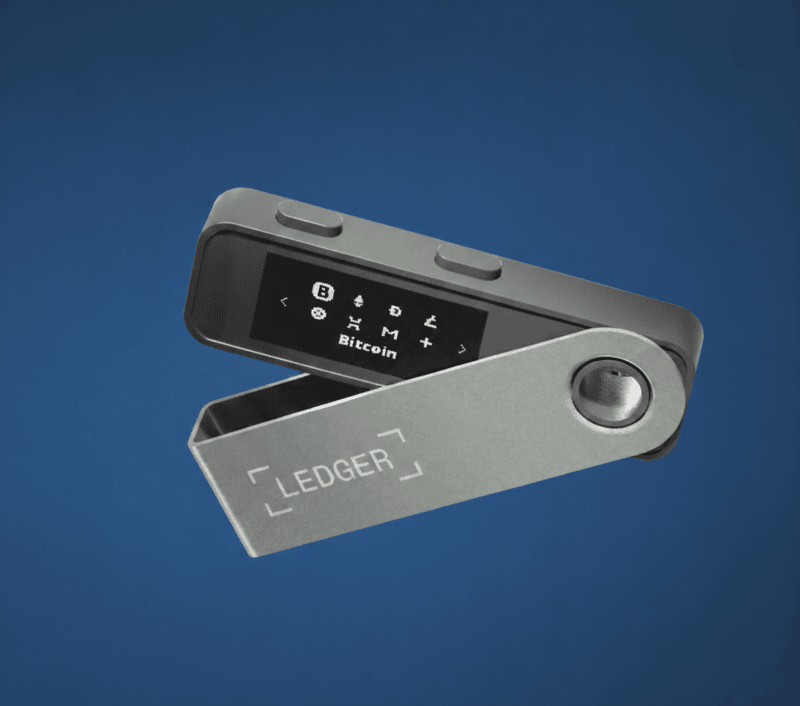
The Ledger Nano S Plus crypto hardware wallet launched in April 2022 as a direct response to the criticisms the original had accumulated. It carries the same BOLOS operating system and follows the same security principles, so anyone familiar with the original will find the transition seamless. The hardware upgrades are meaningful: a CC EAL6+ certified secure element chip, a 128 x 64 pixel display that doubles the screen height, a USB-C connector, and storage for up to 100 apps at once. It supports over 5,500 crypto assets and is typically priced at around 79 USD, though this may vary depending on region and retailer
For existing Nano S owners with a working setup, upgrading is only worth it if the storage limit is a real daily problem. For anyone entering the Ledger ecosystem for the first time, the Nano S Plus is the more complete device and the clearer starting point.
Who the Ledger Nano S Fits
The Nano S suits long-term holders who keep a focused set of assets and interact with their wallet infrequently. Someone holding primarily Bitcoin and Ethereum will rarely encounter the storage limit and will benefit fully from the security architecture. Beginners looking for an affordable, well-documented entry into self-custody will also find it accessible, backed by extensive guides and a track record spanning nearly a decade.
Who Should Look Elsewhere
Active traders rotating through many cryptocurrencies will find the app storage cap a persistent headache. Anyone wanting wireless or iPhone access will find neither is possible. For anyone making a first hardware wallet purchase today, the discontinued status and better hardware available at comparable prices make the Nano S Plus or Nano X the more sensible choice.
Current Relevance
The Nano S has not aged out of being secure. The secure element, BOLOS, and offline signing are still technically sound, and current owners can continue using it without concern. What has shifted is the landscape around it, as better options exist now at similar prices, and there are no new features coming, and the ecosystem has also moved on. For those with a working setup, there is nothing pressing. For new buyers, there are better starting points.
Final Takeaway
The Ledger Nano S earned its reputation through certified secure element technology, a well-built companion application, and consistent delivery on its core promise of offline key storage. For the use case it was designed for, it still delivers, and those qualities do not disappear simply because the device is discontinued.
The Nano S proved the concept, and the Nano S Plus refined it. For existing owners comfortable with their setup, there is no urgency to change. For anyone deciding where to begin, the Nano S Plus offers the same security principles with better hardware at a comparable price, making it the clearer choice for anyone starting fresh.
Frequently Asked Questions
Is the Ledger Nano S still safe to use?
Yes. Its end-of-support status means no new firmware updates, but the existing security architecture remains fully intact and the device continues to function securely.
Does uninstalling an app from the Nano S delete my coins?
No. Assets live on the blockchain, not the device. Reinstall the app and they reappear in Ledger Wallet exactly as before.
What happens if I lose my Ledger Nano S?
Full access to all assets can be restored using the 24-word recovery phrase on any BIP39-compatible wallet or a new Ledger device.
Can the Ledger Nano S connect to a mobile phone?
It works with Android via a USB-OTG adapter. iOS is not supported.
How many apps can the Nano S hold at once?
Between three and five, depending on each application's storage requirements.
Does the Nano S work with third-party software?
Yes. It is compatible with MetaMask, Electrum, MyEtherWallet, and other established wallet interfaces.
What is a recovery phrase and why does it matter?
It is a 24-word backup that fully restores wallet access. Anyone who holds it controls your funds without needing the physical device.
Is the Ledger Nano S still being manufactured?
No. It has been discontinued and succeeded by the Nano S Plus and Nano X.
Can it be used without Ledger Wallet?
Partially. Third-party software covers many functions, but firmware updates and full account management require Ledger Wallet.
What is the main difference between the Nano S and Nano S Plus?
The Nano S Plus has a larger screen, USB-C, a higher-grade EAL6+ chip, and holds up to 100 apps versus three to five on the original.
Disclaimer: All content on The Moon Show is for informational and educational purposes only. The opinions expressed do not constitute financial advice or recommendations to buy, sell, or trade cryptocurrencies. Trading involves significant risk and may result in substantial losses. Always seek independent financial advice before making investment decisions. The Moon Show is not responsible for any financial losses or decisions made based on the information provided.
Please view the full disclaimer at: https://themoonshow.com/disclaimer
Ledger Wallet Review - Features, Models, and Security Explained
A cryptocurrency wallet is a software application or a physical device that enables users to st...
Exodus Wallet Review – Security, Fees, and Usability
Exodus is a non-custodial cryptocurrency wallet that lets you send, receive, store, and swap ov...
Trust Wallet Review - Features, Security, and Performance Explored
A cryptocurrency wallet is a tool that allows users to manage, store, send, and receive cryptoc...