Phemex Exchange Tutorial – Step-by-Step Trading Guide
For those looking to start their crypto journey, the first step is to select a cryptocurrency exchange and understand how to use it. A cryptocurrency exchange is a platform where buyers and sellers meet to deal with digital assets. This tutorial of the Phemex Exchange will walk you through everything you need to know about the platform, from how it works to the practical steps of making your first trade.
We will break down each significant feature of the platform into manageable and straightforward steps. The tutorial will cover everything from setting up your account, securing your funds, and executing your first trade. By the end of this guide, you will be equipped with the knowledge and tools to begin your crypto journey on the Phemex Exchange effectively.
What Is Phemex?
Phemex is a prominent cryptocurrency exchange that offers a robust platform for both Spot and Futures trading. Launched in 2019, the platform has gained a reputation for its high-speed engine that can process a massive number of transactions per second. The cryptocurrency exchange provides a wide range of trading options, including over 500 Spot trading pairs and a comprehensive suite of perpetual contracts.
The design of the exchange focuses on a seamless user experience, with an intuitive interface that caters to both beginners and professional traders. It offers a diverse range of financial products beyond basic trading. The platform provides Futures trading with up to 100x leverage on USD-Margin and Coin-Margin perpetual contracts.
Phemex runs a dedicated Earn program, which enables cryptocurrency traders to generate passive income on their idle cryptocurrency assets through savings or flexible staking options. Traders who want to automate their trading strategies can use its AI-powered trading bots. Additionally, its copy trading feature helps beginners to automatically follow seasoned traders.
The cryptocurrency exchange prioritizes the safety of user assets with a multi-layered approach. Phemex uses a 100% cold wallet storage system to ensure your funds are kept offline to minimize unauthorized access. It also follows the Merkel-Tree Proof-of-Reserves to ensure all assets on the platform are fully backed. Read our full phemex exchange review.
Key Features of Phemex:
- A vast selection of over 500 Spot pairs and a wide range of perpetual contracts with up to 100x leverage.
- Generate passive income on the platform through high-yield savings or flexible staking.
- Follow lead traders on the platform and automate their trading strategies.
- Trade the Phemex Token (PT) for additional discounts on trading fees.
- Deposit cryptocurrencies with zero fees.
- Protect your funds with a cold wallet storage, Merkel-Tree Proof-of-Reserves, and multi-factor authentication.
Pros and Cons
Pros
- Spot trading
- Perpetual contracts with up to 100x leverage
- Robust security
- Competitive fee structure
- Copy trading
- Free crypto deposits
- Proof-of-reserves
Cons
- Regulatory restrictions in certain areas
- Higher fiat withdrawal fees
How to Create an Account on Phemex?
To start your trading journey on the Phemex Exchange, you need to create an account on the platform. The process of creating an account on the exchange is straightforward.
Join Phemex to unlock up to $45,000 in crypto bonuses and experience a global platform built for professional traders.
You need to follow these steps:
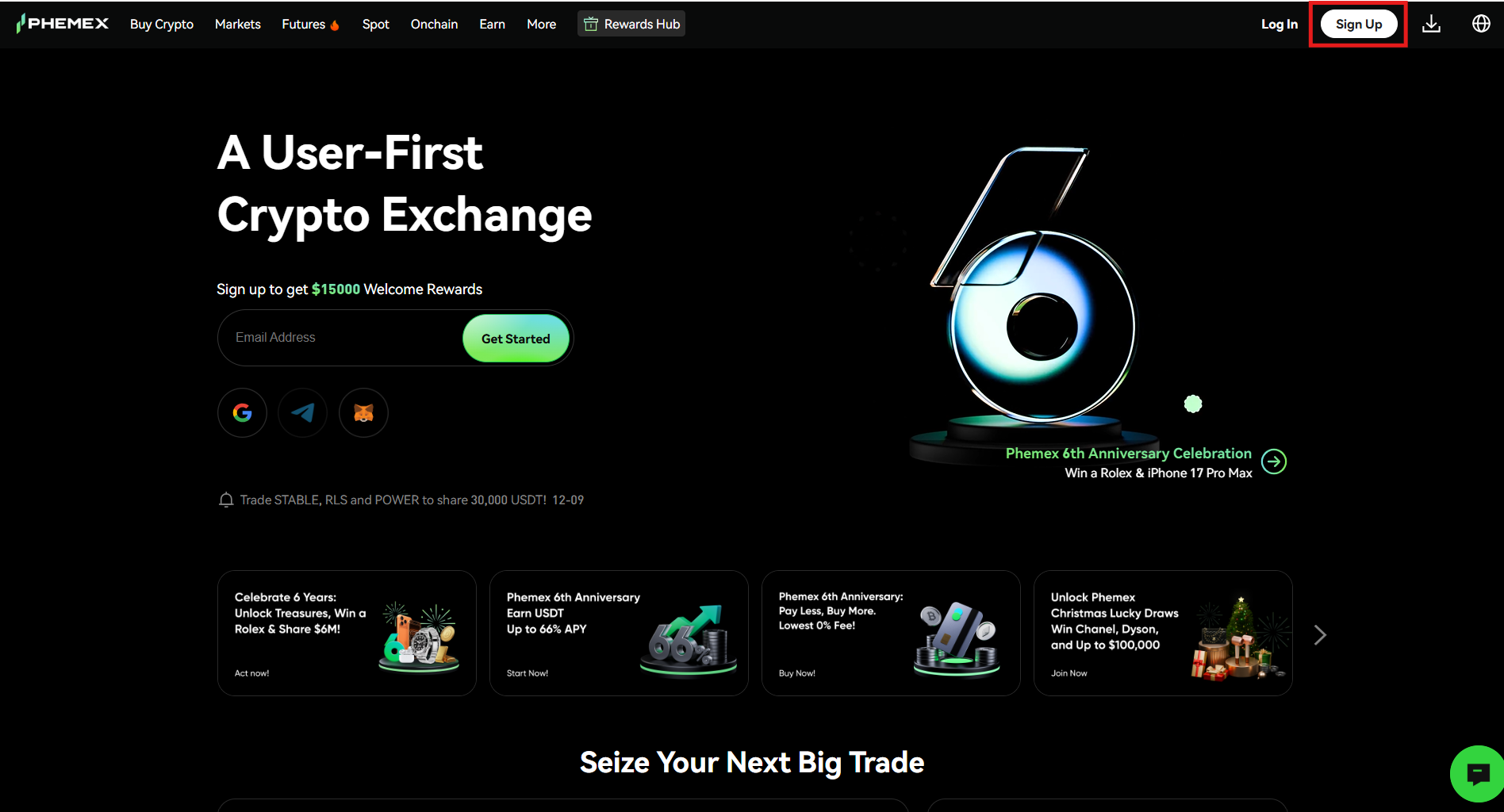
1. Visit the Phemex Website
Visit the Phemex Website and tap the “Sign Up” tab on the homepage.
2. Provide the Sign-Up details
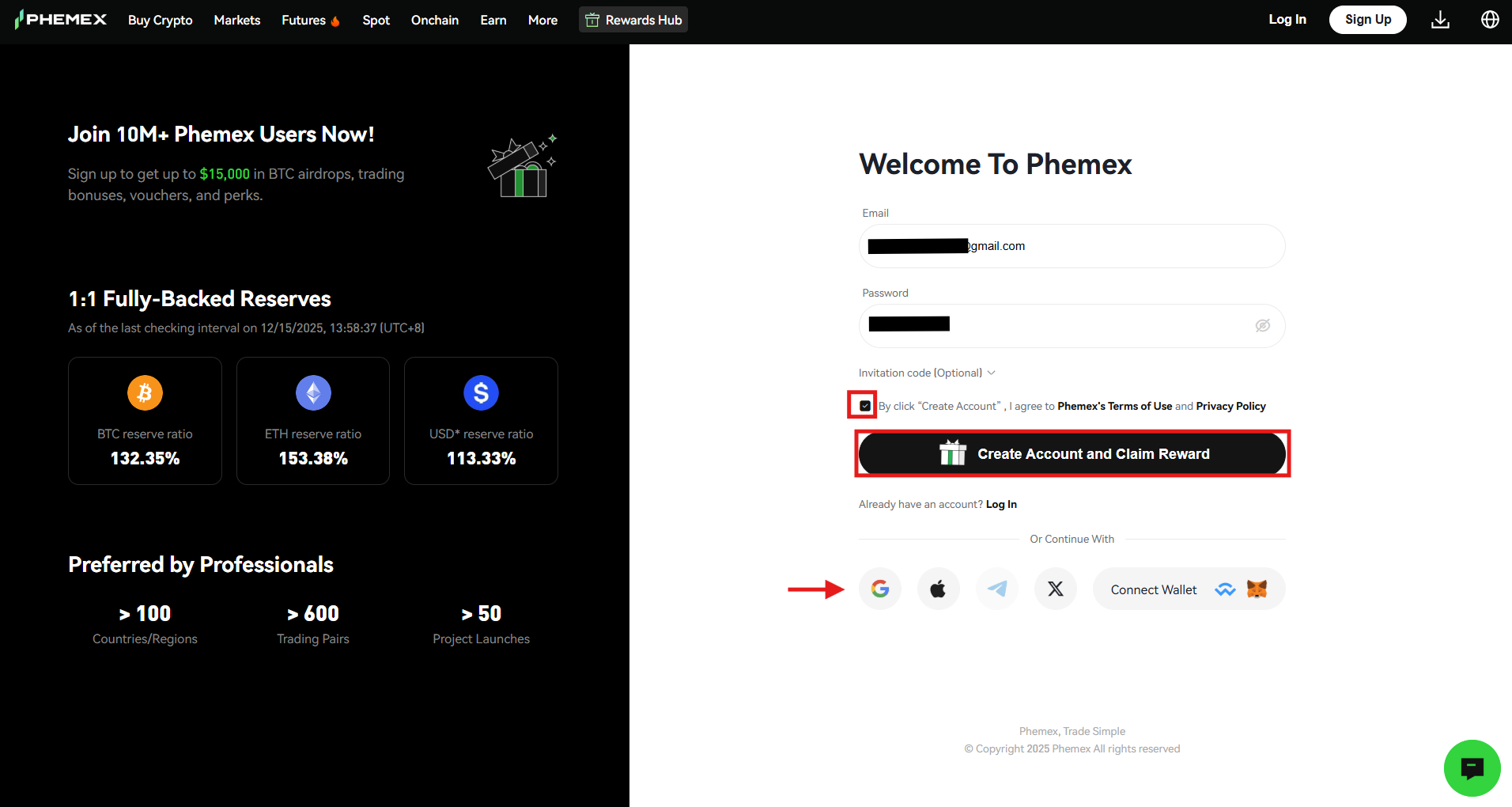
On the Sign-Up page, you need to provide several details. You can create an account on the Phemex Exchange by using your email address, or Google, Apple, Telegram, X, and MetaMask Wallet IDs. In this case, an email address is selected. After entering your email address, create a strong password, agree to the terms of use and privacy policy, and click the “Create Account and Claim Reward” tab.
3. Provide the verification code
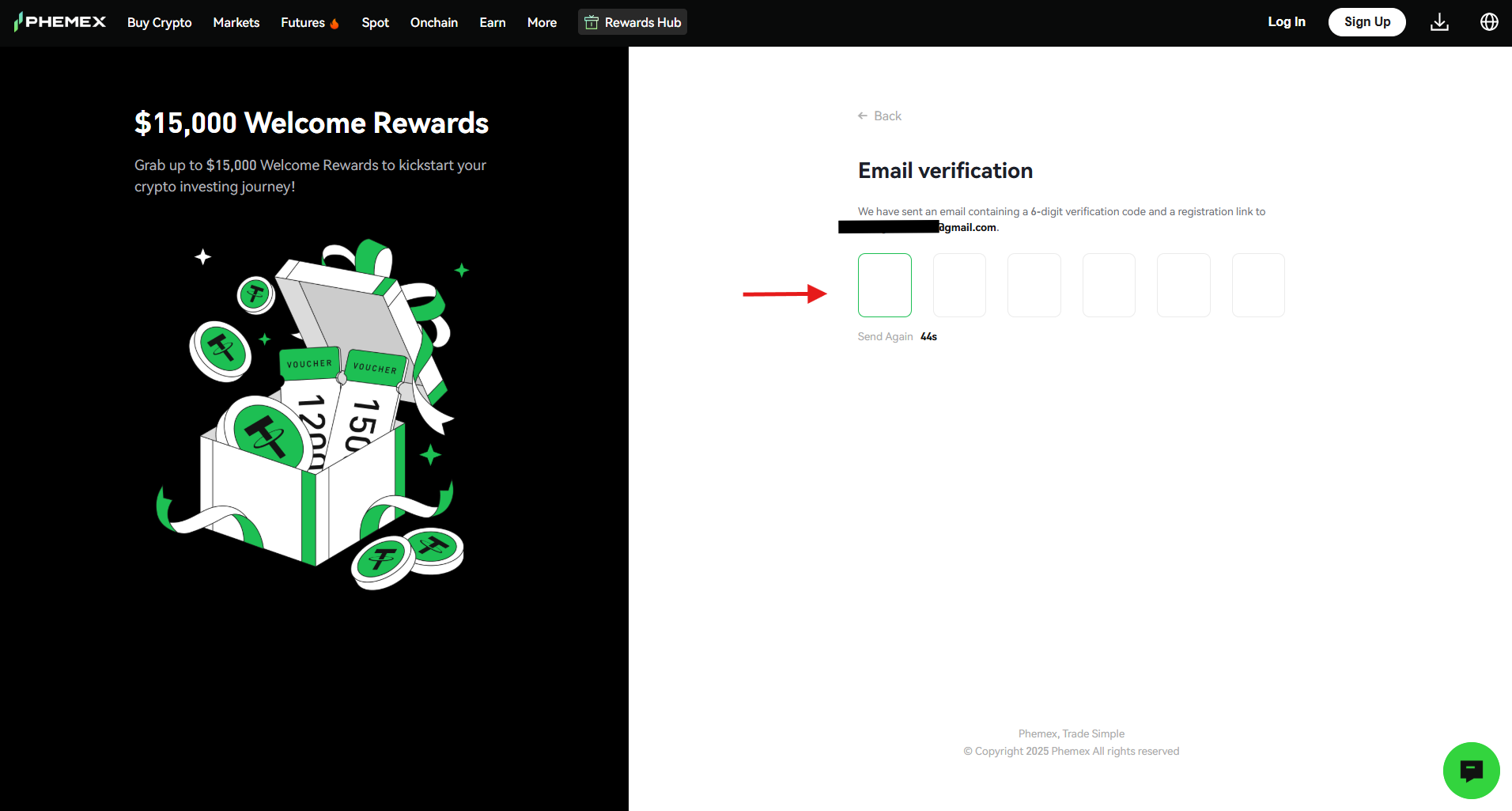
Enter the six-digit verification code that is received at your email address to complete the registration process.
How to Complete KYC on Phemex?
Phemex is a centralized cryptocurrency exchange where users are required to complete the Know Your Customer (KYC) procedure. KYC is performed for identity verification and allows Phemex to confirm the identity of its users. This procedure is required to keep your account and assets secure and to prevent any fraud or other illegal activities.
You need to follow these steps to complete the KYC procedure on the Phemex Exchange.
1. Visit the homepage
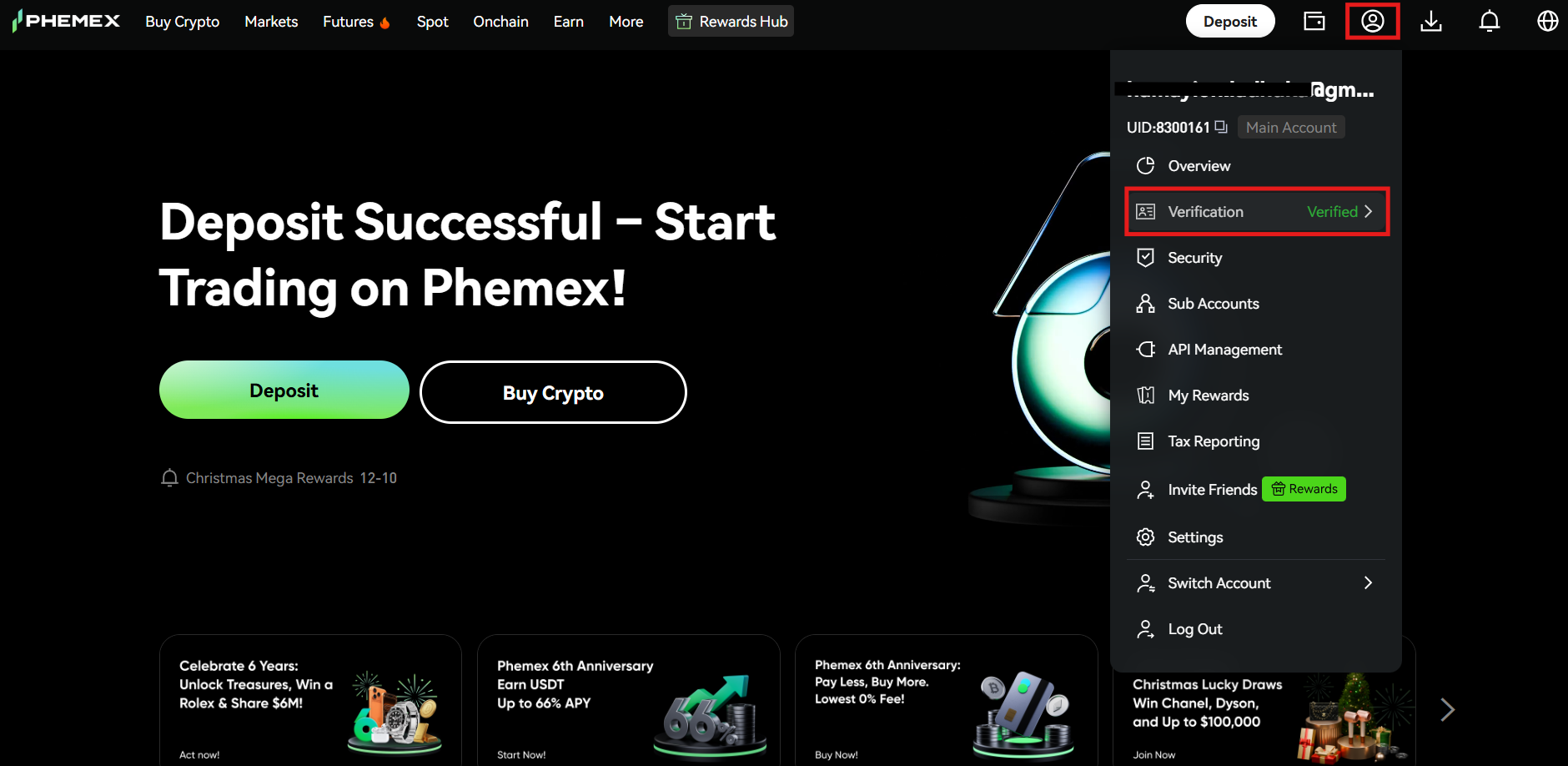
On the Phemex Exchange homepage, navigate to the profile icon and tap the “Complete Identity Verification” tab.
2. Identity verification page
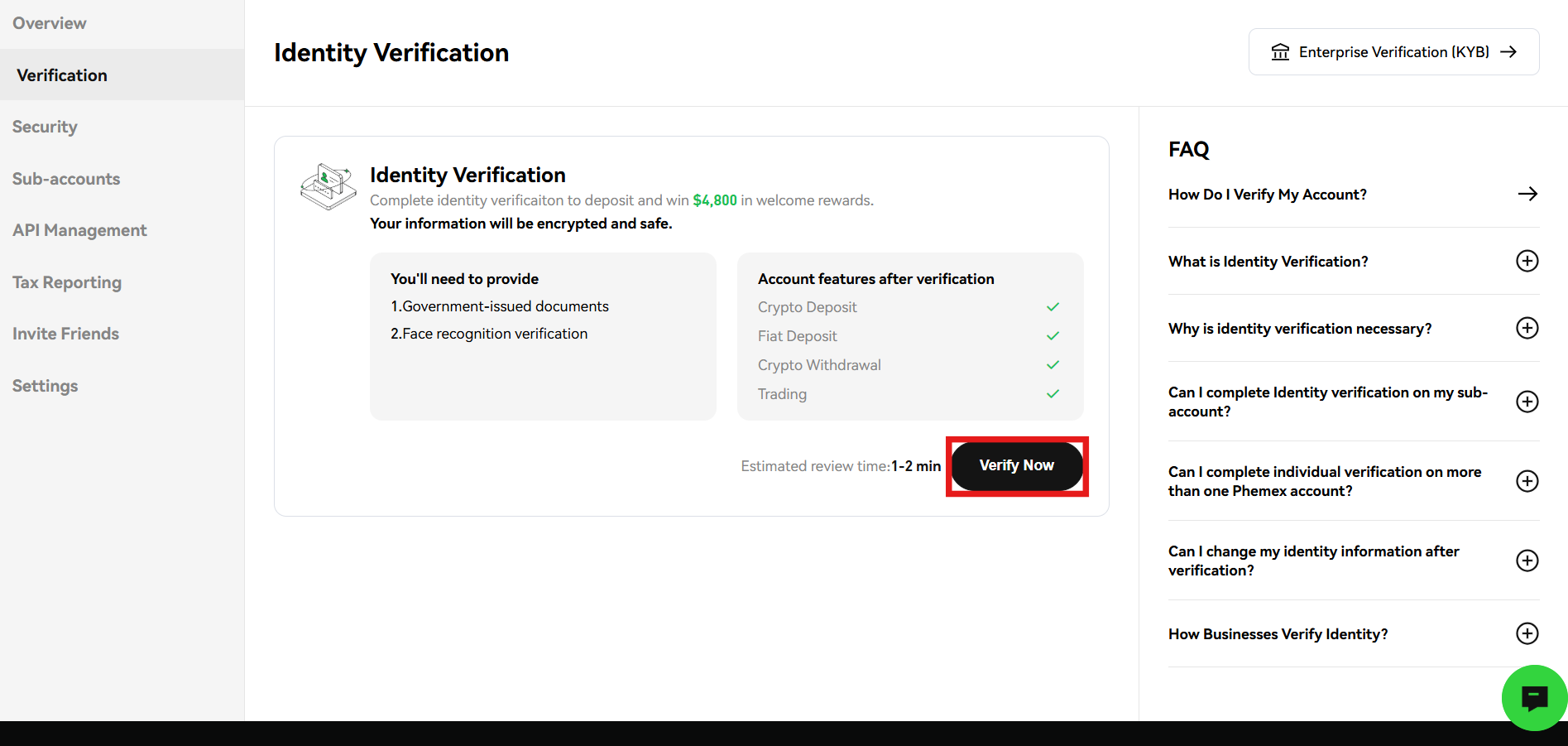
Click the “Verify Now” tab on the identity verification page to start the KYC procedure.
3. Provide the details
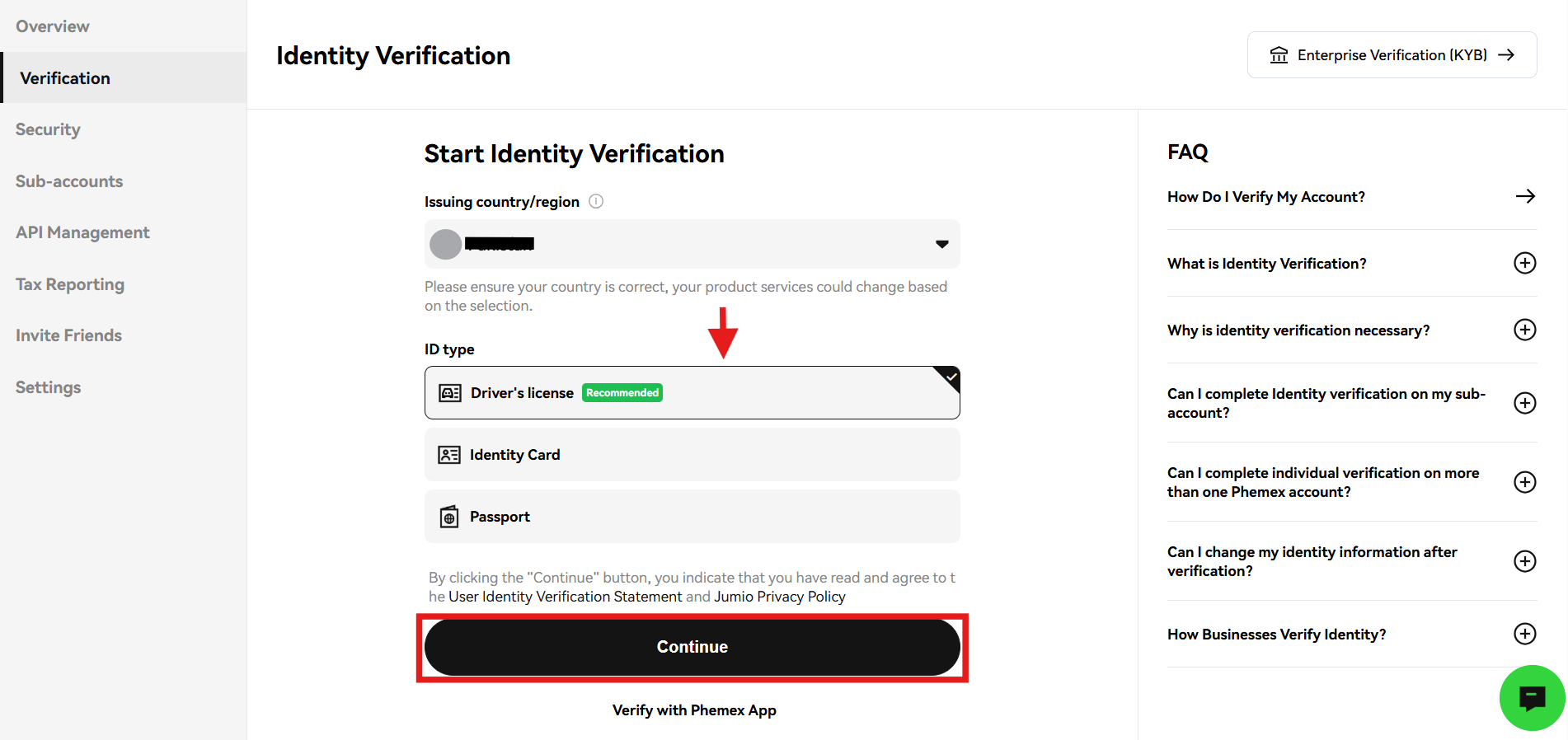
Next, select your country of residence. After this, select the ID type you want to use for the KYC procedure. Phemex uses a driver’s license, an identity card, and a passport for identity verification. Once done, click “Continue.”
4. Prepare the identity document
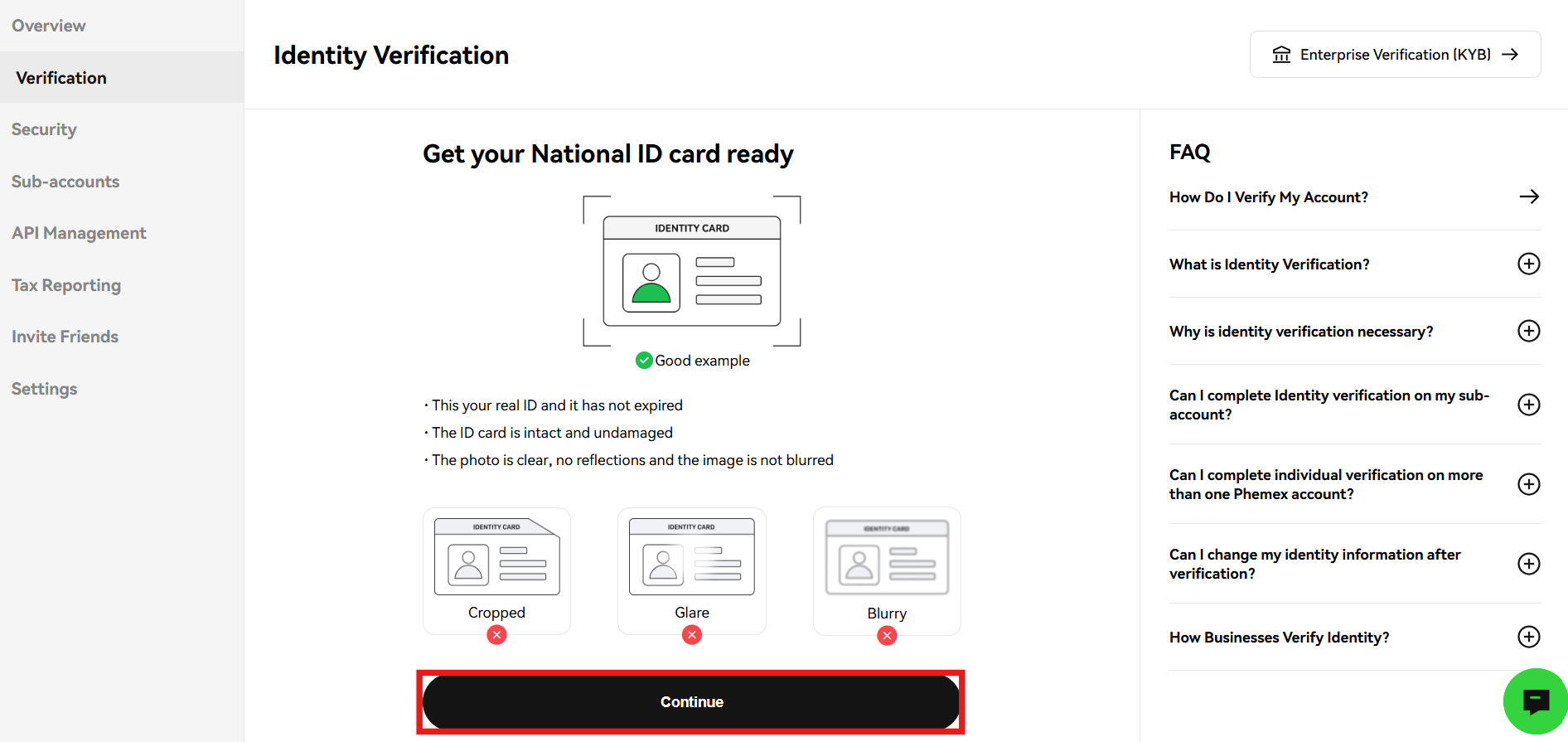
Follow the given instructions and prepare your identity document accordingly. Once done, tap “Continue.”
5. Provide the ID document
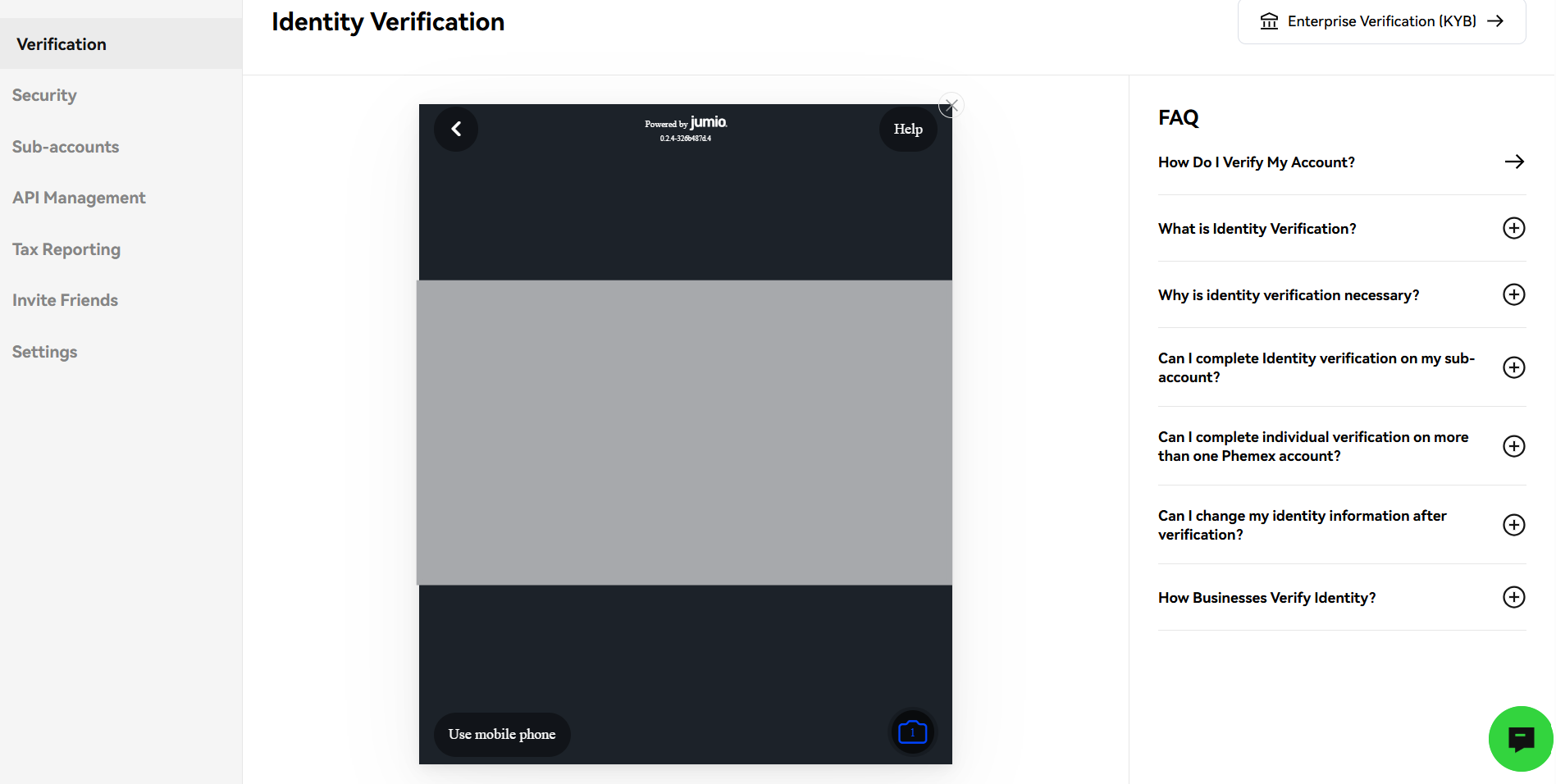
Follow the camera instructions and provide the front and back side images of your ID document.
6. Take a selfie
Next, click “Continue” to take a selfie.
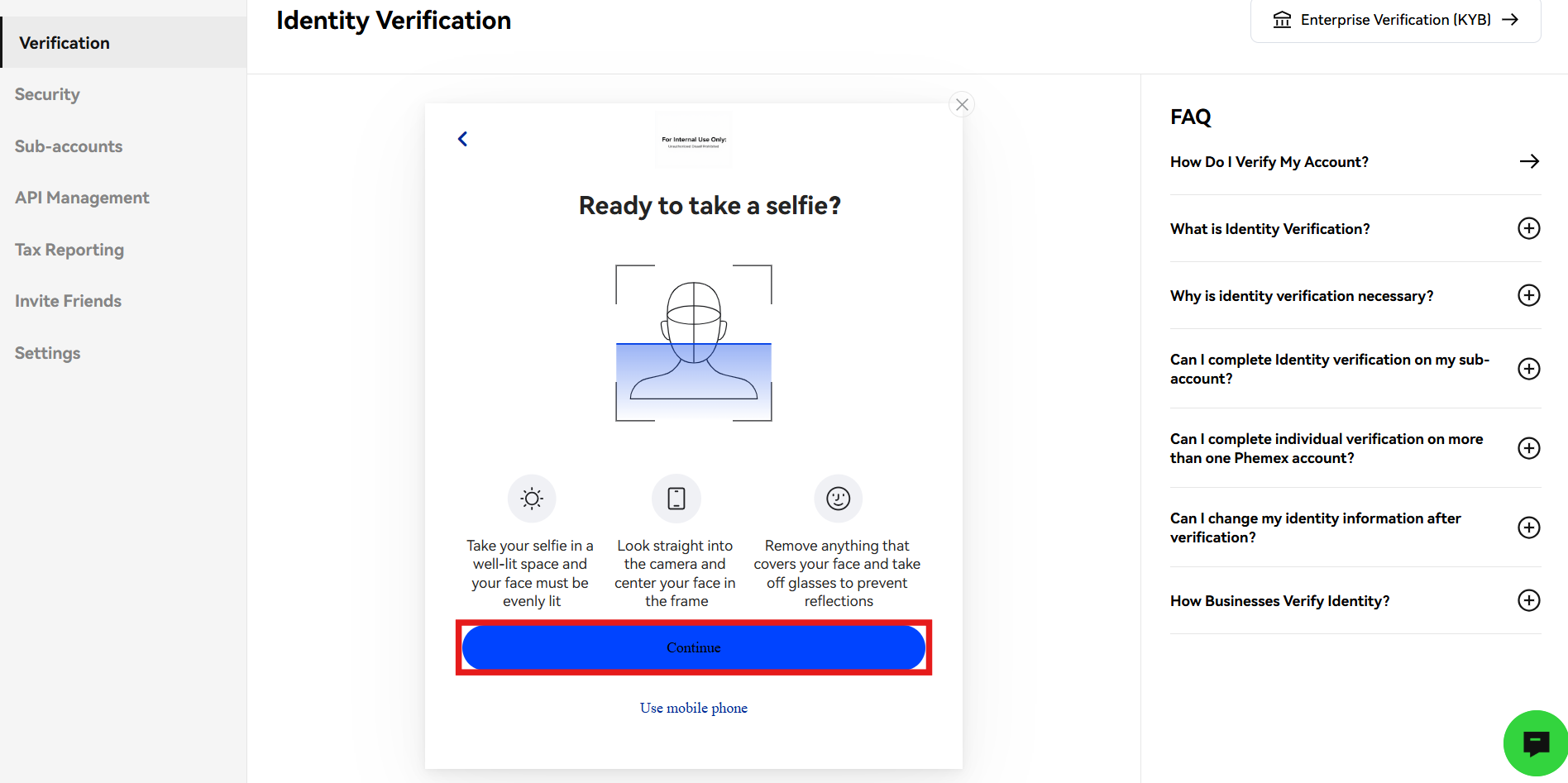
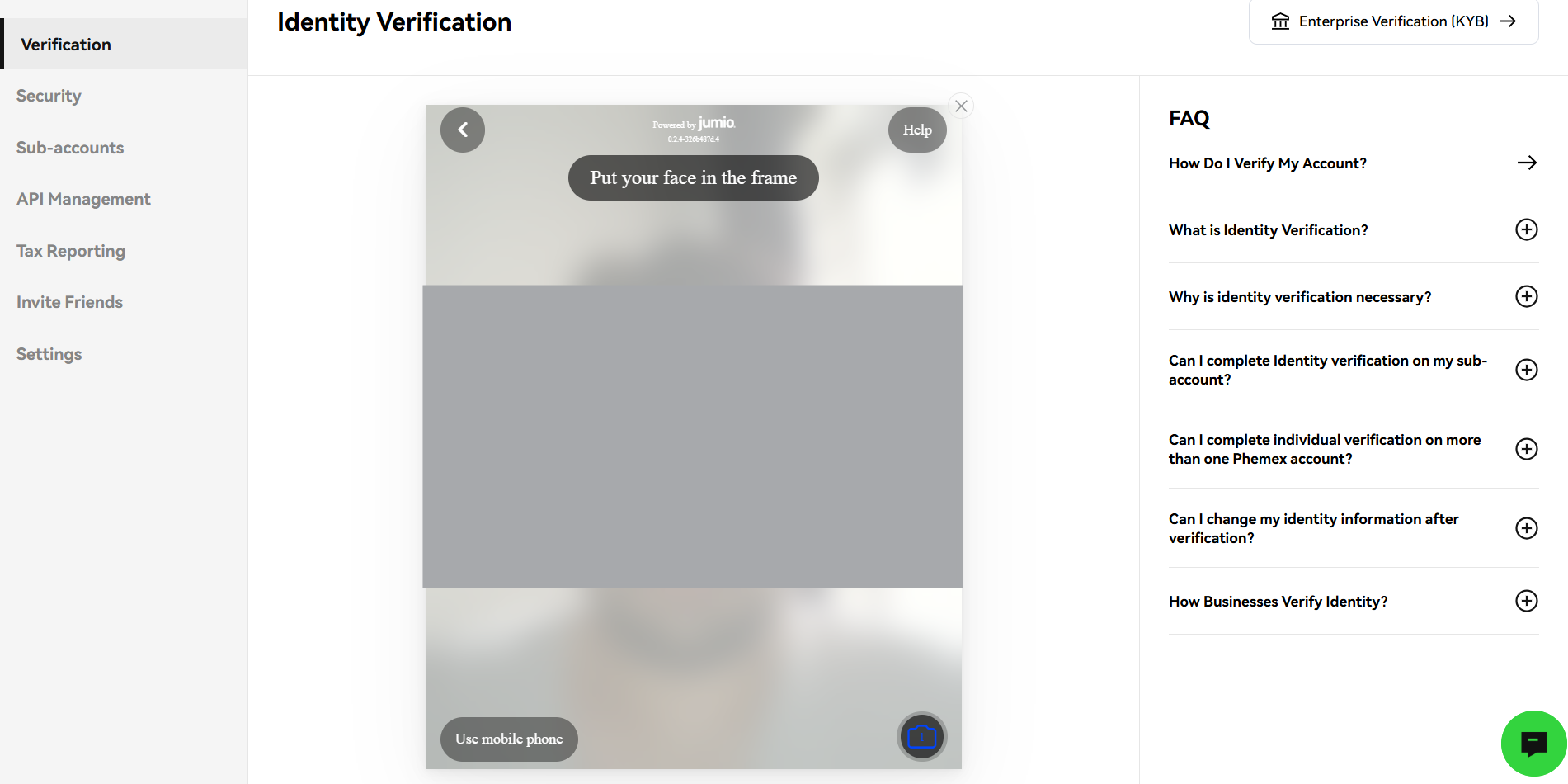
Follow the instructions and take a clear selfie.
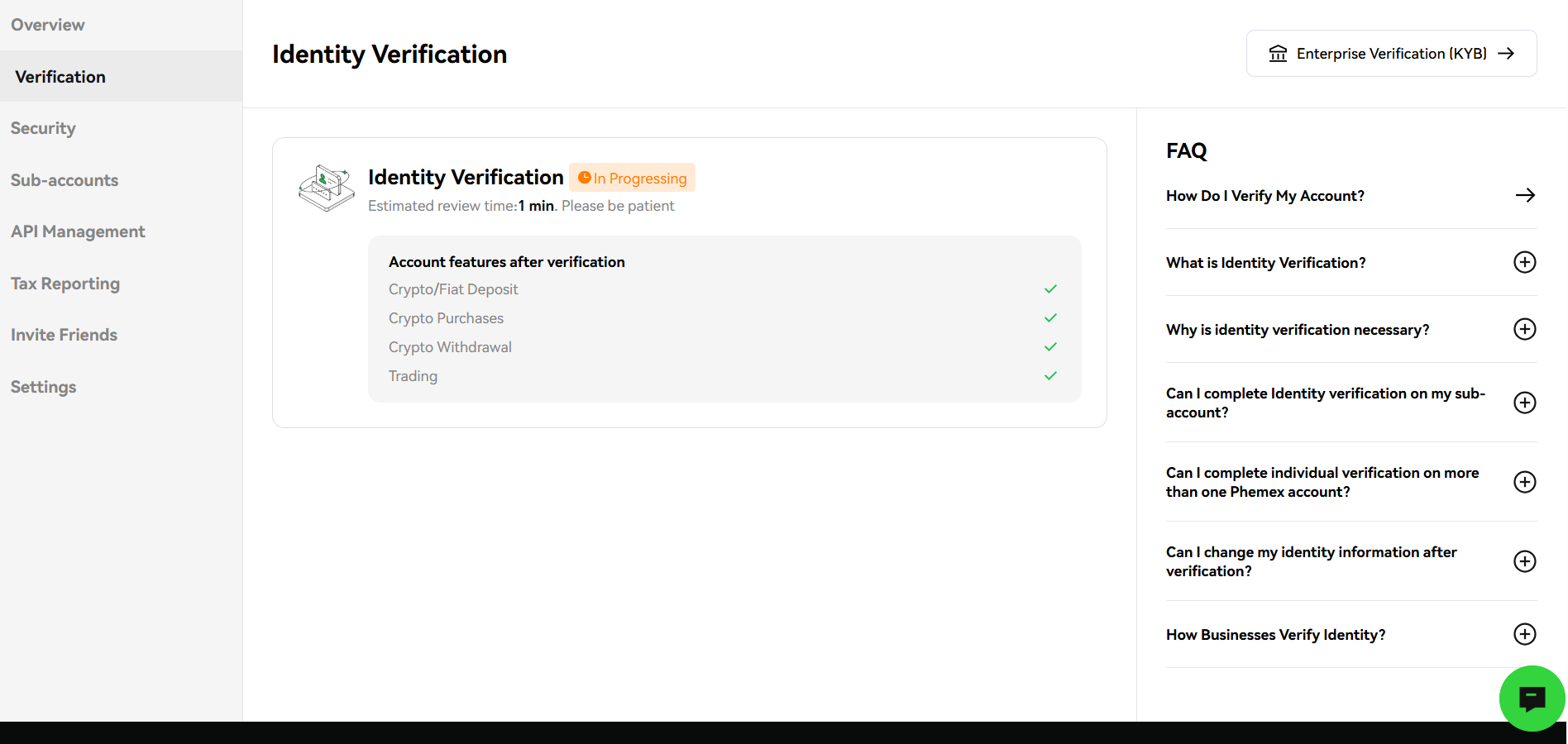
7. Wait for confirmation
Phemex will take a few minutes to verify your identity.
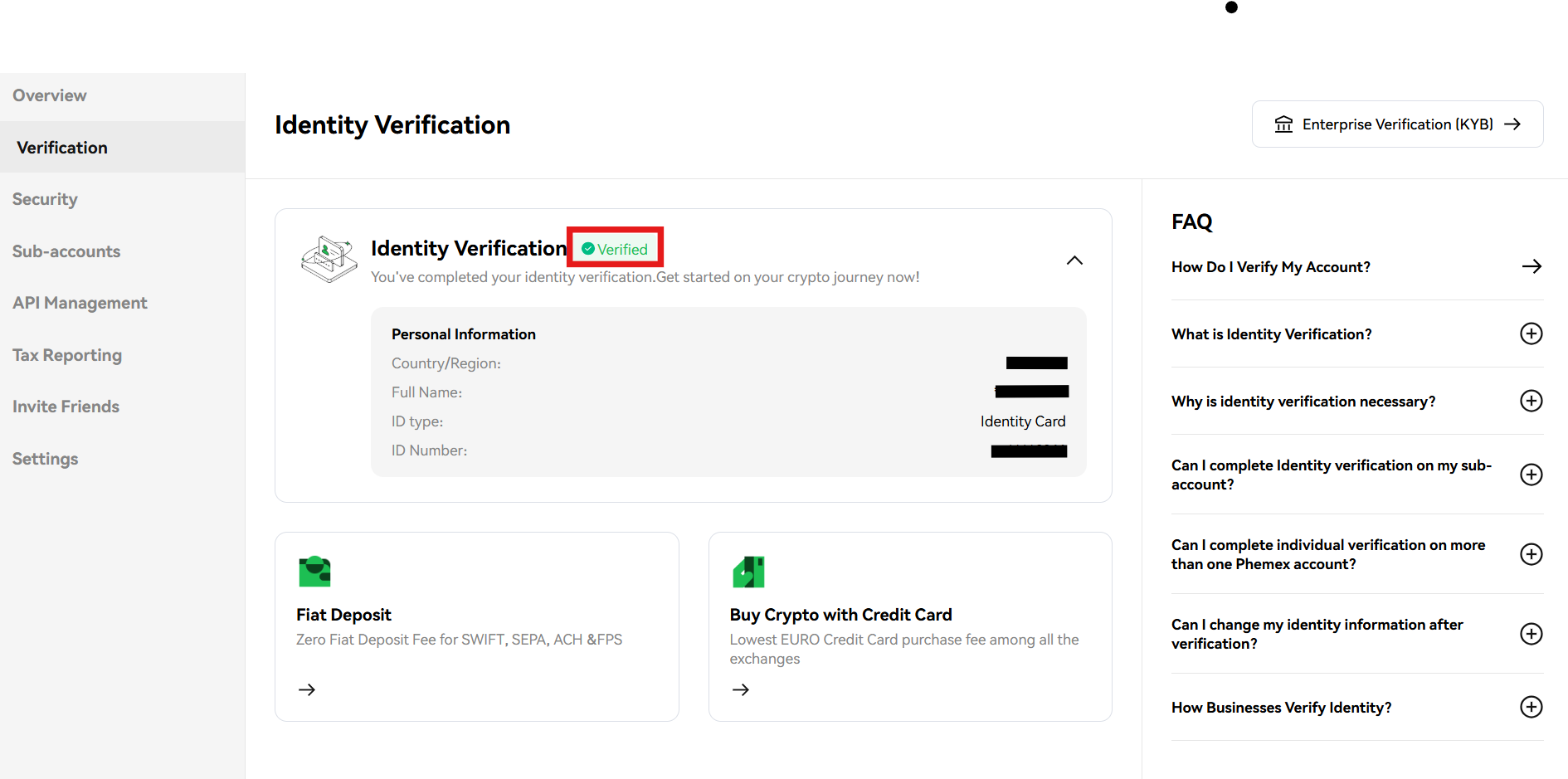
8. Successful verification
Upon successful KYC verification, you will see the verified badge under your profile.
Google Two-Factor Authentication
Setting up Google Two-Factor Authentication (2FA) on your Phemex account is an important step. It enhances the safety of your account and minimizes the risk of unauthorized access.
To complete this procedure, you need to follow these steps.
1. Navigate to the homepage
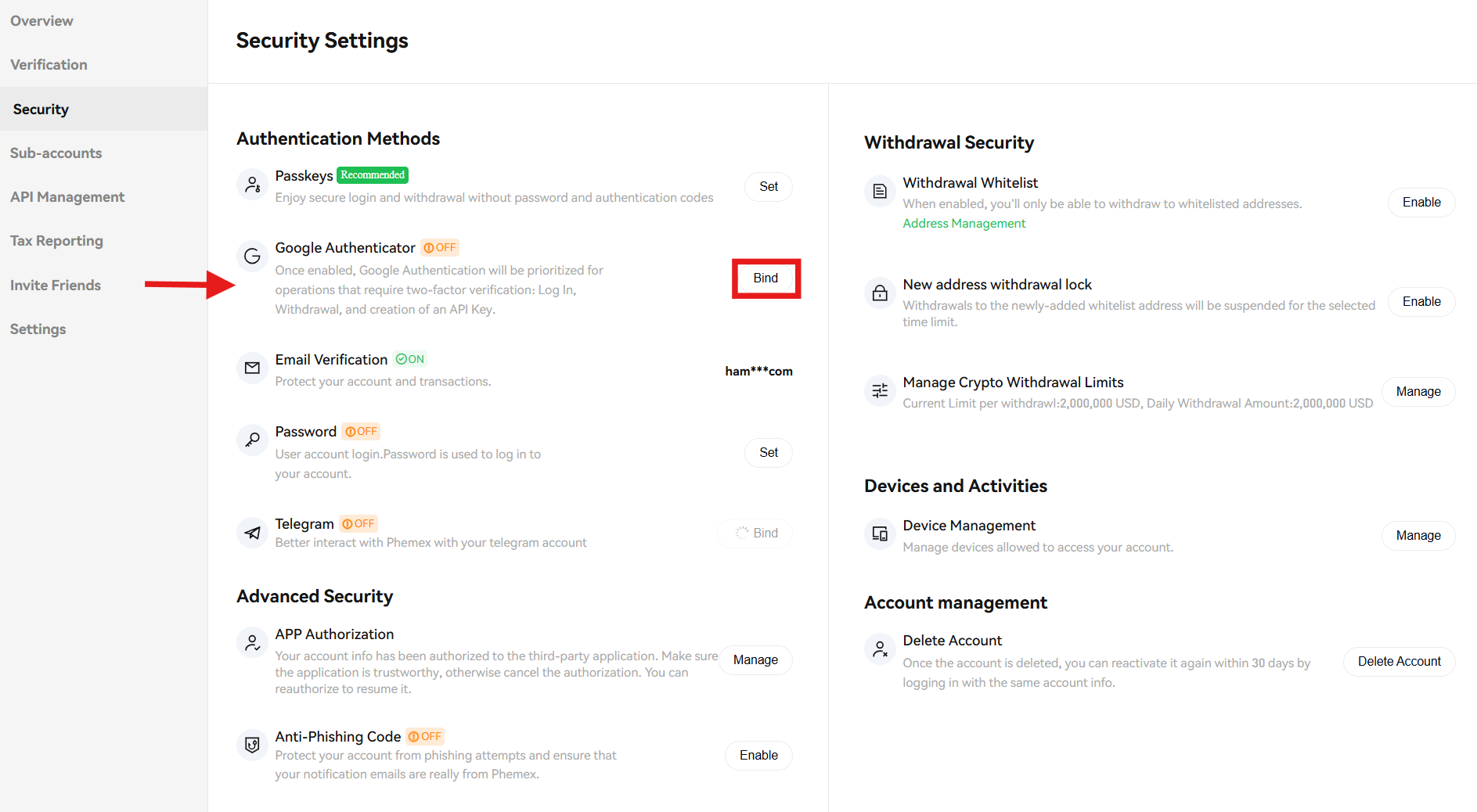
On the Phemex homepage, navigate to the profile icon and click the “Security” tab from the drop-down menu.
2. Start 2FA
On the security page, tap “Bind” beyond Google Authenticator to start the 2FA procedure.
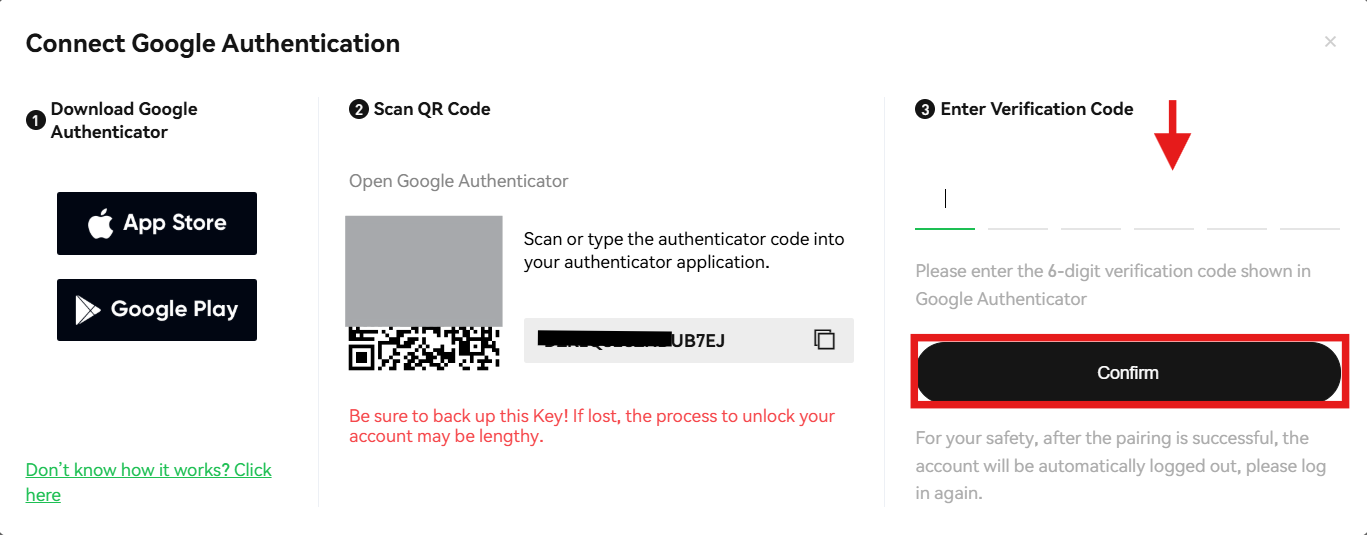
3. Connect Google Authenticator
Download the Google Authenticator App on your mobile phone and scan the QR code. Otherwise, you can copy and paste the given code. Provide the six-digit verification code shown in your Google Authenticator App and tap the “Confirm” tab.
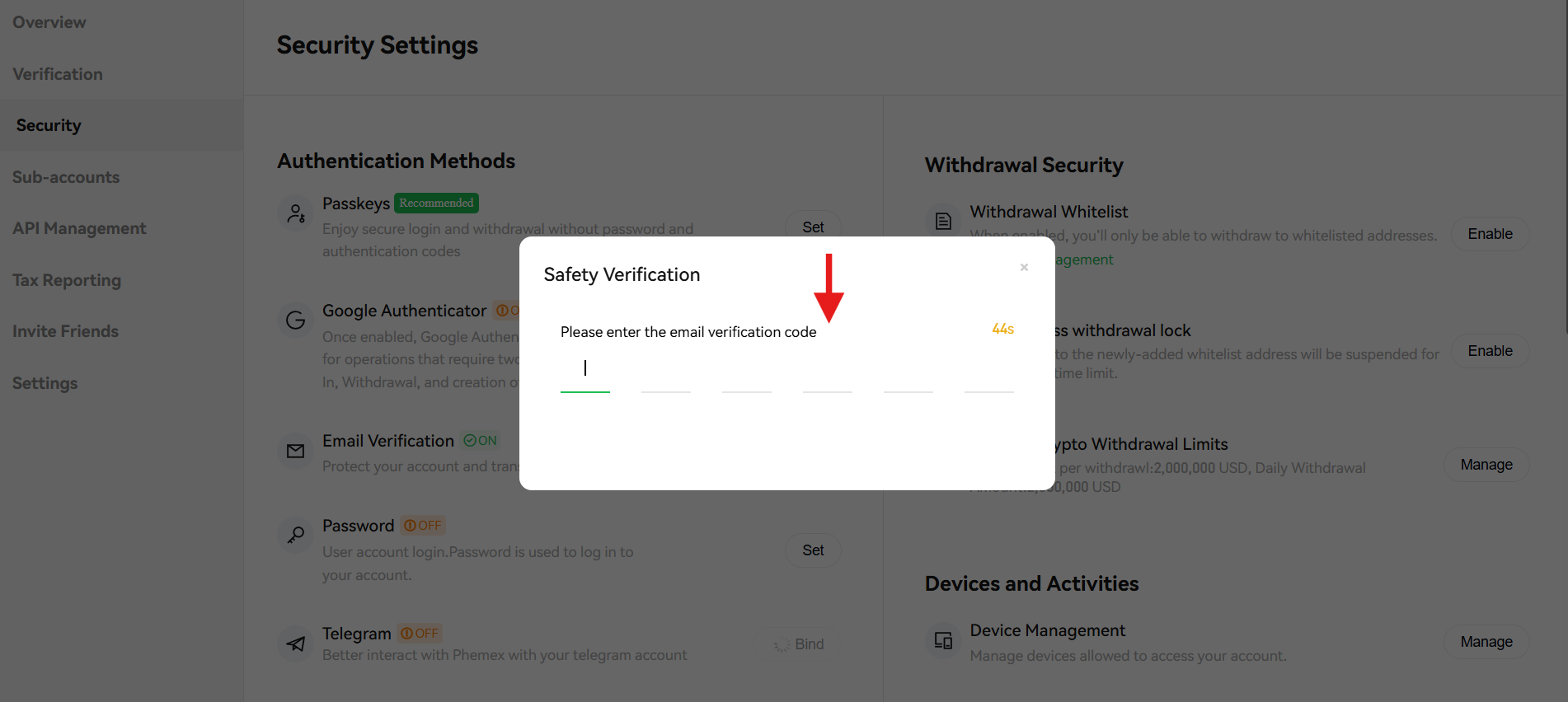
4. Enter the verification code
After this, enter the six-digit verification code that you received at your email address to complete the procedure.
How to Make a Deposit on Phemex?
Phemex is a prominent cryptocurrency exchange that allows its users to deposit cryptocurrencies and fiat currencies into their accounts. You can either deposit crypto assets or fiat assets on the platform and start trading cryptocurrencies.
Sign up on Phemex to claim up to $45,000 in welcome rewards and start trading crypto globally today!
Crypto Deposit
You can deposit popular cryptocurrencies like Bitcoin (BTC) and Ethereum (ETH), stablecoins like Tether (USDT), and other altcoins on Phemex.
To complete a crypto deposit, you need to follow these steps.
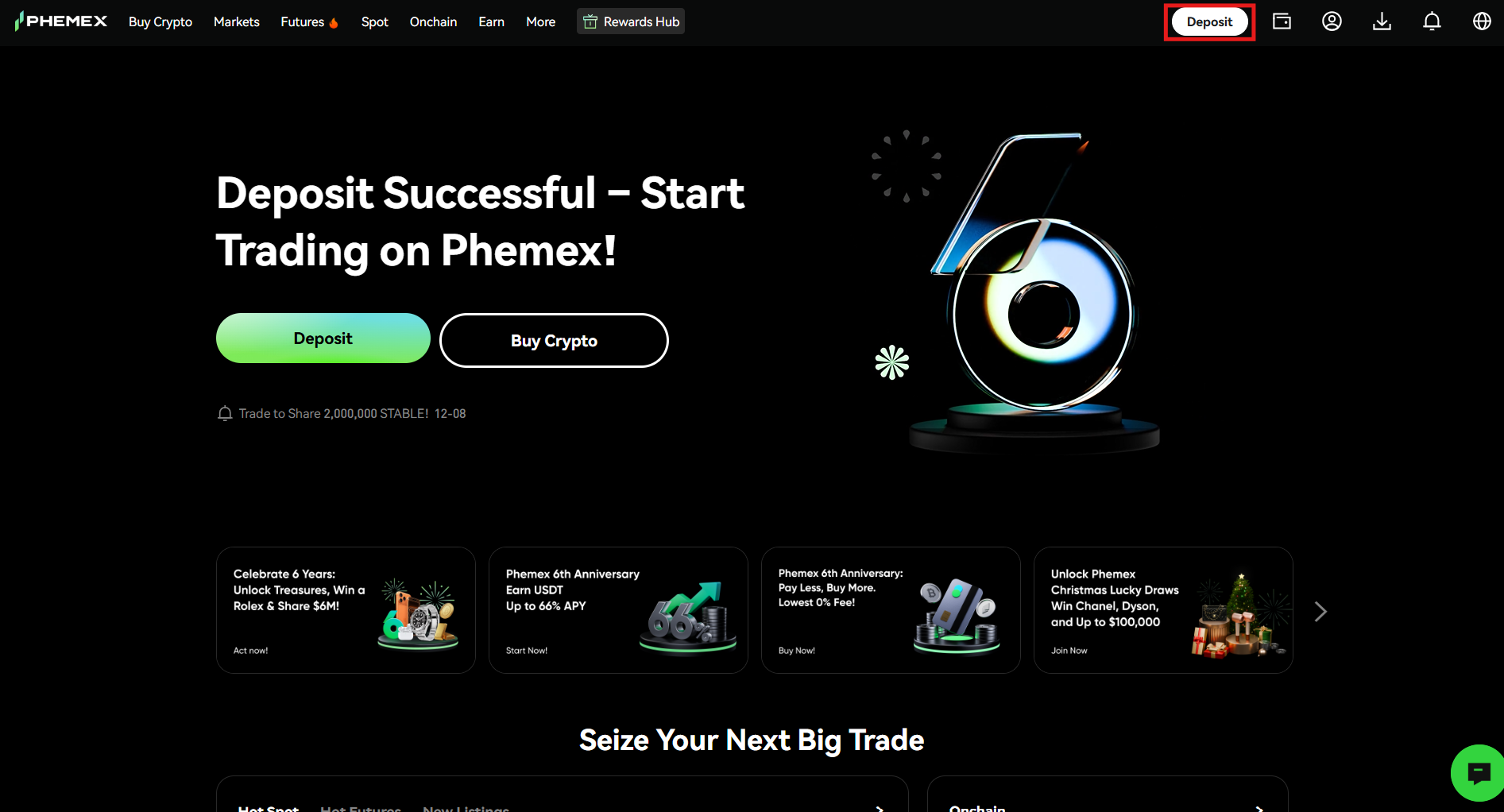
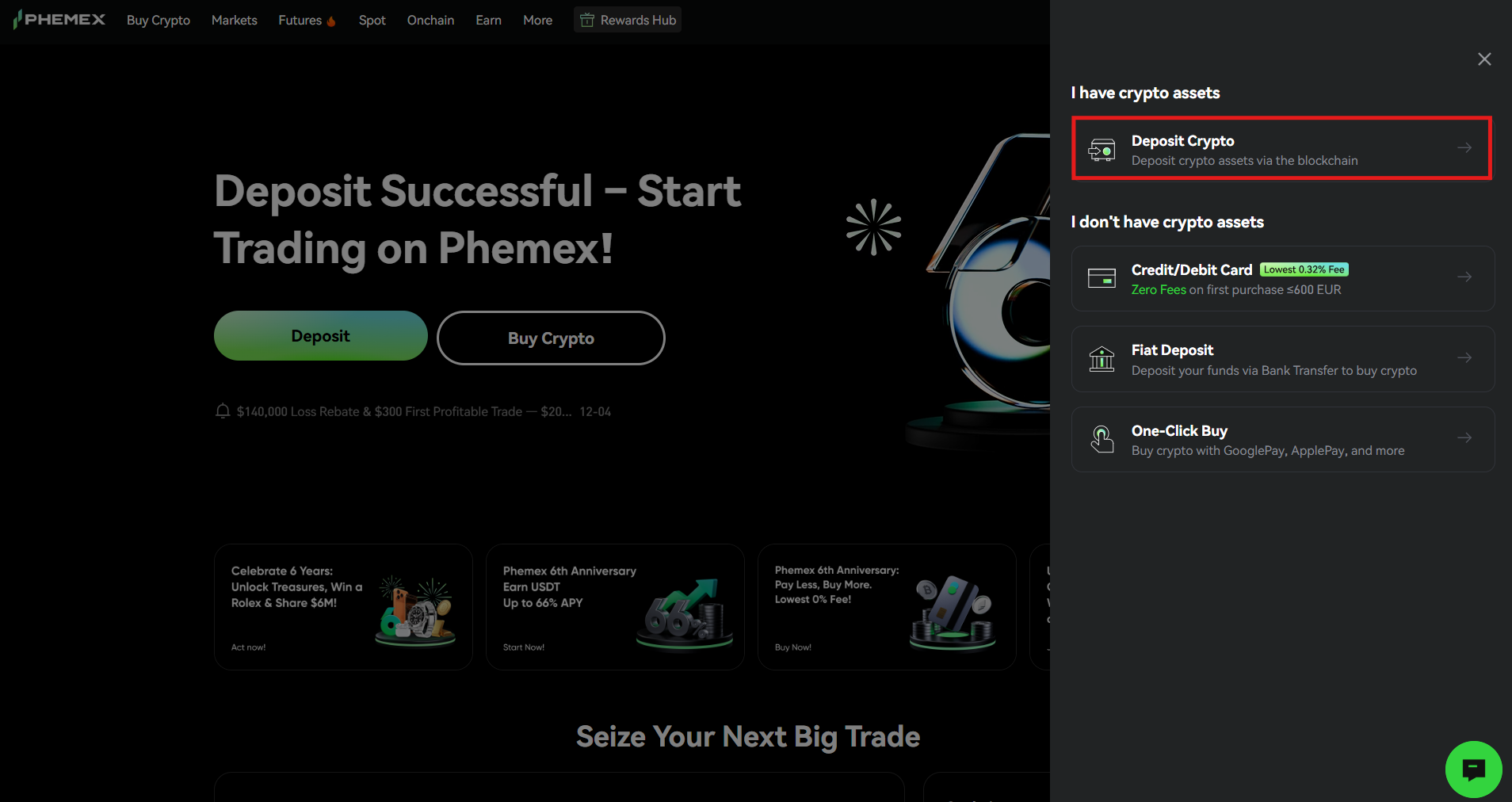
- On the Phemex homepage, click the “Deposit” tab at the top of the menu bar.
- Select the “Deposit Crypto” option.
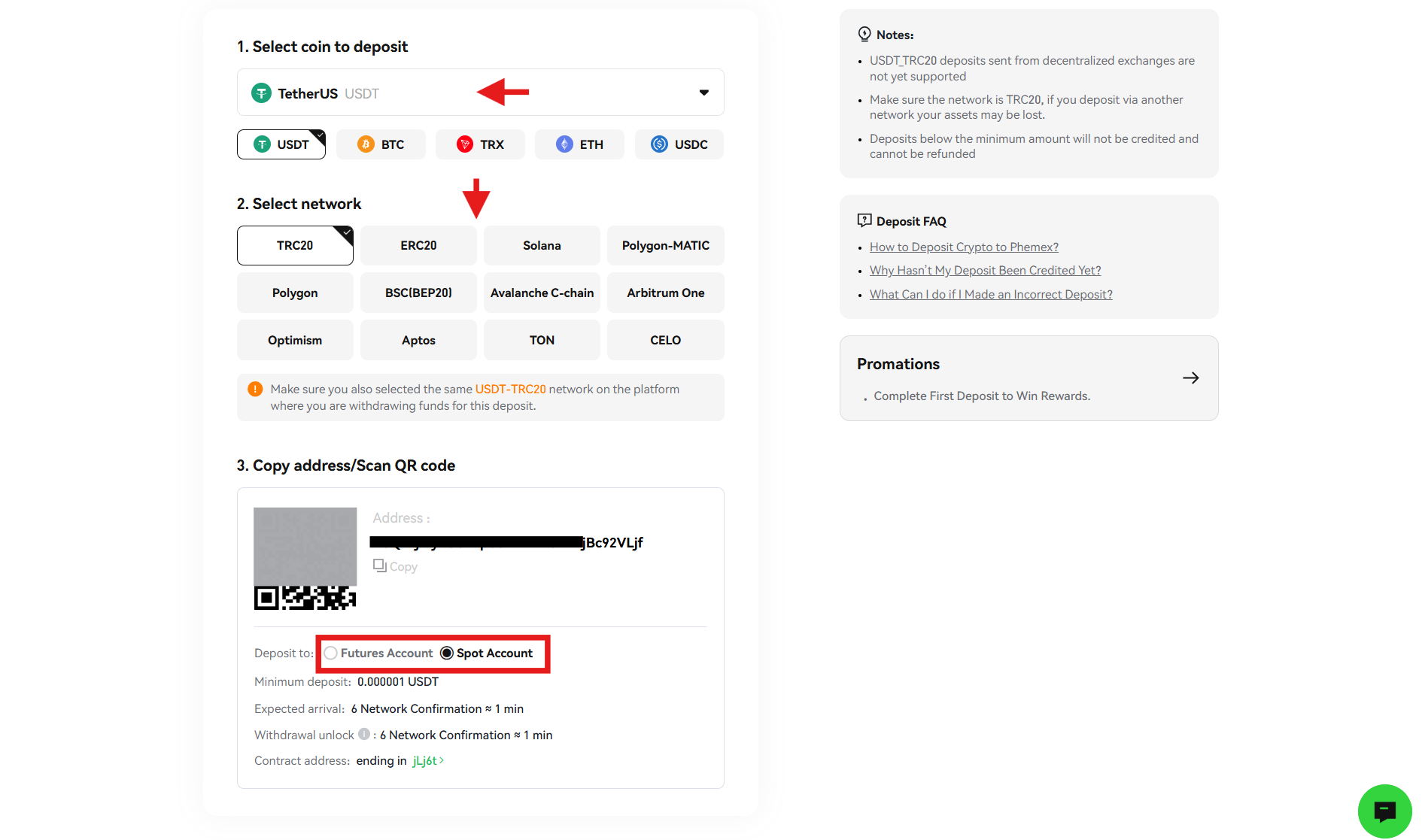
- Select the cryptocurrency you want to deposit, for example, USDT.
- Select the deposit network and make sure you select the same network in the withdrawal wallet that you are using to send the funds.
- Copy the deposit address and paste it into the withdrawal wallet. Otherwise, you can scan the QR code.
- Select the the account destination between Futures and Spot to receive the funds. For example, if you are looking to trade perpetual contracts with leverage, you need to select “Futures Account” to receive the funds.
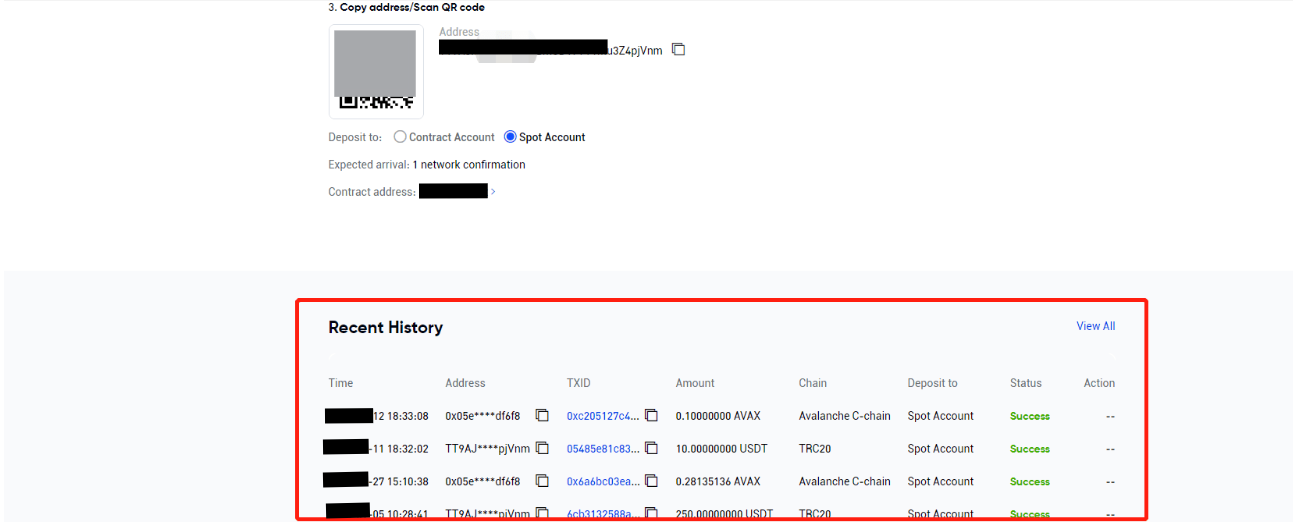
- Once the withdrawal request is confirmed, the transaction will complete within the due time. Remember, the confirmation time varies depending on the blockchain and its current network traffic. Additionally, you can check your deposit history at the bottom of the page.
Fiat Deposit
You can deposit fiat currencies on the Phemex Exchange, such as USD, EUR, JPY, and more, through bank transfers. Remember, fiat deposits on Phemex are entirely free.
Follow these steps to complete a fiat deposit on the platform.
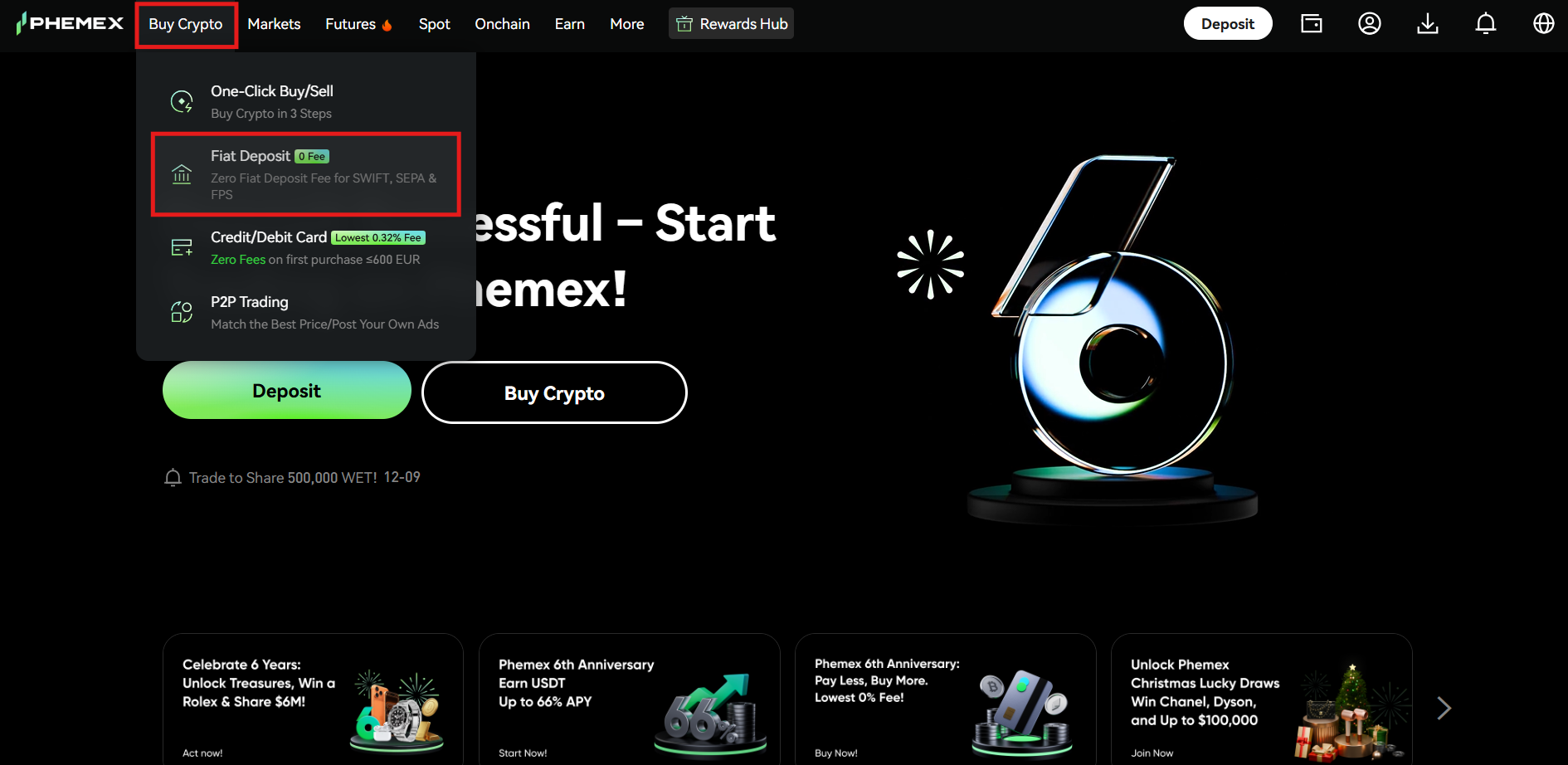
- Navigate to the “Buy Crypto” tab at the top left corner of the homepage and click “Fiat Deposit” from the drop-down list.
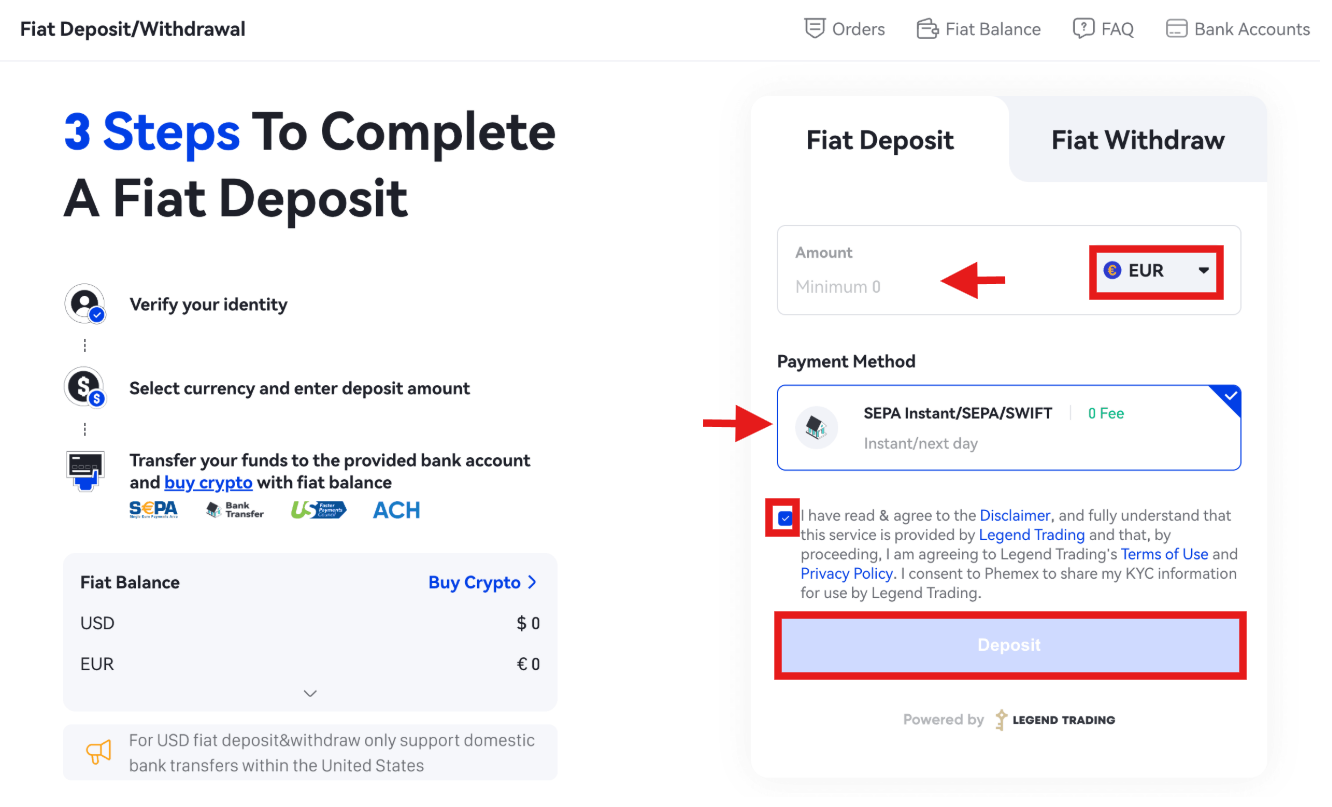
- Select the fiat currency you want to deposit, for example, the Euro (EUR). Next, enter the order amount and select a payment method. Agree to the “Terms of Use and Privacy Policy.” Review the order details and tap “Deposit” to proceed.
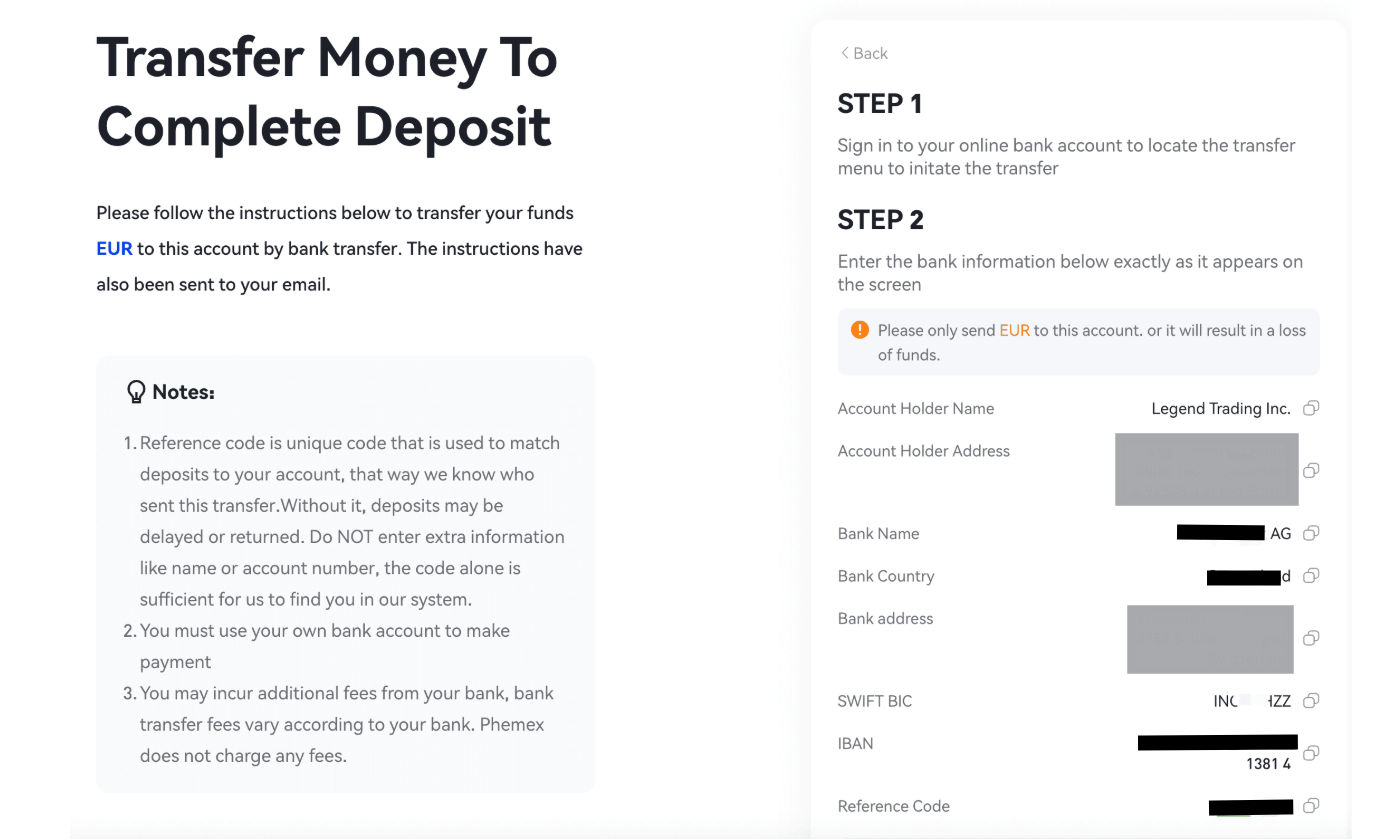
- Sign in to your bank account to initiate the transfer. Enter the corresponding bank information from the page, and do not forget to include the Reference code to match the deposit to your account. Click the “Yes, I Just Made a Deposit” tab when you complete the transfer.
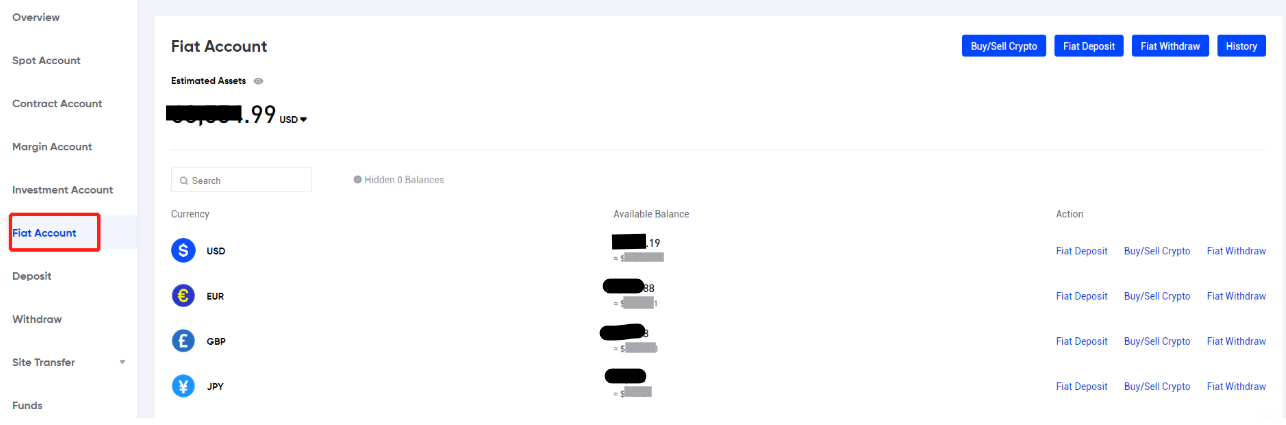
- To check your fiat deposits, tap the “Wallet” tab on the homepage. After this, click the “Fiat Account” tab from the available options on the left side of the page to check your fiat deposits.
Buy Cryptocurrencies with Fiat on Phemex
Phemex allows its users to buy cryptocurrencies with fiat currencies. The supported methods include One-Click Buy/Sell, Credit/Debit Card, and P2P Trading.
Let’s explore these methods in detail.
One-Click Buy/Sell
The One-Click Buy/Sell is an advanced feature on the Phemex Exchange that enables users to buy crypto assets in simple steps.
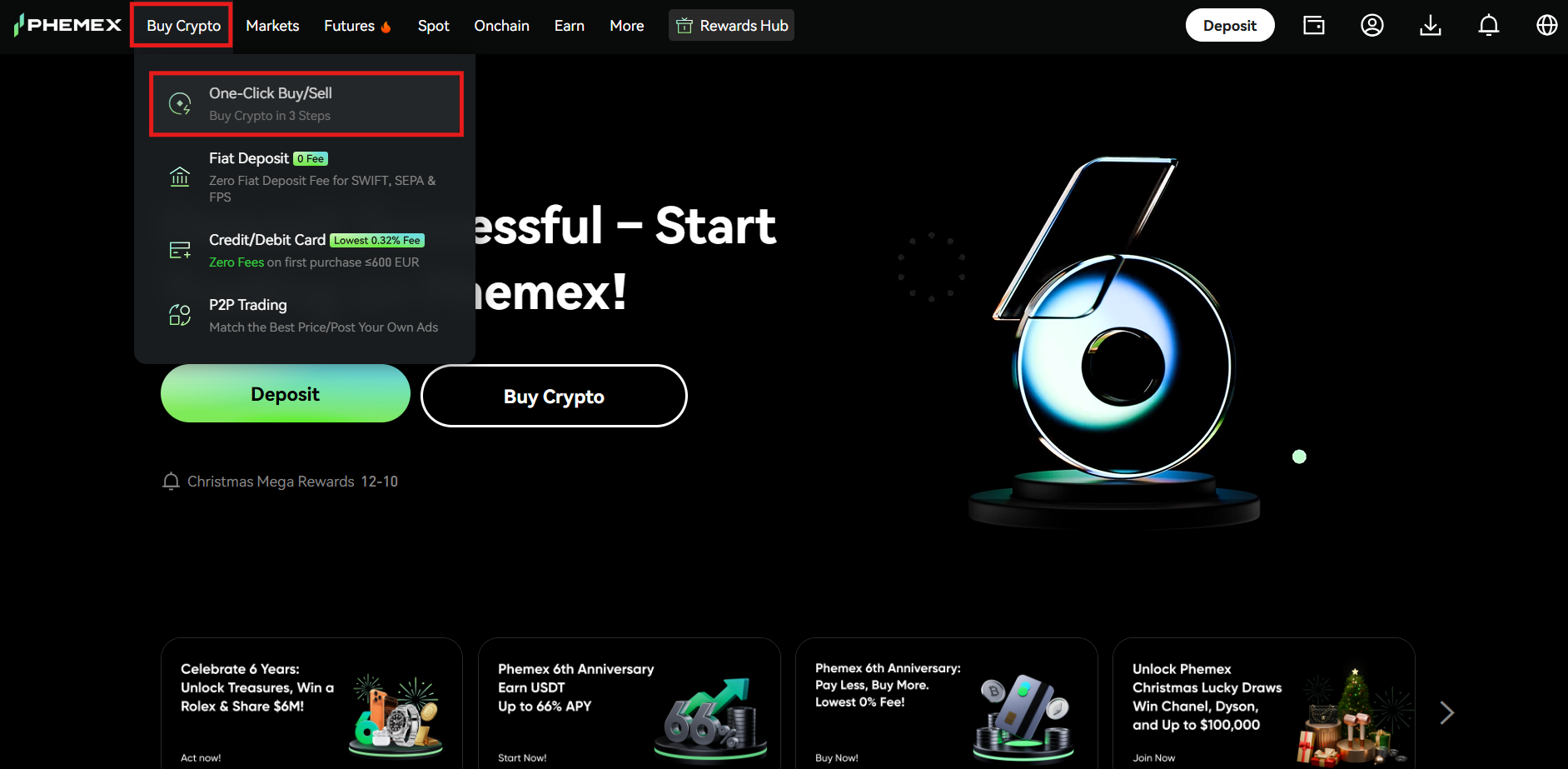
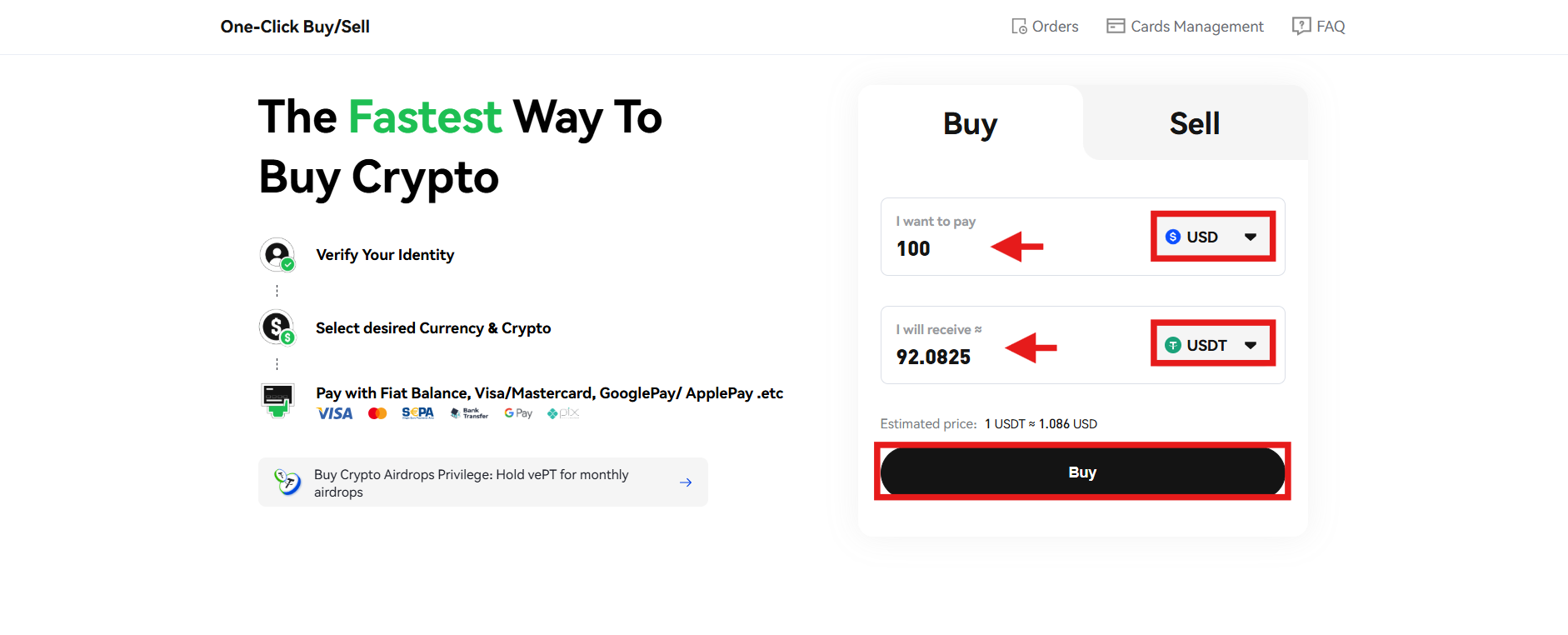
- Navigate to the “Buy Crypto” section on the homepage and click the “One-Click Buy/Sell” tab from the drop-down menu.
- Next, select the fiat currency you want to spend and enter the amount. Select the cryptocurrency you want to buy, and you will see the number of tokens to be received. Review the information and tap “Buy” to proceed.
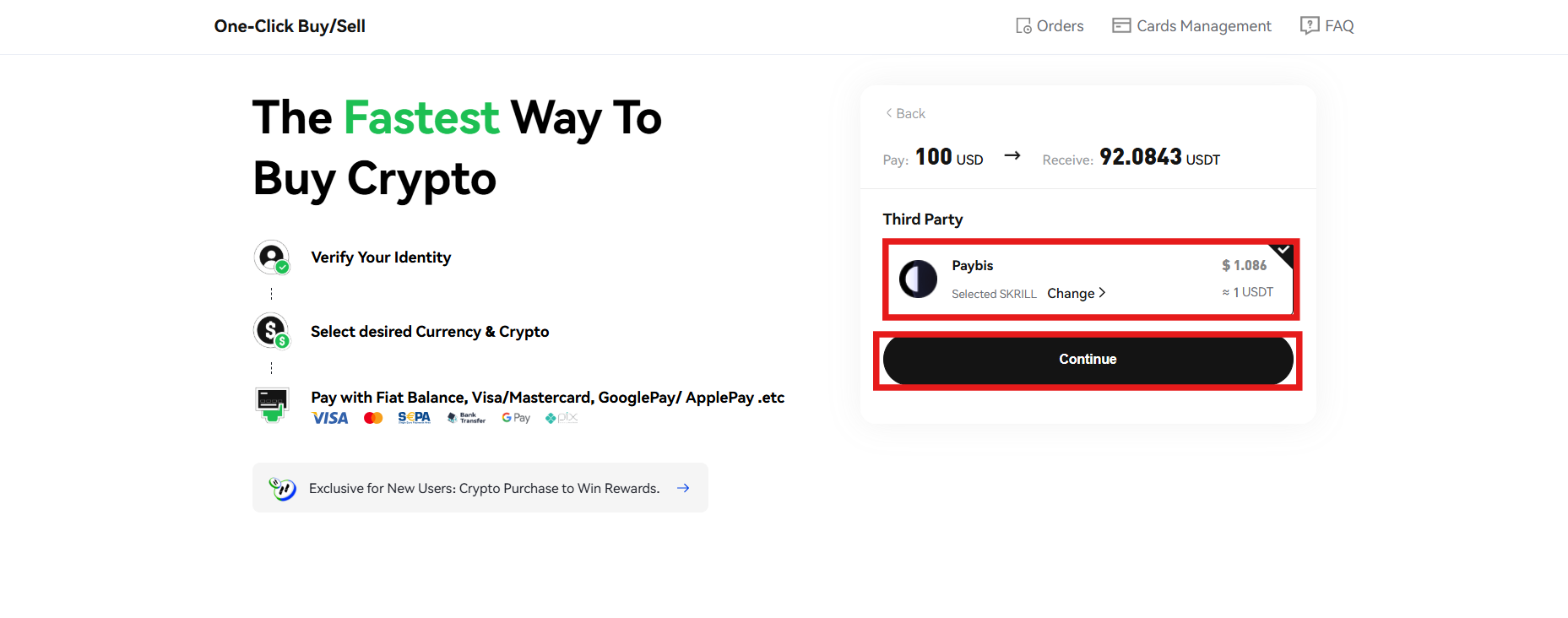
- Select the payment method that offers the best exchange rate. Once done, click “Continue.”
- Review the order details and click “Confirm” to continue.
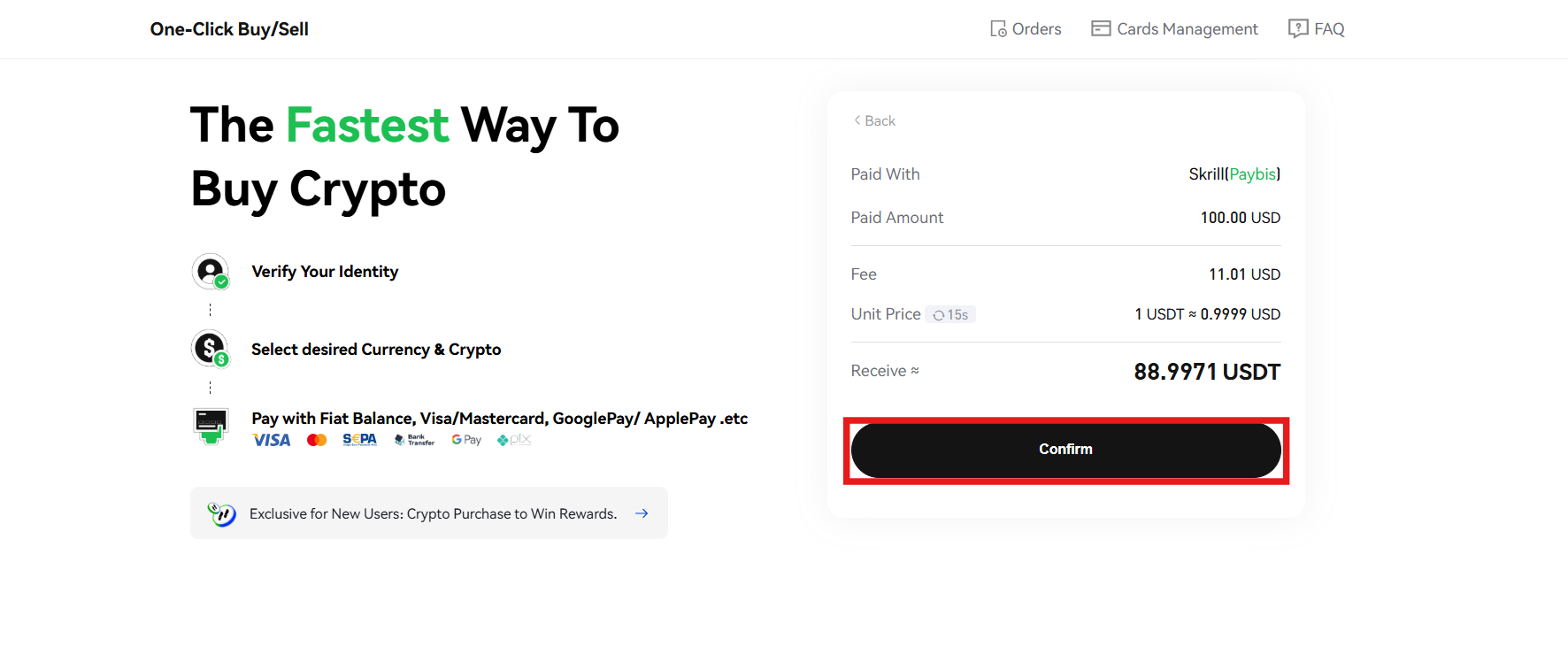
After this, you will be redirected to your selected payment method account, where you need to complete the transaction. Once the transaction is successful, you will see the number of digital tokens received in your account.
Credit/Debit Card
Cryptocurrency enthusiasts can buy digital tokens on the Phemex Exchange using their credit or debit cards.
- Hover over the “Buy Crypto” section on the homepage and tap the “Credit/Debit Card” option.
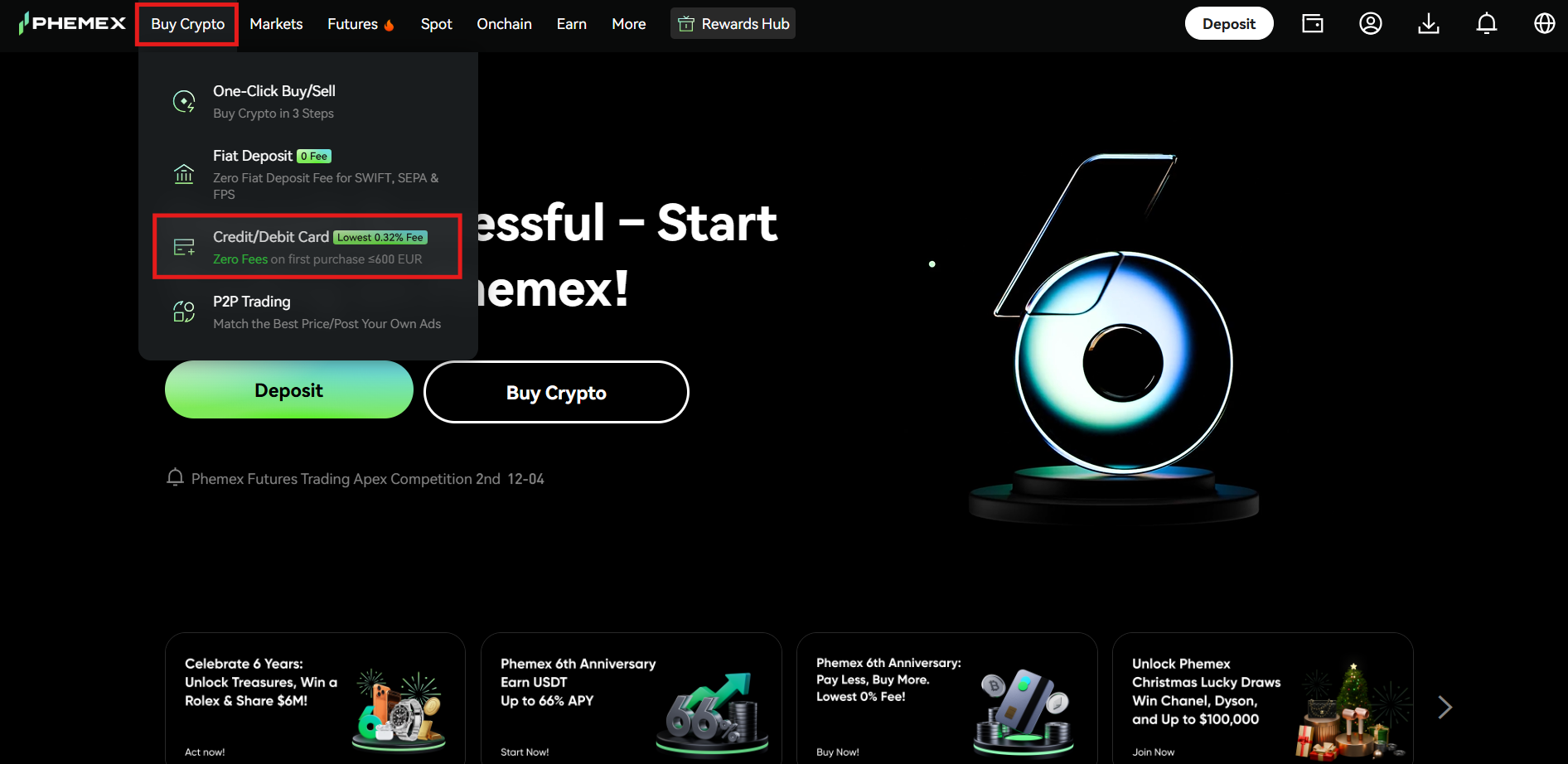
- Add the credit or debit card information if you still have not bound any card to your Phemex account. Remember, the cardholder’s name should match your KYC verification name on Phemex.
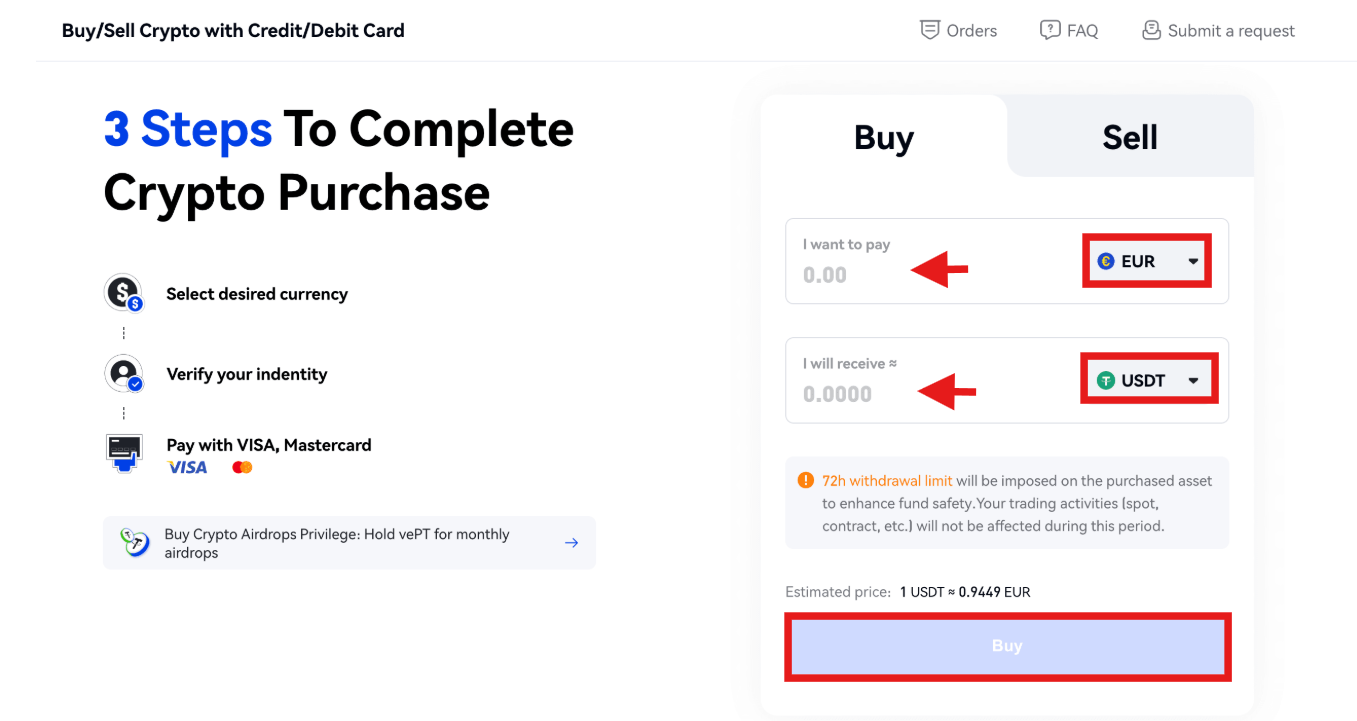
- After adding the card details, select the fiat currency you want to spend and the cryptocurrency you want to receive. Enter the order amount, and the system will automatically display the number of tokens to be received. Once done, click “Buy” to proceed.
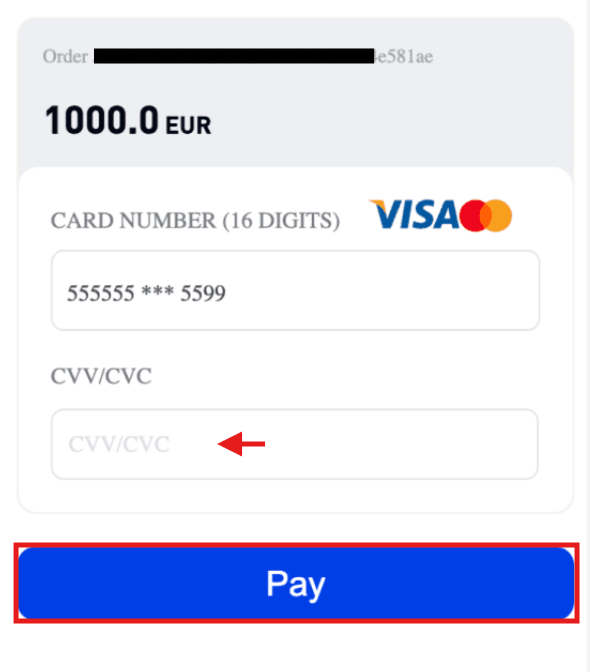
- Enter the CVV/CVC number of your credit or debit card. Click the “Pay” tab to confirm the transaction.
P2P Trading
Peer-to-Peer (P2P) Trading on Phemex allows you to buy cryptocurrencies without the need for any financial intermediary. It offers two features: Express and P2P.
Express
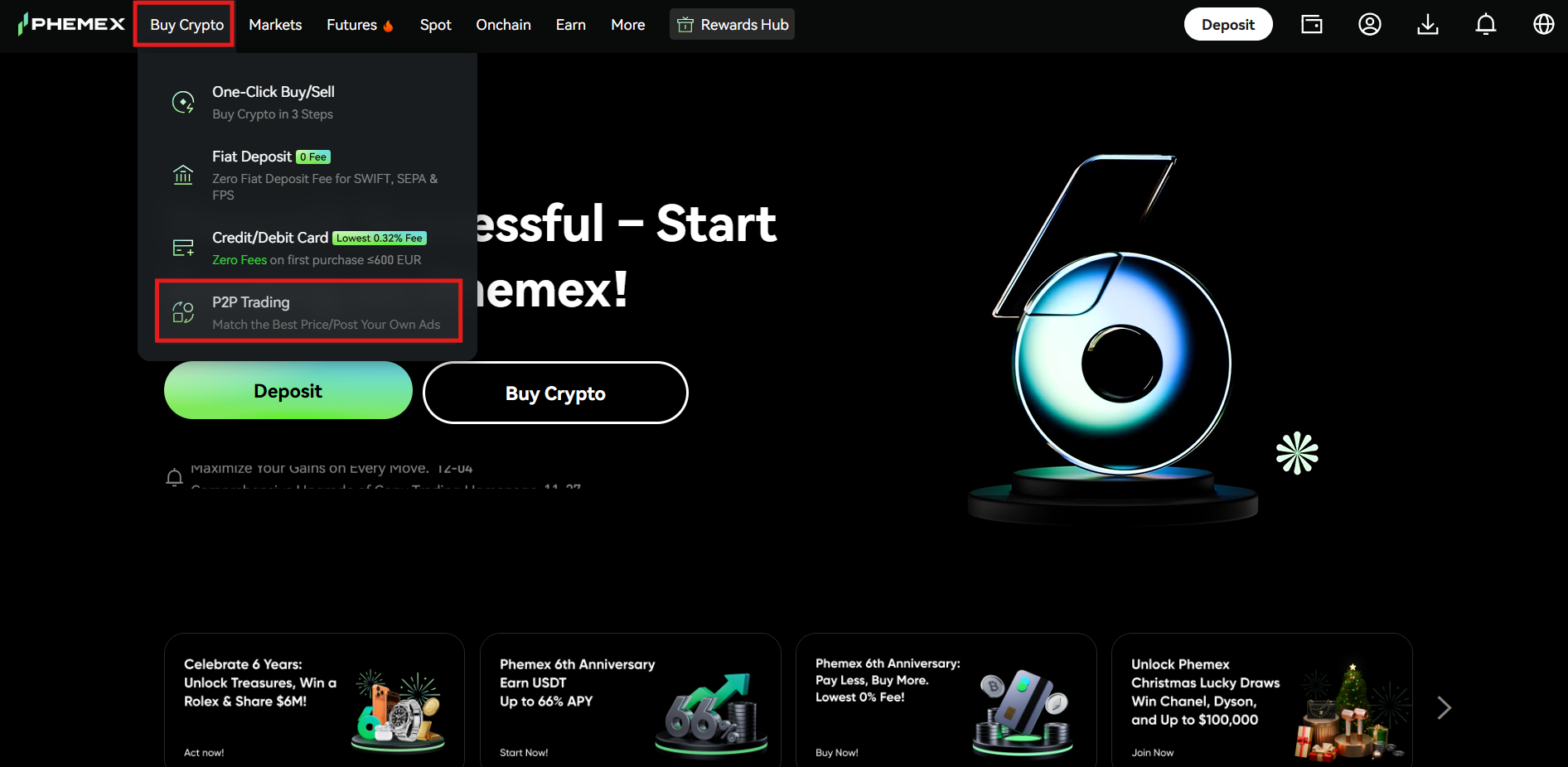
- Navigate to the “Buy Crypto” section on the homepage and tap the “P2P Trading” option.
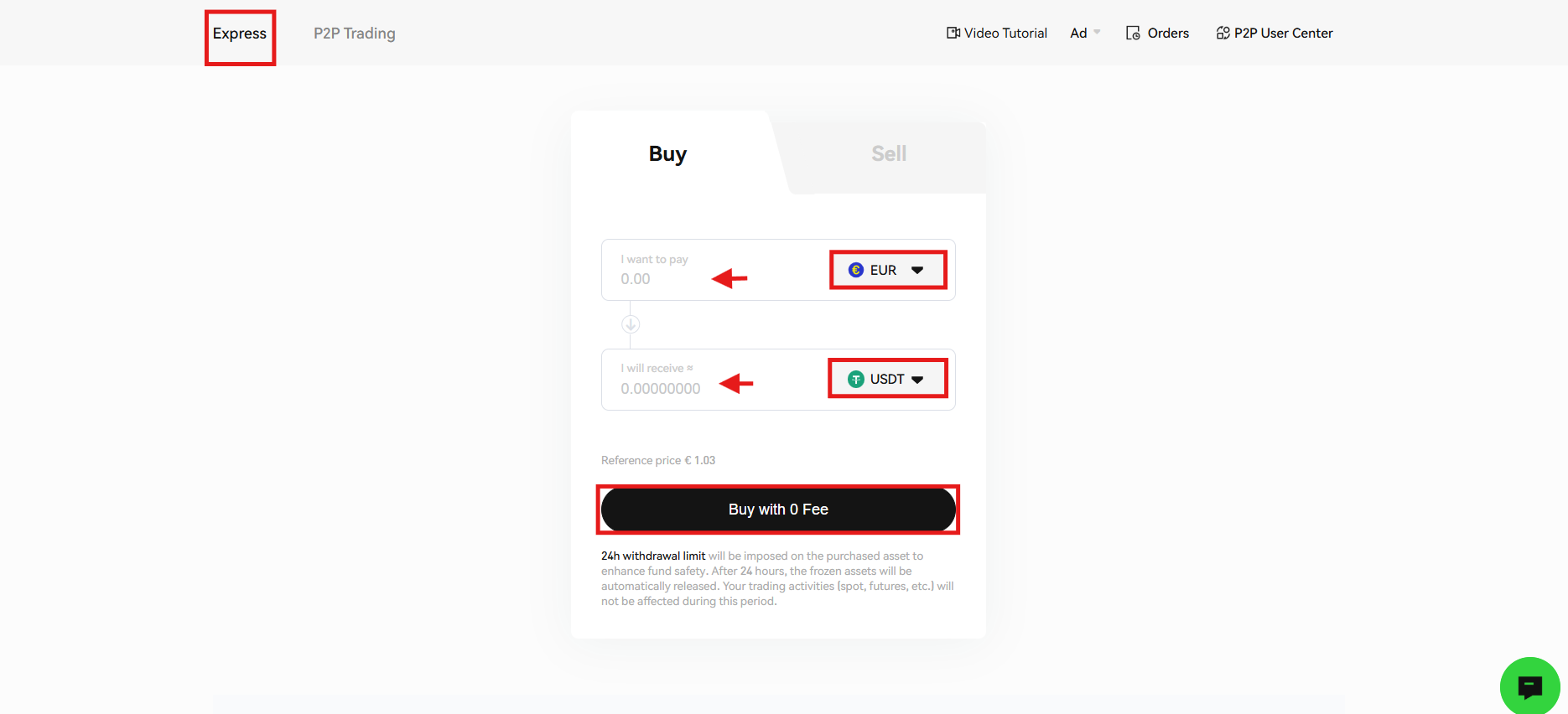
- Select the “Express” option. Choose the fiat currency you want to spend and the receiving digital currency. Enter the order amount, and you will see the number of tokens to be received against it. Review the information and click “Buy with 0 Fee” to proceed.
- After this, you will need to select the payment method to confirm the transaction.
P2P Trading
- Hover over the “Buy Crypto” section on the homepage. Tap “P2P Trading” from the drop-down list.
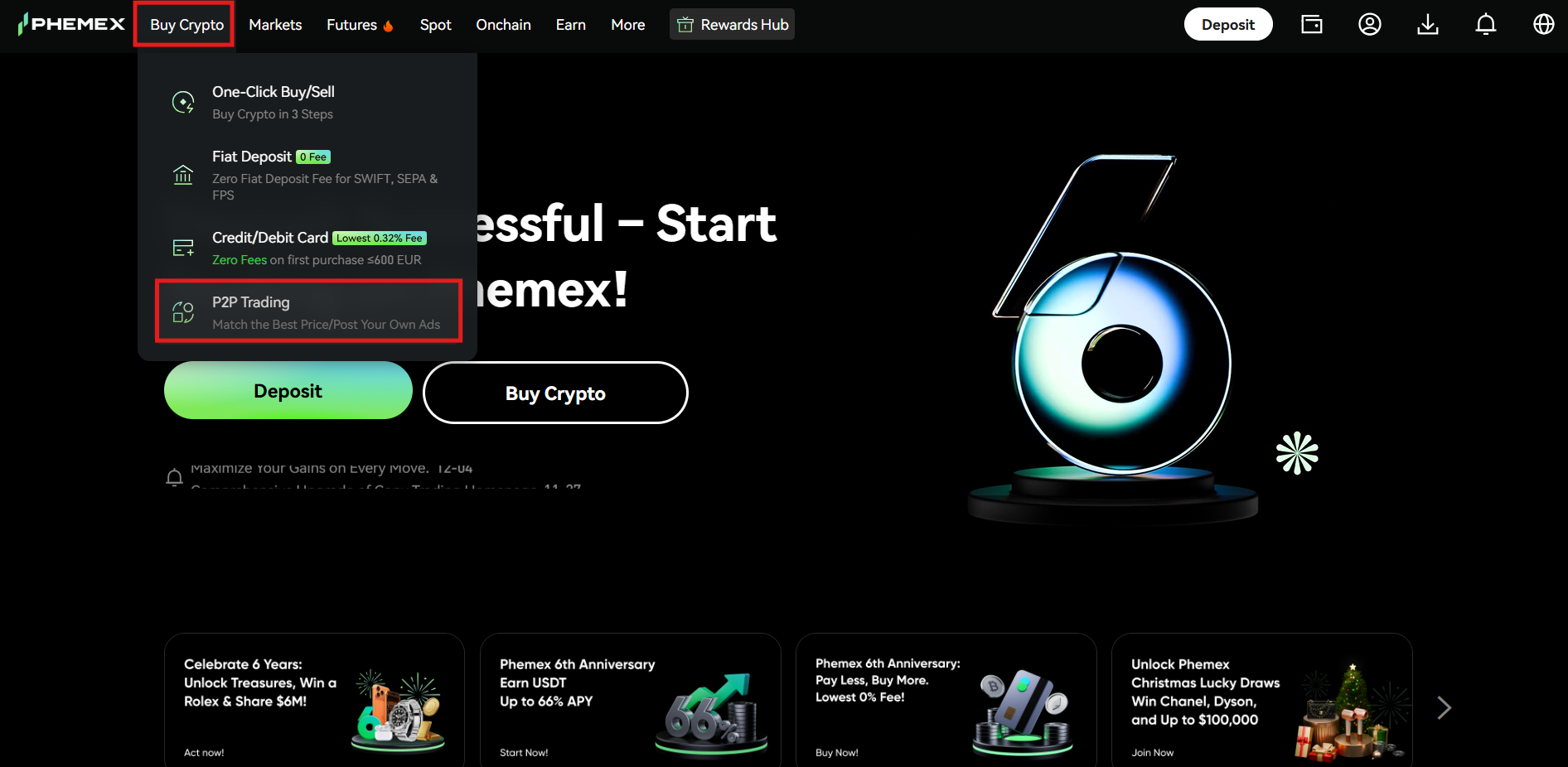
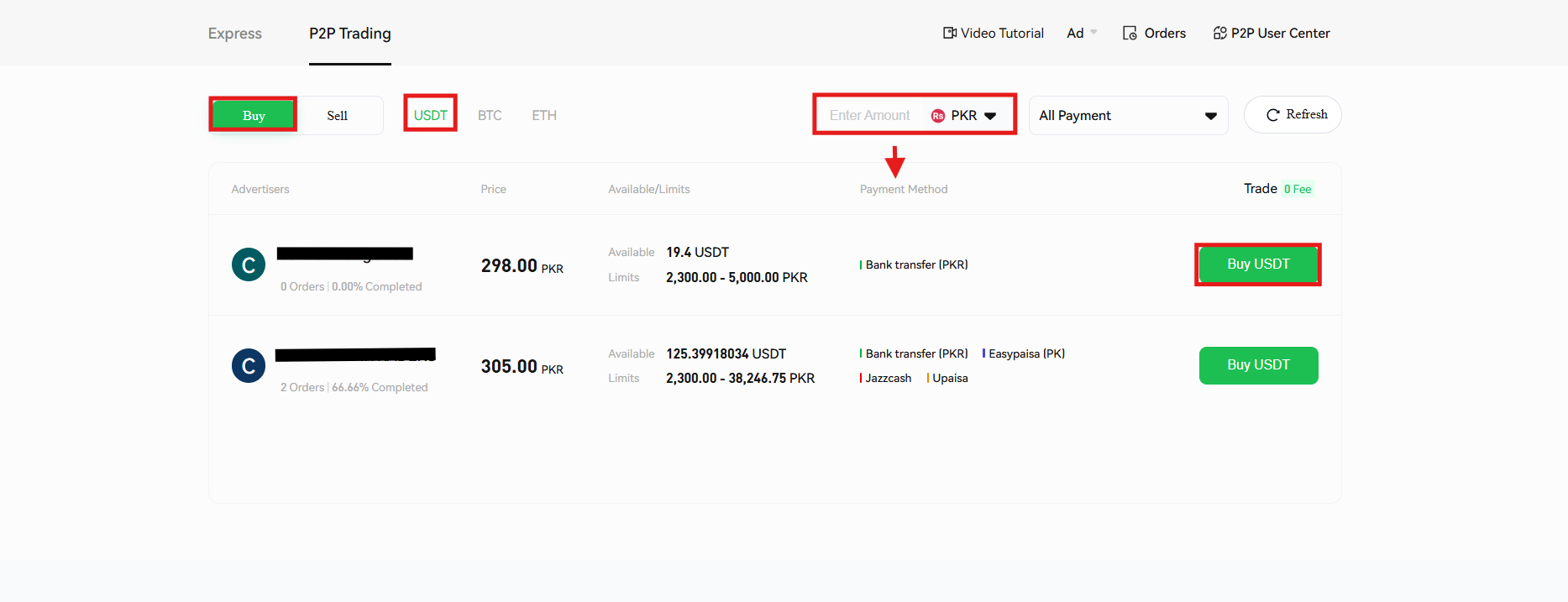
- On the P2P trading page, select the cryptocurrency you want to buy, for example, USDT. Select the fiat currency you want to spend, review the supported payment methods, and the exchange rate. After this, select an ad and click “Buy USDT” to proceed.
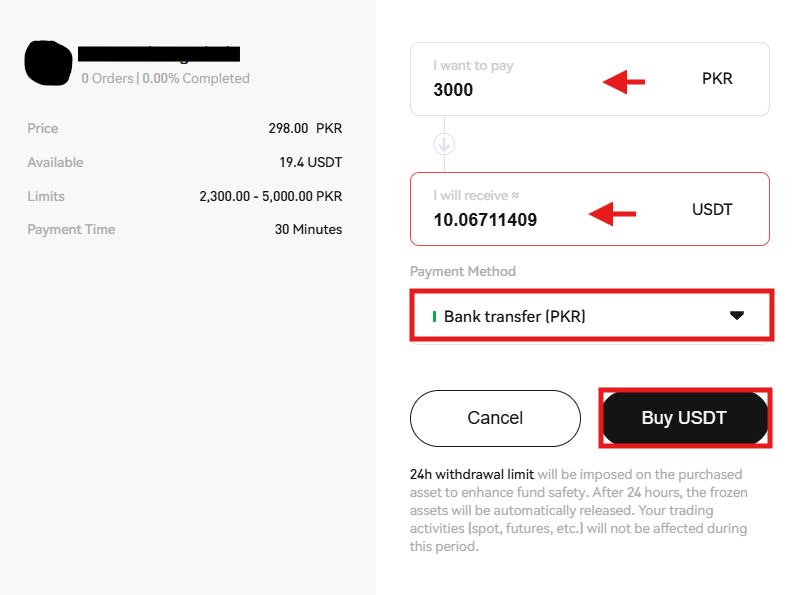
- In the order pop-up window, enter the order amount and select the payment method. Review the order details and tap “Buy USDT” to place the order.
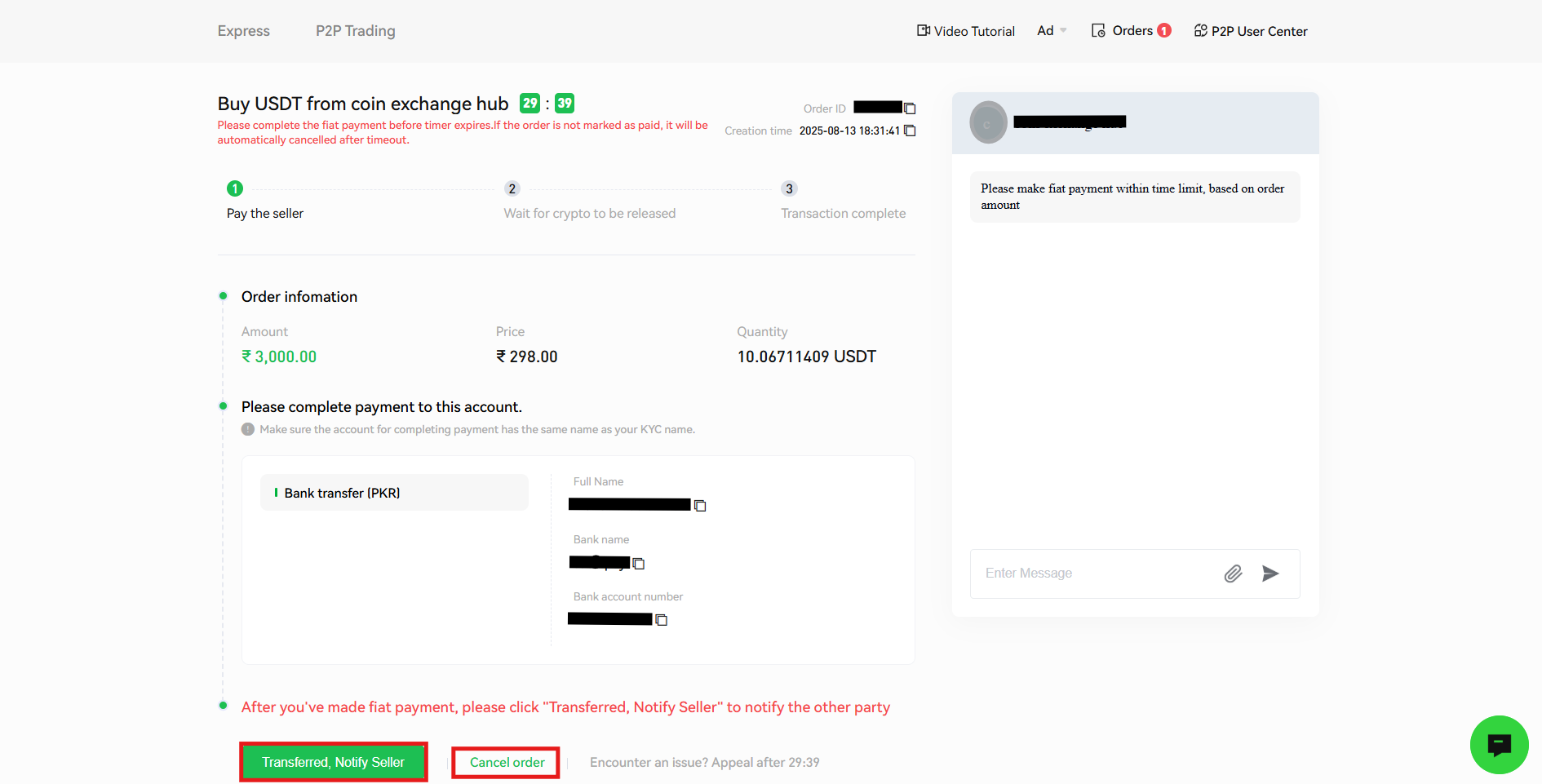
- Copy the merchant’s deposit address to make the payment. Once you have paid the merchant, click the “Transferred, Notify Seller” tab to confirm the purchase. On the other hand, if you want to cancel the order, tap the “Cancel order” tab.
Order Types on Phemex Exchange
The Phemex Exchange has been designed to offer the maximum trading benefits to cryptocurrency traders. The platform offers both basic and advanced order types that traders can use according to their trading strategies.
The available order types on the platform include:
1. Limit Order
Cryptocurrency traders use a limit order to buy or sell a digital asset at a specific or better price. It gives them more control over their trades as this order type only executes once the set market conditions are met.
Example: Suppose the current price of Ethereum (ETH) is $3,200, but you believe that it will drop to $3,100. You can place a buy limit order at $3,100. The order will execute once the price of ETH drops to the targeted price.
2. Market Order
This order type enables cryptocurrency traders to buy or sell a digital asset at the best available current market price. The order is executed immediately, but you may notice a slight price difference at the time of execution due to market fluctuations.
Example: Suppose Bitcoin (BTC) is currently trading at $115,000. You place a market buy order to buy 1 BTC. The order will execute instantly at the best available market price.
3. Limit Conditional Order
A limit conditional order enables you to set a specific trigger condition for the order. Once the trigger condition is met, the order will execute at the limit price, allowing better control over future price movements.
Example: If Bitcoin (BTC) is trading at $115,000, you set a limit conditional buy order or trigger when the price reaches $116,000, with a limit price of $116,200. Once BTC hits $116,000, your limit buy order will be placed at $116,200 or lower.
4. Market Conditional Order
You can use a market conditional order to execute a market order only when a specific trigger condition is met. It helps you automate entries or exits without constantly monitoring price fluctuations.
Example: Suppose Ethereum (ETH) is trading at $3,300, and you set a market conditional sell order to trigger when the price falls to $3,100. Once the set price level is reached, the order will execute at the best available market price.
5. Trailing Stop Order
This is a dynamic stop-loss order that weighs market price and lock-in profits while limiting downside risk. Instead of setting a fixed stop price, it trails the market by a set amount or percentage.
Example: If Bitcoin (BTC) is valued at $116,000, and you set a trailing stop sell order with a $1,000 trail, and the stop-loss activates at $115,000. If BTC rises to $118,000, the stop-loss will adjust to $117,000. If the price of BTC then drops, the order will execute at the best price near $117,000, securing profits.
6. Scaled Order
A scaled order allows you to set multiple buy or sell limit orders at different price levels within a defined range. It helps you average entry or exit prices instead of relying on a single order.
Example: Suppose Ethereum is trading at $3,300, and you want to buy it between $2,800 and $3,000. You can set a scaled order with 10 buy orders to balance your average entry price as the market moves within that zone.
7. Basket Order
Cryptocurrency traders can use a basket order to buy or sell a group of cryptocurrencies simultaneously as a single transaction to diversify their portfolios.
Example: Instead of buying Bitcoin (BTC), Ethereum (ETH), and Solana (SOL) one by one, you can place a basket order to purchase all these coins at once in your chosen proportions. If you allocate 50% BTC, 25% ETH, and 25% SOL, the order will execute according to that split.
8. OCO Order
The One-Cancels-the-Other (OCO) is a pair of orders in crypto trading. When one of the orders executes, the other is automatically canceled. It allows you to combine stop and limit orders to manage risk and profit simultaneously.
Example: If Bitcoin (BTC) is trading at $118,000, and you place an OCO order with a limit sell at $120,000 and a stop-loss at $116,000, if the price rises and hits $120,000, the profit order will execute, and the stop-loss is canceled. On the other hand, if the price falls to $116,000, the stop-loss will execute, and the profit order will be canceled.
Join Phemex to unlock up to $45,000 in crypto bonuses and experience a global platform built for professional traders.
How to Start Spot Trading on Phemex?
Spot trading on the Phemex Exchange enables cryptocurrency traders to buy and sell digital currencies immediately. You can trade a wide range of cryptocurrencies, including Bitcoin (BTC), Ethereum (ETH), and more, in Spot trading on the platform.
To place your first trade in Spot trading on Phemex, you need to complete these steps.
1. Visit the homepage
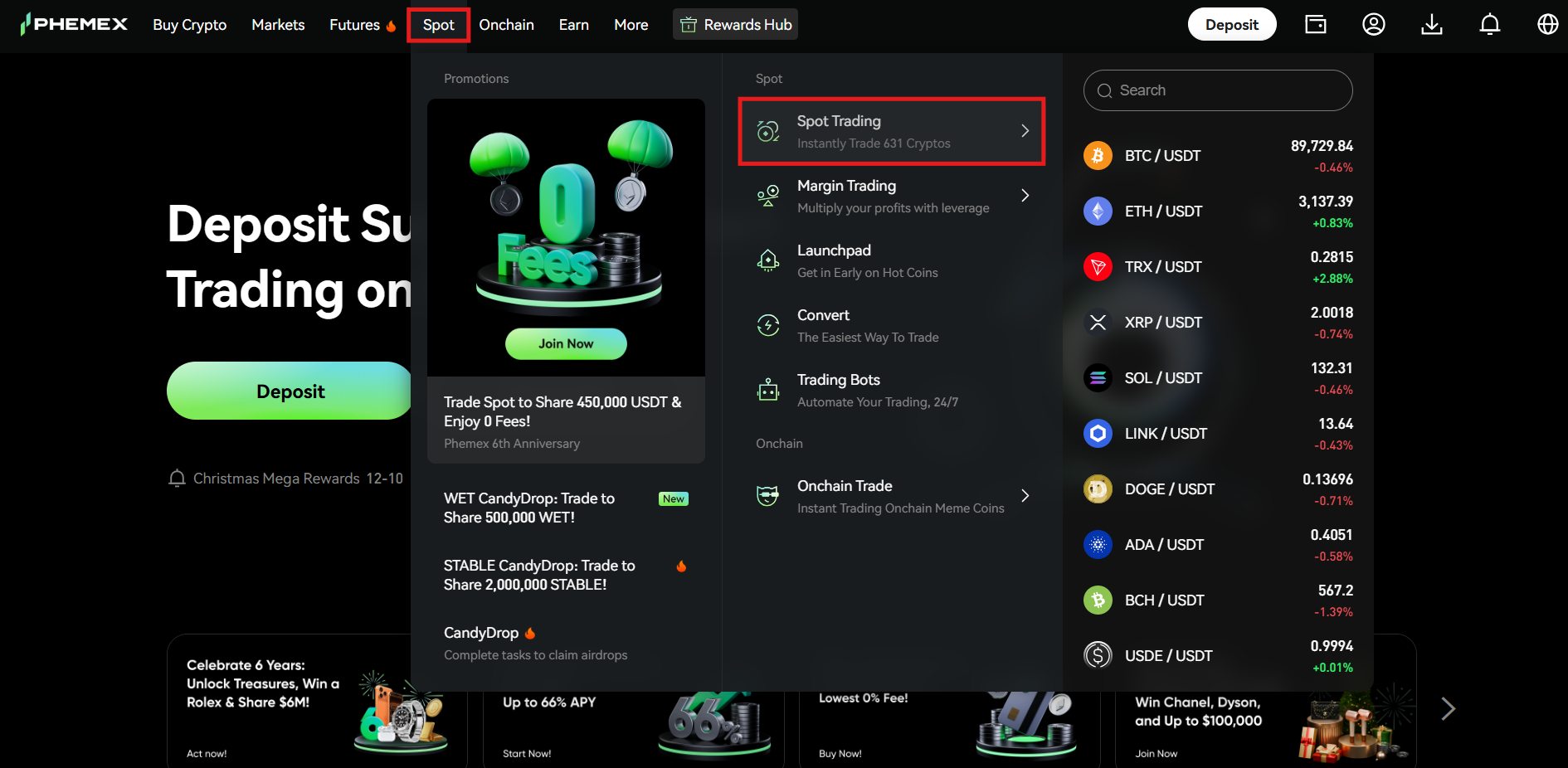
On the Phemex homepage, navigate to the “Spot” tab in the menu bar and click “Spot Trading” from the drop-down menu.
2. Getting familiar with the interface
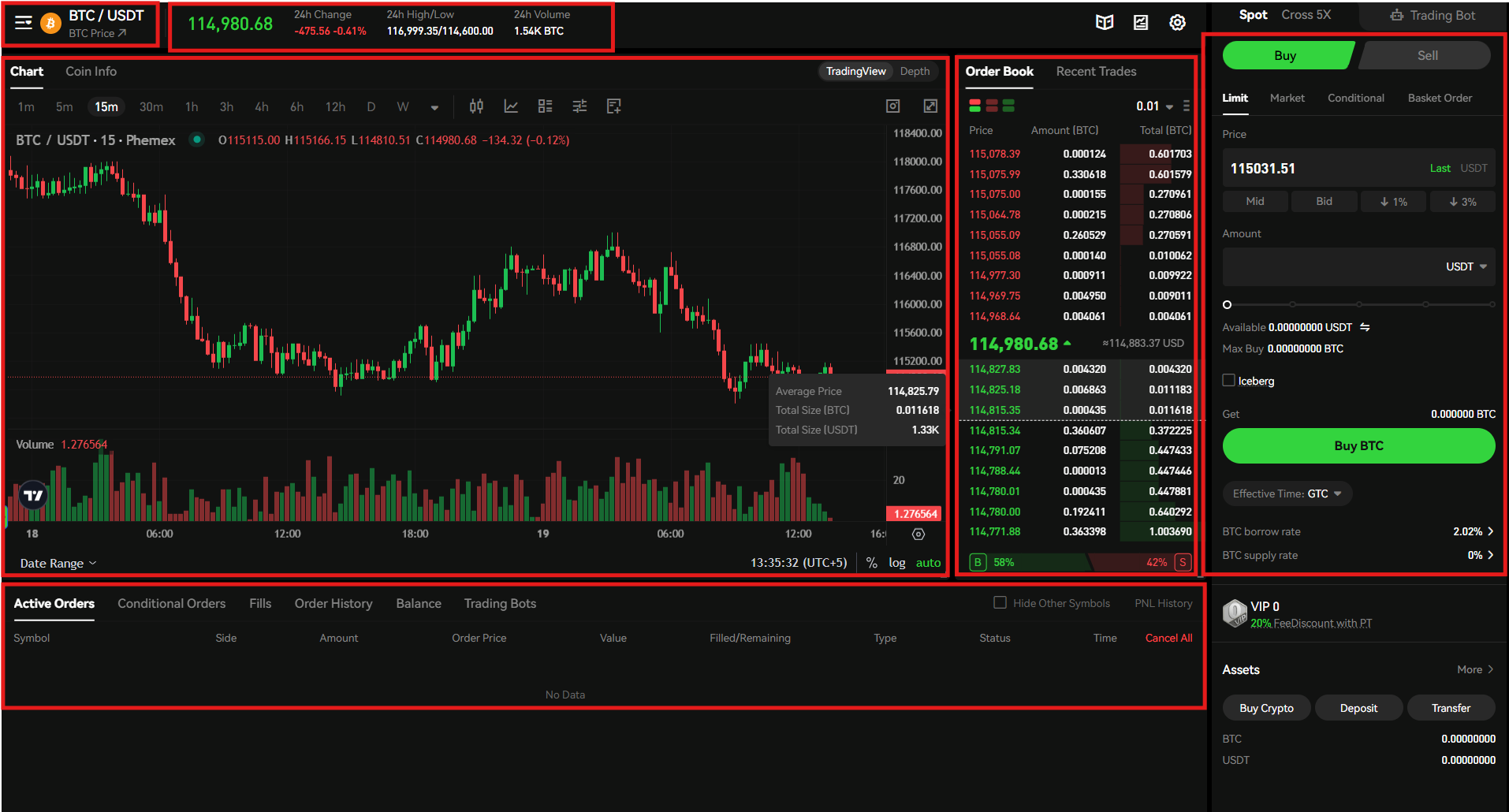
Before placing a trade, you should understand the Spot trading interface on the platform.
- Trading Pair Selector: You can select any trading pair in the top left corner of the interface. For this example, BTC/USDT is selected.
- Price Section: The price section at the top of the interface shows the 24-hour change in price and volume of the selected trading pair.
- Trading Chart: The trading chart on the platform is powered by TradingView with all its advanced technical tools and indicators.
- Order Book: The order book in the middle of the interface displays the current buying and selling prices of the selected token.
- Order Panel: The order panel is on the right side of the interface, where you can place trades using different order types.
- Positions Tab: The positions tab is at the bottom of the interface, where you can check the details of an order.
3. Place a trade
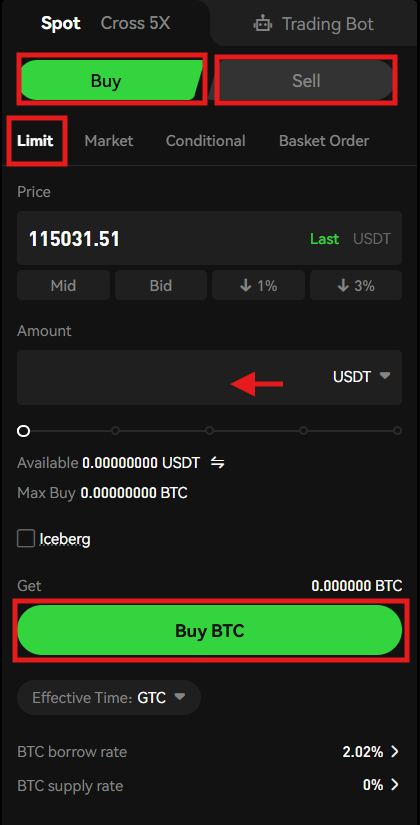
To place a trade, go to the order panel and follow these steps:
- Select the order direction between Buy and Sell.
- Select the order type, and for this example, a Limit Order is selected.
- Enter the order amount.
- Review the order details and click either “Buy BTC” or “Sell BTC.”
Margin Trading on Phemex
Cryptocurrency enthusiasts can trade digital assets on Phemex with up to 5x leverage in Margin trading.
Follow these steps to place your first Margin trade on the platform.
1. Access the Margin tab
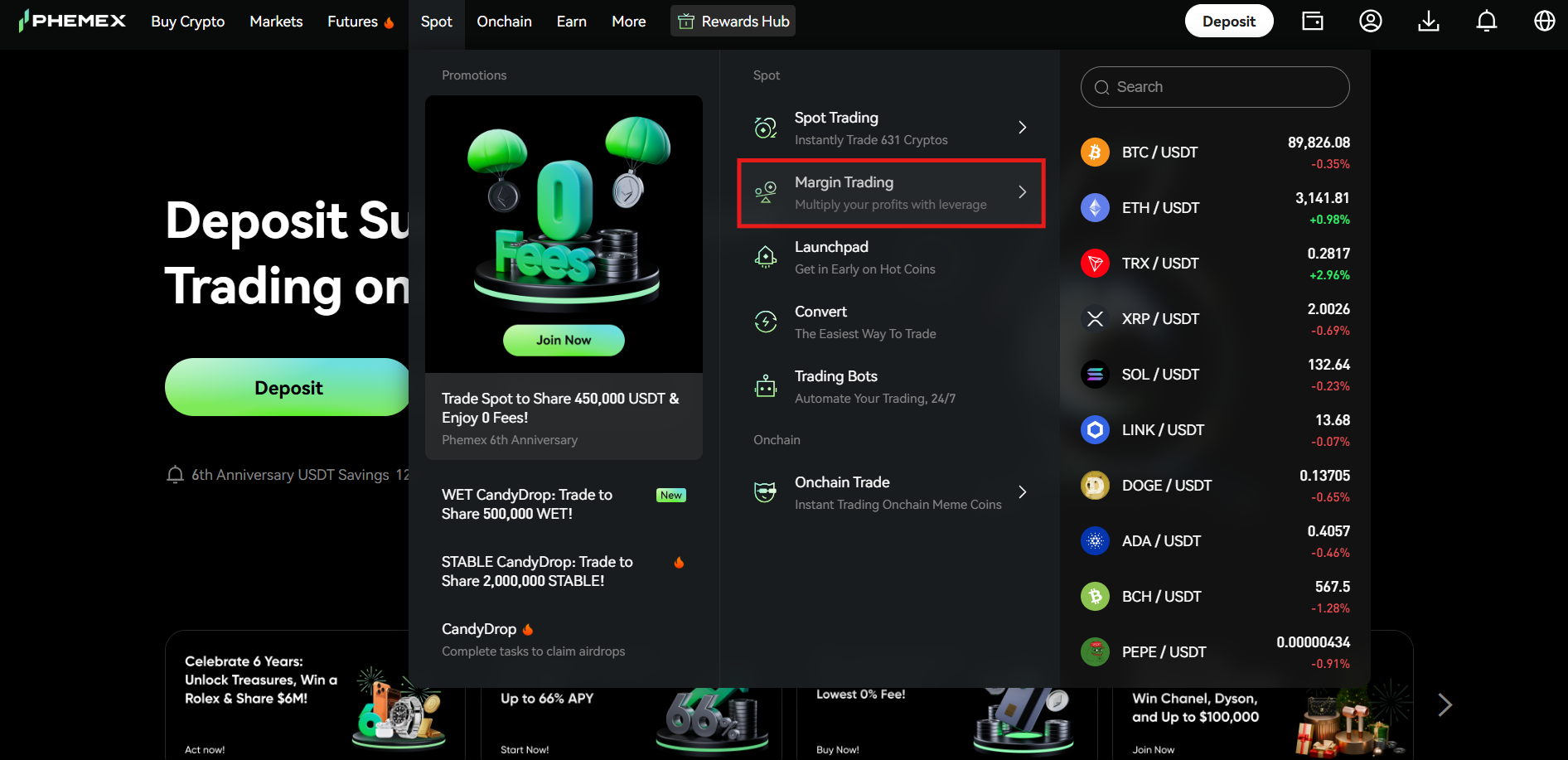
Visit the Phemex homepage and navigate to the “Spot” tab. Click “Margin Trading” from the drop-down menu.
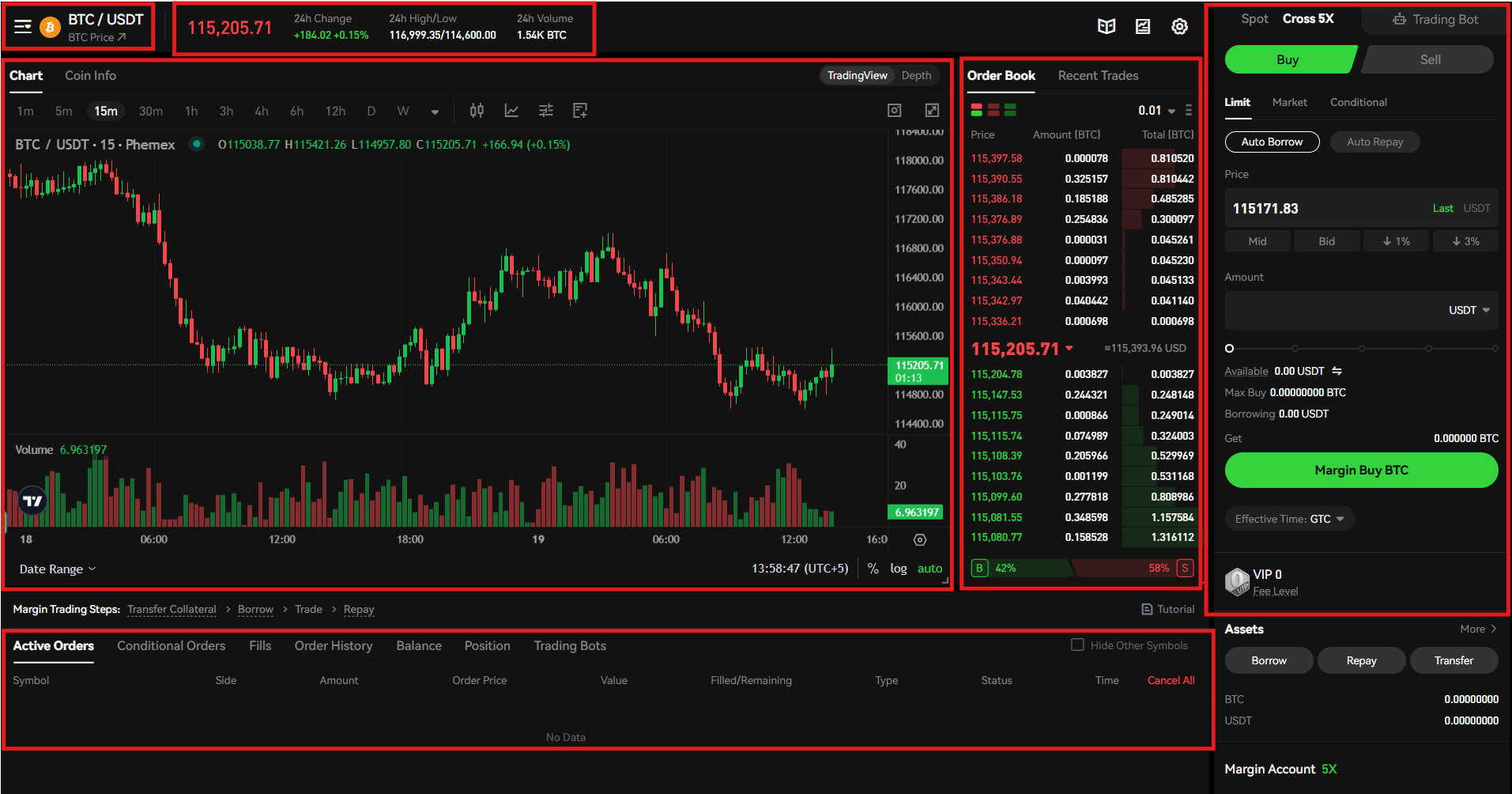
2. The trading interface
Phemex offers a similar trading interface in Margin trading as in Spot trading. The trading pair selector allows you to select a trading pair, for example, BTC against USDT. The chart shows real-time market data, the price section displays changes in the price and volume, and the order book shows the current buying and selling prices of the selected trading pair. You can place a trade in the order panel on the right side and check its details under the positions tab.
3. Open a trade
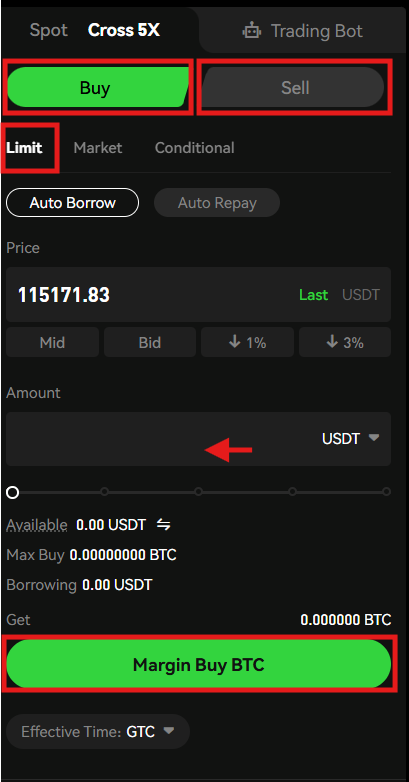
Follow these steps to open a trade:
- Navigate to the order panel.
- Select the order direction between “Buy” and Sell.”
- Select an order type. In this case, a Limit Order is selected.
- Enter the order amount.
- Review the order details and click either “Margin Buy BTC” or “Margin Sell BTC.”
How to Start Futures Trading on Phemex?
Phemex enables its users to trade perpetual contracts with up to 100x leverage. The platform offers USD-Margin and Coin-Margin contracts for the maximum convenience of cryptocurrency traders. The USD-Margin contracts are settled either in USD or USDT, while the Coin-Margin contracts are settled in the underlying asset.
To start Futures trading on Phemex, you need to follow these steps.
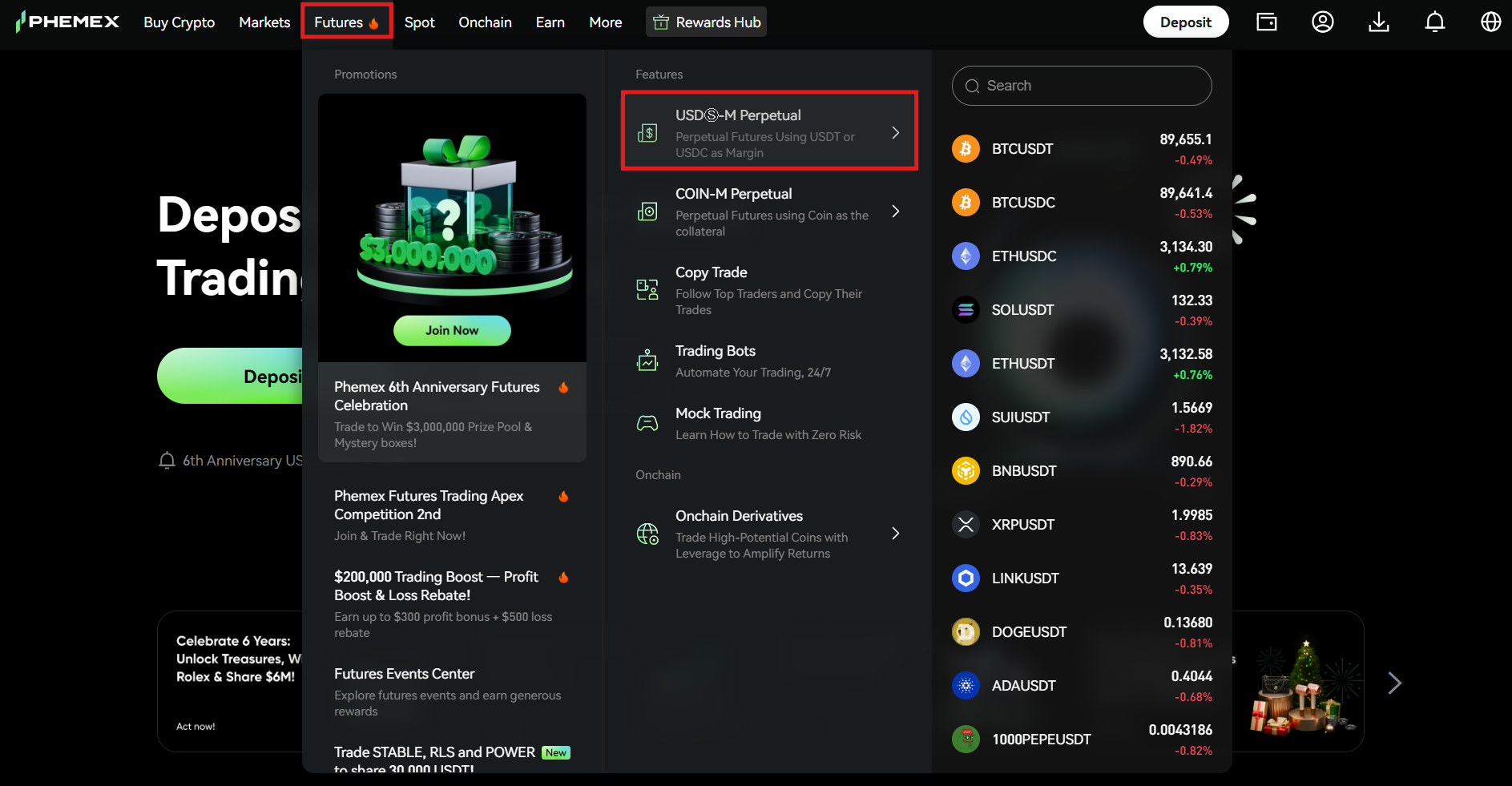
1. Visit the homepage
On the Phemex homepage, hover over the “Futures” tab and select the perpetual contract you want to trade. For this example, USD-Margin Perpetual is selected.
2. Understanding the interface
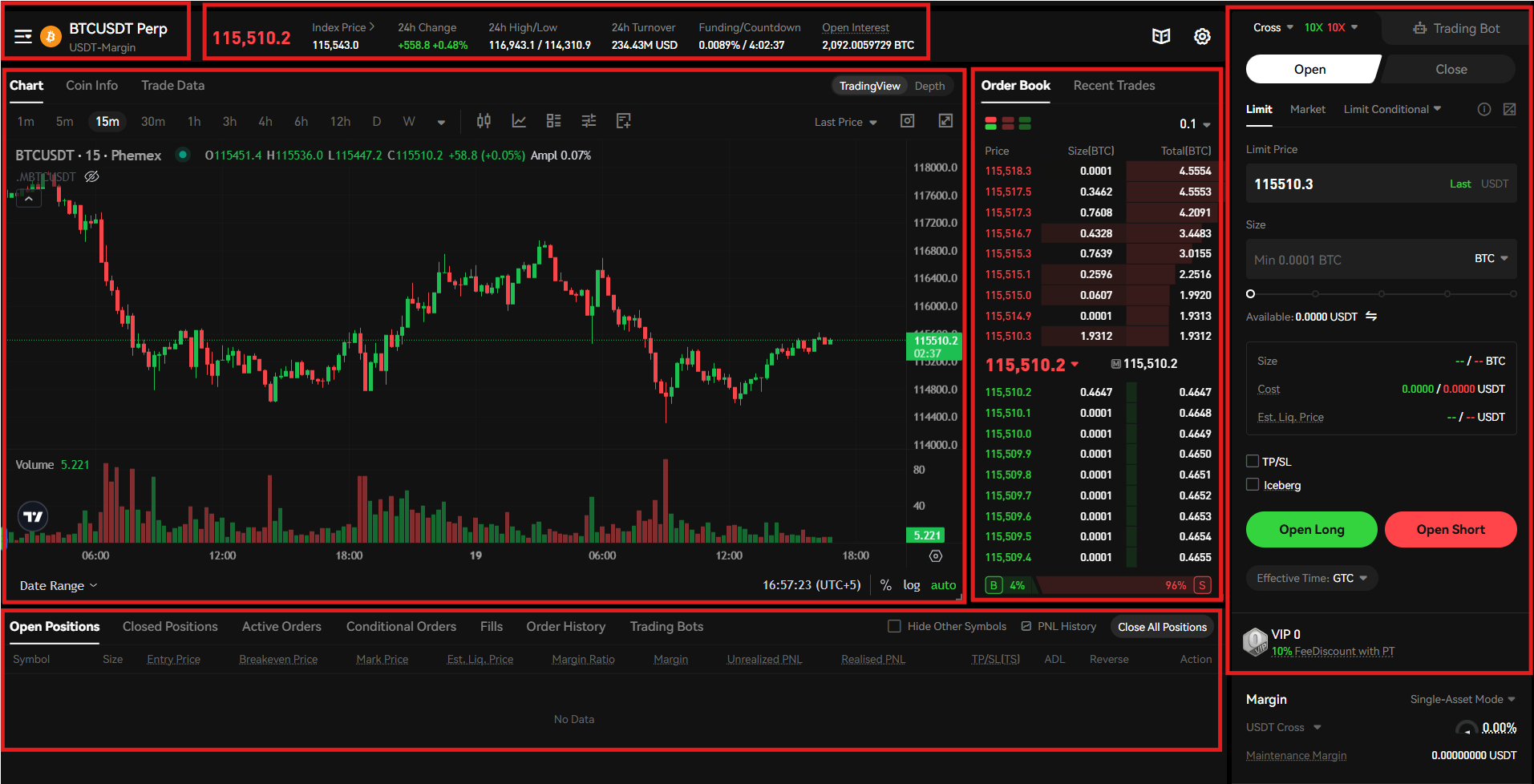
The Futures trading interface on Phemex offers the following features:
- Select the trading pair from the trading pair selector in the top-left corner of the interface. In this case, BTC/USDT Perpetual is selected.
- Check the current change in the price and trading volume of the selected pair in the price section at the top of the interface.
- The trading chart offers advanced trading tools and indicators that you can use according to your trading strategies.
- The order book, in the middle, displays the current traded prices of the selected contract.
- Open or close a position in the order panel on the right side of the interface.
- Check the details of the order under the positions tab at the bottom of the interface.
3. Open a position
To open a position, go to the order panel.
The first step is selecting the margin mode between cross and isolated. Next, select the leverage, and you can select up to 100x leverage. Remember, selecting a higher leverage poses a higher risk. So, it is crucial to select leverage with great caution.
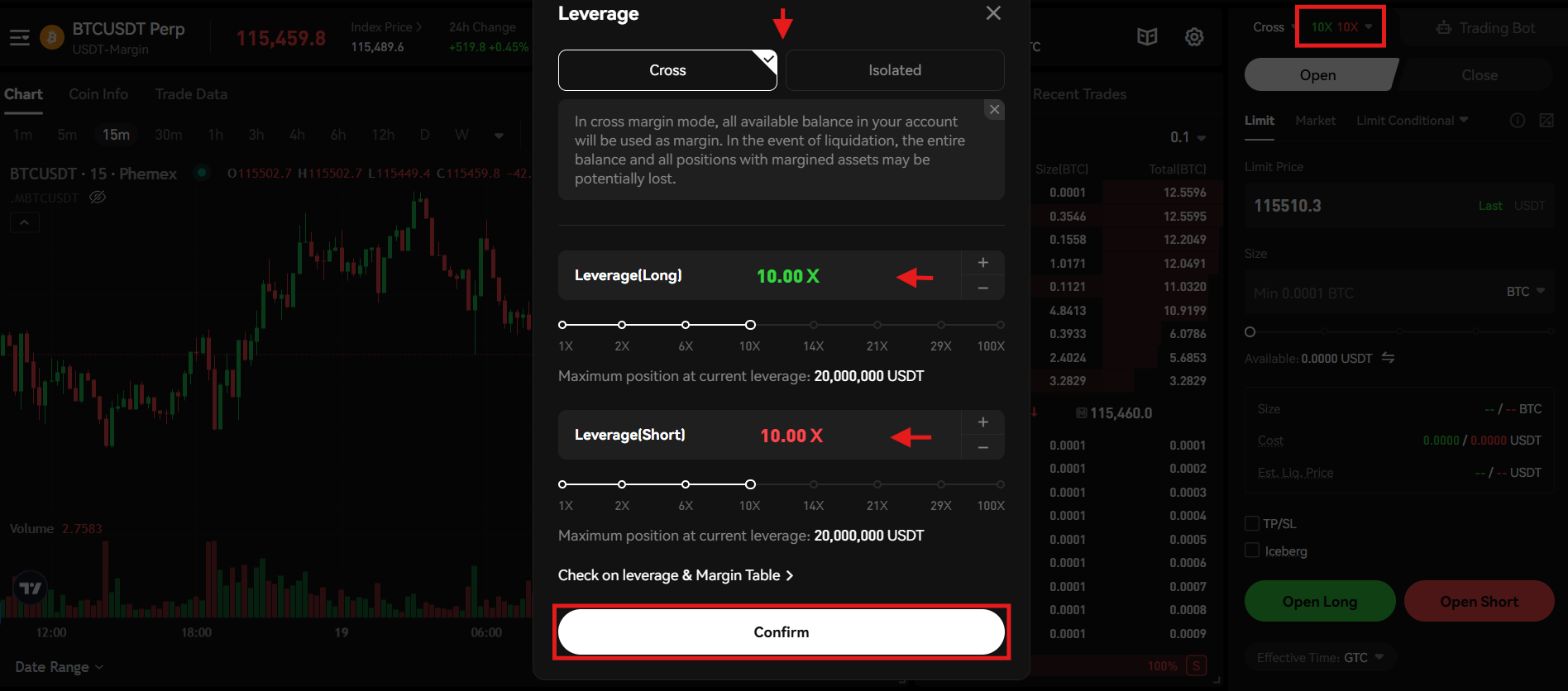
- Next, tap Open in the order panel.
- Select the order type, for example, Limit Order.
- Enter the order amount.
- Review the order details and click either “Open Long” or “Open Short.”
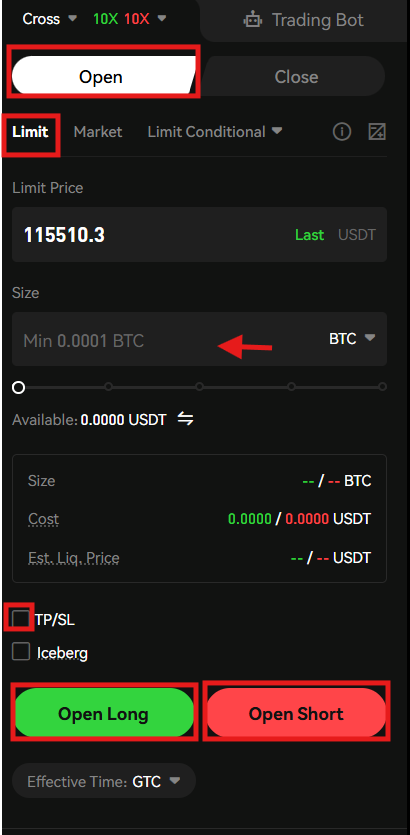
- You can add TP/SL (Take-Profit/Stop-Loss) to your order. Click the TP/SL box and enter the Take-Profit and Stop-loss values.
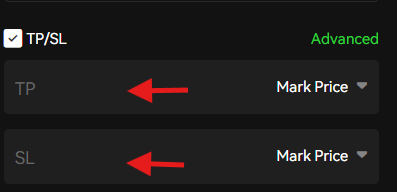
- You can also use advanced TP/SL. Click “Advanced,” select the order direction between long and short, enter the TP and SL prices, and tap “Confirm.”
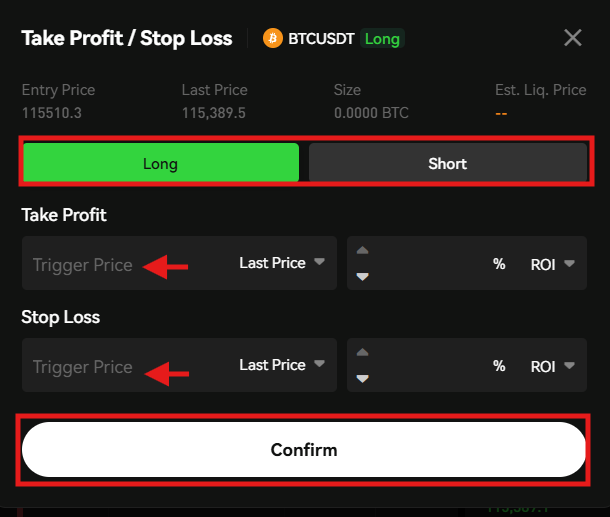
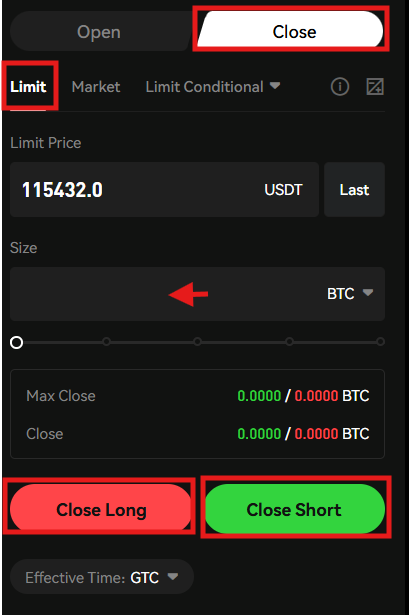
To close a position:
- Click Close in the order panel.
- Select the order type, such as a Limit order.
- Enter the order amount.
- Review the order details and click either “Close Long” or “Close Short” to close the position.
Copy Trading on Phemex
Phemex is an advanced cryptocurrency exchange that offers the copy trading feature to its users. This feature helps users imitate the trading strategies of professional traders and generate passive income.
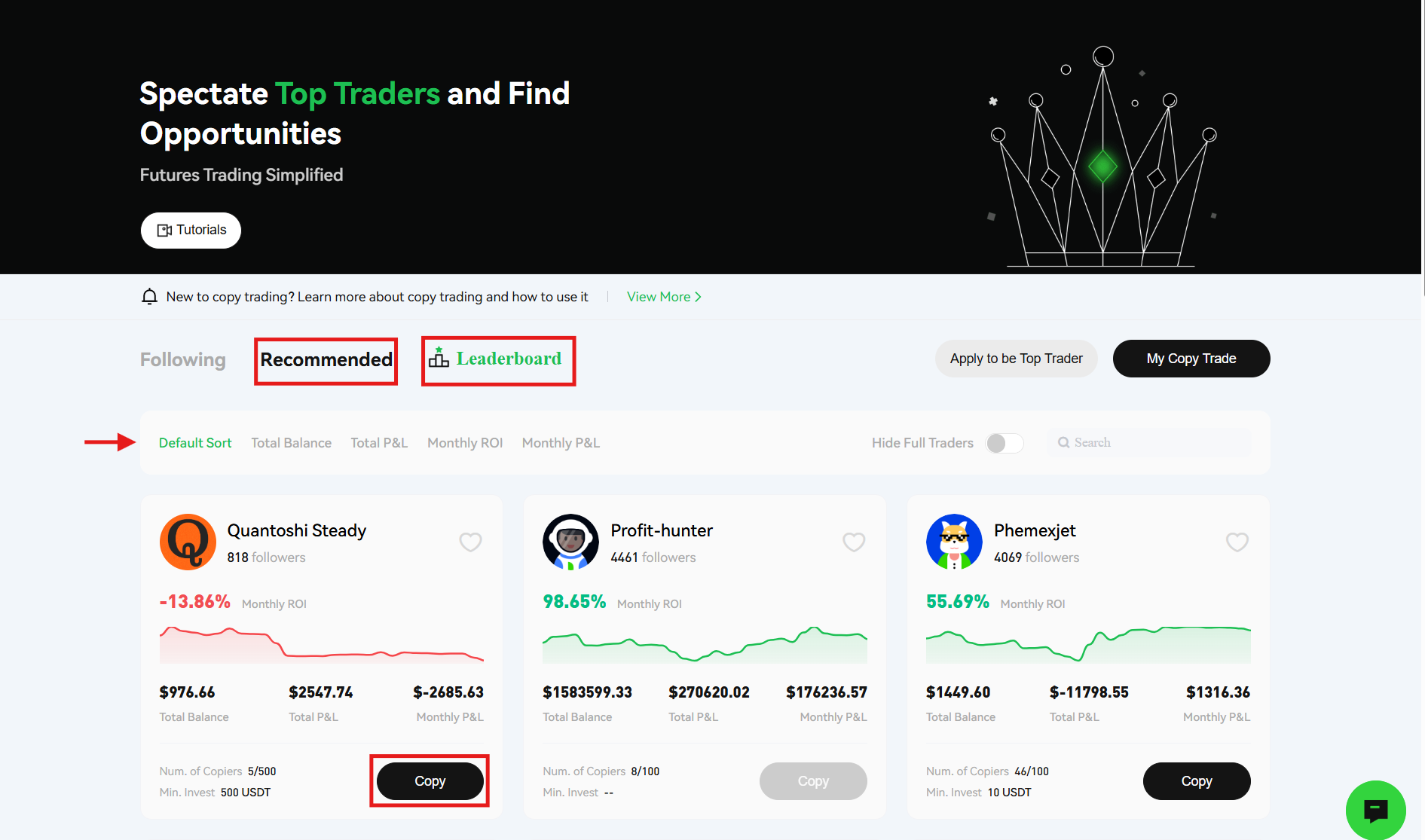
The copy traders on the platform are registered in different categories, which are Total Balance, Monthly ROI (Return On Investment), Total P&L (Profit and Loss), and Monthly P&L.
To start copy trading on Phemex:
1. Navigate to the homepage
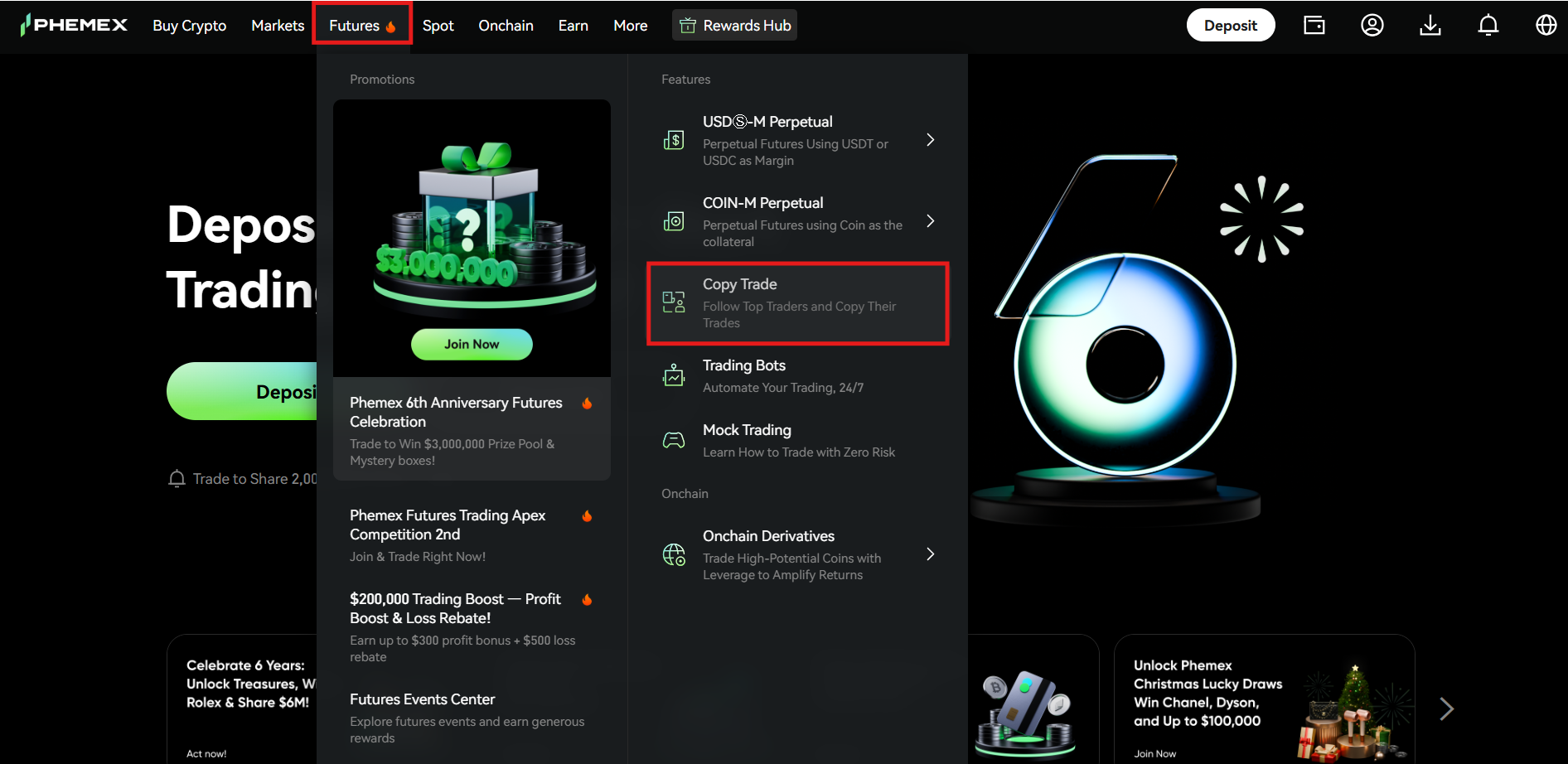
Visit the Phemex Exchange homepage and hover over the “Futures” tab. Tap “Copy Trade” from the drop-down menu.
2. Select the trader
On the copy trading page, go through the list of available traders and their statistics. Pick a trader and click the “Copy” tab.
3. Fill in the form
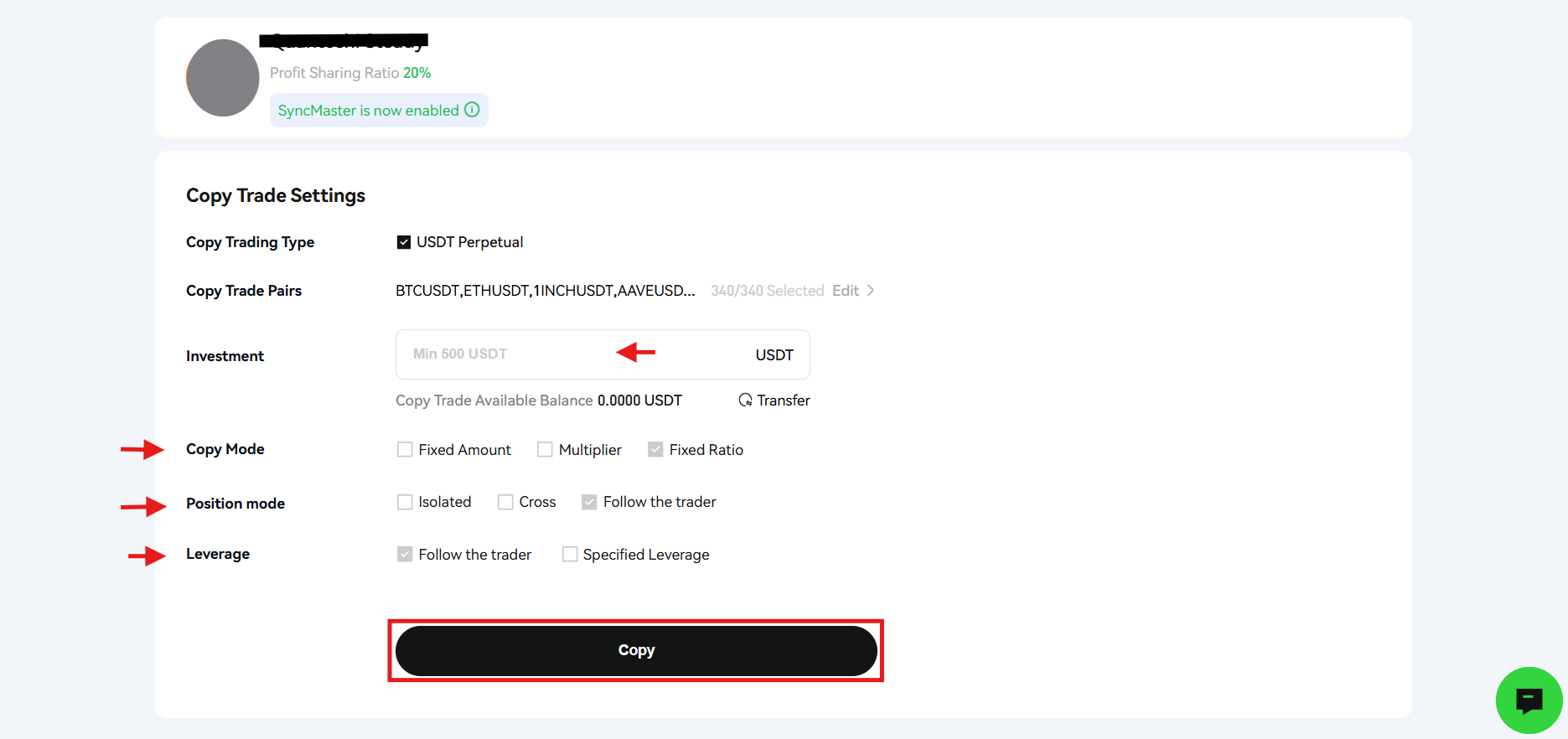
Next, fill in the form. Enter the investment amount, which should be higher than the minimum amount set by the lead trader. Set the copy mode, position mode, and leverage type. Review the details and tap “Copy” to start following the lead trader.
Phemex Trading Fees
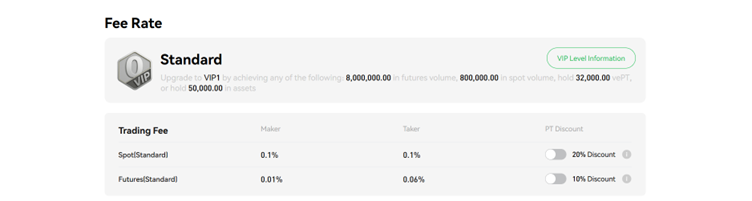
Phemex charges fees for Spot and Futures trading on the platform. However, by trading the native PT token, you can enjoy additional discounts on fees. In addition, the trading fees for VIP traders vary.
The following standard trading fees are charged on the platform:
- 1% maker and taker fee in Spot trading. A 20% discount on fees when you trade the PT token in the Spot market.
- 01% maker fee and 0.06% taker fee in Futures trading. A10% discount on fees when you trade the native PT token in the Futures market.
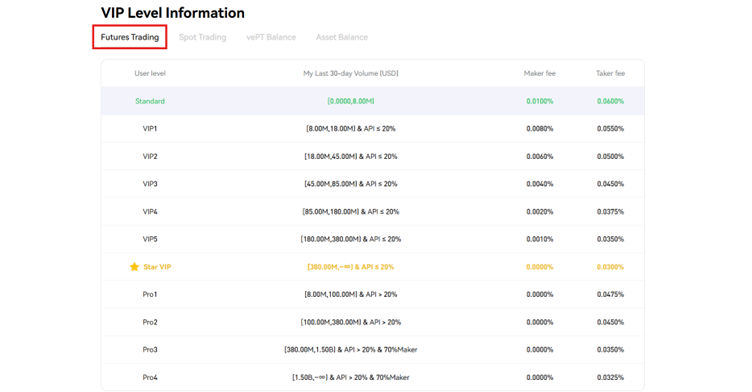
The VIP traders on Phemex are charged the following fees in Futures trading:
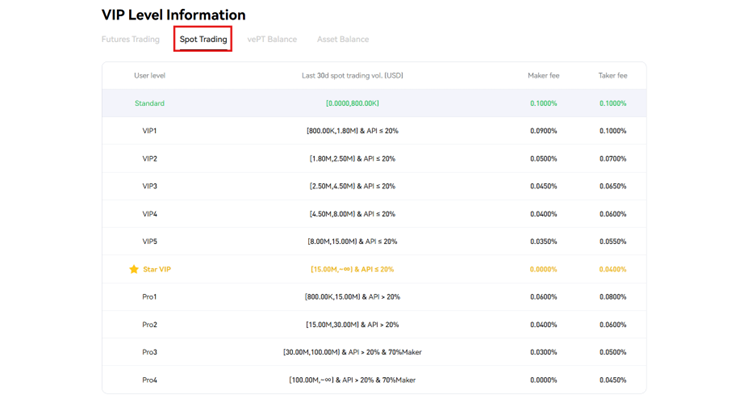
The VIP traders on Phemex are charged the following fees in Spot trading:
How to Withdraw Cryptocurrencies from Phemex?
You can withdraw a wide range of cryptocurrencies from the Phemex Exchange, including Bitcoin (BTC), Ethereum (ETH), Tether (USDT), and more.
Follow these steps to complete a withdrawal.
1. Visit the homepage
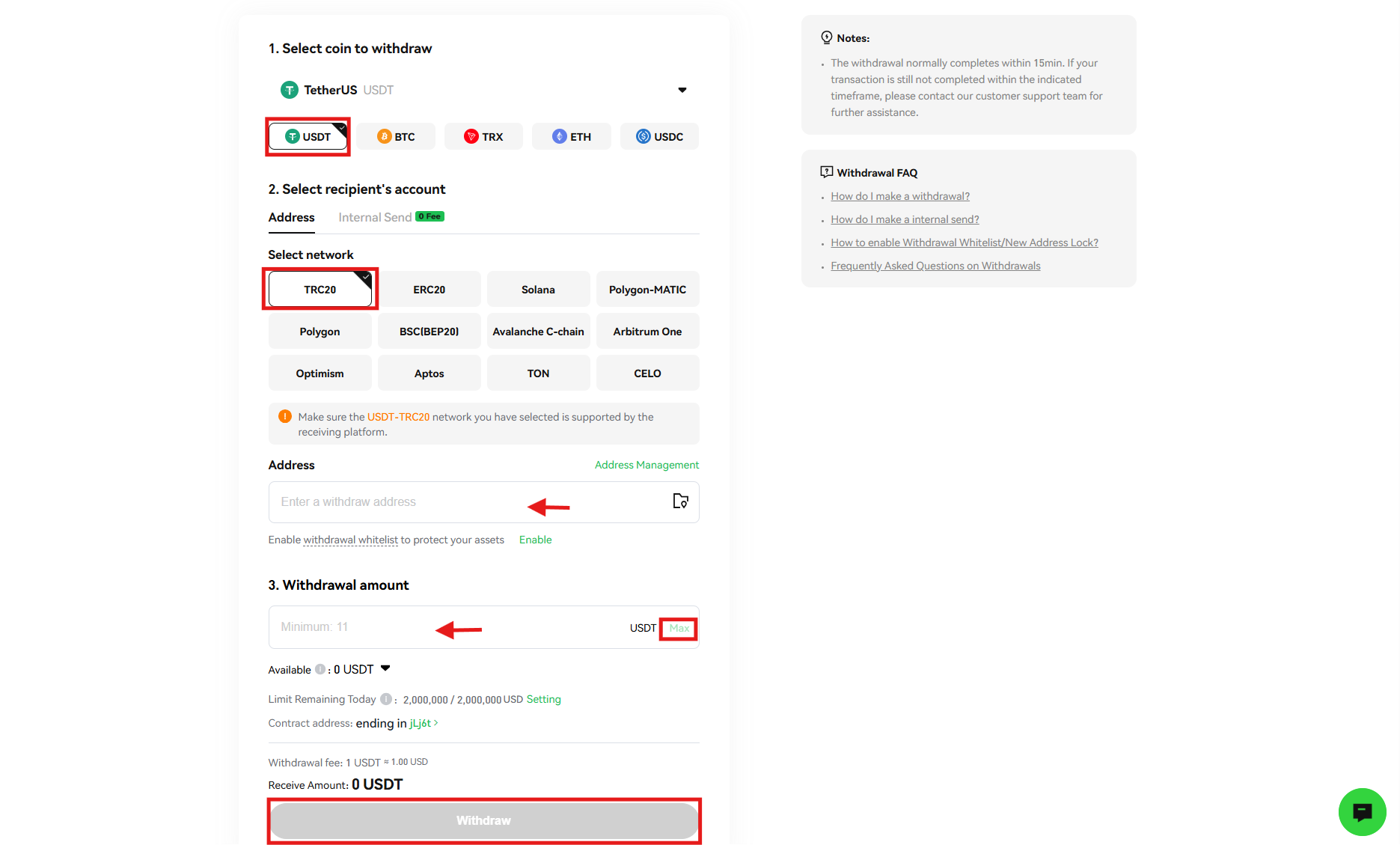
On the Phemex homepage, head to the “Wallet” icon in the menu bar and select “Withdraw” from the drop-down menu.
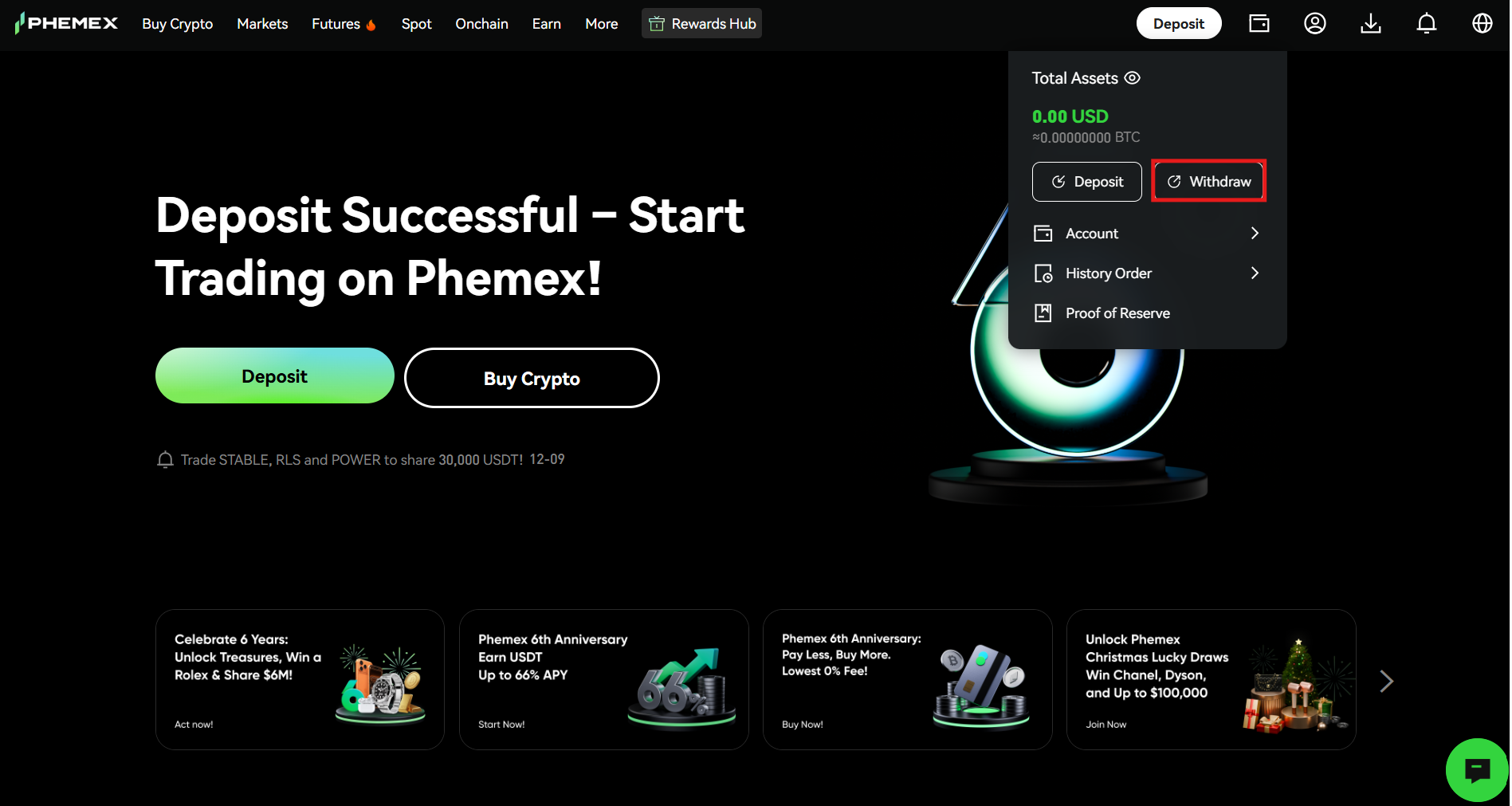
2. Complete the withdrawal
On the withdrawal page, follow these steps:
- Select the cryptocurrency you want to withdraw, for example, USDT.
- Select the withdrawal network, for example, TRC20. Ensure that you select the same network in the platform from where you are sending the funds.
- Copy the address from the wallet to which you are sending the funds and paste it into the “Address” field.
- Enter the withdrawal amount or tap “Max” to withdraw all coins.
- Review the details and click “Withdraw” to complete the withdrawal.
Is Phemex a Secure Cryptocurrency Exchange?
The Phemex Exchange has been designed to ensure a safe trading environment for cryptocurrency enthusiasts. The platform combines enterprise-grade infrastructure with a protection mechanism for maximum safety of funds. It follows the Merkel-Tree Proof-of-Reserves to ensure all assets are fully backed on the platform with a 1:1 reserve ratio.
Phemex stores the majority of users’ funds offline, thanks to its Hierarchical Deterministic (HD) cold wallet system. The cryptocurrency exchange runs its operations on AWS to ensure enhanced safety and risk management. In addition, safety features like anti-phishing codes and two-factor authentication (2FA) further strengthen the platform’s safety.
Final Takeaways
Phemex stands out for its remarkable features, such as a robust trading engine that smoothly handles a large volume of transactions. The platform supports a wide range of digital currencies to help cryptocurrency enthusiasts diversify their portfolios. Its commitment to advanced trading options, such as perpetual contract trading with up to 100x leverage, positions it as a leading platform for traders looking to maximize their potential gains.
The platform’s commitment to security, with its multi-level security protocols and 100% cold wallet storage, lays a strong foundation of trust for your assets. The exchange offers basic yet advanced order types that you can use to modify your trading strategies. With its user-friendly interface, powerful trading tools, and a focus on security, Phemex is a safe choice for anyone looking to trade digital currencies.
Register on Phemex to secure your share of $45,000 in rewards and access global crypto markets with professional tools.
Frequently Asked Questions (FAQs)
What is Phemex?
Phemex is a centralized cryptocurrency exchange that enables you to buy, sell, and trade a wide range of digital assets.
What types of trading options are available on Phemex?
Phemex offers several trading options to its users, including Spot, Futures, Margin, and Copy.
Is Phemex safe?
Phemex utilizes advanced safety measures, such as 100% cold wallet storage, two-factor authentication (2FA), multi-signature wallets, and more.
What are the trading fees on Phemex?
Phemex charges a 0.1% maker and taker fee in Spot trading, while the maker fee is 0.01% and the taker fee is 0.06% in Futures trading.
Does Phemex support KYC?
Phemex is a centralized cryptocurrency exchange where users need to complete the Know Your Customer (KYC) procedure to verify their identity.
What documents are required for KYC verification?
Phemex accepts government-issued identity documents, including a passport, a driver’s license, and a national ID card.
How can I fund my Phemex account?
You can use several ways to make a deposit on Phemex, such as on-chain deposits, bank transfers, P2P trading, and credit/debit cards.
What is the copy trading feature on Phemex?
The copy trading feature on Phemex enables beginners to follow the trading strategies of professional traders and generate passive income on their investments.
What is the Phemex Token (PT)?
The Phemex Token (PT) is the native utility and governance token of the Phemex Exchange. You earn rewards by staking it and discounts on trading fees by trading it.
Is Phemex available in the US?
Users cannot directly access the Phemex Exchange in the US due to regulatory restrictions.
Does Phemex offer Margin trading?
Phemex offers Margin trading with up to 5x leverage to its users.
Disclaimer: All content on The Moon Show is for informational and educational purposes only. The opinions expressed do not constitute financial advice or recommendations to buy, sell, or trade cryptocurrencies. Trading involves significant risk and may result in substantial losses. Always seek independent financial advice before making investment decisions. The Moon Show is not responsible for any financial losses or decisions made based on the information provided.
Please view the full disclaimer at: https://themoonshow.com/disclaimer

WEEX Exchange Tutorial 2026: A Complete Step-by-Step Guide
WEEX is not among the largest cryptocurrency exchanges. It does not match the trading volume of...

How to Use Bybit in 2026 - Step-by-Step Beginner Guide
Cryptocurrency trading continues to evolve with time. Today, crypto users can access several ex...

MEXC Exchange Tutorial 2026: A Complete Step-by-Step Guide
MEXC lists over 3,000 tokens, charges zero maker fees on both spot and futures, and offers leve...