The Ultimate Hyperliquid Exchange Tutorial
Decentralized Exchanges (DEXs) are peer-to-peer platforms that offer permissionless access, a wide range of digital assets, and enhanced transparency. These exchanges enable users to trade cryptocurrency directly from their wallets via smart contracts. One such platform making waves in the cryptocurrency market is Hyperliquid. Although it is a decentralized exchange, it is quite similar to and functions like a centralized exchange.
Hyperliquid is built on its own Layer-1 blockchain rather than on an existing chain, such as Ethereum or Solana. Hyperliquid uses a fully on-chain order book, meaning orders, cancellations, and trade matching occur on-chain and are publicly verified. The platform supports both spot and perpetual contract trading, offering users access to a range of tools, including margin, leverage, and advanced order types.
In this tutorial of Hyperliquid, you will learn how to use this platform to place a trade and secure your digital assets.
What is Hyperliquid?
Hyperliquid is a decentralized cryptocurrency exchange (DEX) that was launched in 2023. The platform offers both spot and perpetual futures markets, diversifying it from competitors. It operates on a Layer 1 blockchain, ensuring transparency, a secure trading environment, and low trading fees.
When it comes to trading, Hyperliquid offers more than 200 cryptocurrencies and over 200 perpetual contracts with leverage up to 40x on top digital currencies, including Bitcoin (BTC), Ethereum (ETH), and Solana (SOL). Users can also select from a wide range of spot-market contracts to buy and sell cryptocurrencies at current market prices. The platform offers quick order execution and can execute up to 200,000 transactions per second.
Hyperliquid enables users to connect via popular EVM-compatible wallets or use an email-based wallet for quick onboarding. By trading the platform’s native token, HYPE, users can enjoy several benefits, including trading-fee discounts. Traders are not required to complete the KYC verification since it is a decentralized exchange. Additionally, Hyperliquid offers staking rewards, fee discounts, and more to enhance user convenience.
Pros and Cons
Pros
- More than 100 perpetual contracts
- No-KYC verifications
- Futures trading commissions at 0.045%
- Custom Layer-1 blockchain
- More than 200 cryptocurrencies
- Quick order execution
- Competitive fee structure
Cons
- Most altcoins offer a maximum leverage of just 3x
- Geared towards professional traders
- Low spot trading volume
- No fiat support
How to Get Started with Hyperliquid?
To get started with Hyperliquid, users need a DeFi wallet, such as MetaMask, and USDC and ETH on the Arbitrum network. The platform uses USDC as collateral to make trades. On the other hand, ETH is used to pay Arbitrum gas fees for USDC deposits and withdrawals.
Users can follow the following step-by-step guide to create an account on Hyperliquid.
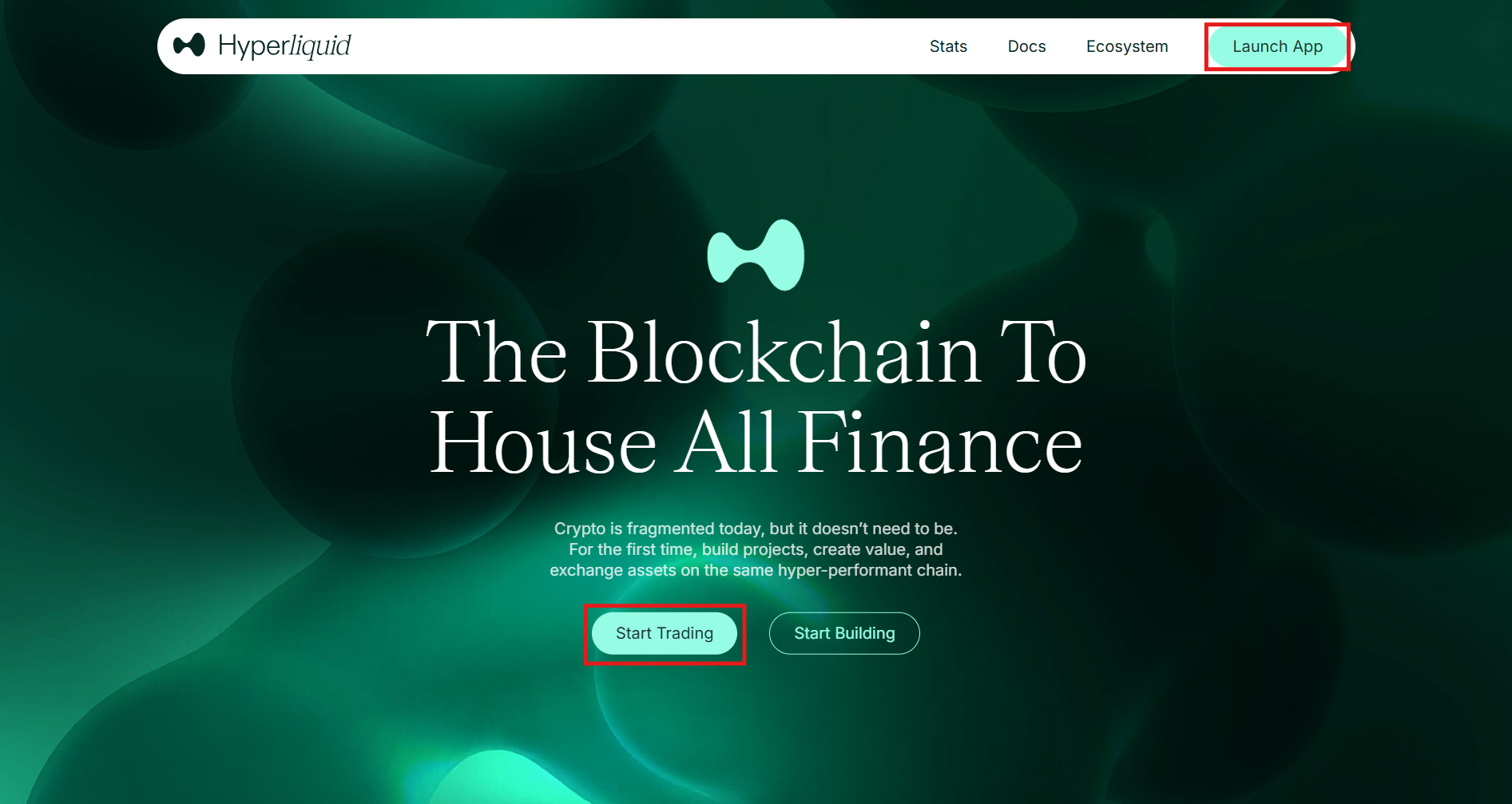
1. Visit the homepage
Open the Hyperliquid website and tap the “Launch App” tab in the upper right corner of the homepage. Alternatively, click “Start Trading.”
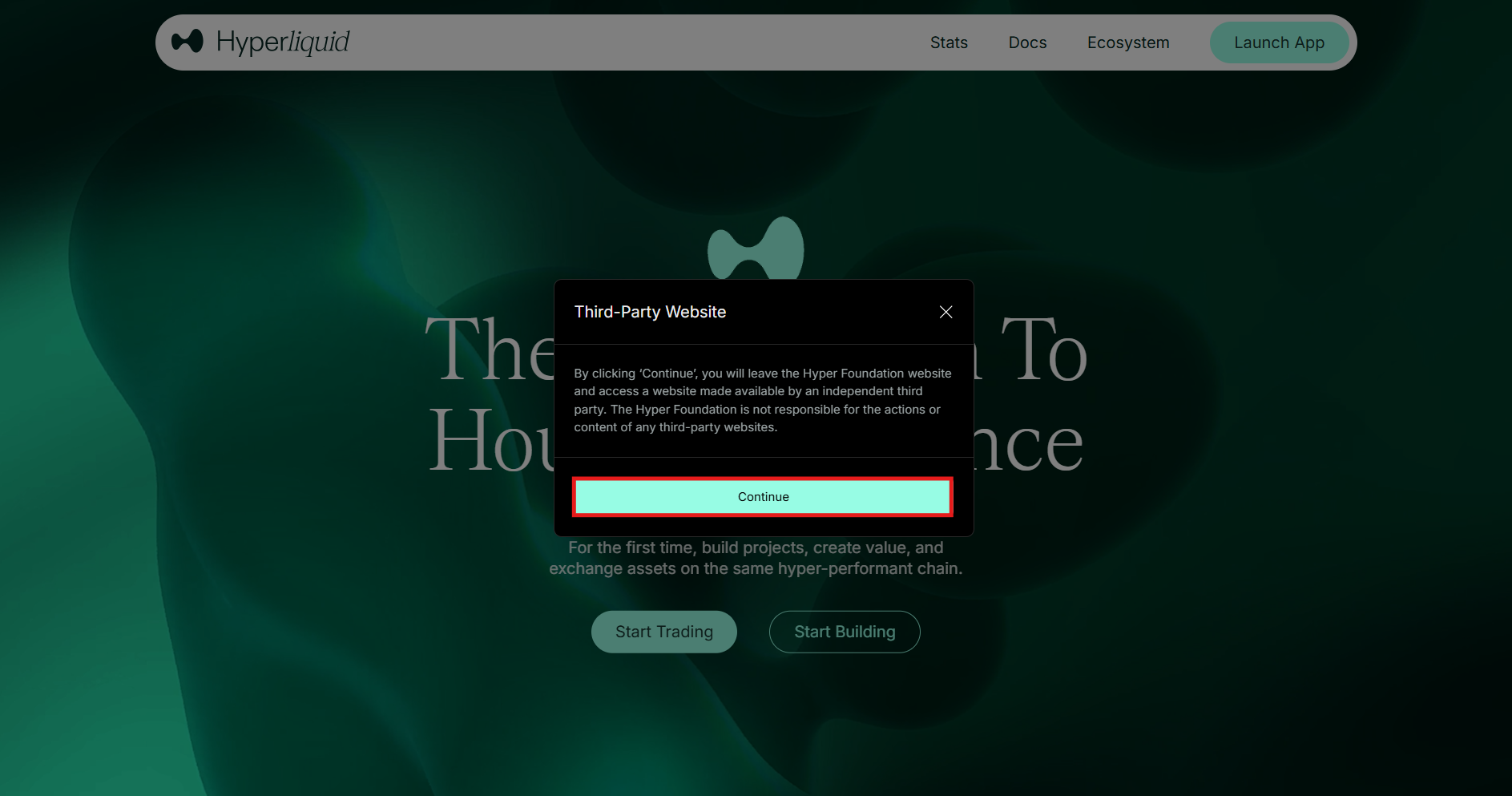
Read the disclaimer and click “Continue” to proceed.
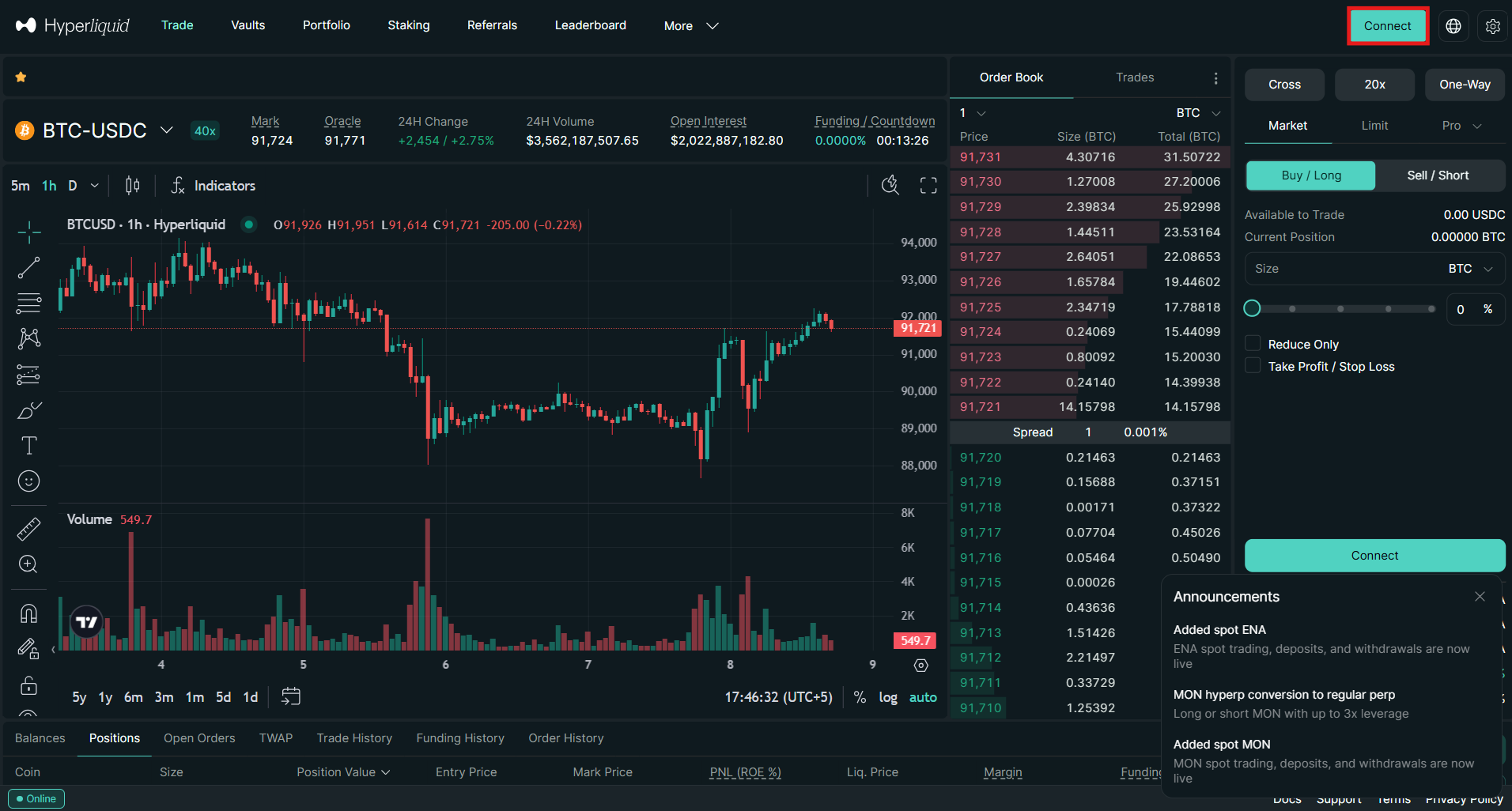
2. Connect the wallet
Click “Connect” in the top right corner.
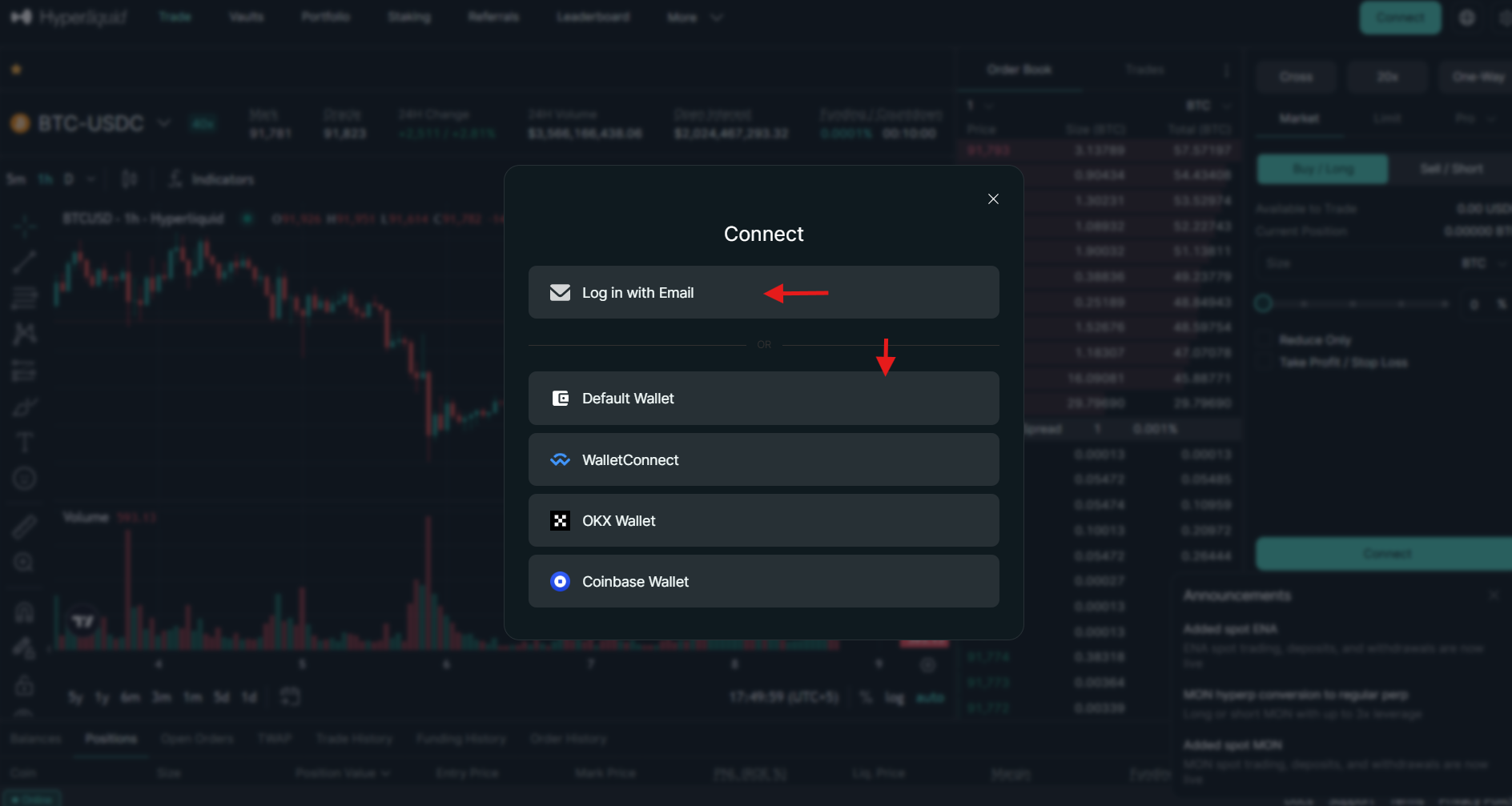
Select the crypto wallet you wish to connect from the list. If the wallet isn’t there and you prefer to use Hyperliquid’s custodial wallet, click “Log in with Email.”
3. Provide the email address
Enter your email address and click “Submit.”
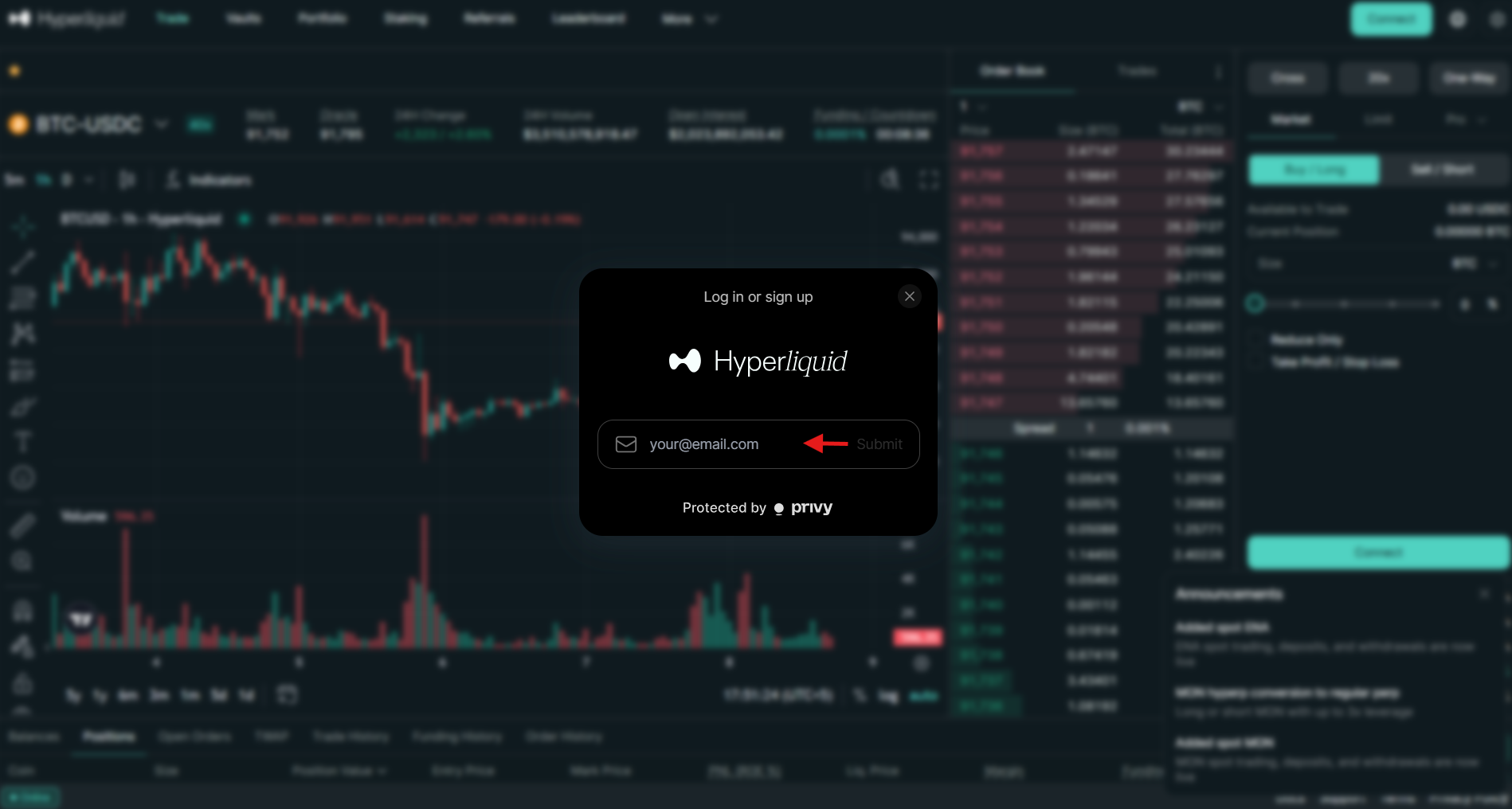
Enter the 6-digit verification code received at your email address.
4. Terms of usage
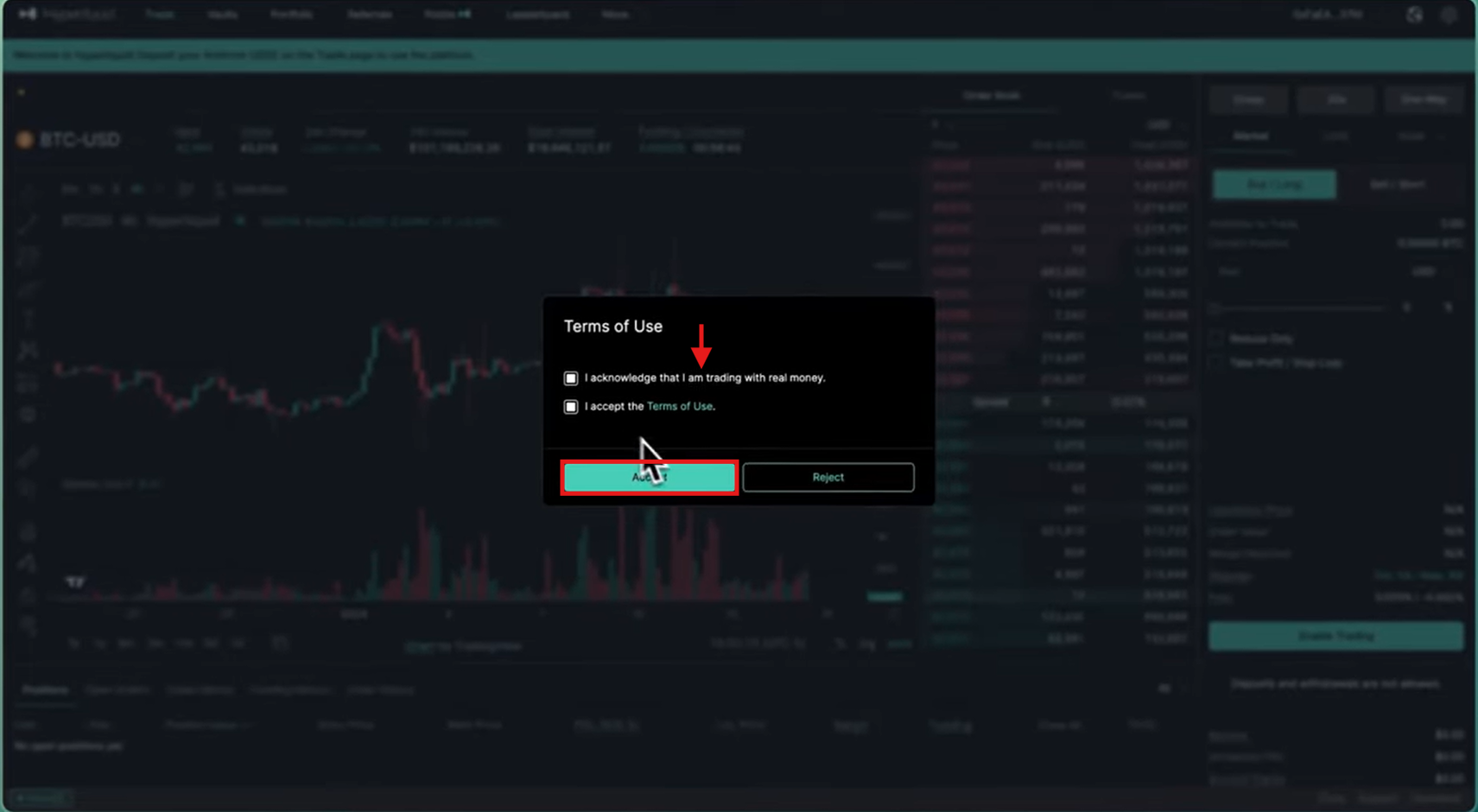
Agree to the terms of usage, privacy policy, and cookie policy. Once done, click “Accept” to start using the platform.
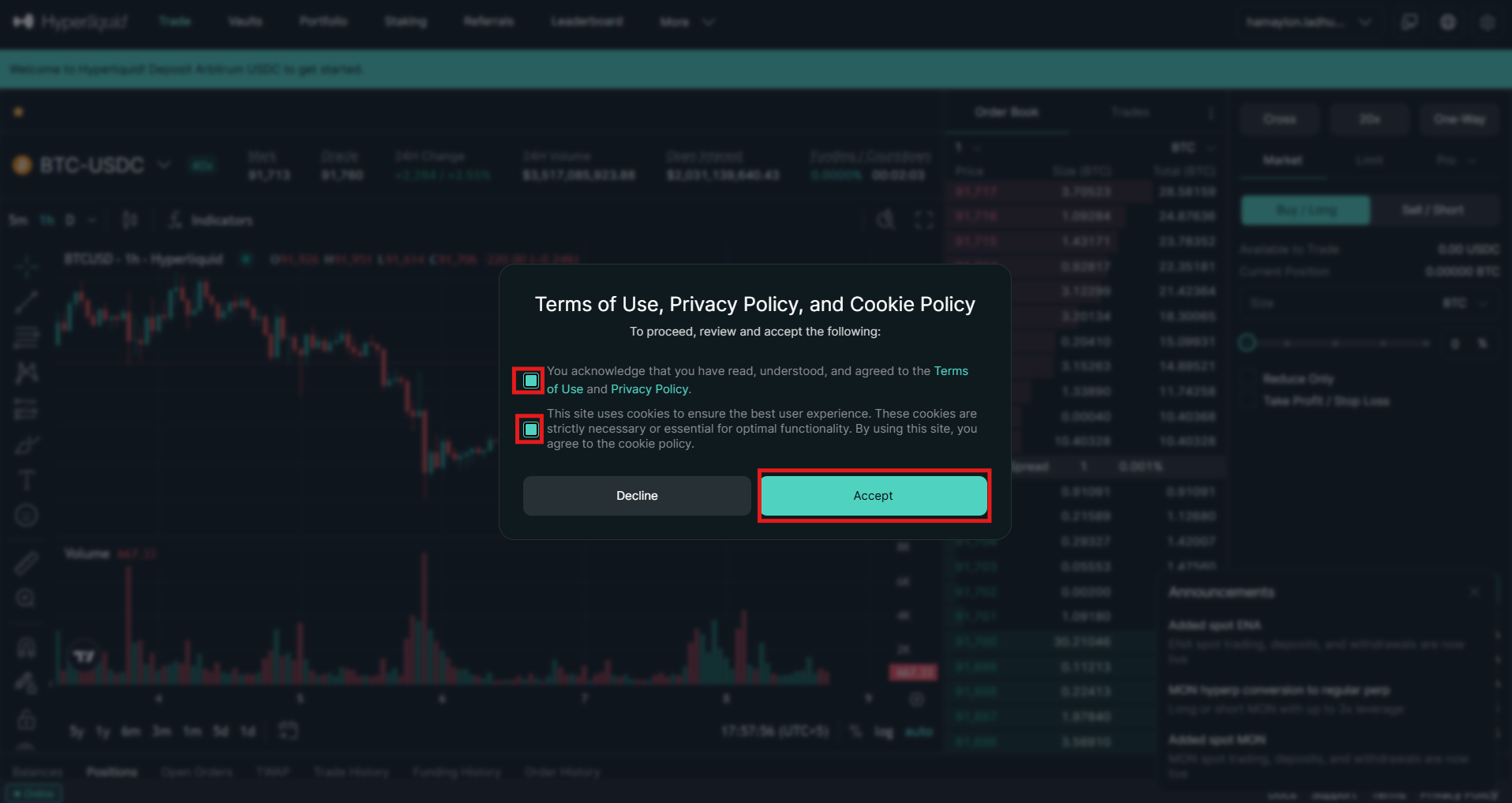
Connecting an External Wallet
Follow these steps to connect an external wallet, such as Coinbase or MetaMask.
- Click “Connect” in the top right corner of the menu bar and tap “Wallet Connect” or the external wallet of your choice.
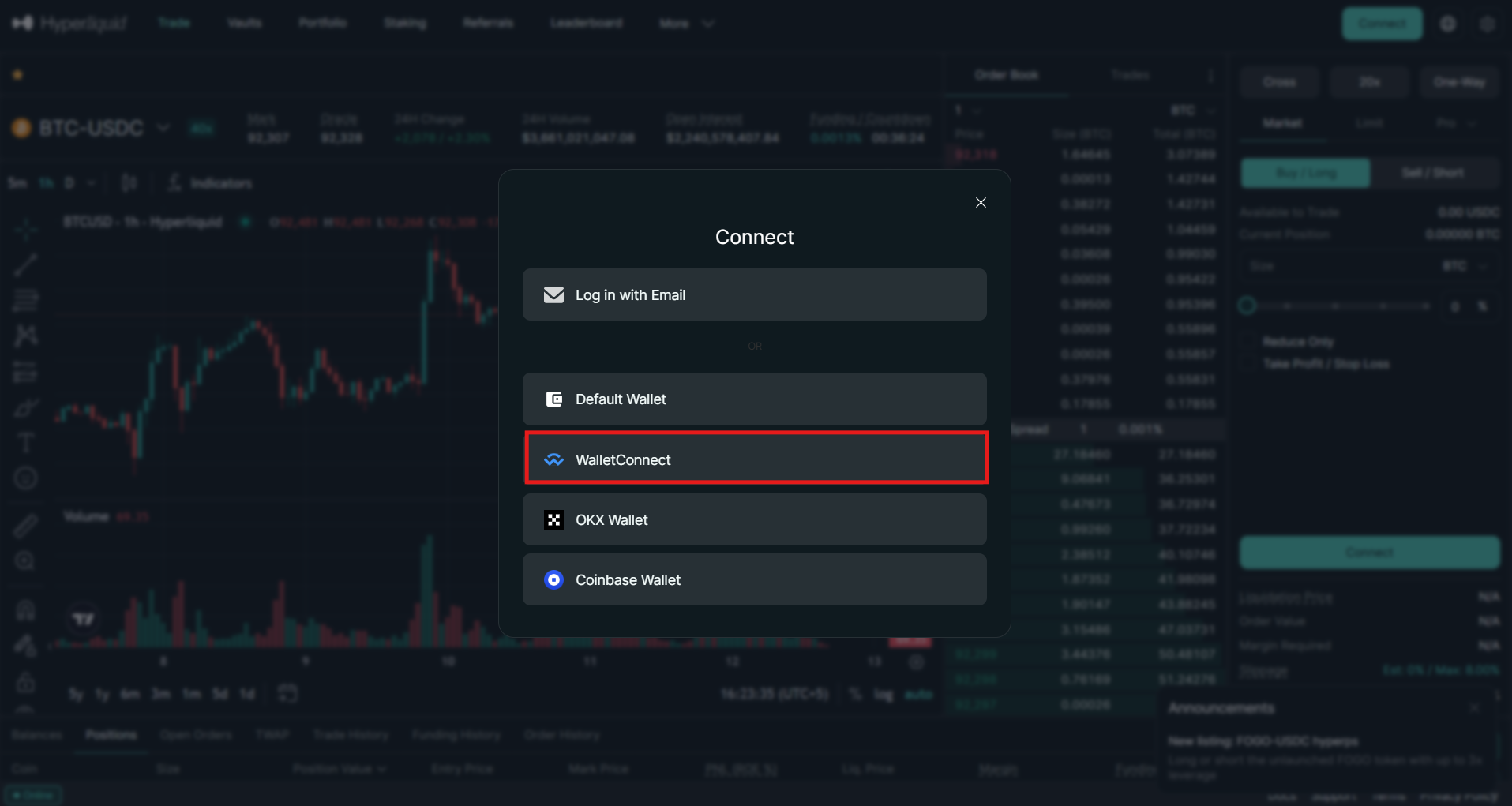
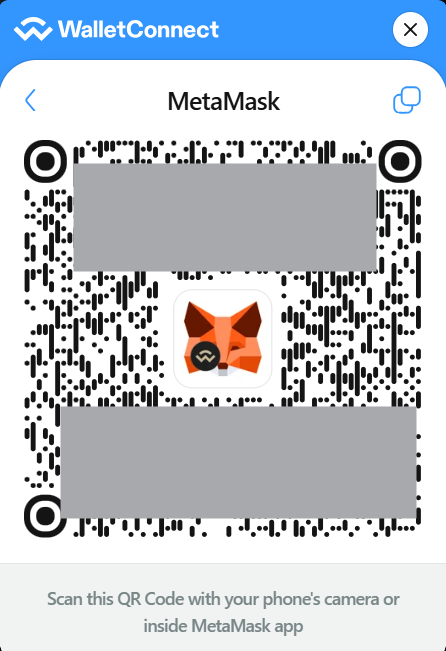
- Select the external wallet you want to connect, such as MetaMask. Otherwise, open the wallet on your mobile device and scan the QR code to connect.
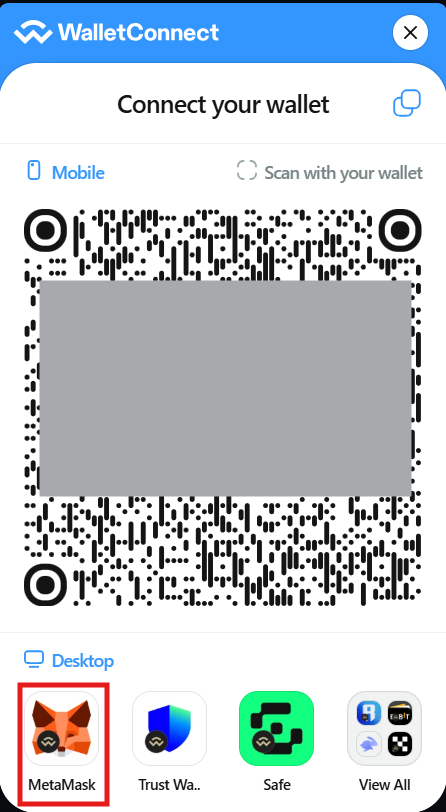
- Incase you select MetaMask wallet, click it. Scan the QR code using your mobile’s camera or inside the MetaMask app.
- Connect the wallet from inside the app. Next, agree to the terms of use and click “Accept” to start using the wallet.
How to Deposit on Hyperliquid?
After creating an account on Hyperliquid, users should deposit funds. Hyperliquid is built on a non-custodial infrastructure, meaning traders need to fund their own crypto wallets. Traders need USDC to trade perpetual contracts on the platform, as all trades are settled in stablecoin. In spot trading, users can buy digital currencies with either USDC or Hyperliquid’s native token, USDH.
Hyperliquid does not support fiat payments, but many non-custodial wallets, such as Best Wallet, MetaMask, and Exodus, allow users to purchase USDC with traditional payment methods. Once users have USDC in their wallets, they can connect to Hyperliquid DEX.
To make a deposit, follow these steps:
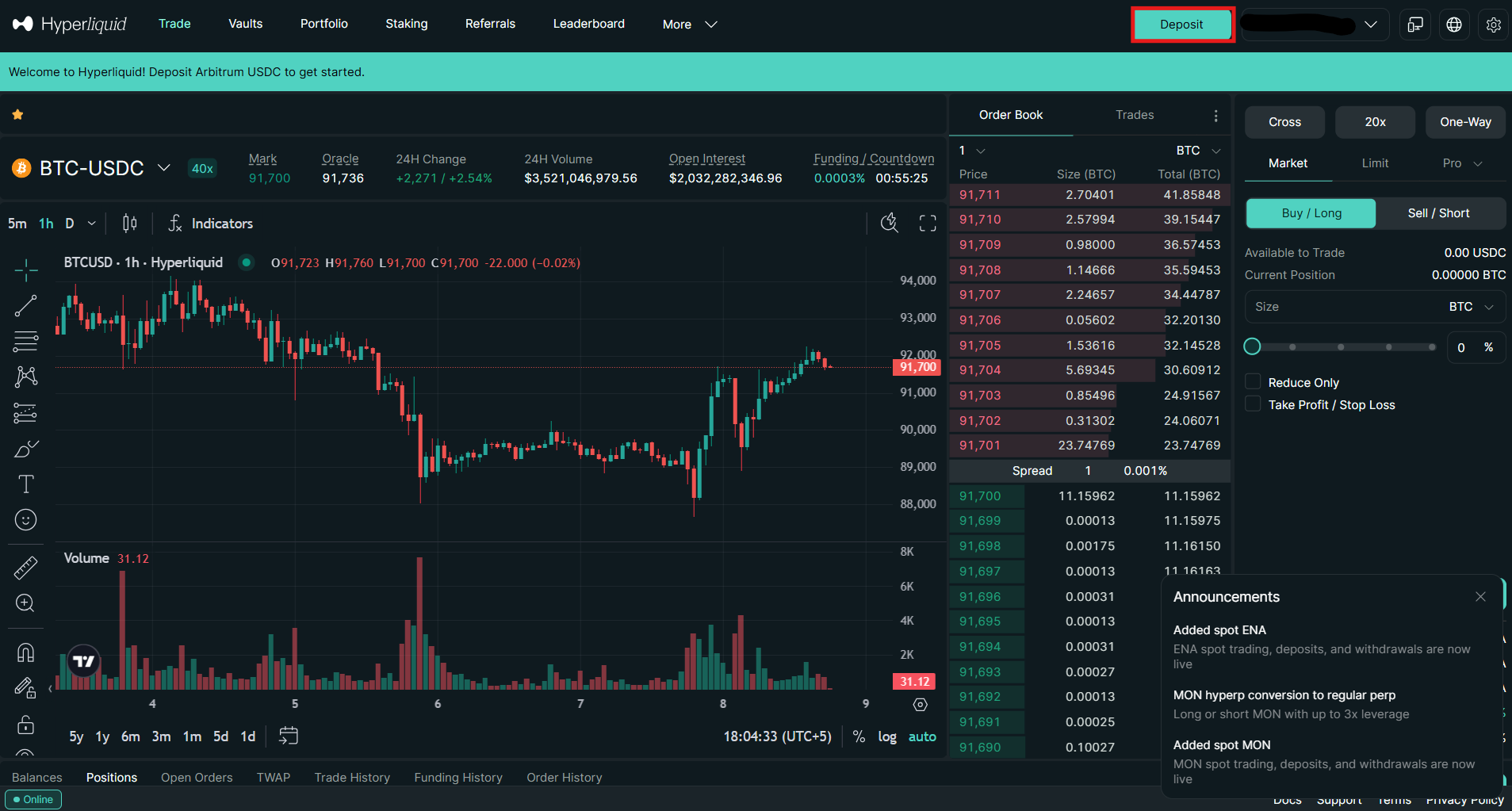
- Tap the “Deposit” tab in the upper right corner of the homepage.
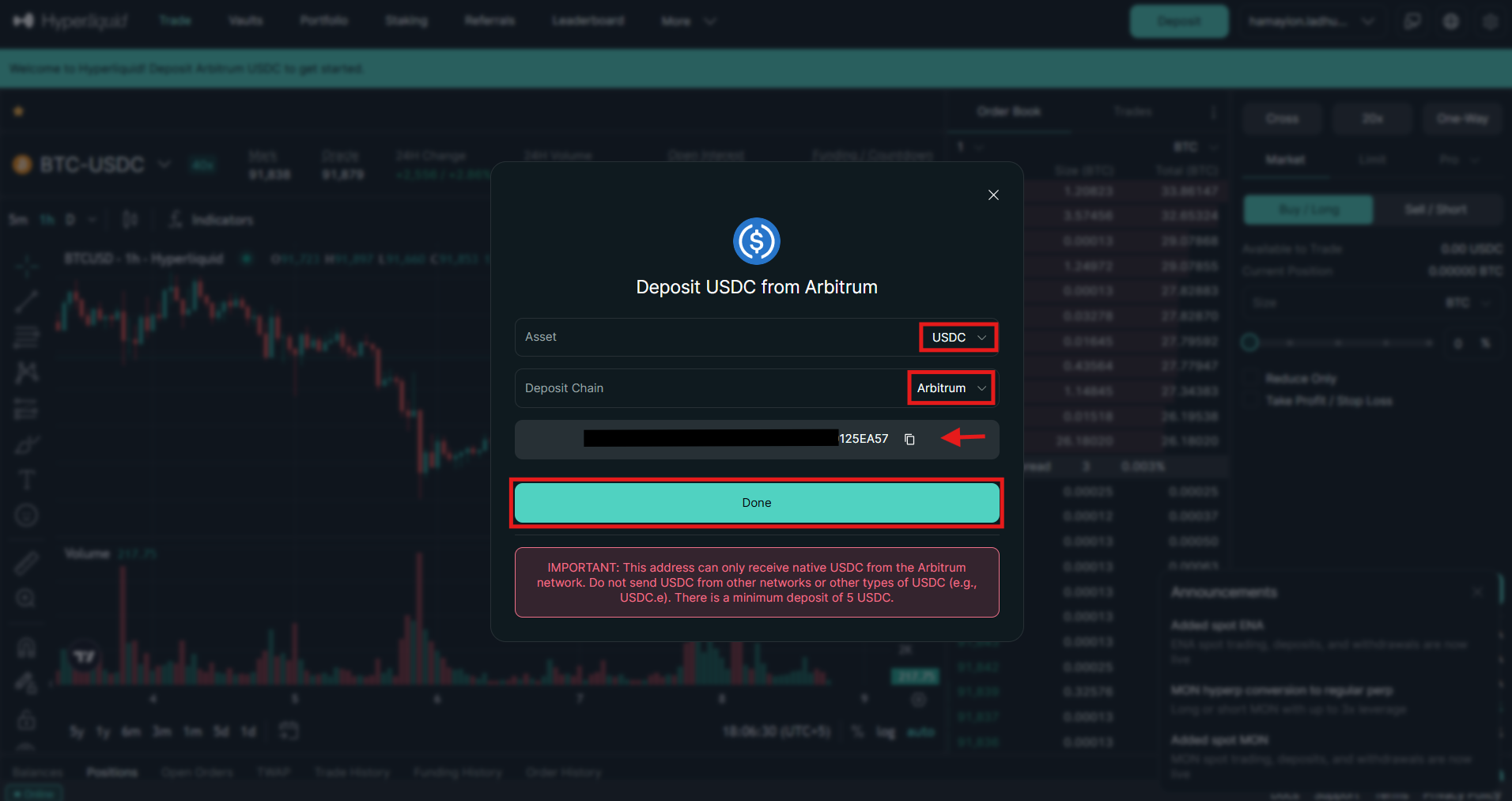
- Select the cryptocurrency you want to deposit, such as USDC. Next, select the deposit chain, such as Arbitrum. After this, copy the deposit address and paste it into the wallet you are using to send the funds. Remember, you should select the same deposit chain in the wallet that you are using to send funds.
The funds will be automatically received into your perpetual wallet, from which you can transfer them to another wallet, such as the spot wallet.
How to Trade Cryptocurrency on Hyperliquid?
Once the funds are in and the wallet is connected, users can start trading digital currencies on Hyperliquid. The platform supports more than 200 cryptocurrencies, including Bitcoin (BTC), Ethereum (ETH), and Solana (SOL). Traders are offered a wide range of products, including futures and spot trading, along with advanced order types.
Before placing a trade on Hyperliquid, it is crucial to understand the order types.
Order Types on Hyperliquid
Hyperliquid is a decentralized exchange that offers several order types for trading cryptocurrencies. The available order types on the platform include:
- Market Order
A market order is executed immediately at the current market price.
Example: Suppose Bitcoin (BTC) is trading at $90,000 and you place a market buy order for 0.01 BTC. The order will execute instantly at the current market price.
- Limit Order
A limit order is executed at a specified price or better.
Example: Suppose Ethereum (ETH) is trading at $3,000 and you place a limit buy order at $2,900. The order will execute once the price falls to $2,900 or lower.
- Scale Order
This order type enables traders to place multiple limit orders within a defined price range.
Example: Suppose you are looking to buy 0.04 BTC. Instead of buying at once, you place four scaled orders of 0.01 BTC at $89,500, $89,000, $88,500, and $88,000 to get a better average entry price.Top of FormBottom of Form
- Stop Limit Order
This order type executes a limit order once the specified price is reached.
Example: If BTC is trading at $90,000, and you place a stop-limit sell order with a stop price of $88,500 and a limit price of $88,000. A limit sell order will execute at $88,000 once the stop price is reached.
- Stop Market Order
It triggers a market order when a specified price is reached.
Example: If ETH is trading at $3,100, and you place a stop-market sell order at $2,900. The order will execute immediately once the price hits $2,900.
- Take Limit Order
Traders use a limit order to lock in profits by placing it at a specified price.
Example: Suppose you buy ETH at $3,100 and place a take-profit sell order at $3,500. The order will execute only when ETH reaches $3,500 or higher.
- Take Market Order
This order type helps traders secure profits by triggering a market order once the target price is reached.
Example: Suppose you buy Bitcoin (BTC) at $90,000 and set a take market sell order $93,000. The order will execute instantly at the best available price when BTC hits $93,000.
- TWAP Order
A TWAP (Time-Weighted Average Price) order executes a large order over time to minimize market impact.
Example: Instead of buying 1 ETH at once, you place a TWAP order to buy 1 ETH over one hour. The exchange will execute small market or limit orders every few minutes to achieve an average price.
How to Start Spot Trading on Hyperliquid?
Hyperliquid enables traders to buy and sell cryptocurrency in the traditional spot market. Traders can swap USDC or USDH for their preferred digital asset. The platform lists a range of spot trading pairs, including both small- and large-cap assets.
To start spot trading on Hyperliquid, follow these steps.
1. Visit the homepage
On the homepage, click “Trade” in the menu bar and select the spot trading pair, such as BTC/USDC.
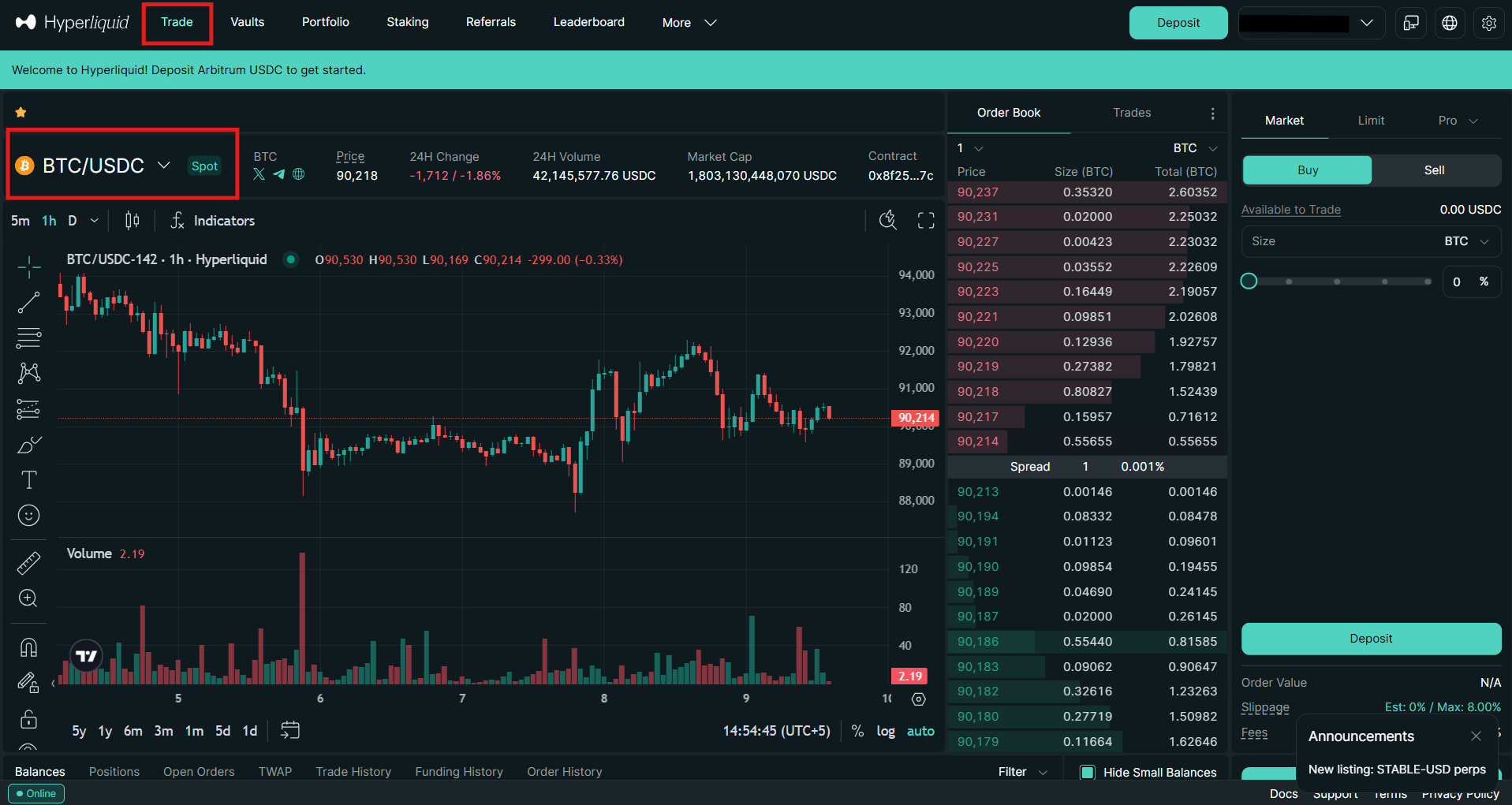
2. Getting familiar with the interface
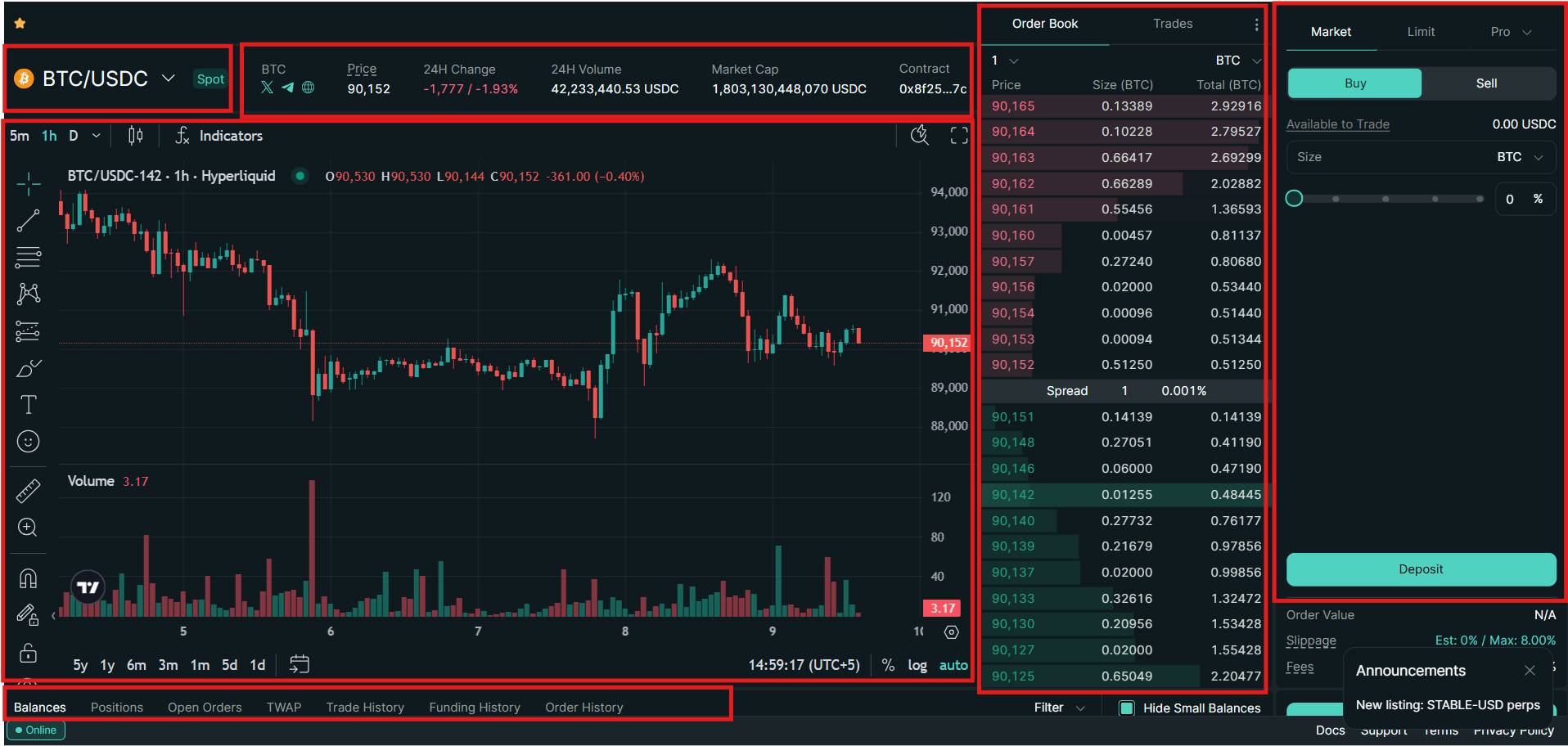
The spot trading interface on Hyperliquid offers the following features:
- Trading Pair Selector: Located in the top-left corner of the interface, it allows traders to select a trading pair.
- Price Section: Beyond the trading pair selector, the price section shows the current price of the selected cryptocurrency, 24-hour change in the trading volume, and more.
- Trading Chart: The Hyperliquid trading interface is built on TradingView, offering a full suite of advanced charting tools and indicators for precise trade execution
- Order Book: The order book is located in the middle of the trading interface, showing the current buy and sell prices for the selected trading pair.
- Order Panel: The order panel on the right side of the interface lets traders use various order types to buy and sell digital assets at the current market price.
- Positions Tab: Located at the bottom of the interface, this tab shows all open positions.
3. Place a trade
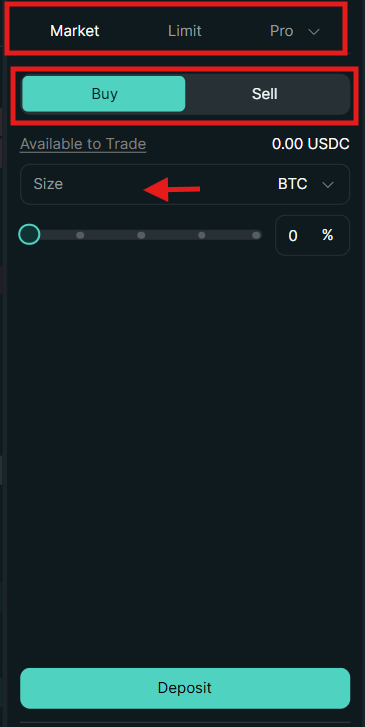
Go to the order panel and follow these steps to place a trade.
- Select the trading pair, for example, BTC/USDC.
- Select the order type, for example, a Limit Order.
- Click either “Buy” or Sell.”
- Enter the order details and execute the order.
How to Start Futures Trading on Hyperliquid?
Hyperliquid is one of the largest DEX perpetual platforms by trading volume. The platform offers deep liquidity with a daily trading volume exceeding $7 billion.
Hyperliquid offers more than 100 perpetual contracts with up to 40x leverage on BTC/USDC. ETH offers 25x leverage, and XRP offers 20x leverage, while most small-cap assets provide 3x to 5x leverage.
To start futures trading on Hyperliquid, follow these steps:
1. Visit the homepage
On the homepage, tap “Trade” in the menu bar and select the perpetual contract to trade.
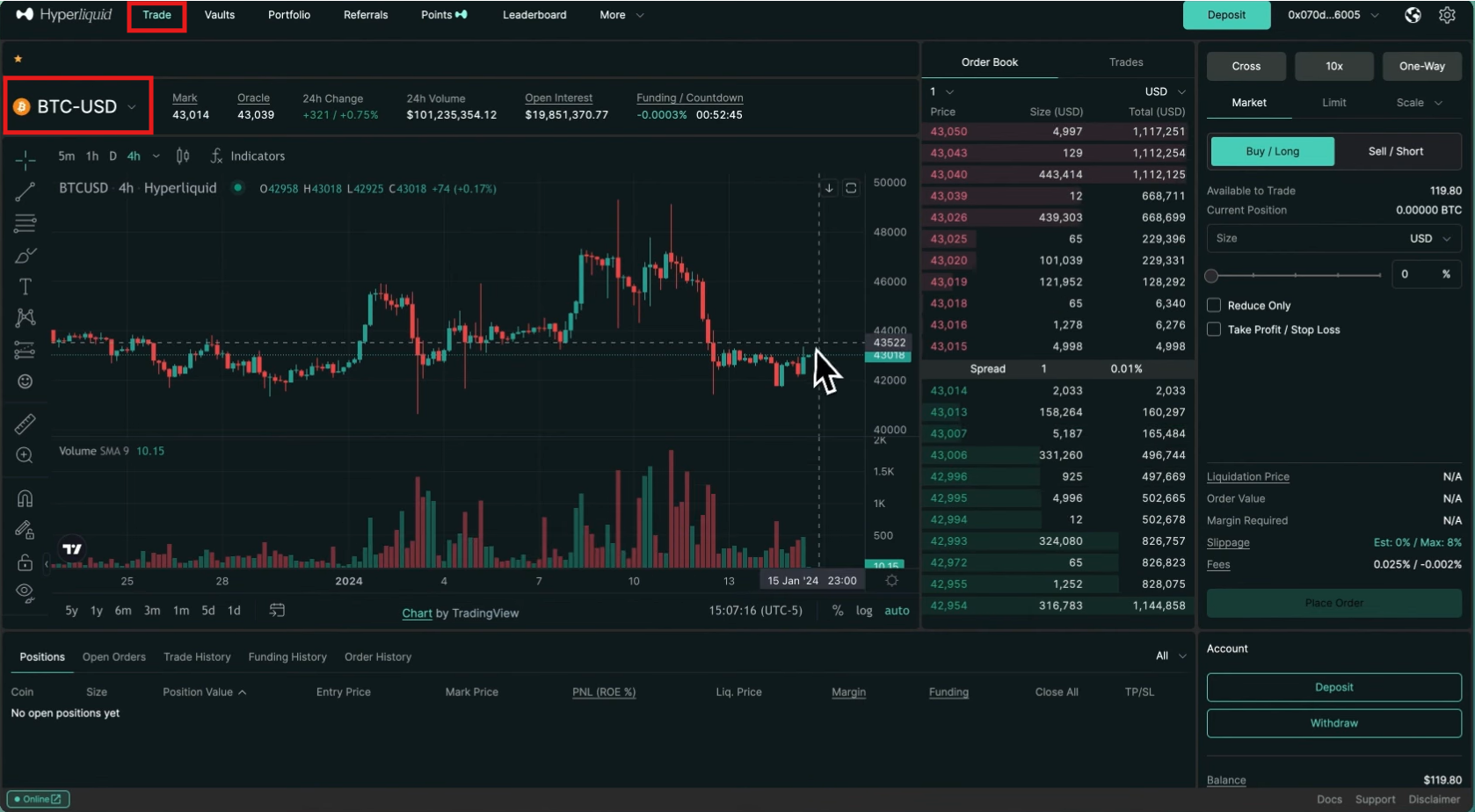
2. Understand the interface
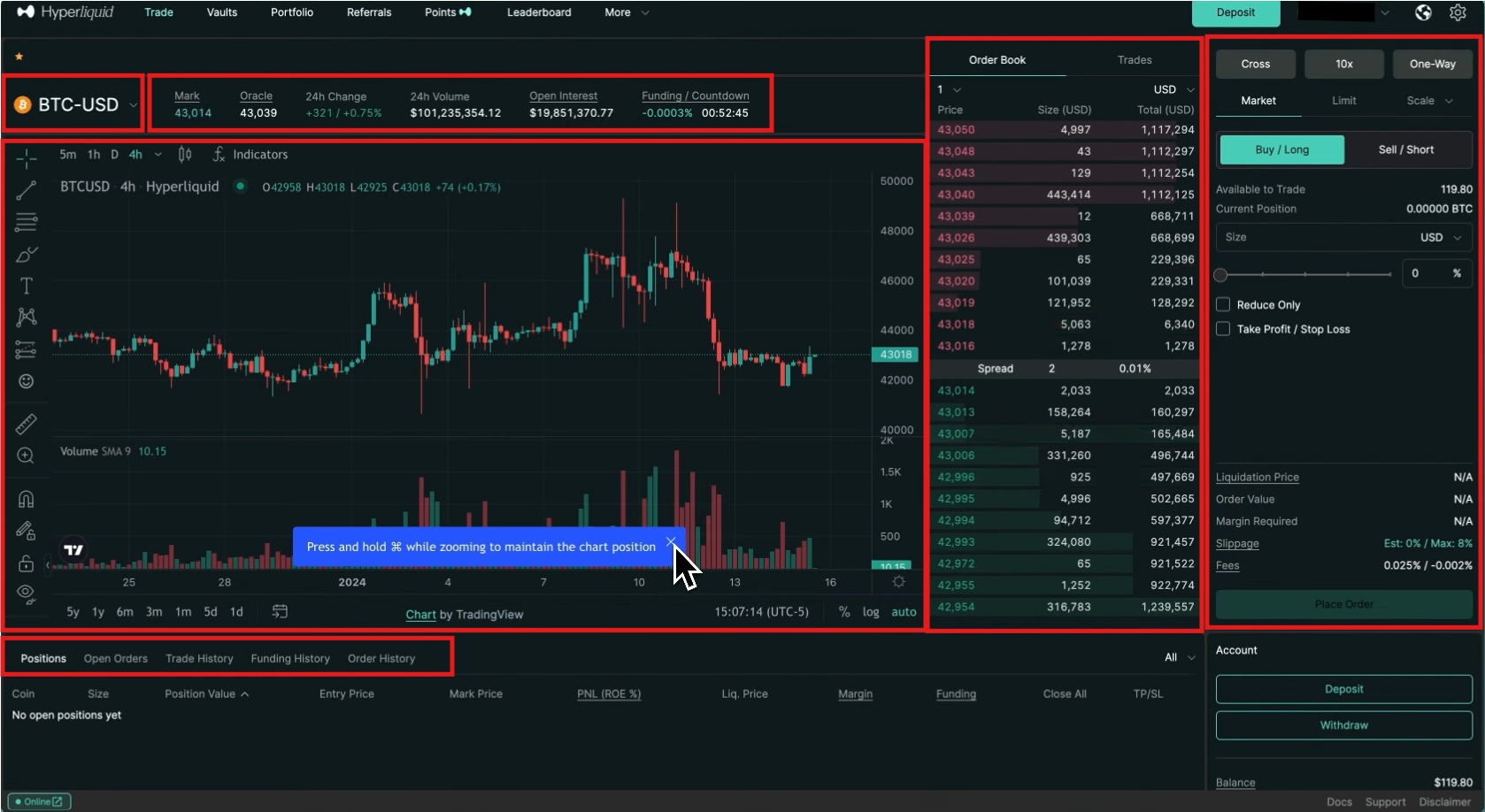
The futures trading interface on Hyperliquid offers the following features:
- The trading dashboard has a clean, real-time interface that features trading pairs, an order book, and a portfolio overview.
- Traders can open or close positions by using order types, such as market, limit, stop, TWAP, and more.
- Choose between cross-margin and isolated-margin modes for better risk control, with leverage up to 40x available.
- Monitor and manage a position from the positions tab with tools for take-profit and stop-loss.
3. Place a trade
Go to the order panel, and follow these steps.
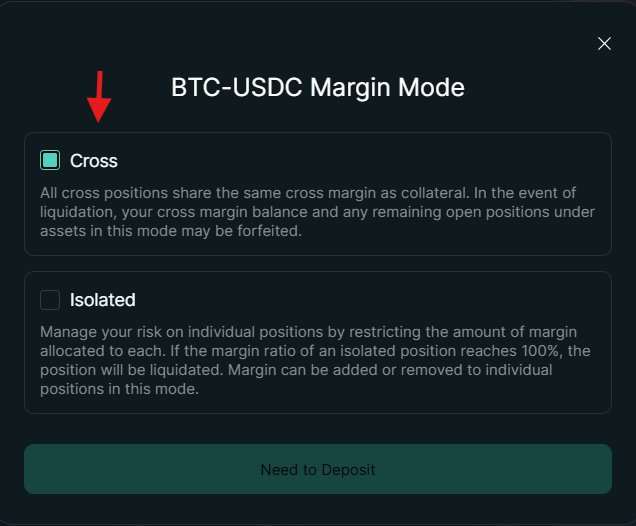
- Select the margin mode between cross and isolated. Cross margin uses the entire account balance to prevent liquidation, while isolated margin limits risk to only the funds allocated to a specific position.
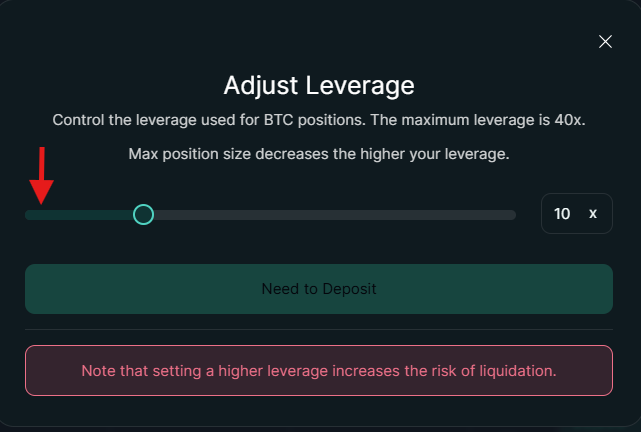
- Adjust the leverage accordingly. Hyperliquid offers up to 40x leverage on specific contracts. Remember, selecting a higher leverage poses a greater risk of liquidation.
- After this, select the order type, for example, a Limit Order.
- Select the order direction between Buy/Long and Sell/Short.
- Enter the order amount.
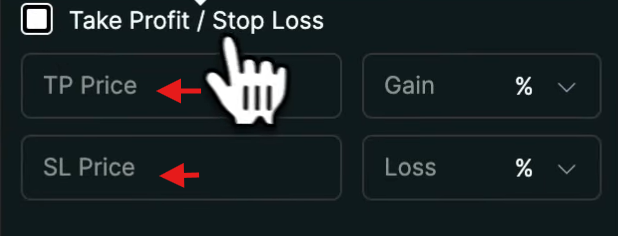
- You can also add Take-Profit / Stop-Loss to your position, which is optional.
- Review the order details and click “Place Order” to open a position.
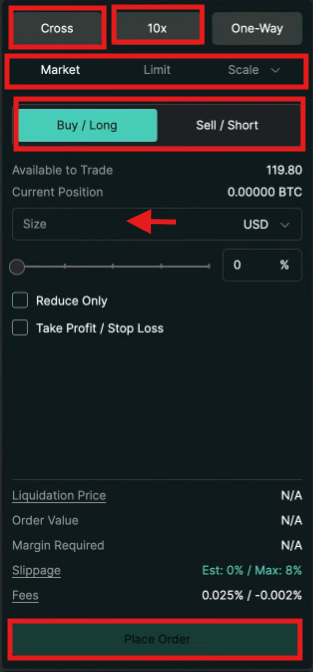
- To add Take-Profit / Stop-Loss to your position to limit losses, click the “Take-Profit / Stop-Loss” tab in the order panel and add the take-profit and stop-loss values.
How to Withdraw Funds from Hyperliquid?
The process of withdrawing funds from Hyperliquid is simple.
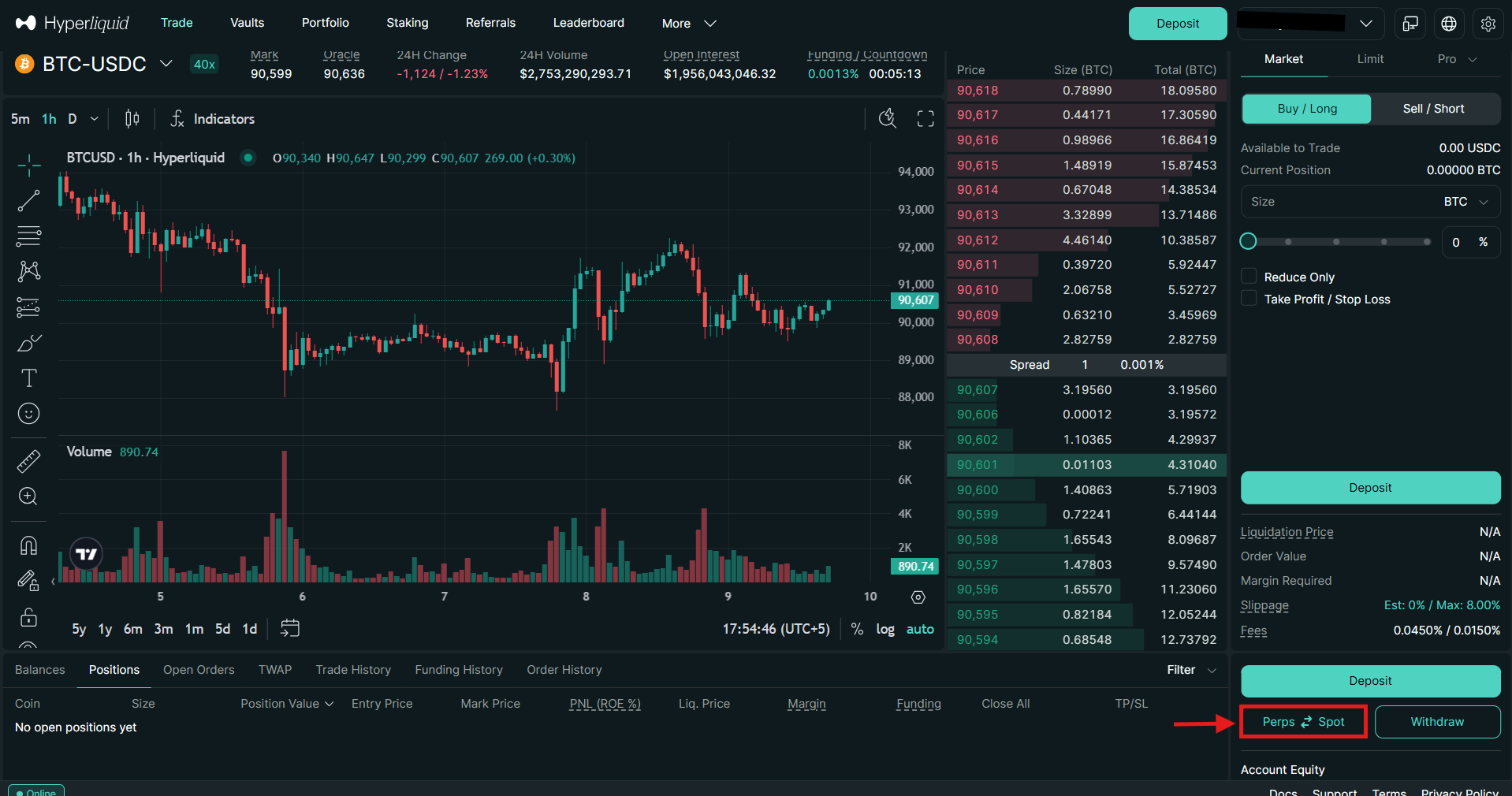
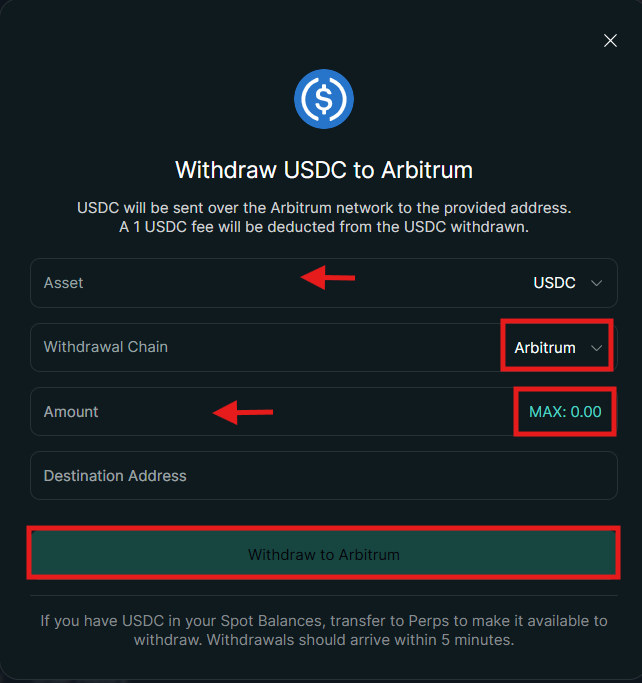
- If the funds are in the spot account, you should transfer them to the perpetual account to make them available for withdrawal. Click “Perp-Spot” in the order panel to transfer funds.
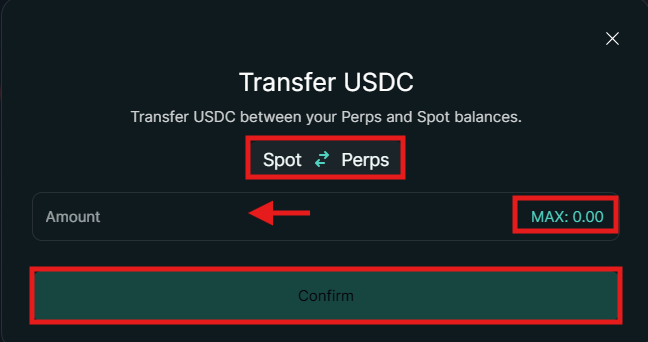
- Make sure you are sending from the spot to the perpetual account. Enter the order amount or click “Max” to transfer all funds. Review the order details and tap “Confirm.”
- Next, click “Withdraw” in the order panel.
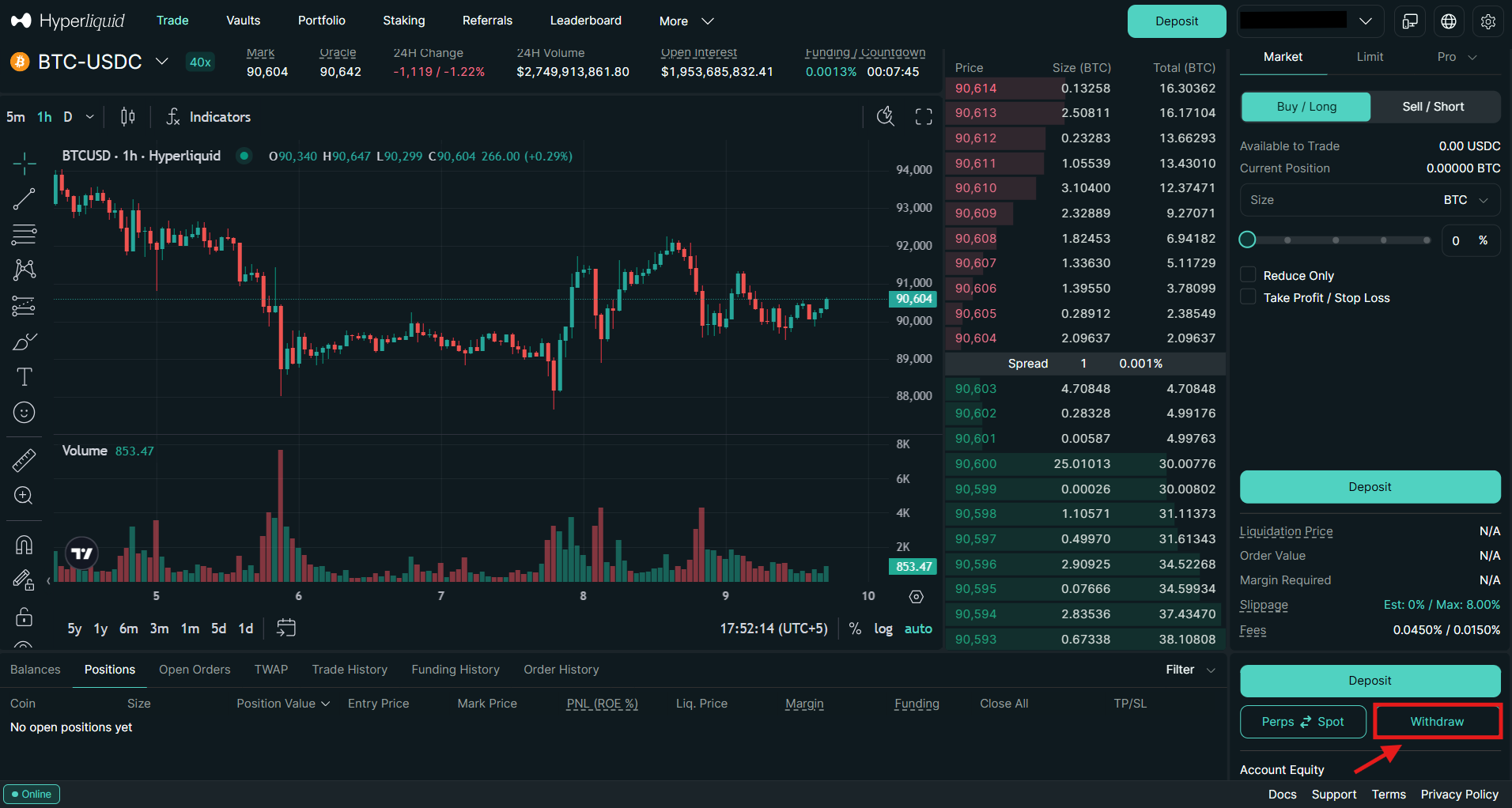
- Select the withdrawal asset, such as USDC. Select the withdrawal chain (e.g., Arbitrum) and enter the order amount. Review the order details, and click “Withdraw to Arbitrum.”
Trading Fees on Hyperliquid
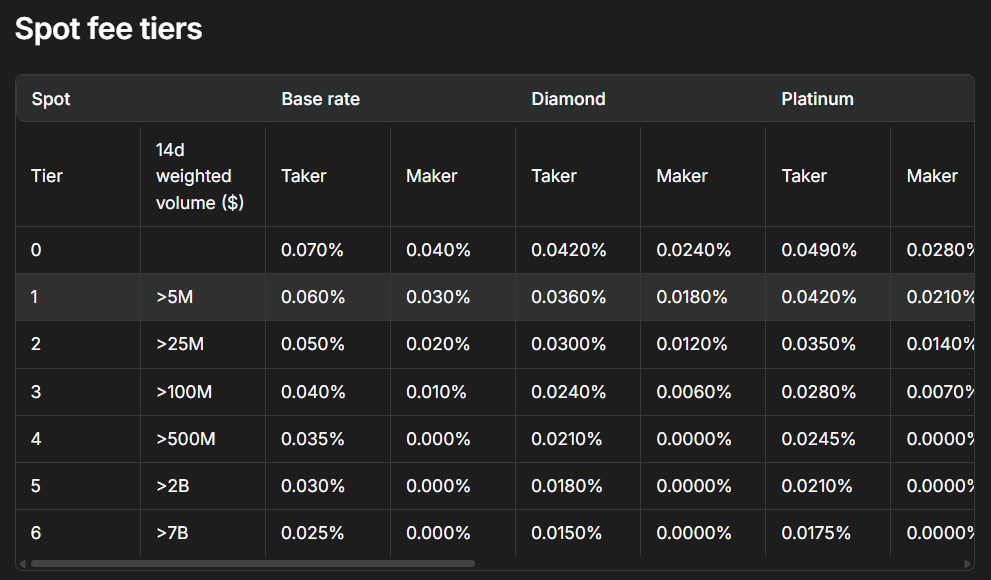
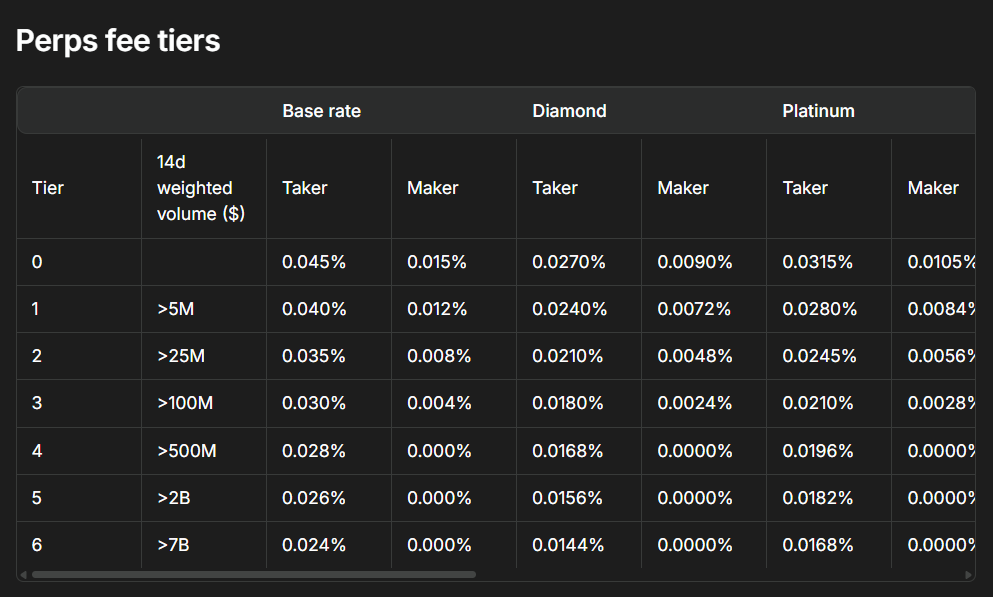
Hyperliquid uses a maker-taker fee model in both spot and futures trading. The fees are calculated based on the 14-day weighted trading volume.
In spot trading, the basic maker fee is 0.04%, while the taker fee is 0.07%. The following table shows spot-trading fees based on trading volume.
In futures trading, the platform charges the following fees: taker 0.045% and maker 0.015%. The following table shows the perpetual market fees by trading volume.
Final Thoughts
Hyperliquid is a no-KYC, decentralized cryptocurrency exchange that allows traders to stay anonymous while trading digital currencies. The platform is built on its custom Layer-1 blockchain and features a transparent order book. Its appeal lies in its functioning as a centralized exchange (CEX). Getting started is straightforward: users can connect their wallet using an email address and begin using the platform.
The platform allows users to trade both spot and perpetual trading pairs. Hyperliquid offers advanced order types for trading cryptocurrencies. Additionally, the platform has a competitive fee structure that provides multiple benefits to users.
Frequently Asked Questions (FAQs)
What is Hyperliquid?
Hyperliquid is a decentralized cryptocurrency exchange that is built on its own Layer-1 blockchain. It offers complete on-chain transparency and no KYC verifications.
Is Hyperliquid secure?
Hyperliquid is based on a custom Layer-1 blockchain with a complete on-chain order book. It makes the platform more transparent than its competitors.
What is the native stablecoin of Hyperliquid?
Hyperliquid's native stablecoin is USDH, pegged to the US dollar.
Do I need to complete KYC on Hyperliquid?
No, Hyperliquid is a decentralized platform that does not require KYC.
Is Hyperliquid available globally?
Hyperliquid is a decentralized platform and does not require KYC. This makes it accessible worldwide. However, users should check local regulations before using the platform.
What makes Hyperliquid different from other DEXs?
Unlike AMM-based DEXs, Hyperliquid operates on its own Layer-1 blockchain and maintains a fully on-chain order book, like centralized exchanges.
Can I trade perpetual contracts on Hyperliquid?
Hyperliquid supports more than 100 perpetual contracts with up to 40x leverage on selected pairs.
Does Hyperliquid support spot trading?
Yes, Hyperliquid offers spot trading.
What cryptocurrencies can I trade on Hyperliquid?
Hyperliquid supports leading cryptocurrencies, including Bitcoin (BTC), Ethereum (ETH), Solana (SOL), XRP, and more. Additionally, traders can also find a wide range of low-cap coins on the platform.
What are spot trading fees on Hyperliquid?
The maker fee in spot trading is 0.04%, while the taker fee is 0.07%.
What are the futures trading fees on Hyperliquid?
Hyperliquid charges the following fees in futures trading: taker 0.045% and maker 0.015%
Disclaimer: All content on The Moon Show is for informational and educational purposes only. The opinions expressed do not constitute financial advice or recommendations to buy, sell, or trade cryptocurrencies. Trading involves significant risk and may result in substantial losses. Always seek independent financial advice before making investment decisions. The Moon Show is not responsible for any financial losses or decisions made based on the information provided.
Please view the full disclaimer at: https://themoonshow.com/disclaimer

WEEX Exchange Tutorial 2026: A Complete Step-by-Step Guide
WEEX is not among the largest cryptocurrency exchanges. It does not match the trading volume of...

How to Use Bybit in 2026 - Step-by-Step Beginner Guide
Cryptocurrency trading continues to evolve with time. Today, crypto users can access several ex...

MEXC Exchange Tutorial 2026: A Complete Step-by-Step Guide
MEXC lists over 3,000 tokens, charges zero maker fees on both spot and futures, and offers leve...