How to Use BitMart in 2026? The Ultimate Guide
Quick Answer: To use BitMart in 2026, first create an account using your email or phone, complete KYC verification, enable Google Two-factor authentication (2FA), and make a crypto or fiat deposit. From there, you can start trading spot, futures (up to 200x leverage), and TradFi Assets, and withdraw funds. The whole setup takes about 10-15 minutes, though level 2 KYC verification can take longer depending on the time required for document review.
What You Will Learn
- How to create an account on BitMart, including KYC verification and 2FA setup.
- Making a crypto deposit or buying crypto with fiat currency.
- How to place an order in spot, futures, or TradFi assets trading.
- How to safely withdraw funds.
- What are BitMart trading fees?
- Measures taken by BitMart to secure your funds.
Before You Start on BitMart
Have these ready before you begin:
- A valid email address or phone number (Google and Apple ID sign-up are also supported).
- A government-issued ID for KYC verification (Passport, Driving License, National ID Card).
- A smartphone for facial verification and to install a 2FA authenticator app.
- Basic familiarity with a wallet address or network (e.g., TRC-20, ERC-20) is essential, since choosing the wrong address can result in loss of funds.
- Clarity over how much you are willing to risk when trading futures contracts.
5-step Summary: How to Trade on BitMart
- Create a BitMart account using an email address, phone number, or Google/Apple ID.
- Complete KYC verification to unlock full withdrawal limits and trading features.
- Enable Google 2FA on your account before making a deposit.
- Deposit crypto directly or buy it with a card, via P2P trading, or through a third-party payment provider.
- Choose spot, futures, or TradFi, place your order, and withdraw funds when you are ready.
BitMart at a Glance
| Attribute | Detail |
| Founded | 2017 |
| Headquarters | Cayman Islands |
| Users | 12 million + |
| Daily Trading Volume | 6 billion + |
| Cryptocurrencies listed | 1000+ |
| Trading Pairs | 1200+ |
| Max Leverage | Up to 200x |
| TradFi Trading | Stocks, Gold, Oil, Forex |
| Fiat Currencies (Deposit) | 20+ supported |
What is BitMart?
Founded in 2017, BitMart is a centralized cryptocurrency exchange (CEX) serving millions of users in over 180 countries. It is headquartered in the Cayman Islands, with regional offices in the US, China, and South Korea.
It offers spot, futures with up to 200x leverage, and TradFi asset trading. Users get advanced trading tools, such as technical indicators and several order types, to diversify their trading strategies. Its native BMX token offers users who trade it additional discounts of up to 25% on fees.
One key development is the launch of BitMart US as a separate licensed platform in early 2026. It offers trading services to US residents under its own compliance structure. Remember, the global BitMart (covered in this guide) and BitMart US are technically separate products, so check which one applies to you based on your location.
How to Create an Account on BitMart?
Opening an account on BitMart is a quick process and does not take more than two to three minutes.
Follow these steps:
- Go to the BitMart website and click Get Started on the homepage.
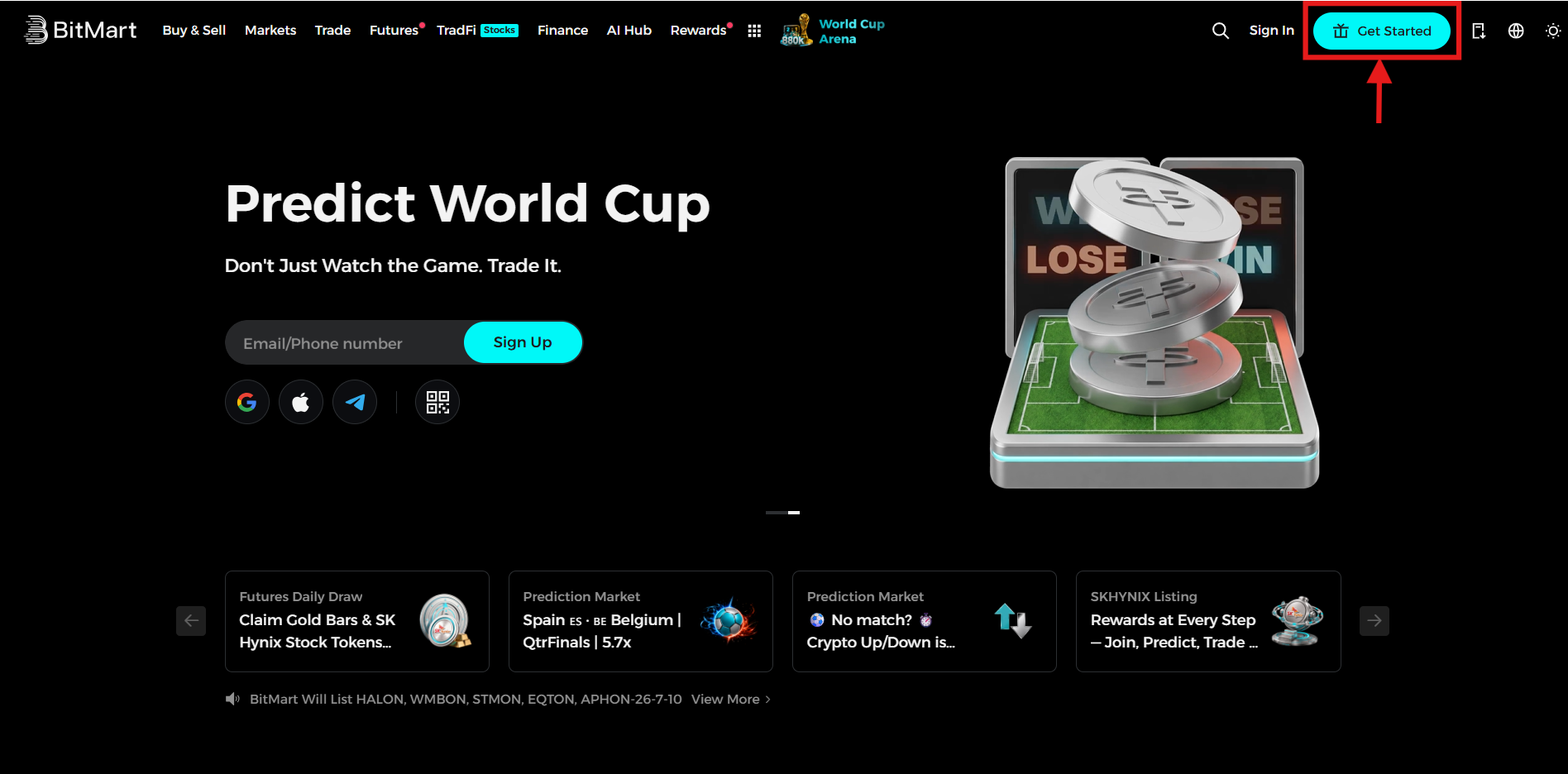
Homepage
- Choose your sign-up method. BitMart supports email address, phone number, and Google or Apple ID sign-ups.
This guide uses an email address as the example sign-up method.
- Enter your email address.
- Create a strong password using a mix of upper-case letters, lower-case letters, numbers, and symbols.
- Agree to BitMart's User Agreement and Privacy Policy.
- Review your details and tap Sign Up.
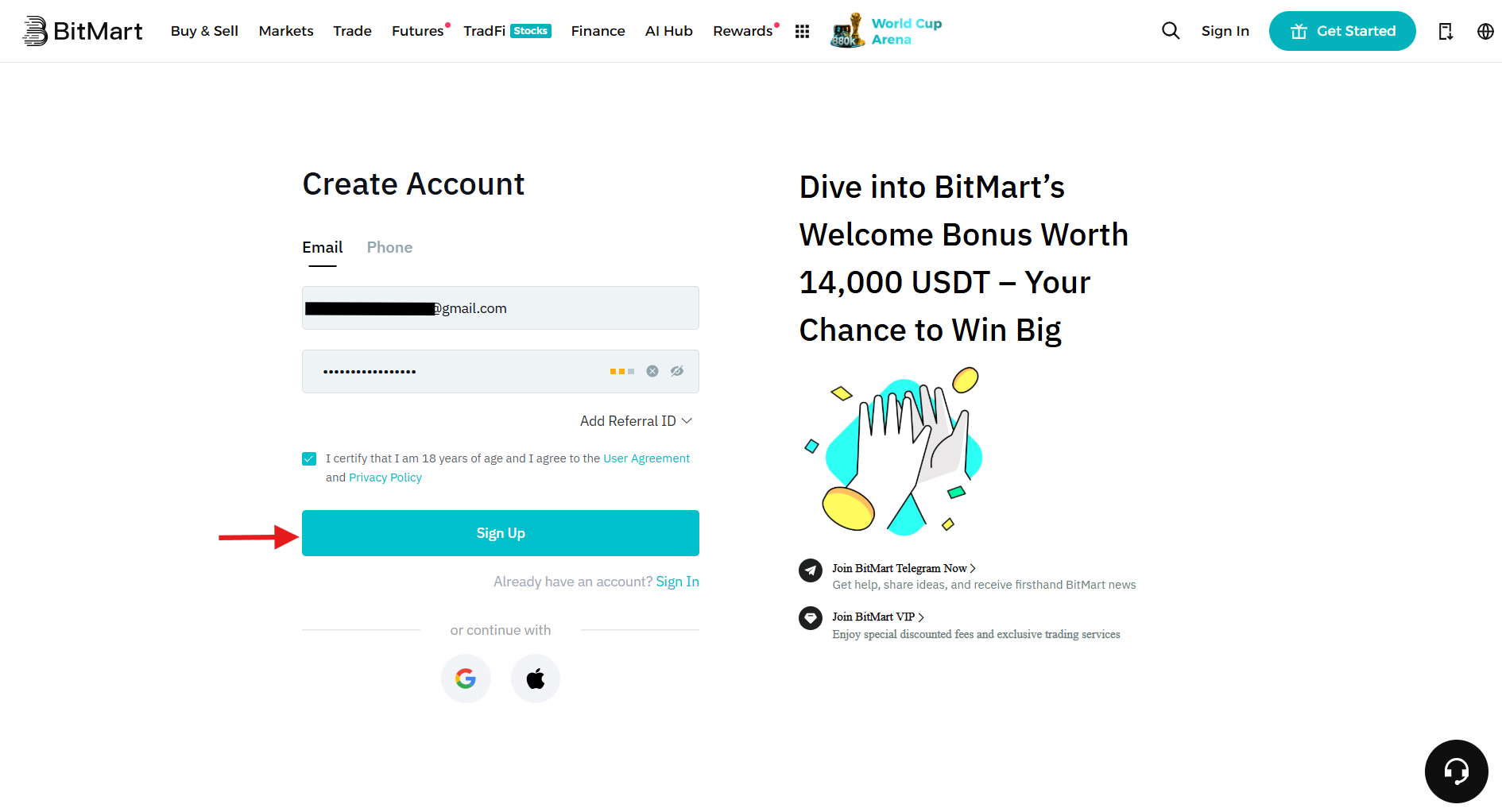
Create account
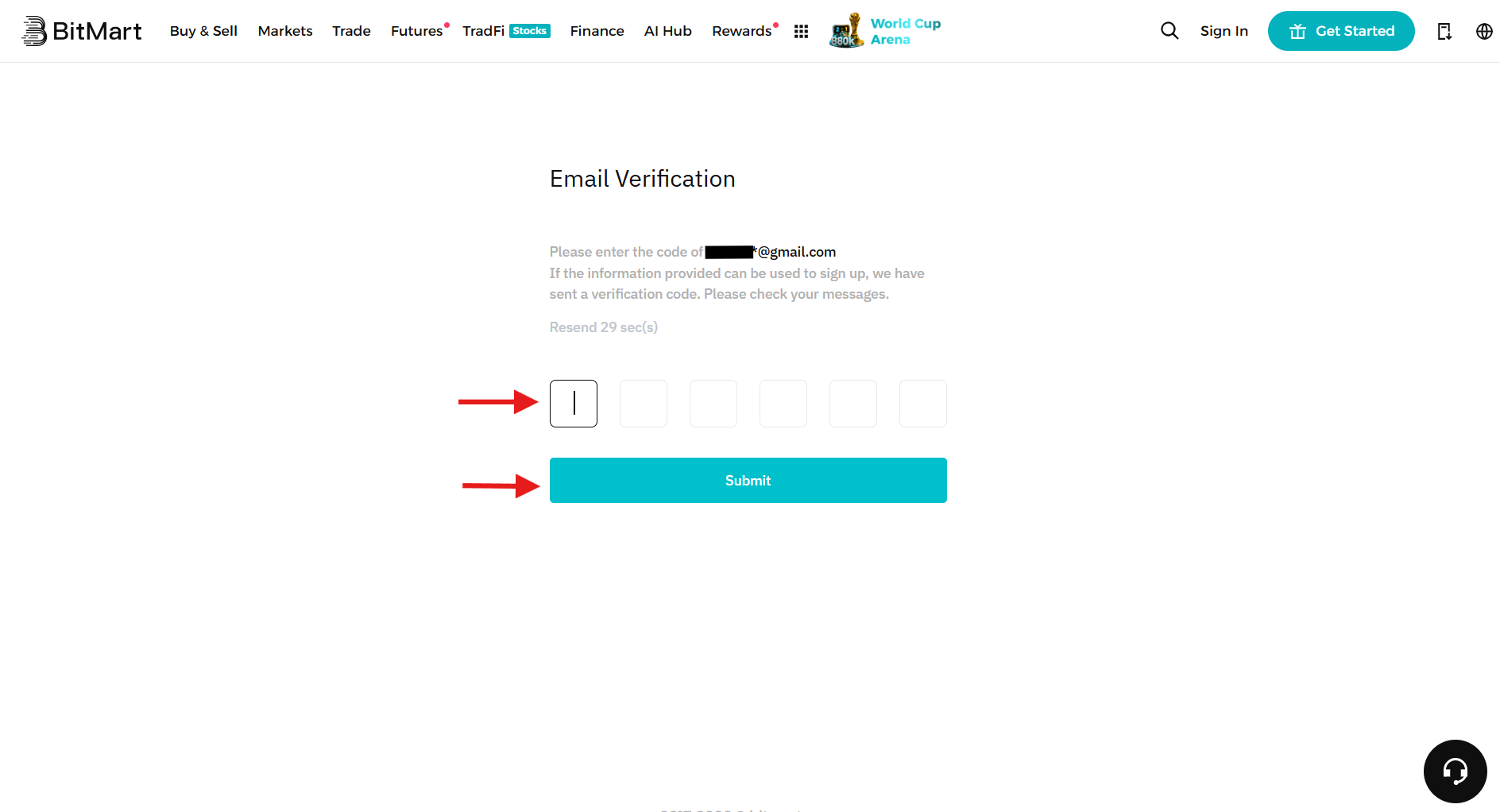
- Enter the 6-digit verification code sent to your email address to complete registration.
How to Complete KYC Verification on BitMart?
BitMart is a centralized cryptocurrency exchange that supports Know Your Customer (KYC) verification to increase withdrawal limits and enhance security.
There are two KYC levels on BitMart:
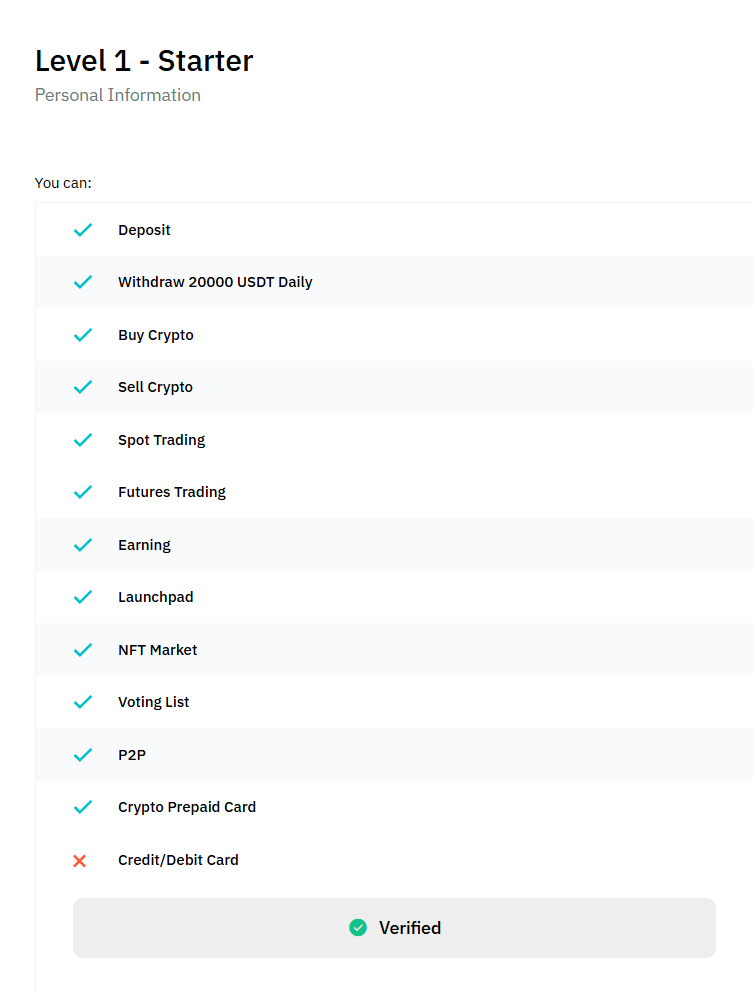
- Level 1 KYC: Unlocks several features on the exchange and increases the withdrawal limit to up to 20,000 USDT daily. You need to provide your name, country of origin, and date of birth to complete this level.
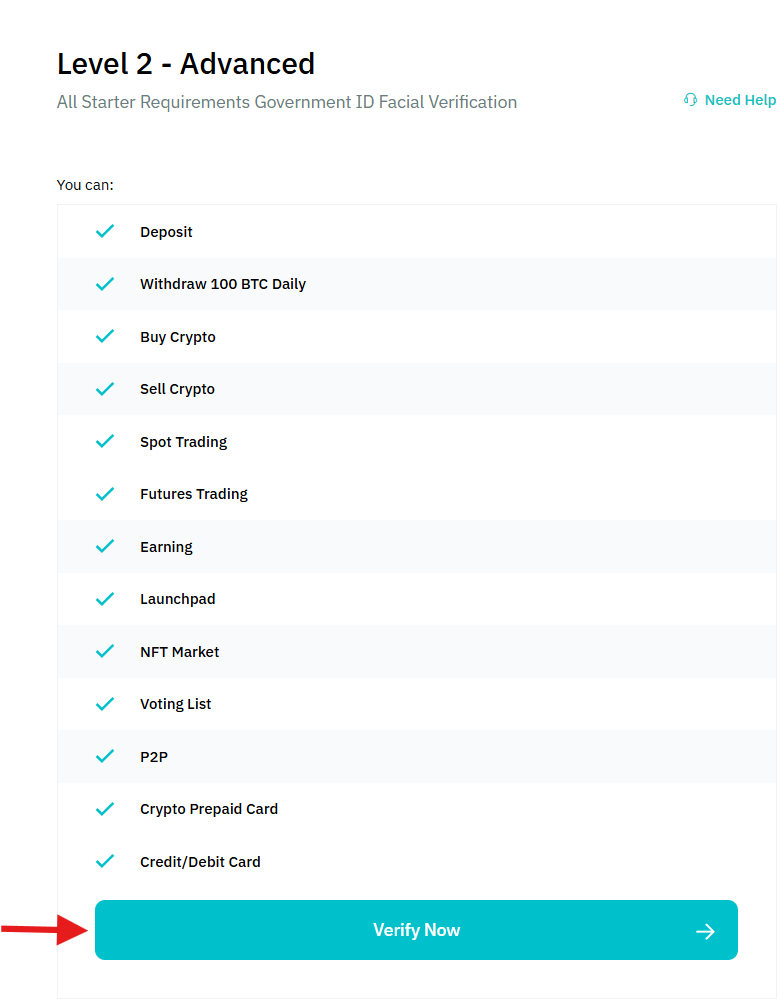
- Level 2 KYC: Provides access to features such as margin trading, Earn products, and Launchpad. In addition, it increases the daily withdrawal limit to 100 BTC. The additional requirements for this level include proof of identity and facial verification.
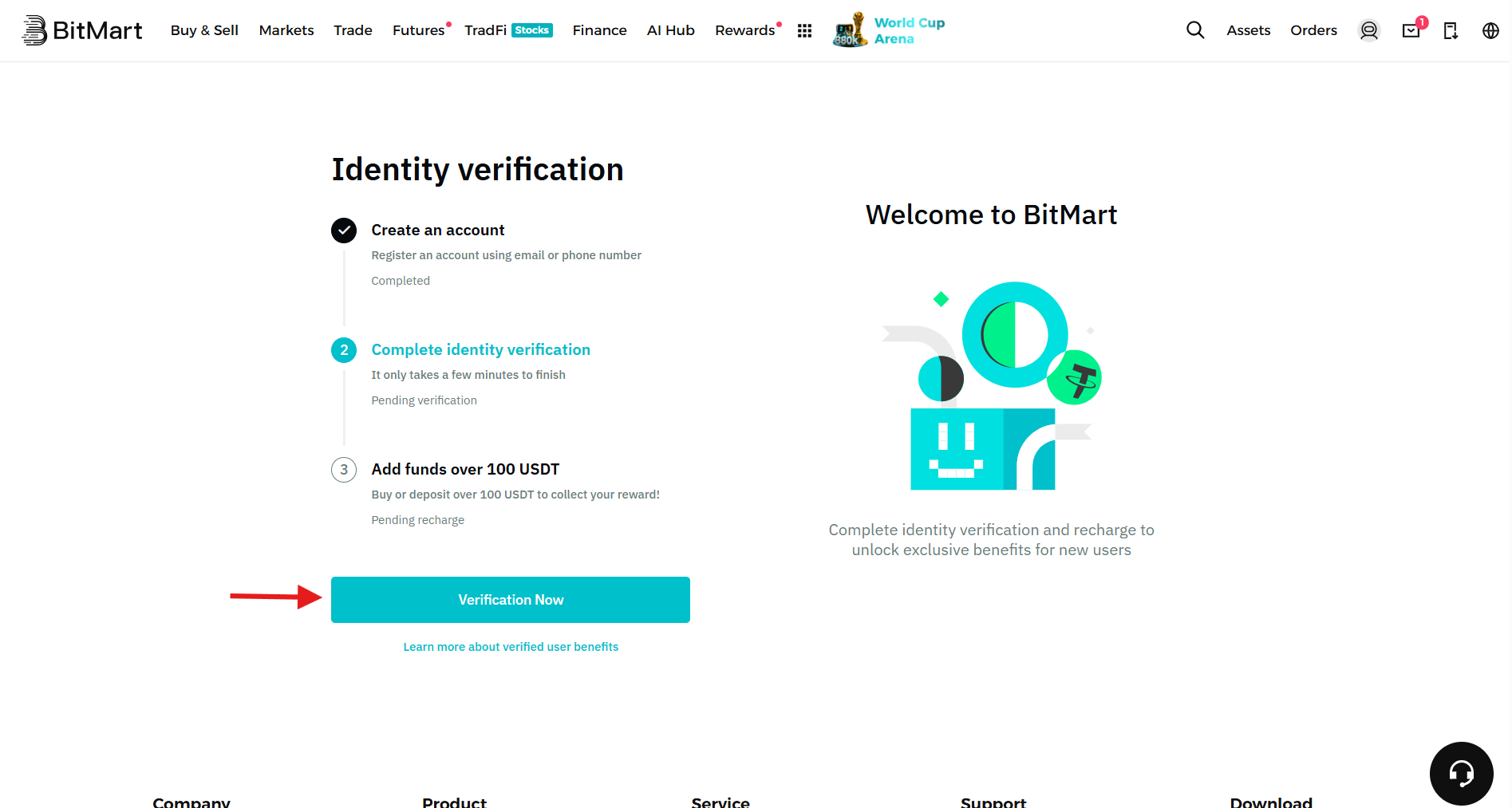
After creating the account, you will be redirected to KYC verification. Alternatively, hover over the profile icon on the homepage and click on Verification from the dropdown menu.
Click “Verification Now’ to start the process.
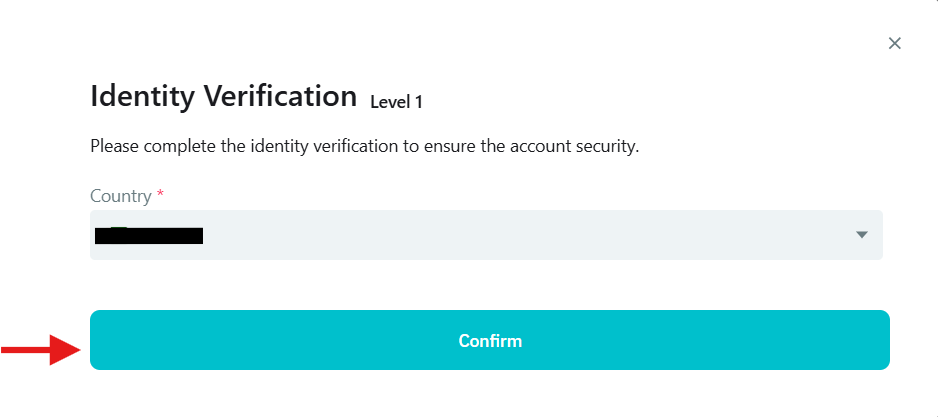
Select your country of residence and click Confirm.
This completes level 1 verification, and you will be able to access the following features:
To start KYC Level 2 verification, click Verify Now under the Level 2 verification section. You can also see the features you can unlock with this level, such as a 100 BTC daily withdrawal limit, credit/debit card access to buy cryptocurrencies, and more.
Select the document type, such as a National ID Card. Once done, click Confirm.
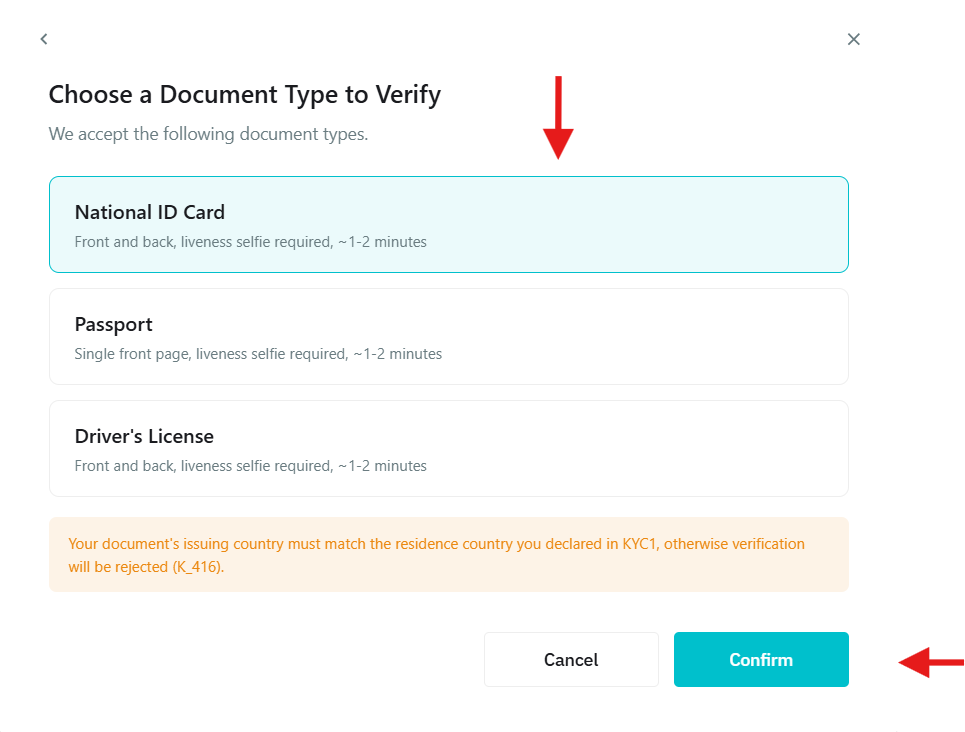
It will take you to the BitMart mobile phone application, where you need to provide the additional required documents.
- Select the document type from Passport, Driving License, and Identity Card.
- Click a selfie using your phone camera on the app.
The system will soon verify your documents and upgrade your KYC level.
How to Set Up 2FA on BitMart?
Visit your account’s security page and click Enable beyond Google Authenticator.
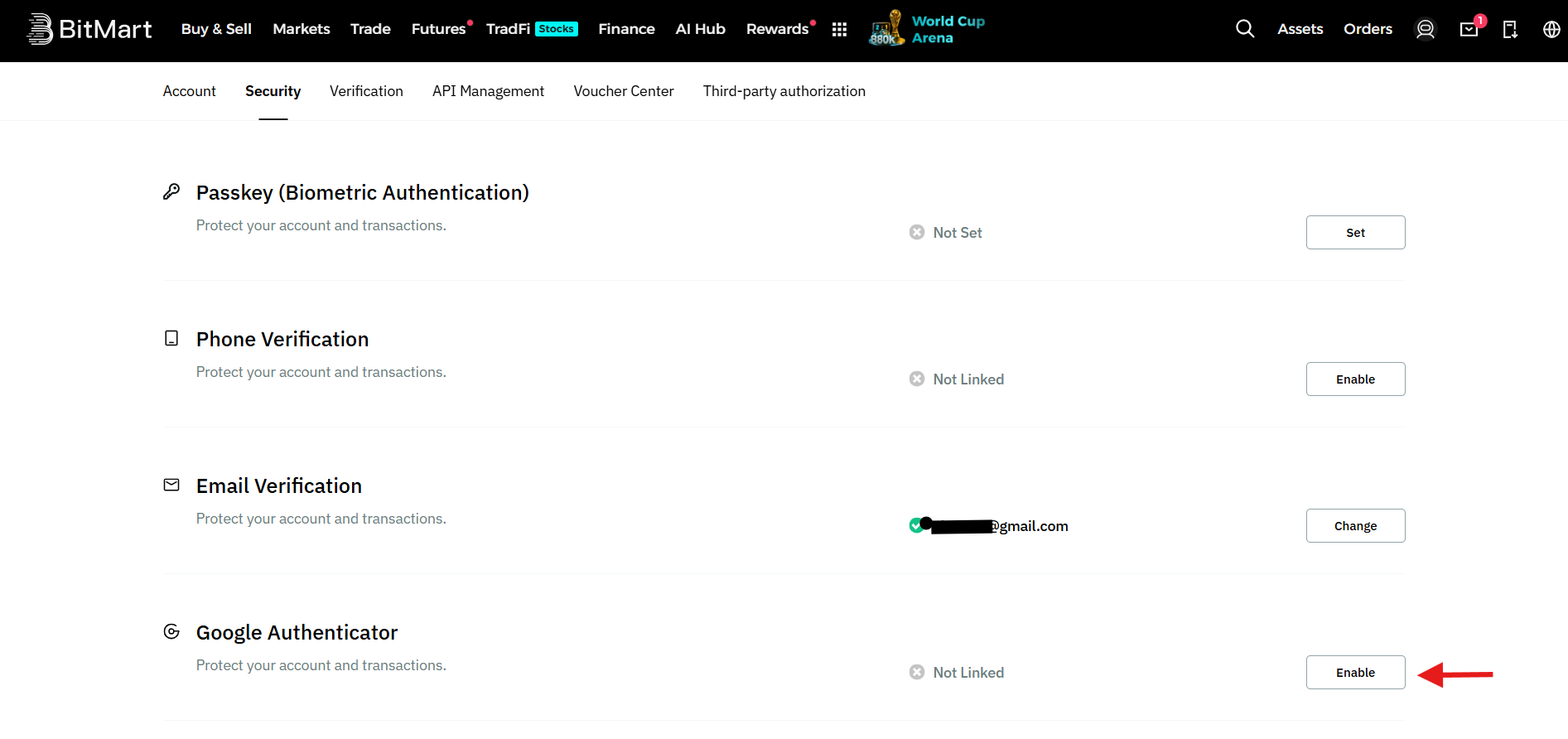
Next:
- Download the Google 2FA app on your mobile phone.
- Scan the QR code or copy the key in your app to link it with your account.
- Enter the 6-digit verification code from the app.
- Click Submit to continue the process.
- After this, enter the codes that you receive at your email and mobile phone number. Click on Submit to enable 2FA for your account.
How to Make a Deposit on BitMart?
BitMart supports several deposit methods, including crypto, P2P trading, credit/debit card purchases, and third-party payments.
In this tutorial, the crypto deposit method is explained.
Go to the BitMart homepage, hover over the profile icon, and click on Deposit from the dropdown menu.
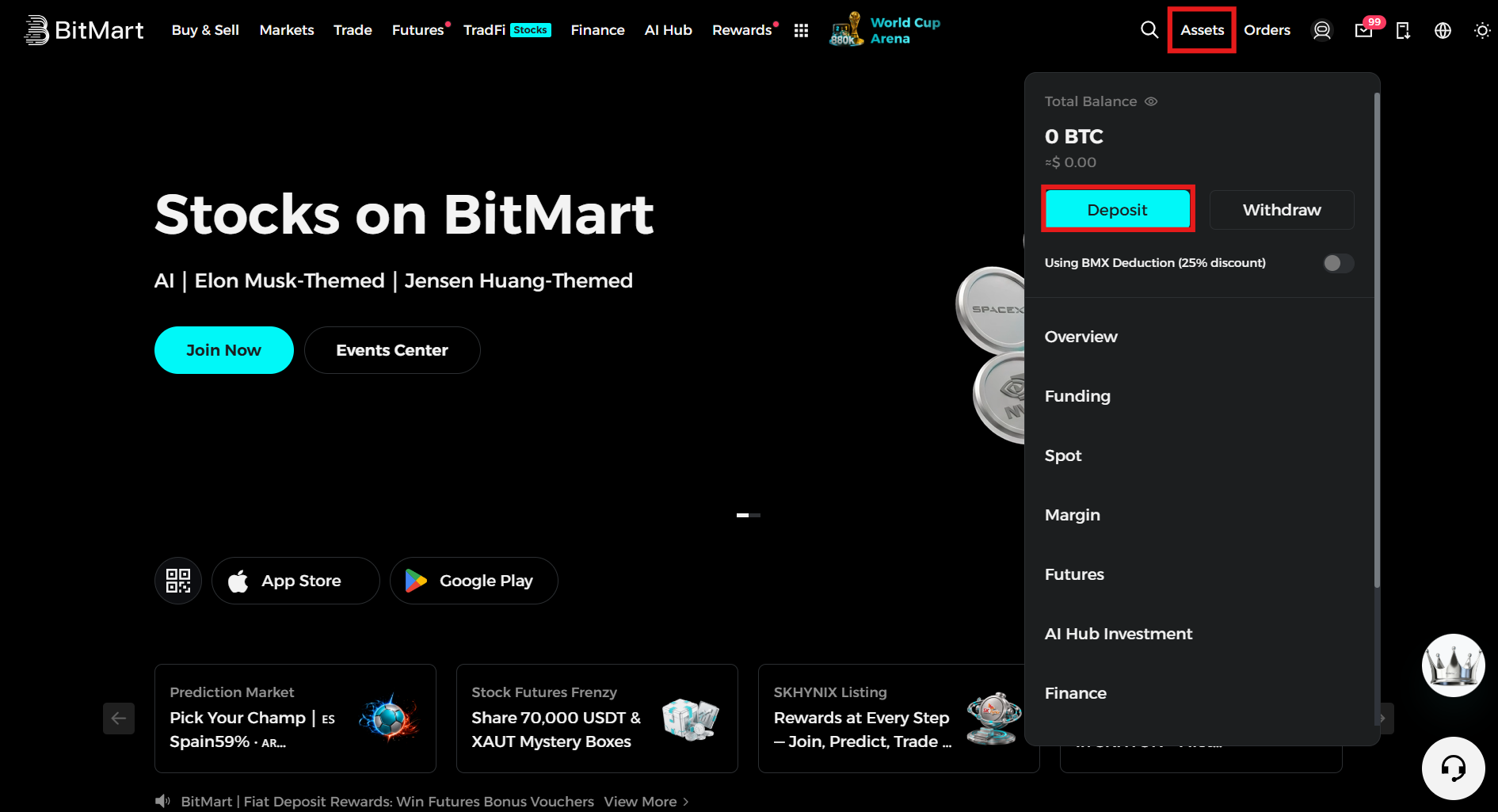
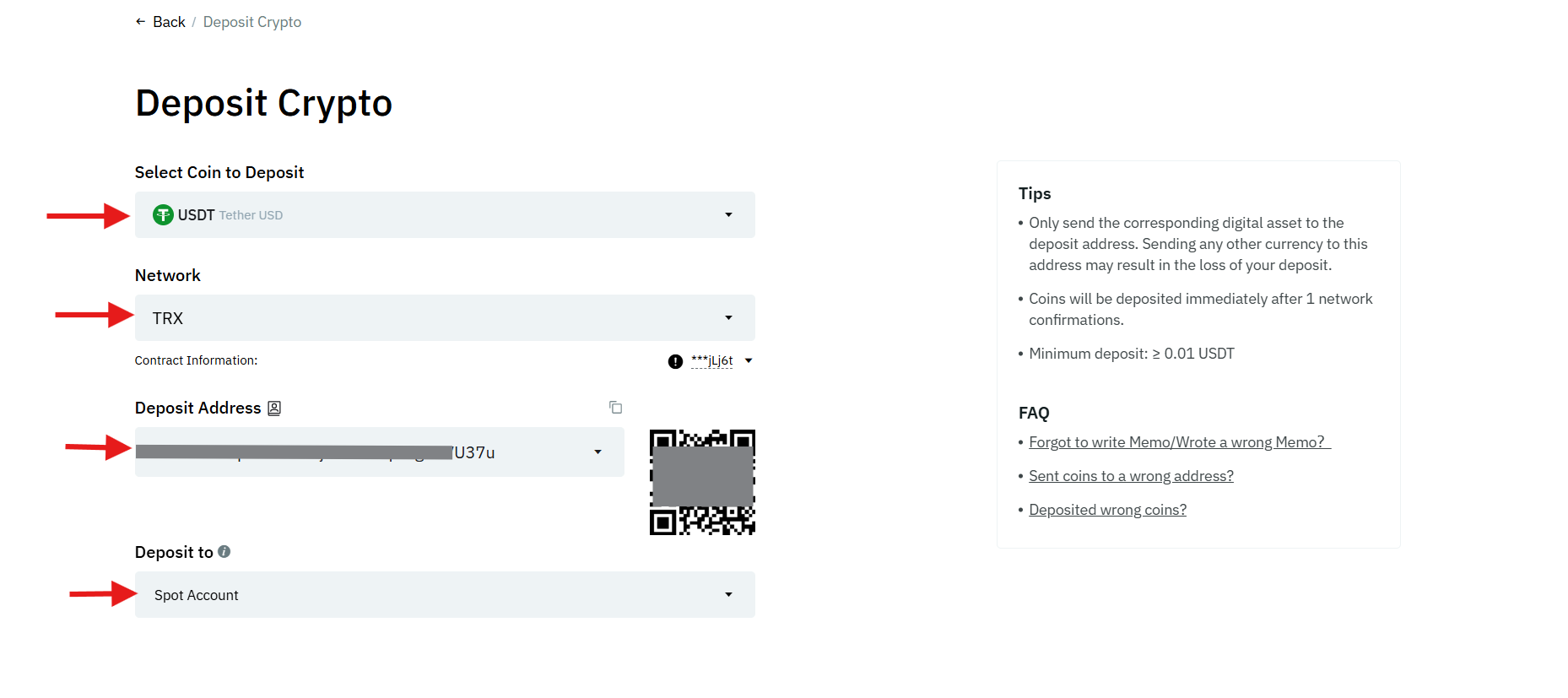
On the deposit crypto page:
- Select the cryptocurrency you want to deposit. In this case, USDT is selected.
- Choose the deposit network carefully. Remember, if your selected deposit network is TRX (TRC-20) for USDT, you should choose USDT-TRX (TRC-20) as the withdrawal network in the sender platform. It is important because choosing the wrong network can result in the loss of funds.
- Copy the deposit address and paste it into the sender withdrawal platform, or you can scan the QR code.
- Select the account type to which you want to receive the deposit, for example, Spot, Futures, and Copy trading.
- Confirm the details and deposit the amount from the withdrawal wallet.
Note: For any deposit or withdrawal larger than you are comfortable losing, send a small test transaction first (a few dollars' worth) and confirm it arrives correctly before moving the full amount. It costs a small network fee, but it's cheap insurance against a costly mistake.
Trading Order Types on BitMart
You can use the following order types when trading cryptocurrencies on BitMart:
- Limit Order
Traders can use a limit order to sell a digital coin at a specific or future price.
Example: If 1 Bitcoin (BTC) is trading at $70,000 and you want to buy at $69,000, place a limit order at that price. The order will only be executed once BTC reaches $69,000 or you cancel it.
- Market Order
A market order can be used to buy or sell cryptocurrencies at the best available market price.
Example: You place a market order to buy 1 Bitcoin (BTC) at the current price, say $70,000. The order is immediately filled.
- Trigger Order
A trigger order allows traders to set a trigger price to buy or sell digital assets. This way, traders can place trades in advance and execute them when specific market conditions are met.
Example: You set a trigger order to sell 1 Bitcoin (BTC) if the price drops to $68,000, aiming to limit losses. Once the market reaches the trigger price of $68,000, the order is executed instantly.
- TP/SL Order
A Take-Profit/Stop-Loss enables you to pre-define a price level when opening a position to maximize profits and limit losses. Once a settled profit level is reached, Take-Profit closes a position. On the other hand, when the market turns volatile, Stop-Loss is triggered to limit losses.
Example: A trader purchases 1 Bitcoin (BTC) at $70,000 and sets a Take-Profit (TP) at $75,000 and a Stop-Loss (SL) at $68,000. The Take-Profit is triggered when the price reaches $75,000, and the Stop-Loss is triggered when the price reaches $68,000.
- Advanced Limit Order
It is an advanced order type that allows traders to set specific parameters to be met before opening a position.
Example: You place an advanced limit order to sell 1 Bitcoin (BTC) at $69,000 with the Post Only option to add liquidity to the market by not executing the trade immediately as a taker order. Once the price reaches $69,000, the order is filled if it remains on the order book, avoiding taker fees.
- Post Only Order
Traders can use this order type to ensure they are a maker in the order book, thus adding liquidity to the market. It cancels automatically once the order is filled to avoid taker fees.
Example: You place a post-only limit order to buy 1 Bitcoin (BTC) at $70,000, ensuring it is added to the order book as a maker. If the order is immediately matched with an existing sell order, it gets cancelled to avoid any taker fees.
- Trailing Stop Order
This order type allows you to limit losses once the market moves in your favor. It adjusts according to market movements instead of a fixed price.
Example: Traders set a trailing stop order to sell 1 Bitcoin (BTC) with a $1,000 trail when the price is at $70,000. If the price reaches $73,000, the stop moves up to $72,000. On the other hand, if the price drops to $73,000, the order is triggered to lock in profits.
How to Start Spot Trading on BitMart?
Spot trading means buying or selling a cryptocurrency for immediate settlement at the current market price: no leverage, no borrowed funds, just a straightforward exchange of one asset for another.
- Go to the BitMart homepage, navigate to the Trade section on the menu bar, and click on Spot from the dropdown menu.
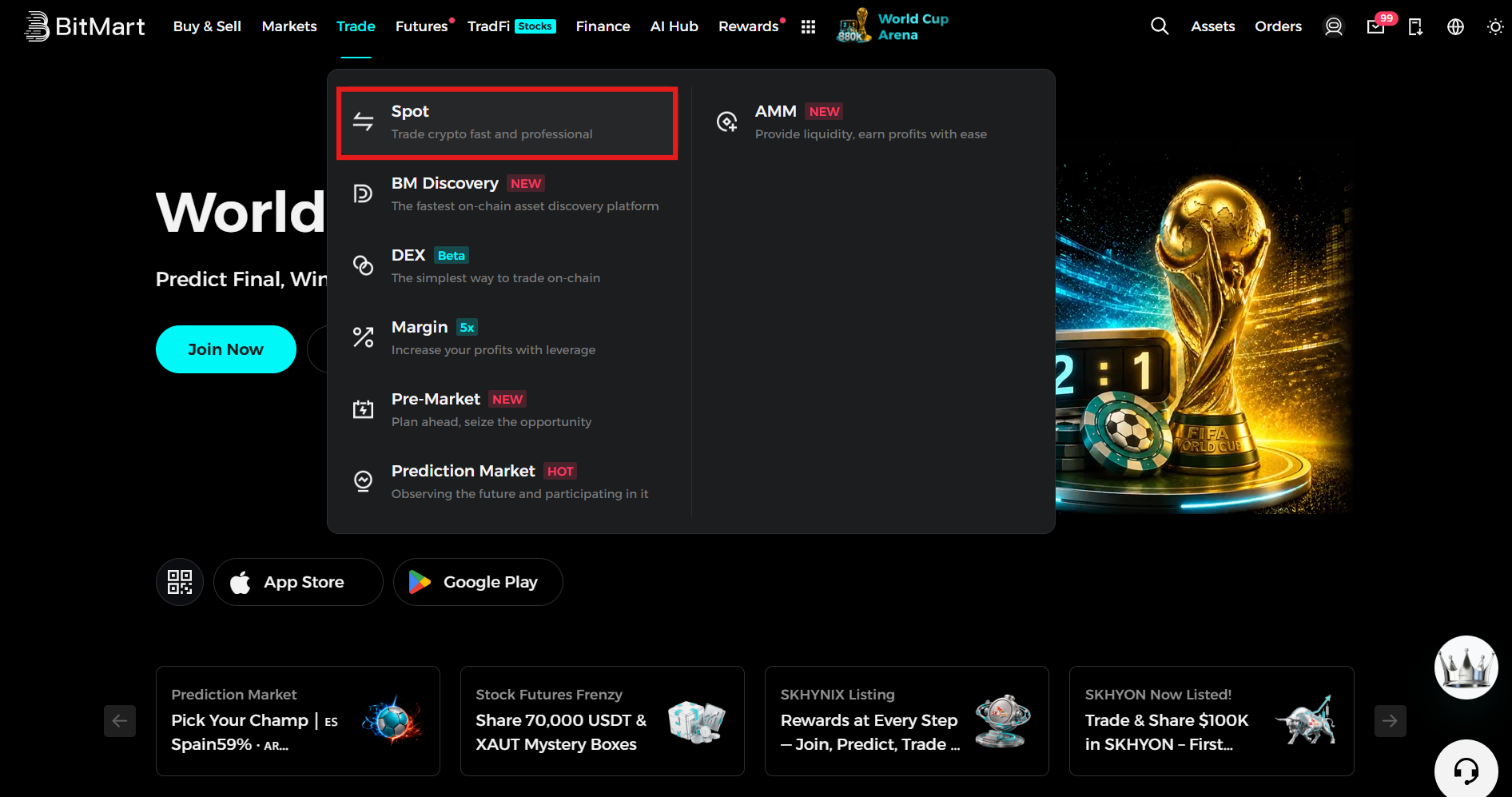
Spot trading
2: Get familiar with the interface:
Trading pair selector: top-left corner of the interface.
Price and volume panel: shows 24-hour price change and trading volume for the selected pair.
Trading chart: powered by TradingView, with technical indicators available.
Order book: shows live buy and sell prices, positioned in the middle of the screen.
Order panel: where you actually place trades, on the right side.
Positions tab: shows your open and past orders, at the bottom of the screen.
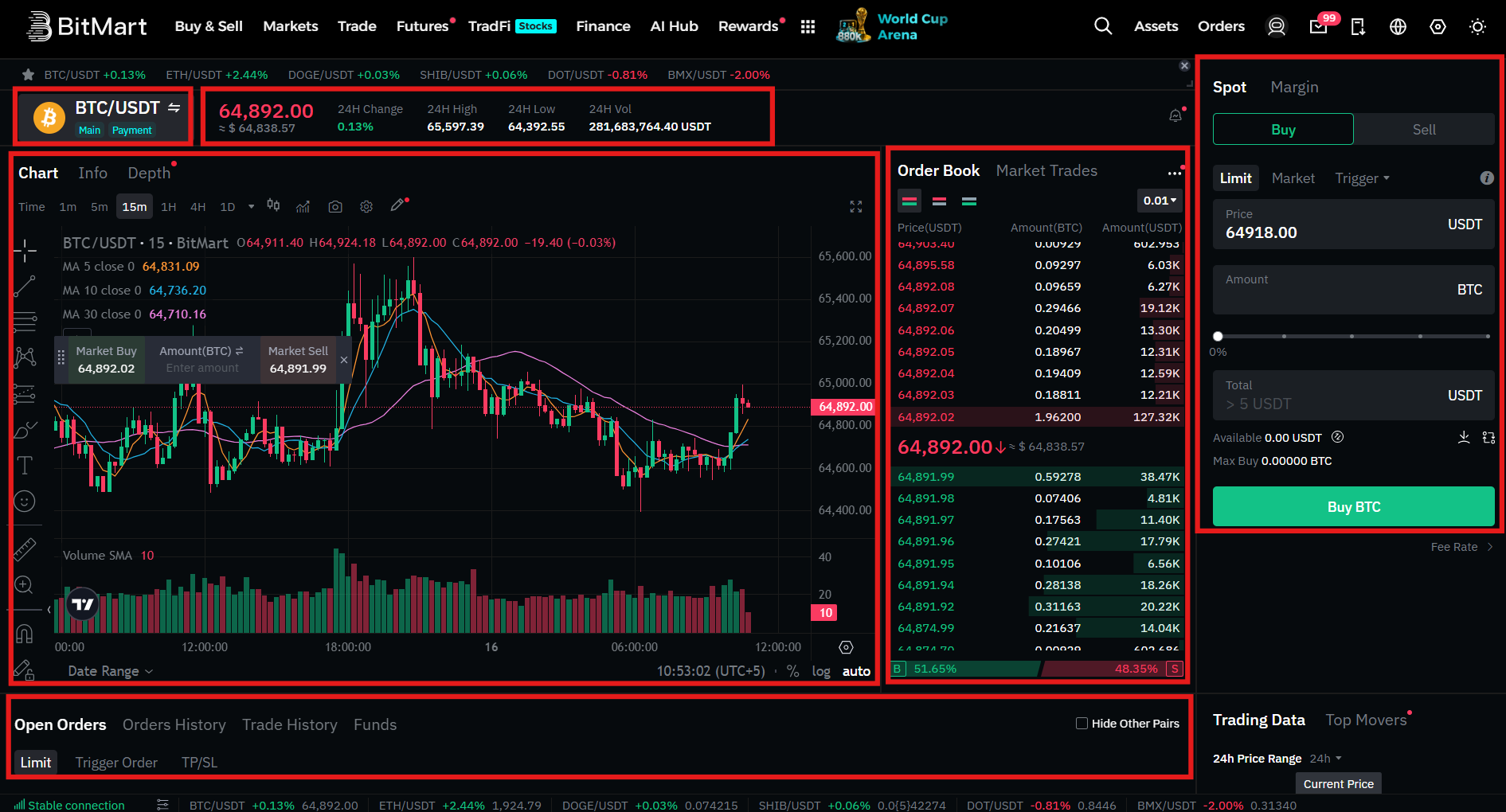
3: Place an order:
Select a trading pair from the top-left dropdown or search bar (this example uses BTC/USDT).
To buy BTC:
- Click on Buy.
- Select the order type. For this example, a Limit Order is selected.
- You can see the current price of the selected order.
- Enter the order amount, or you can use the percentage bar.
- You will see the total amount in USDT that you will spend to buy BTC.
- Review the order details and click on Buy BTC.
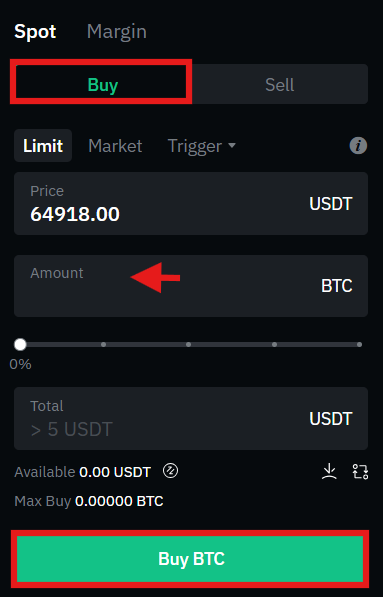
To sell BTC:
- Go to the order panel and click on Sell.
- Select the order type. For this example, a Limit Order is selected.
- You can see the current market price of BTC.
- Enter the order amount or select a percentage of BTC that you want to sell using the percentage bar.
- You will see the total amount received in USDT.
- Review the details and click on Sell BTC.
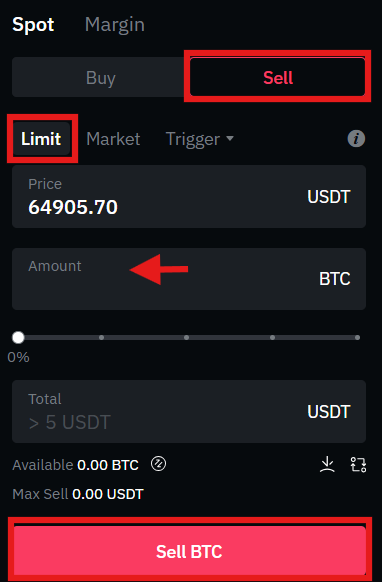
How to Start Futures Trading on BitMart?
Futures trading lets you speculate on price movement using leverage, meaning you control a larger position than your actual capital would normally allow. BitMart offers 460+ perpetual futures contracts with leverage up to 200x on eligible markets.
Note: Leverage magnifies both gains and losses. At high leverage, even a small adverse price move can liquidate your entire position. Futures trading is not beginner-friendly; if you're new to crypto, it's worth mastering spot trading first and using leverage only if you fully understand it and can afford to lose it.
There are two types of Future contracts offered on the BitMart Exchange:
- USDT-Margined Futures: These are linear contracts that are settled either in USDT or USDC. They have different expiration dates, including perpetual and quarterly.
- Coin-Margined Futures: These contracts use the underlying digital asset as the settlement currency instead of stablecoins. Trading them could be complex since market volatility directly affects profit and loss calculations.
To start Futures trading on BitMart, you need to follow the following steps:
1: Go to the BitMart homepage, navigate to the Futures tab, and select the Futures contract you want to trade from the dropdown menu. For this example, USDT-Margin is selected.
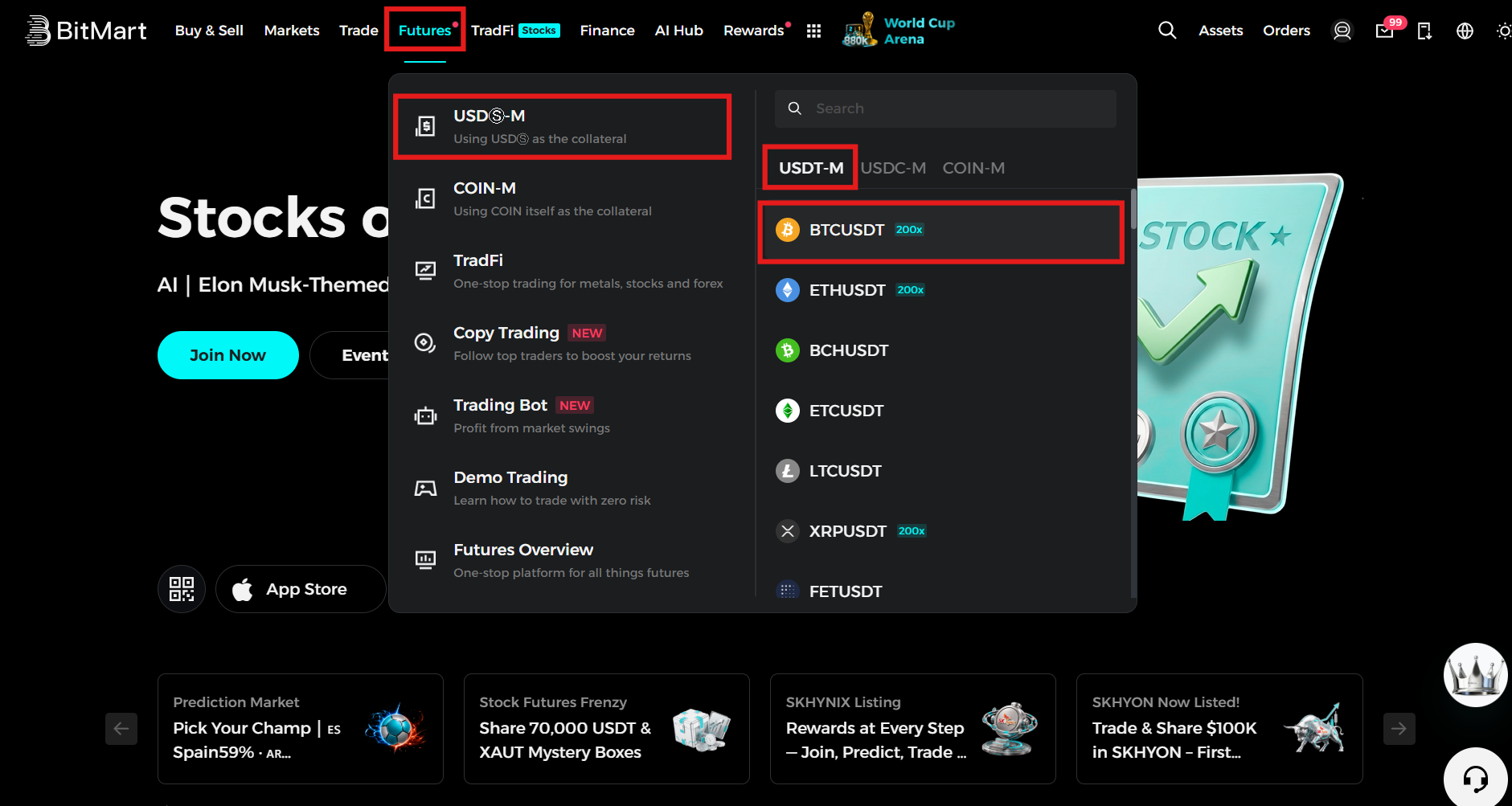
To open a position:
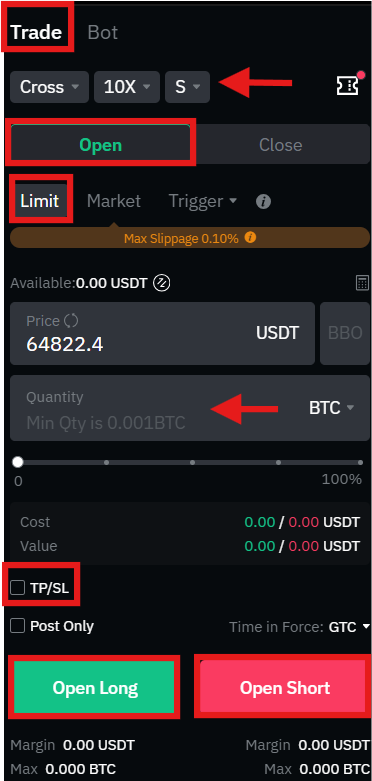
- Select a trading pair. This example uses the BTC/USDT perpetual contract.
- Select a margin mode: Cross (shares available funds across all open positions) or Isolated (locks a fixed margin to one position).
- Select your leverage. Higher leverage increases both potential gains and potential losses: choose carefully.
- Click Open in the order panel.
- Select an order type (this example uses Limit Order).
- Check the current price.
- Enter the order amount.
- Optionally add TP/SL to the order.
- Review the details and click Open Long or Open Short to execute.
To close a position:
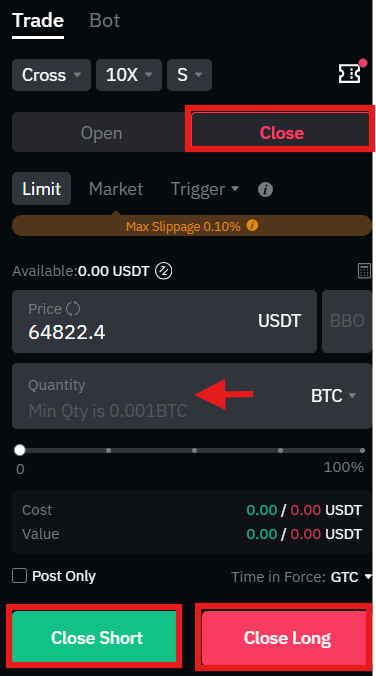
- Click Close in the order panel.
- Check the current price.
- Enter the amount to close or use the percentage bar.
- Click Close Short or Close Long to confirm.
How to Make a Withdrawal on BitMart?
BitMart offers an on-chain withdrawal method for sending funds from your account to an external wallet. It's straightforward, but it's also the step where a small mistake like the wrong network can permanently cost you funds.
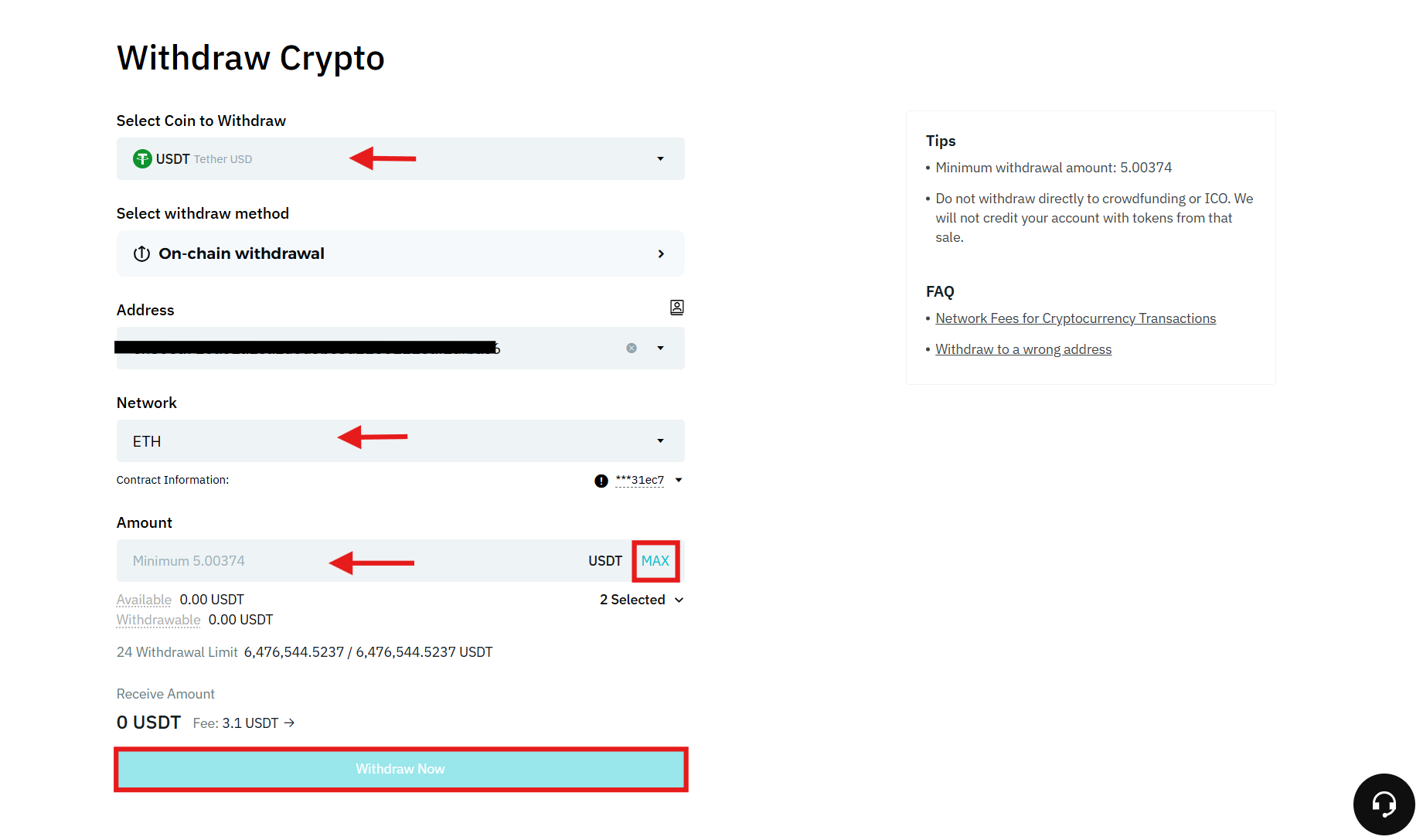
To make a withdrawal, click Assets on the homepage, tap Withdraw, and follow these steps:
- Select the crypto you want to withdraw, such as USDT.
- Select the withdrawal method.
- Enter the withdrawal address.
- Select the withdrawal network.
- Enter the order amount or click Max to withdraw all funds.
- Review the details and click Withdraw Now.
- Enter the verification code sent to your email and your Google 2FA code to authorize the withdrawal.
How to verify a withdrawal address: Always copy-paste addresses instead of typing them and double-check the first four and last four characters against the source you copied from; some malware swaps clipboard contents to a scammer's address. For any withdrawal larger than you can afford to lose, send a small test amount first and confirm it arrives before sending the rest.
BitMart Trading Fees
BitMart has a competitive fee structure designed to offer maximum benefits to users. The trading fees on the platform are calculated based on the 30-day cumulative trading volume across its Spot, Futures, and Margin markets. In addition, users who trade the native token of BitMart, BMX, can get an additional 25% off on trading fees.
Let’s explore the trading fees in detail.
Spot Trading Fees on BitMart
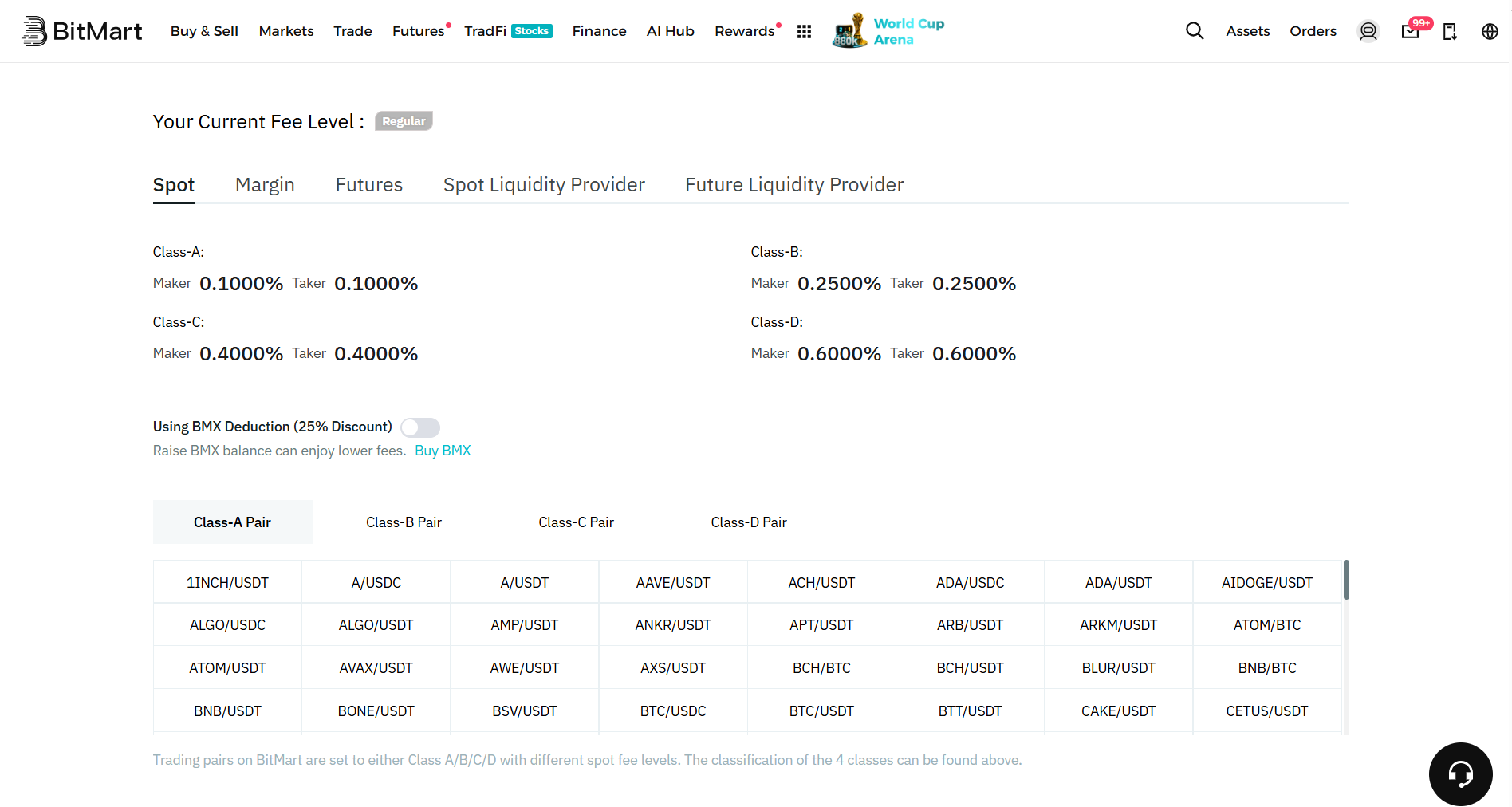
The Spot trading fee structure on BitMart is divided into four classes: A, B, C, and D. Popular tokens like Bitcoin (BTC) and Ethereum (ETH) fall in the A-Class, while other cryptocurrencies fall in the B, C, and D categories. In addition, if you are a VIP member on the platform, the Spot trading fees vary according to your VIP level.
You can check the regular (Level 1) maker and taker fees in Spot trading on BitMart in the following table:
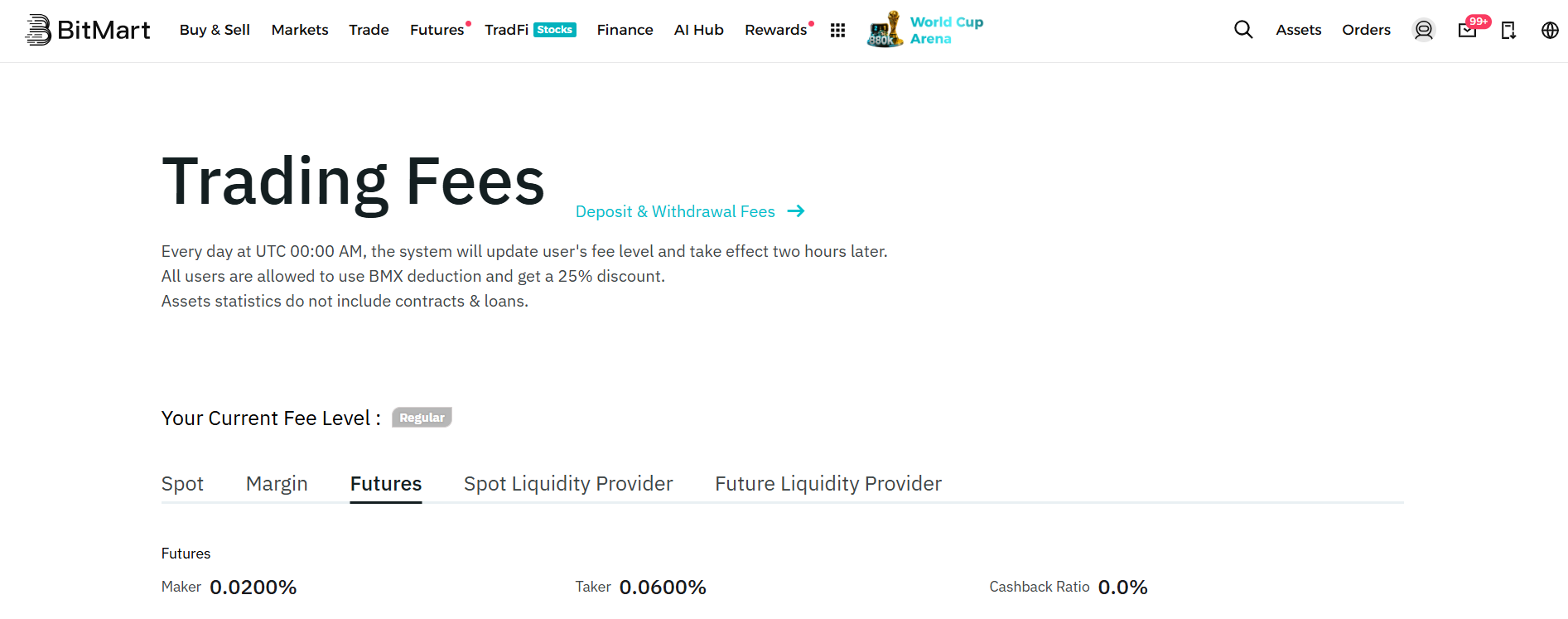
Futures Trading Fees
BitMart charges the following maker and taker fees in futures trading:
- Maker Fee: 0.02%
- Taker Fee: 0.06%
BitMart Security: What to Know
BitMart was the victim of a security breach in 2021, during which the exchange lost nearly $200 million. Since then, the platform has implemented a set of robust security measures to prevent such incidents in the future.
Most of the users’ funds on BitMart are stored in cold wallets, which significantly reduces the chances of online threats. The platform also uses several safety measures, such as 2FA and KYC procedures, to minimize the risk of fraud. In addition, it regularly conducts security audits to prevent hacks.
BitMart runs an advanced Bug Bounty Program to reward developers and security researchers who identify and report any possible vulnerabilities or bugs in its system. Such initiatives encourage everyone to help manage the platform's security while earning rewards.
Common Errors and Fixes
| Problem | Likely Cause | Fix |
| Deposit never arrives | Wrong network selected, or address copied incorrectly | Confirm the network matches on both sending and receiving platforms. If the network was correct, contact support with your transaction hash. Do not resend. |
| Withdrawal stuck or delayed | Network congestion, or additional security review triggered | Check the transaction hash on a block explorer for the relevant network. Large or first-time withdrawals may trigger manual review, which adds delay but is a normal safety measure. |
| Can't withdraw the full amount you expect | KYC level limit reached, or minimum withdrawal threshold not met | Check your current KYC level and daily/monthly limits under Verification, and confirm the amount clears the minimum withdrawal threshold for that asset. |
| Order won't fill | Limit price is too far from the current market price | Adjust your limit price closer to the current market price, or switch to a market order if you need immediate execution. |
| Position liquidated unexpectedly | Leverage too high relative to available margin, or no Stop-Loss set | Use lower leverage, maintain more margin buffer, and set a Stop-Loss on every leveraged position. |
BitMart: Pros and Cons
| Pros | Cons |
| 1,700+ supported cryptocurrencies | Higher fees for card and third-party fiat purchases |
| 0.02% / 0.06% futures maker/taker | No real-time proof-of-reserves system published |
| Advanced order types across spot and futures | Higher fees for low-cap assets |
| Copy trading for hands-off exposure to futures strategies | Experienced a major security breach in 2021 |
| Cold-storage, KYC, 2FA, and audit security measures | Geographic restrictions in several jurisdictions |
Next Steps
If you have followed this guide from the top, you should now have a verified BitMart account with 2FA enabled and a clear picture of how deposits, trading, and withdrawals work.
From here, follow these steps:
- Start with a small spot trade before moving to leveraged products, even if you are already familiar with trading on other exchanges.
- Bookmark BitMart's official fee and verification pages so you can always check the current numbers rather than relying on memory.
- Set up price alerts or use BitMart's TradingView charting tools to build a routine before committing meaningful capital.
- If you plan to trade futures or margin, decide your risk limits (position size, leverage cap, Stop-Loss rules) before you place your first leveraged trade: not after.
- Consider moving long-term holdings to self-custody once you are done actively trading them.
Closing Thoughts
BitMart is a reputable mid-tier cryptocurrency exchange that offers over 1,700 tradable assets, deep futures leverage, margin trading, and a copy trading feature that lowers the barrier to entry for leveraged strategies. Before you trade, verify fees directly on BitMart and ensure 2FA is enabled and the verification process is complete.
BitMart supports both spot and advanced futures trading strategies. If you skip 2FA, make guesses for withdrawal networks, or over-leverage a futures position, the same platform can turn a manageable mistake into an unrecoverable one.
Frequently Asked Questions (FAQs)
Is BitMart available to residents of the U.S.A.?
Yes, with certain limitations on the global BitMart platform. In addition, BitMart US launched in early 2026 as a separately licensed, fee-free platform specifically for American users: check which version applies to your state.
In how many countries can BitMart be accessed?
BitMart serves users in 160+ countries, subject to its Geographic Restrictions policy, which excludes jurisdictions such as Cuba, Iran, North Korea, and a handful of others.
What are futures trading fees on BitMart?
BitMart charges a 0.02% maker fee and a 0.06% taker fee in futures trading.
How many KYC levels are offered on BitMart?
BitMart offers two levels of KYC that users can complete based on their trading preferences.
Can I buy crypto with fiat currency on BitMart?
Yes, through P2P trading, credit/debit card purchases, and third-party payment providers like MoonPay and Banxa. Card and third-party purchases typically cost more than P2P trades or direct crypto deposits.
Please view the full disclaimer at: https://themoonshow.com/disclaimer

WEEX Exchange Tutorial 2026: A Complete Step-by-Step Guide
WEEX is not among the largest cryptocurrency exchanges. It does not match the trading volume of...
How to Use Bybit in 2026 - Step-by-Step Beginner Guide
Cryptocurrency trading continues to evolve with time. Today, crypto users can access several ex...

MEXC Exchange Tutorial 2026: A Complete Step-by-Step Guide
MEXC lists over 3,000 tokens, charges zero maker fees on both spot and futures, and offers leve...