Bybit App Tutorial 2026 – A Step-by-Step Guide for Beginners
Bybit is a cryptocurrency trading platform that focuses on usability and reliability. The platform features an advanced mobile app that enables users to trade cryptocurrencies on the go. It saves them the hassle of going to the desktop version all the time and offers them the convenience of buying and selling digital tokens directly from their mobile phones.
The Bybit App has been designed to provide a seamless trading experience for crypto enthusiasts. The app offers all the major features offered on the desktop version of the platform, including deposits and withdrawals, trading cryptocurrencies, advanced order types, copy trading, and more. Additionally, the app boasts enhanced security to ensure a consistent and safe environment.
This tutorial of the Bybit App will guide you through all its features in 2025, from account setup to placing a trade. You will learn how to install the app, secure your account, and use advanced trading functionalities and risk management tools. By the end of this tutorial, you will be equipped with all the necessary information to use the Bybit App and trade confidently at any time.
Your $30,000 bonus + 10% discount are waiting on Bybit! Sign up and claim these rewards before they're gone. Time's ticking!
Let’s begin this tutorial so you can use the app effectively.
Understanding Bybit
Bybit is a leading cryptocurrency trading platform founded by Ben Zhou in 2018. The cryptocurrency exchange is headquartered in the United Arab Emirates (UAE) and is used by over 70 million users worldwide. The platform has been ranked among the world’s top 10 cryptocurrency exchanges due to several key factors, including deep liquidity, advanced trading features, robust security measures, and more.
With time, Bybit has played a crucial role in the development of the Web3 ecosystem. The platform offers top blockchain projects for the maximum convenience of its users. Additionally, it provides a wide range of advanced trading tools, making it a top choice for cryptocurrency users.
| Read Our Bybit Exchange Review | Read Our Bybit Exchange Tutorial |
The cryptocurrency exchange offers a user-friendly mobile application. The Bybit App has been designed to provide a hassle-free trading experience for traders, offering a platform to trade digital assets with just a few clicks. The app offers a range of features, including deposit and withdrawal methods, advanced trading tools, various order types, trading charts, and more.
Bybit provides its users with deep liquidity, ensuring quick trade execution and minimal price slippage, even for large orders. It gives users the confidence to enter or exit a position precisely when required. The platform’s daily average trading volume exceeds $36 billion, a testament to its unwavering market dominance and user trust.
The cryptocurrency exchange offers access to all digital assets listed on its website through the app. Bybit supports more than 700 digital tokens and over 300 trading pairs. Some of the popular available tokens include Bitcoin (BTC), Ethereum (ETH), Solana (XRP), Tether (USDT), and more.
Users can start Spot trading to buy and sell digital currencies on the app. It allows you to start Futures trading with up to 100x leverage on USDT, USDC, and Inverse contracts. Additionally, the Bybit App is highly protected with advanced safety features to ensure a safe trading environment.
How to Sign Up on the Bybit App?
The process of signing up for the Bybit app is straightforward and takes only a few minutes. To complete the sign-up process on the app, follow the steps listed below.
Start trading on Bybit today and get 10% off fees PLUS up to $30,000 in bonuses! Sign up today and start saving while you earn. This exclusive offer won't last - claim yours now!
1. Download the Bybit App
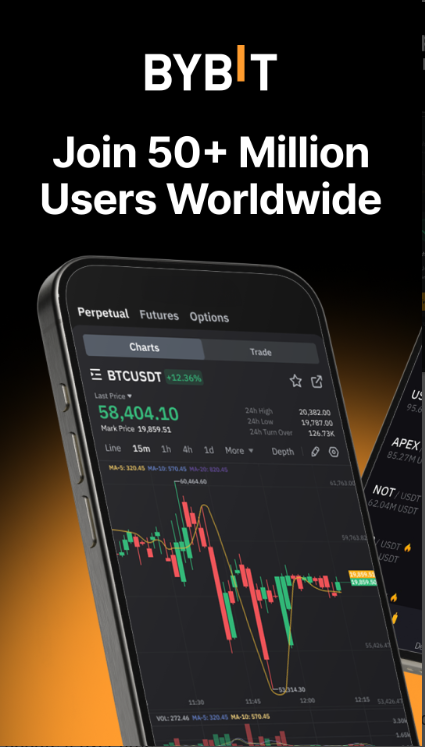
The first step is to download the Bybit App on your mobile device. If you are an Android user, head to the Google Play Store. On the other hand, if you are an iPhone user, head to the App Store. Type Bybit in the search bar, and download the mobile app.
2. Launch the app
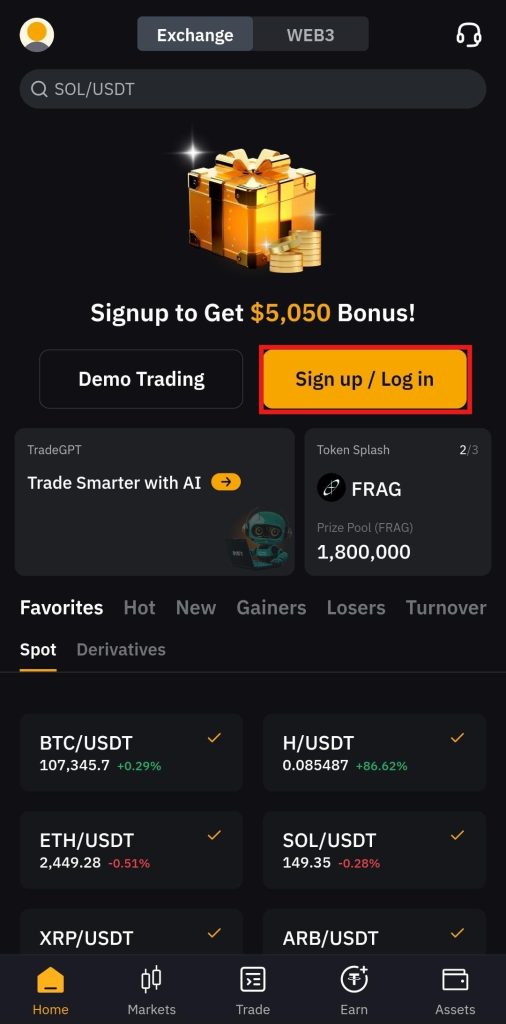
After downloading the app, launch it on your mobile device and begin the registration process. On the home screen, click the "Sign up / Log in" tab, and it will direct you to the registration page.
3. Enter your email or mobile number
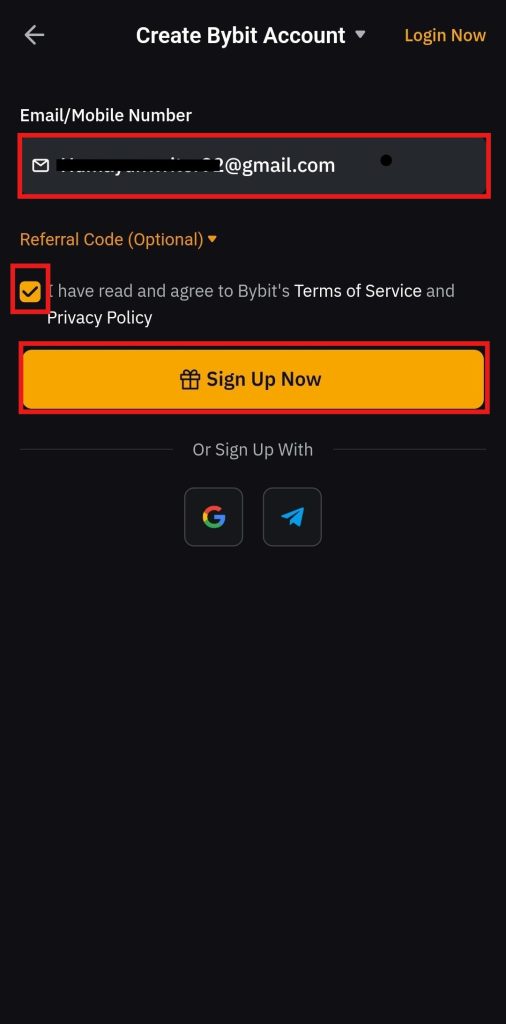
Bybit offers several sign-up options on the mobile app: email address, mobile number, Google ID, or Telegram ID. For this example, an email address is selected. Enter your email address, agree to the Bybit “Terms of Service and Privacy Policy,” and click Sign Up Now.
4. Enter the verification code
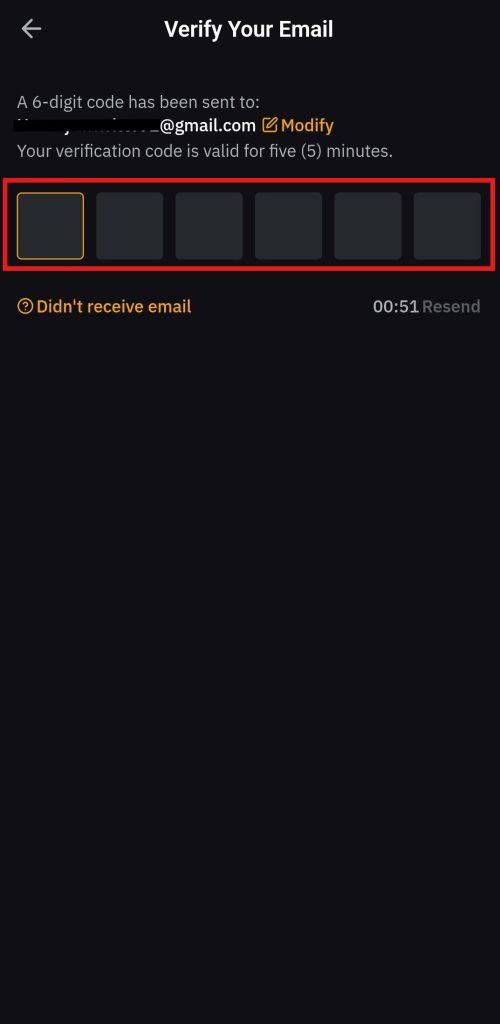
Provide the six-digit verification code you received at your email address to proceed with the sign-up process.
5. Create a strong password
Next, you need to create a strong password that includes upper-case and lower-case letters, symbols, and special characters. Once done, click on the “Sign Up Now” tab.
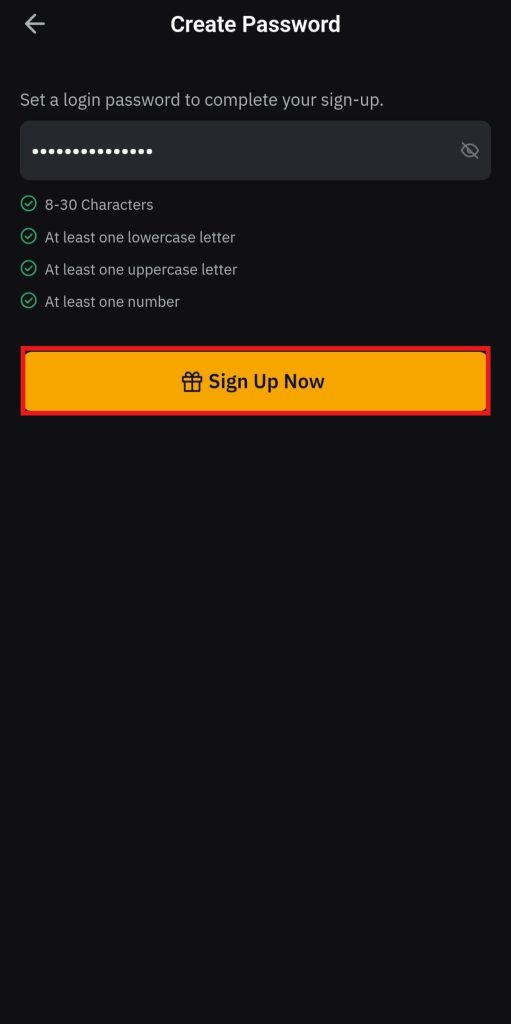
Once these steps are completed, you will be directed to complete the Know Your Customer (KYC) procedure on the application. You can skip this procedure and still enjoy limited access to the app’s features. However, to get complete access to all features on the platform, you need to complete the KYC procedure.
Know Your Customer Procedure (KYC) on the Bybit App
Bybit is a centralized cryptocurrency exchange that requires mandatory KYC procedures for all users. After completing the sign-up procedure on the app, users are required to complete the KYC procedure to access all features on the platform.
You need to follow these steps to complete the KYC procedure on the Bybit app:
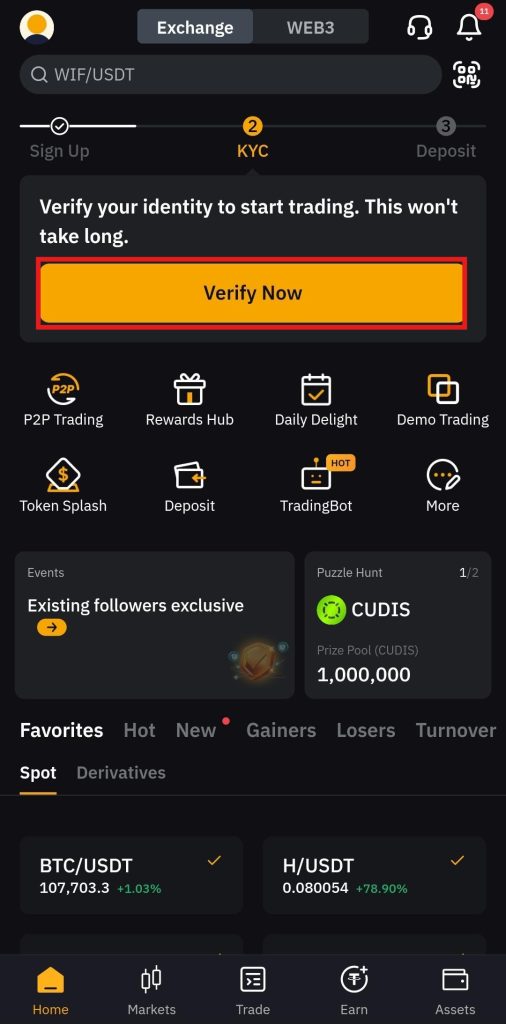
1. Visit the main screen
Go to the main screen of the Bybit app and click "Verify Now."
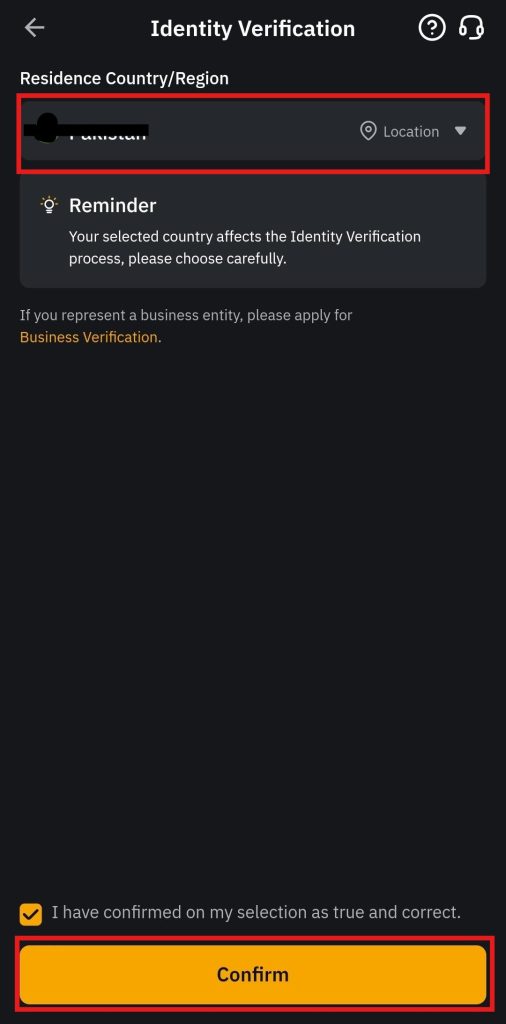
2. Select the country of residence
Select your country of residence and click Confirm.
3. Submit proof of identity
Next, provide proof of identity documents. Bybit accepts national identity cards, passports, driver’s licenses, and residence permits as valid identification documents. You are also required to provide a selfie. For this, click on Verify.
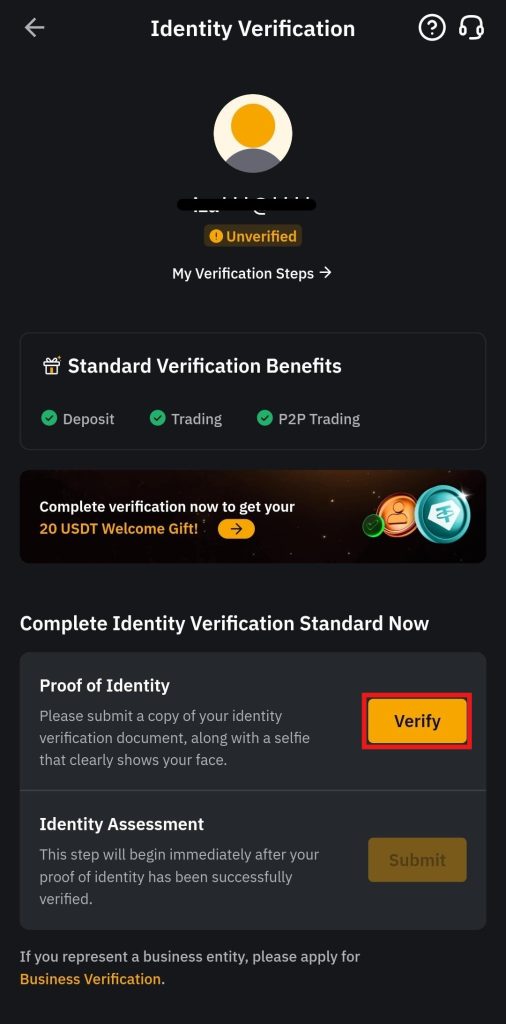
Select the identity document, follow the instructions, and click on Continue.
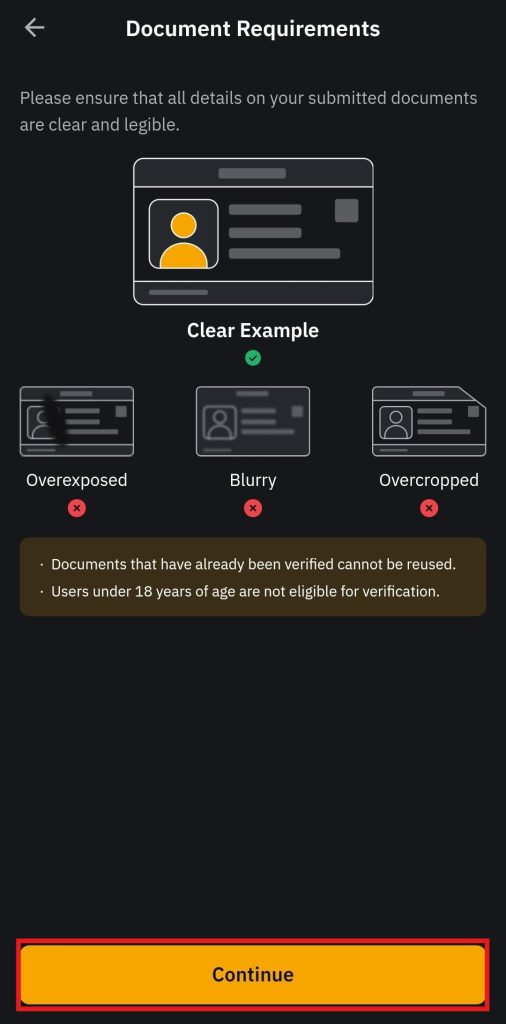
You will be directed to the web page on the mobile app where you need to provide the verification document. Click on Next.
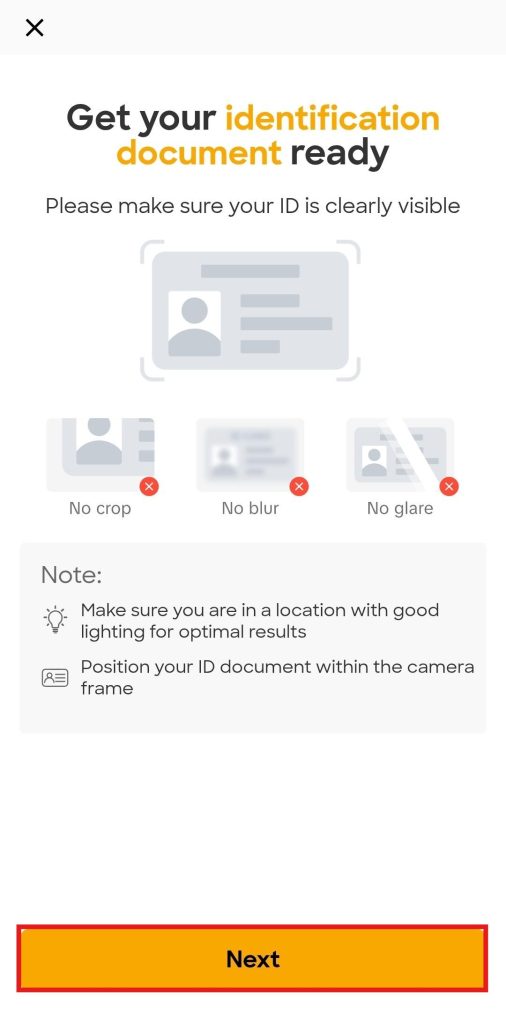
After this, take a picture of the identity documents and a selfie. Once your identity is verified, you will receive a notification from the system within 24 hours confirming that the KYC procedure has been completed. If the process is unsuccessful, you will need to restart it.
How to Make a Deposit on the Bybit App?
Bybit offers several deposit methods to its users on the mobile app, including crypto and Fiat deposits. It gives you the convenience of purchasing digital tokens with ease and trading them.
Listed below are the ways through which you can deposit funds into your account on the Bybit App.
Crypto Deposits
To deposit cryptocurrencies on the Bybit App, you need to follow these steps:
- Click Deposit Now on the home screen.
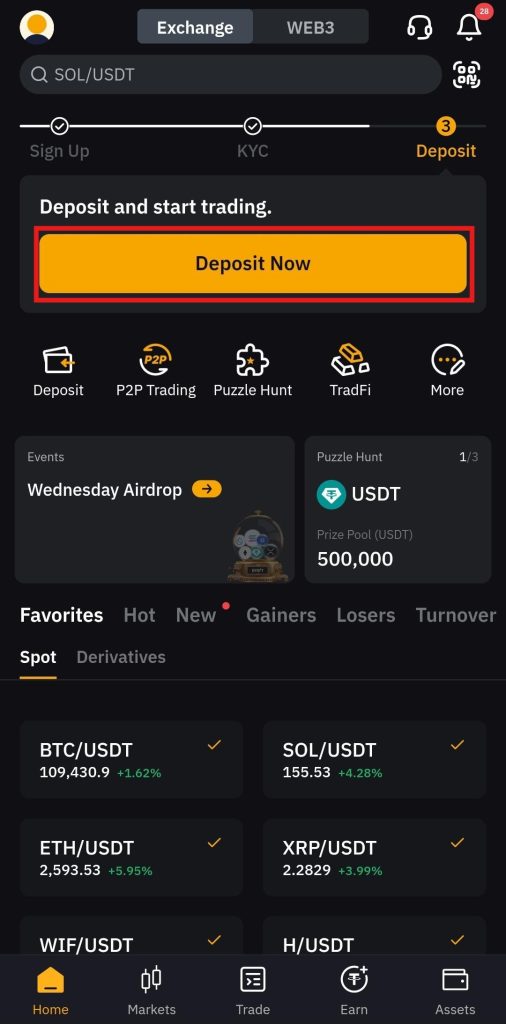
- Next, select the Deposit Crypto option.
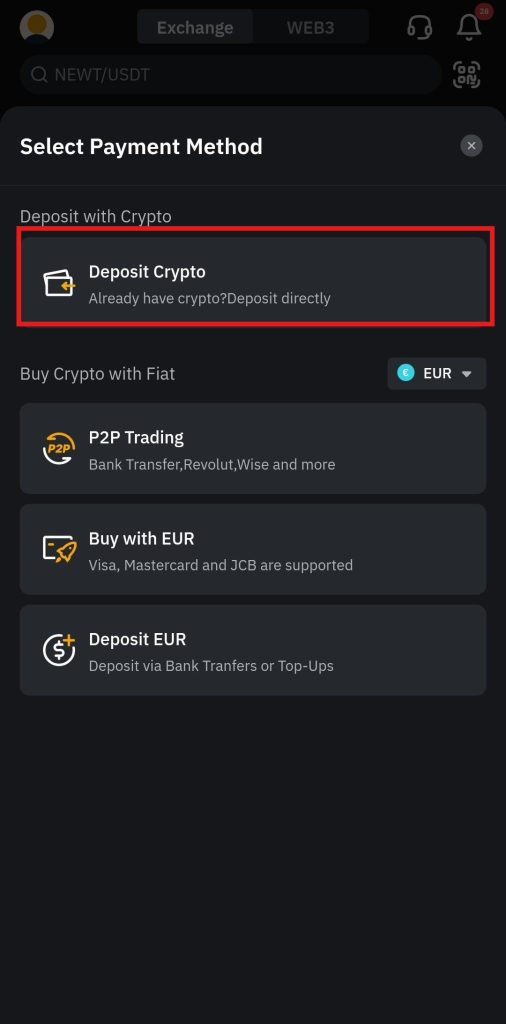
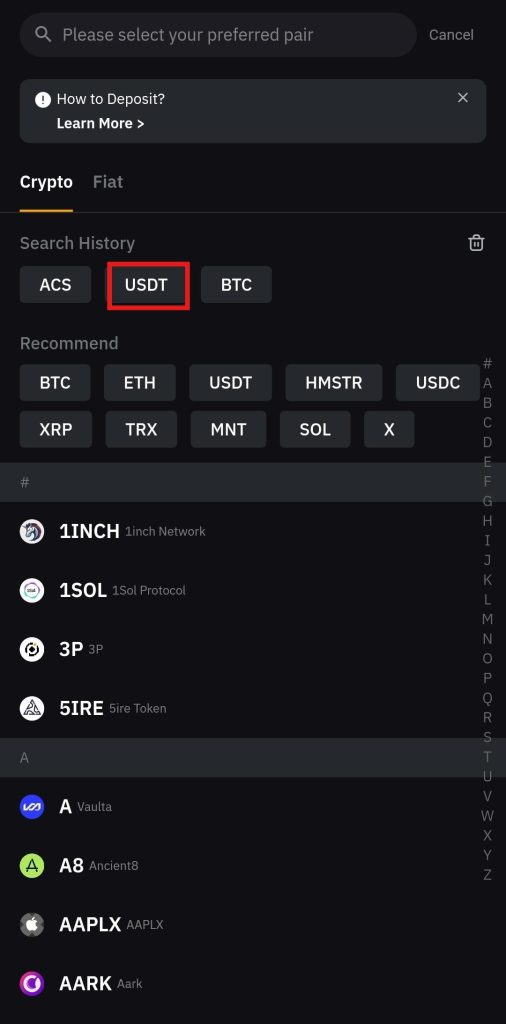
- Select the cryptocurrency you want to deposit, for example, USDT.
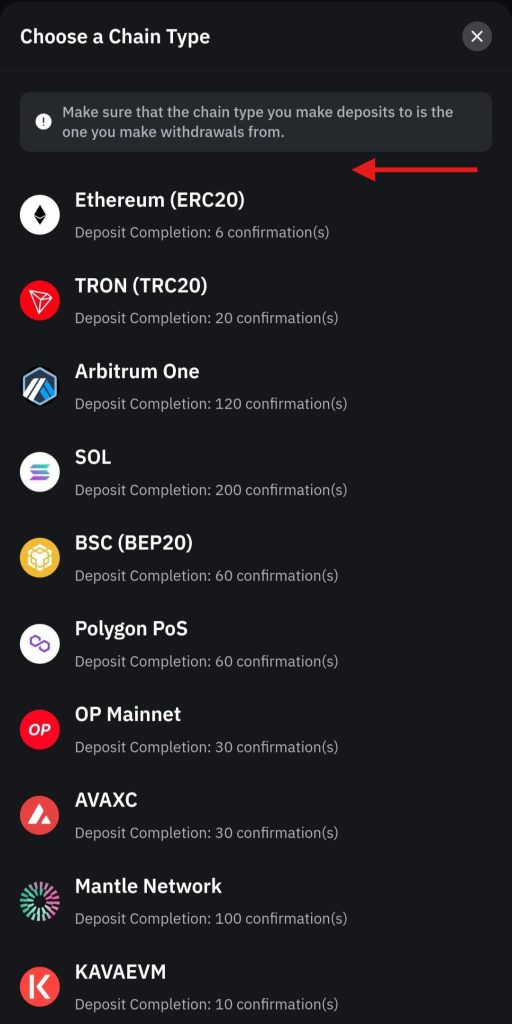
- Select the chain type you want to use for the deposit. Ensure that you select the same chain type as the one from which you make withdrawals.
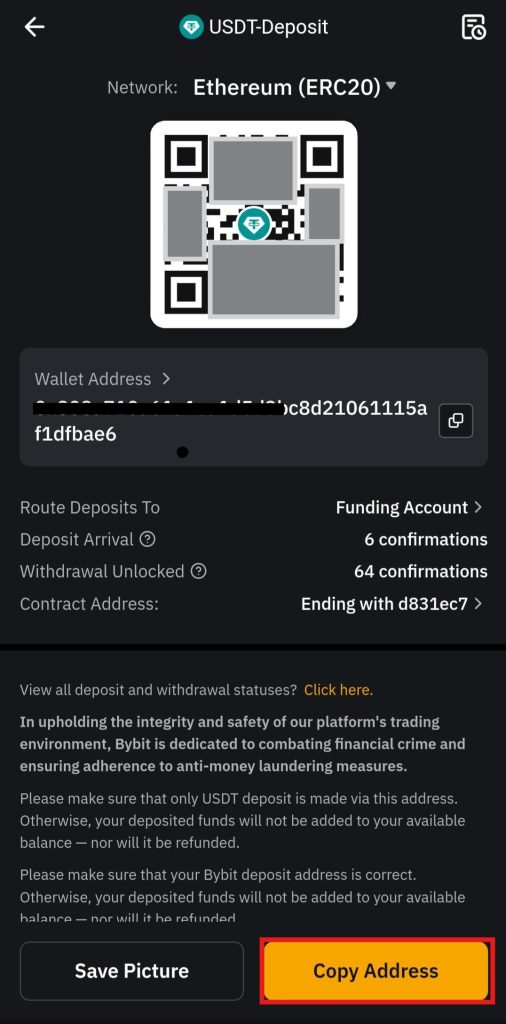
- Click Copy Address to copy the deposit wallet address and paste it into the wallet from which you are sending the cryptocurrency. Otherwise, you can scan the QR code. You will receive the deposit in your Funding Account.
Fiat Deposits
You can deposit Fiat currencies on the Bybit App. The platform supports around 23 Fiat currencies for the maximum convenience of users.
You need to follow these steps:
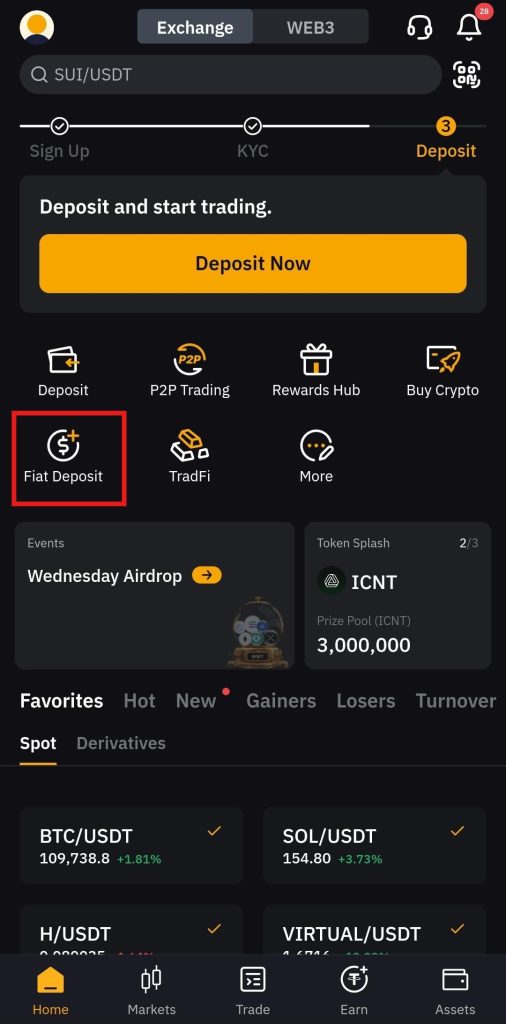
- On the home screen, click Fiat Deposit.
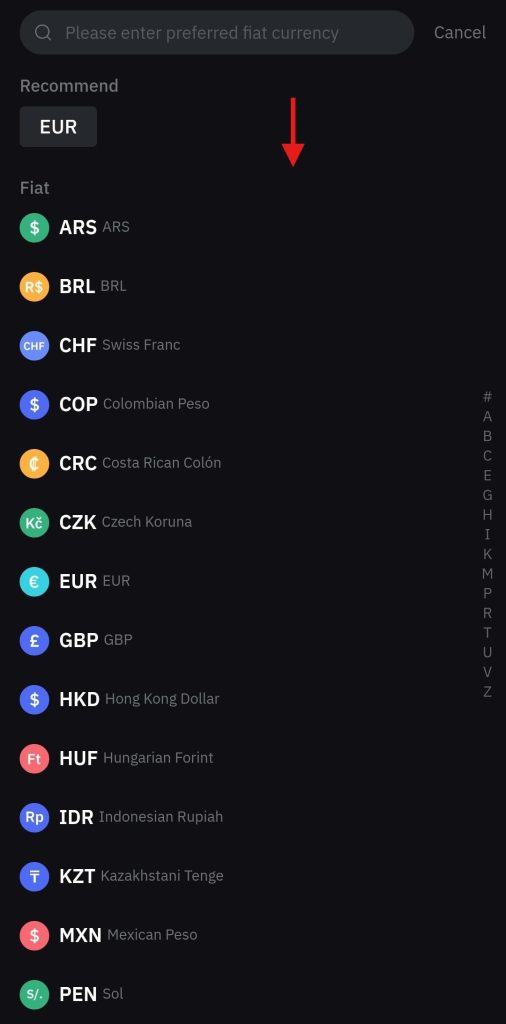
- Select the Fiat currency you want to spend, for example, the Euro (EUR).
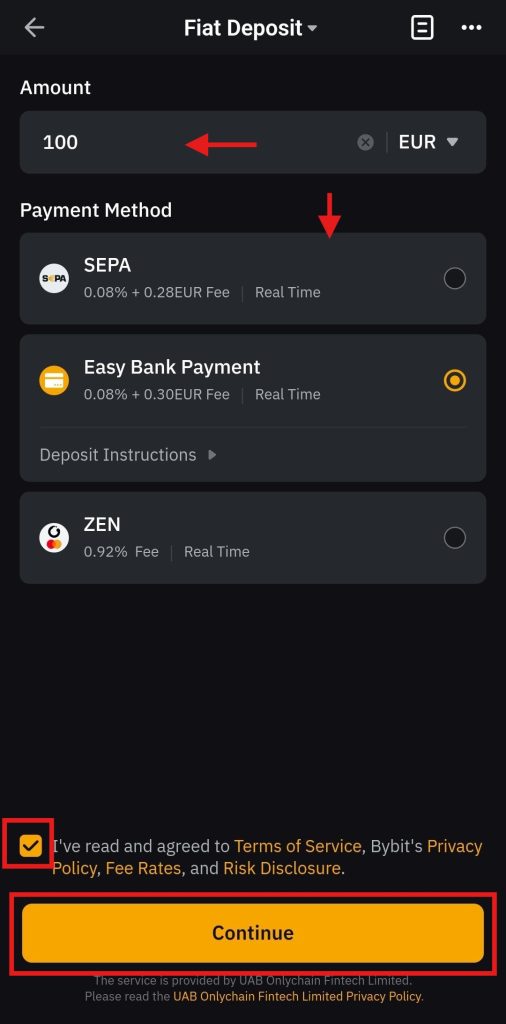
- Enter the order amount, select a payment method, agree to the terms of service, and click Continue to complete the transaction.
How to Buy Crypto with Fiat on the Bybit App?
Bybit enables its users to purchase cryptocurrencies using Fiat currencies through the mobile app's One-Click Buy and P2P trading features.
One-Click Buy
On the Bybit App, you can buy digital tokens with fiat currencies through the One-Click Buy option.
You need to follow the following steps:
- Click Buy Crypto on the home screen.
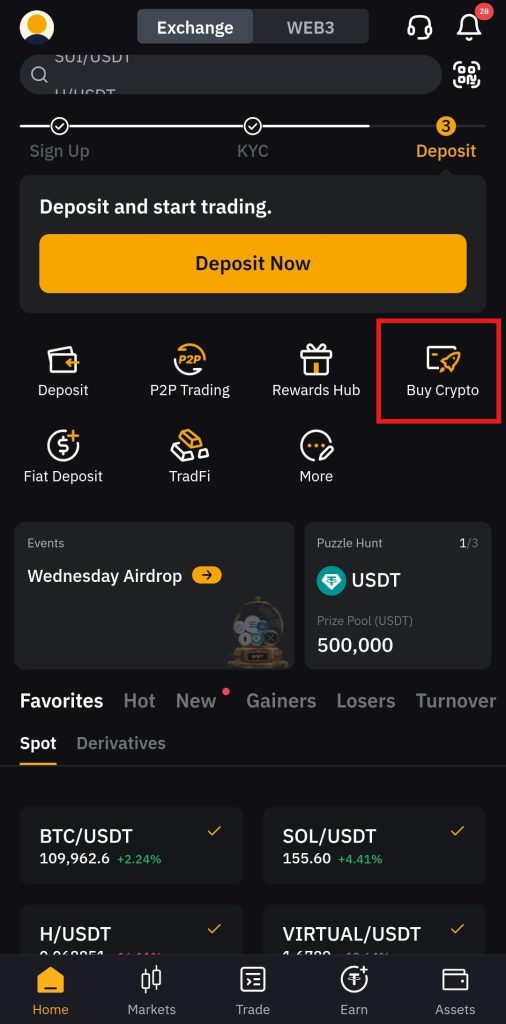
- Select the cryptocurrency you want to buy, for example, USDT.
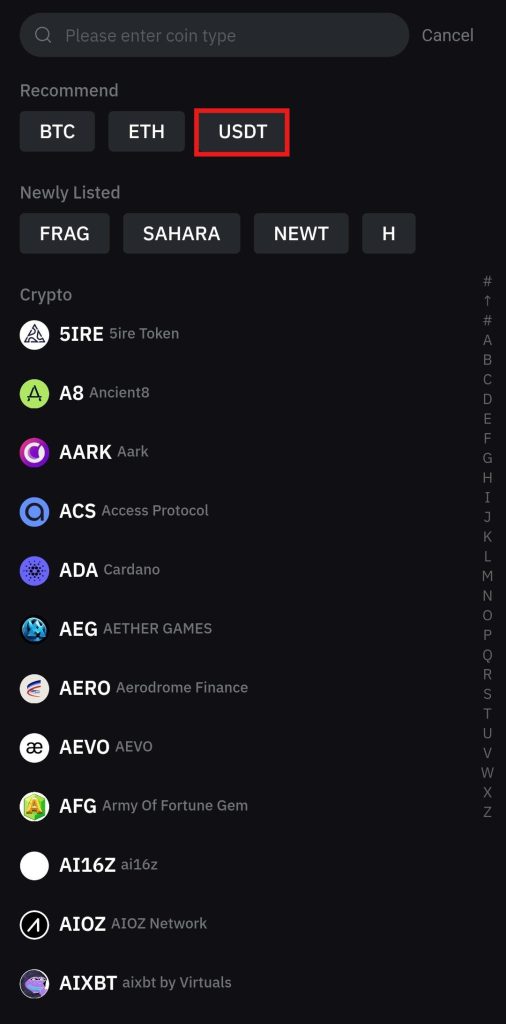
- Select the Fiat currency you want to spend, for example, USD.
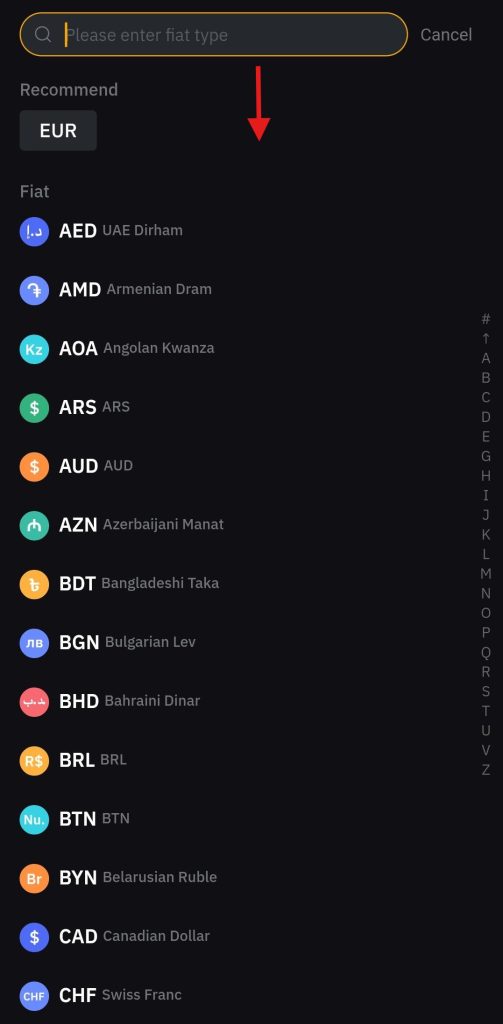
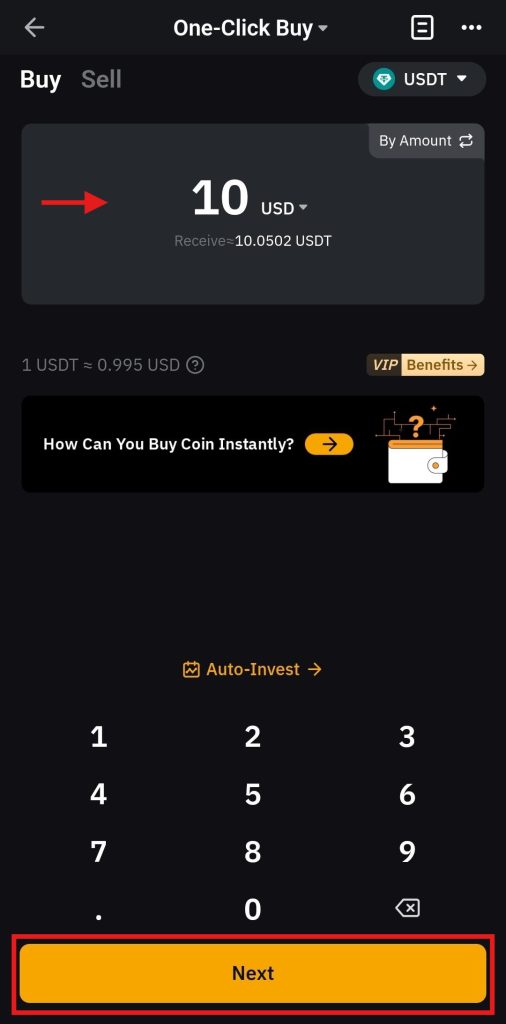
- Enter the order amount, for example, 10 USD, and click Next to proceed. You will see the total number of tokens received of the selected cryptocurrency.
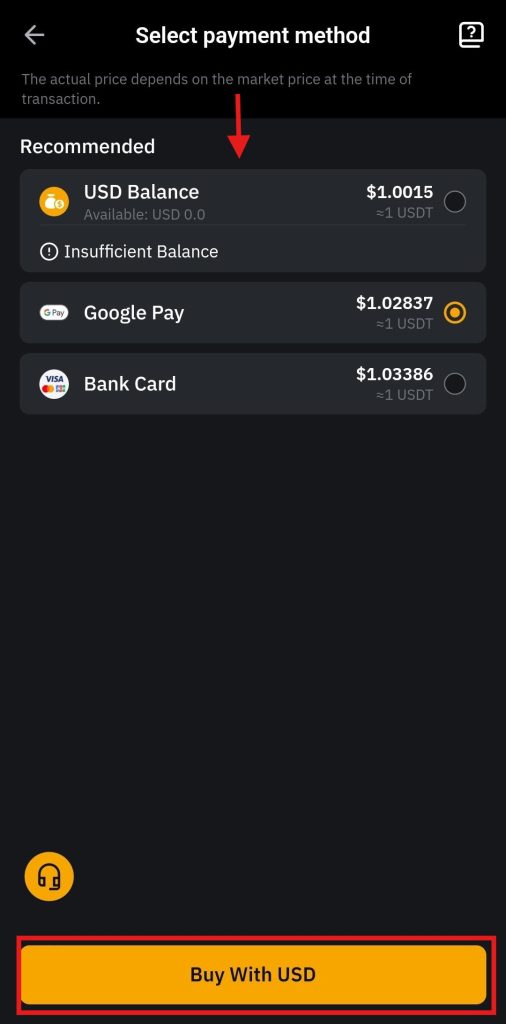
- Select a payment method, such as Google Pay, Debit Card, Master Card, and more. Once done, click Buy With USD.
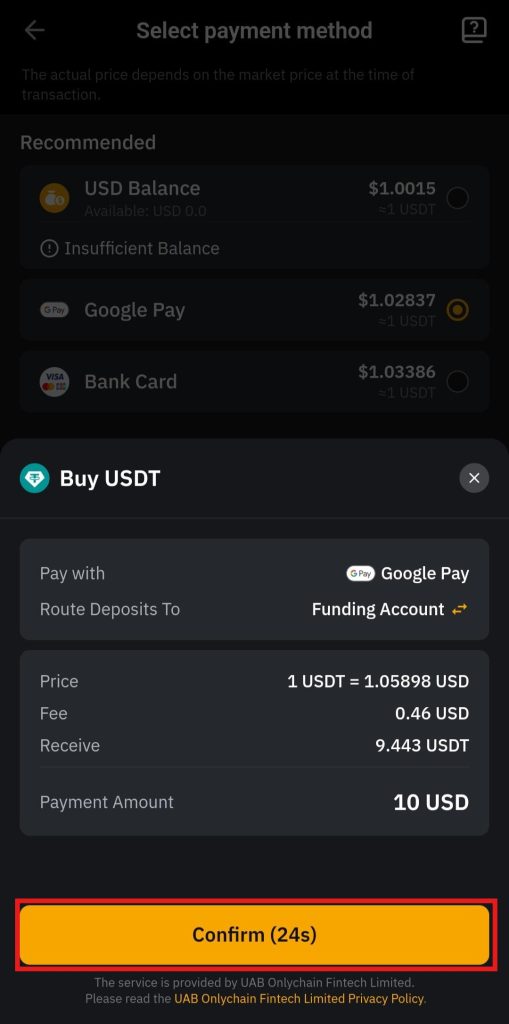
- Click on Confirm to complete the transaction. It will then take you to the confirmation window, where you can buy the digital token.
P2P Trading
Peer-to-Peer (P2P) trading is a unique feature offered by Bybit on its app. It allows users to buy cryptocurrencies with Fiat currencies directly from verified sellers.
To start P2P trading:
- Click P2P trading on the home screen.
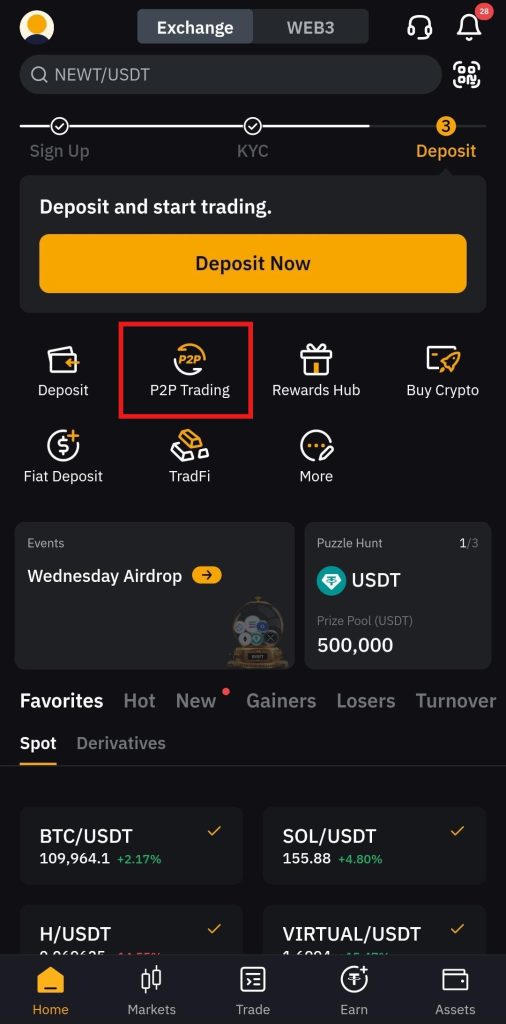
- Select the Fiat currency you want to spend, for example, the Euro (EUR). Next, select a verified ad to choose the merchant and click Buy. Do not forget to check the offered rate.
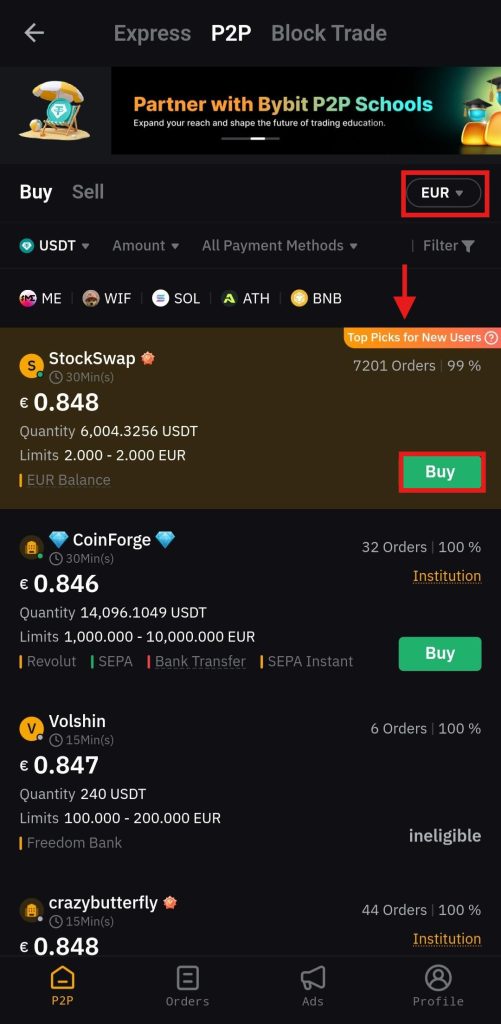
- Next, enter the order amount and click on Buy to complete the transaction.
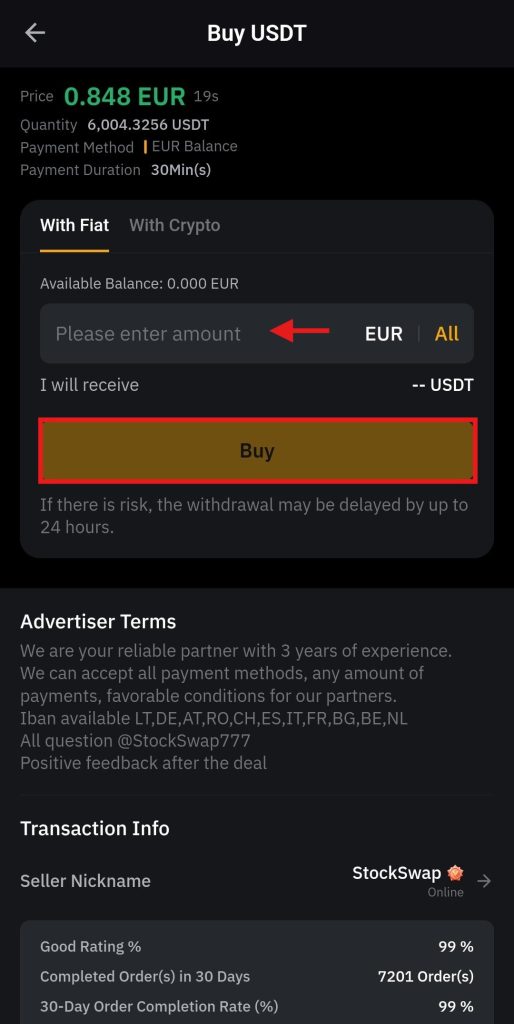
Remember, Bybit does not charge any fees for P2P transactions. Once the seller gets the payment, you can check your balance in the Funding Account.
Order Types on the Bybit App
Bybit offers a range of basic and advanced order types on the app that users can utilize when placing a trade. You can select any of these order types and start trading on the mobile app.
The following order types are offered on the app:
1. Limit Order
Crypto traders use a limit order to buy or sell a digital asset at a specific price.
Example: A trader is looking to buy one Bitcoin (BTC) at $100,000 and places a buy-limit order with the targeted price. The order will only execute once BTC reaches $100,000.
2. Market Order
You can use market order type to buy or sell a cryptocurrency at the current market price.
Example: Suppose one Bitcoin (BTC) is trading at $100,000. You place a market order to buy BTC, and it will execute immediately at the current market price.
3. TP/SL Order
Crypto traders can utilize the Take-Profit/Stop-Loss (TP/SL) order to automatically achieve their target profit level and limit losses.
Example: A trader buys one Ethereum (ETH) at $2,300 and sets a take-profit target at $2,600 and a stop-loss at $2,200 to limit losses. The order will execute if any of these conditions are met.
4. OCO Order
An OCO, One-Cancels-the-Other, is an order type that you can use to combine two order types: stop-limit and limit. If one of these orders is filled, the other is automatically cancelled.
Example: A trader purchases one Bitcoin (BTC) at $100,00, and sets this order with a take-profit target at $102,000 and a stop-loss at $99,000. When any of these conditions is met first, the order will execute, cancelling the other condition.
5. Conditional Order
You can use this order type to automate your trading strategy at pre-defined levels.
Example: You want to buy one Ethereum (ETH) at $2,300 when expecting a breakout and place this order. The order will be executed as a market order or a limit order.
6. Trailing Stop Order
This order type offers enhanced risk management by allowing traders to set a dynamic stop-loss on an order, locking in profits and minimizing losses.
Example: A trader buys one Bitcoin (BTC) at $100,000 and places the order to sell it with a $500 trailing stop. If BTC reaches $103,000, the stop price will be $102,500. If the price falls further, the order will be executed to minimize losses.
7. TWAP Order
You can use the Time-Weighted Average Price (TWAP) order to execute large trades in small orders to avoid slippage when the market turns volatile.
Example: A trader seeks to sell 5 Bitcoins (BTC) within an hour without affecting the market and places a TWAP order. The order will execute the complete order in smaller parts, such as selling one BTC every 10 minutes.
8. Iceberg Order
Crypto traders can utilize this order type to break down large orders into smaller ones, thereby minimizing risk. It keeps only a portion of the larger order visible in the order book.
Example: A trader wants to sell 10 Bitcoins (BTC) at $100,00 each and place an Iceberg order. It will only show 1 BTC in the order book until the complete order is executed.
9. Scaled Order
You can use this order type to set a series of limit orders to minimize the impact of market volatility.
Example: A trader sets a scaled order to buy 5 Bitcoins (BTC) with several limits: 1 BTC at $99,000, 1 BTC at $100,000, and 3 BTC at $101,000. The order will execute once the price reaches these targets.
10. Chase Limit Order
Traders can improve profits by maintaining price control when they use this order type.
Example: You want to buy one Bitcoin (BTC) AT $100,000, place this order type, and set the limit price at $1,000. If the price of BTC reaches $101,000, the limit order is updated to $101,500, ensuring that you buy BTC at the best price.
Double your advantage on Bybit: 10% off trades + $30,000 up for grabs! Sign up now and claim these exclusive rewards. Offer expires soon!
Spot Trading Tutorial on the Bybit App
You can start Spot trading on the Bybit app in a hassle-free manner.
To start Spot trading on the app, you need to follow the following steps:
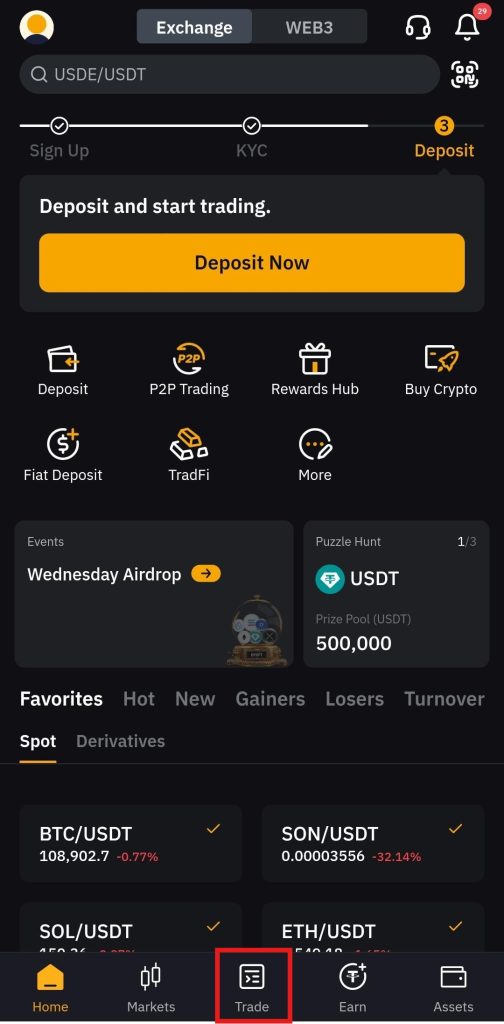
1. Visit the home screen
Navigate to the Bybit app home screen and click Trade.
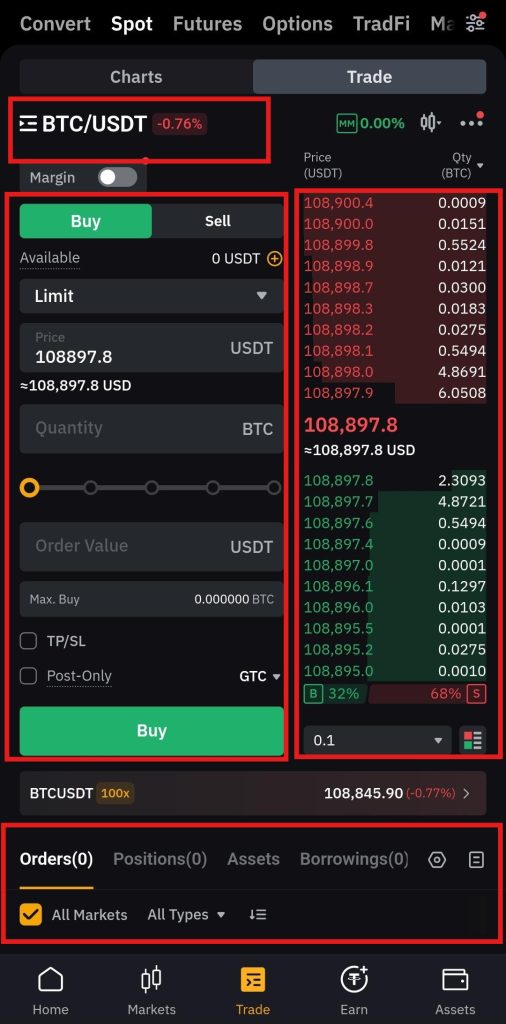
2. Getting familiar with the interface
The trading interface offers the following features:
- The trading pair selector is on the top left of the interface, where you can select a trading pair to trade. In this case, BTC/USDT is selected.
- The order panel is on the left side, where you can place a trade.
- The order book on the right side shows the latest buying and selling prices of the selected trading pair.
- The positions tab is at the bottom of the interface, where you can view the details of a trade after placing it.
3. Place a trade
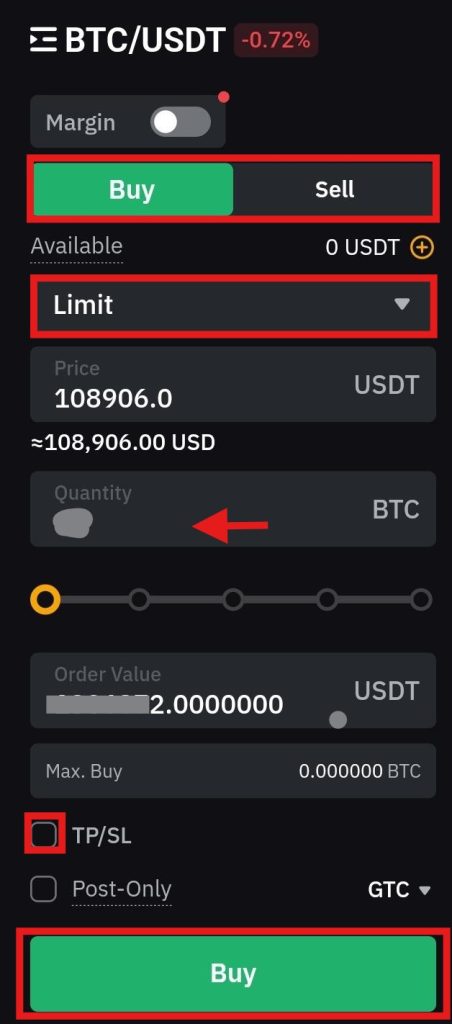
To place a trade:
- Navigate to the order panel.
- Click either Buy or Sell.
- Select an order type, for example, a Limit order.
- Enter the order amount, or you can use the handy percentage bar.
- You can also add TP/SL (Take-Profit/Stop-Loss) to your order, which is optional.
- Review the order details and click either Buy or Sell.
4. Add TP/SL to the order
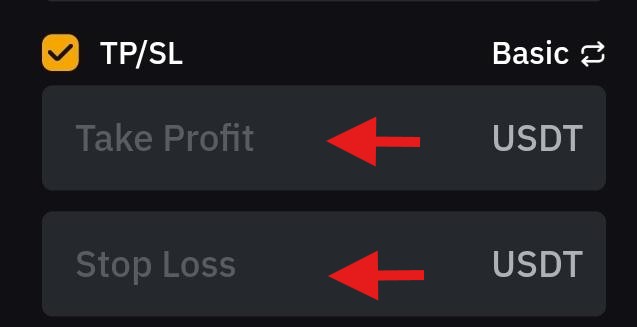
To add TP/SL to your order:
- Enable TP/SL settings in the order panel.
- Enter the Take-Profit and Stop-Loss prices.
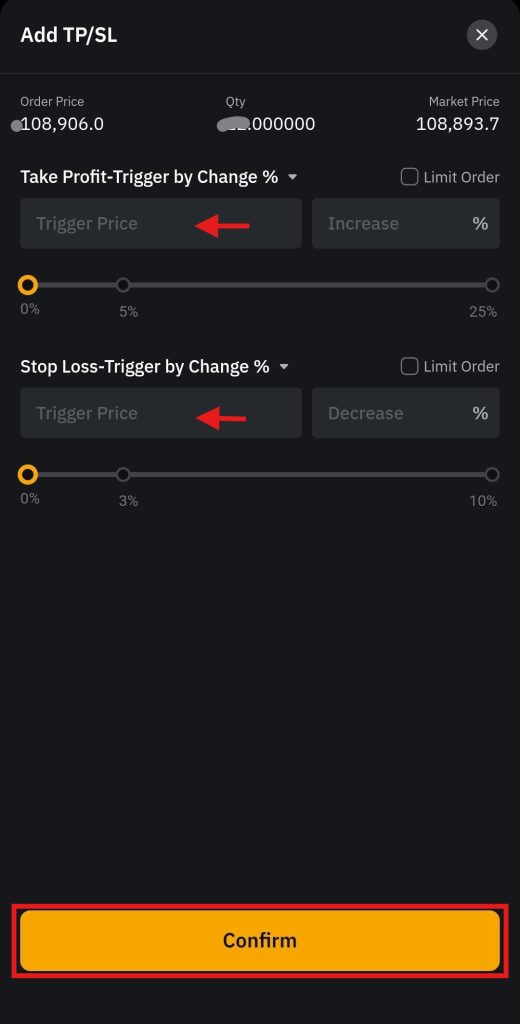
- You can also select advanced TP/SL settings.
- Toggle to advanced settings.
- Enter the trigger price for Take-Profit and Stop-Loss.
- Review the details and click on Confirm.
Once you open a trade, you can view its details under the positions tab.
Futures Trading on the Bybit App
Bybit offers Futures trading with advanced trading tools and order types on its mobile app.
To start Futures trading on the app:
1. Visit the home screen
Click Trade on the home screen.
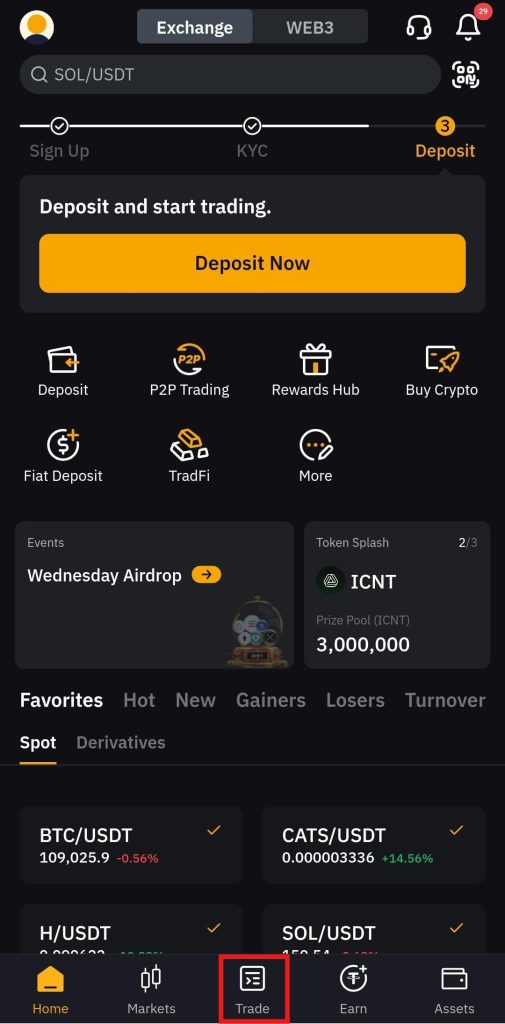
2. Getting familiar with the interface
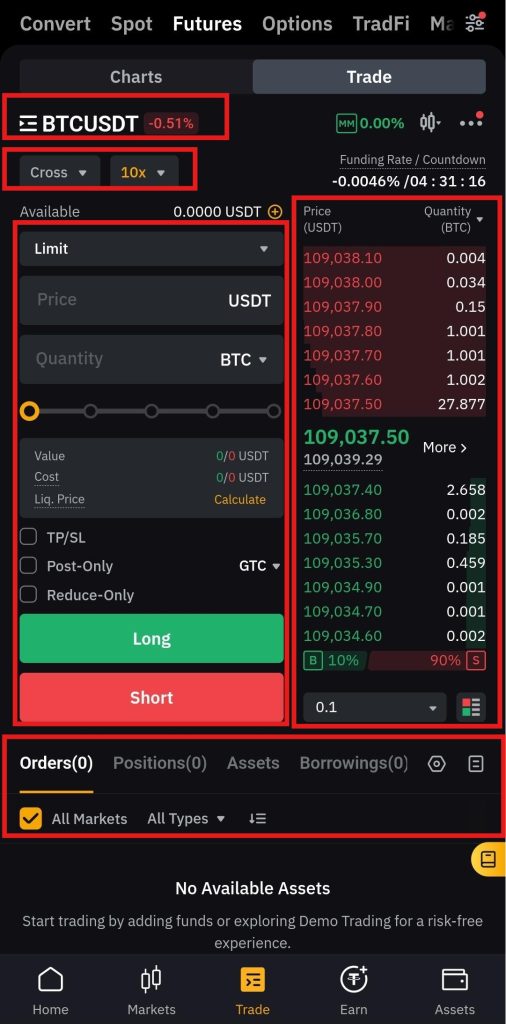
The trading interface offers the following features:
- You can select a trading pair from the trading pair selector on the left side of the interface. In this case, BTC/USDT is selected.
- The current buying and selling prices of the selected trading pair are displayed in the order book on the right side of the interface.
- You can place a trade in the order panel on the left side of the interface.
- You can view details of the trade in the positions tab, which is at the bottom of the interface.
3. Place a trade
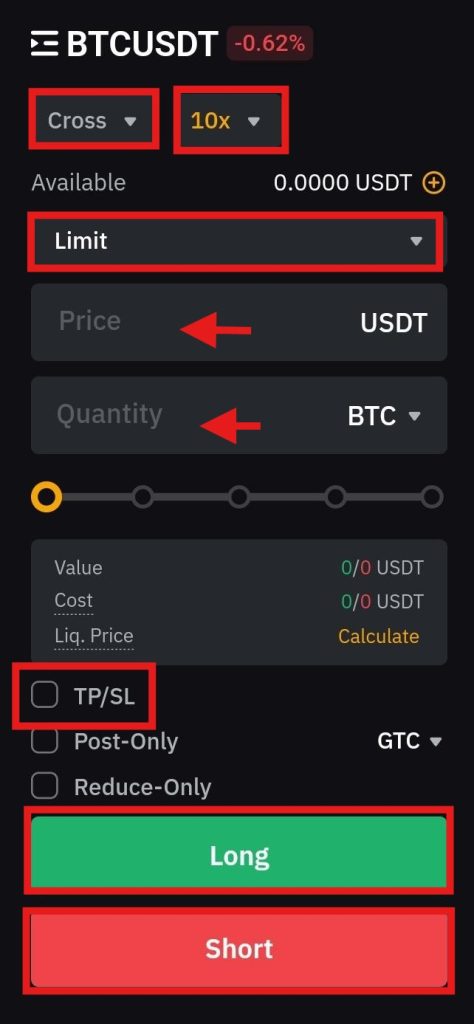
To place a trade:
- Go to the order panel, and select the margin mode between Isolated, Cross, and Portfolio. The isolated margin allocates a portion of funds to the position, the cross margin allocates funds to the entire position, and the portfolio margin calculates margin requirements based on the entire portfolio.
- Select the leverage, and Bybit offers up to 100x leverage on Futures contracts.
- Select the order type, for example, a Limit order.
- Enter the order amount.
- You can also add TP/SL to the order, which is optional.
- Review the order details and click either Long or Short to open a position.
After opening a position, you can view its details under the positions tab.
How to Start Copy Trading on the Bybit App?
Bybit allows its users to copy the trades of professional traders on its app. It allows users to learn from the trading strategies of seasoned traders and also generate passive income through their investments.
To start copy trading on the app:
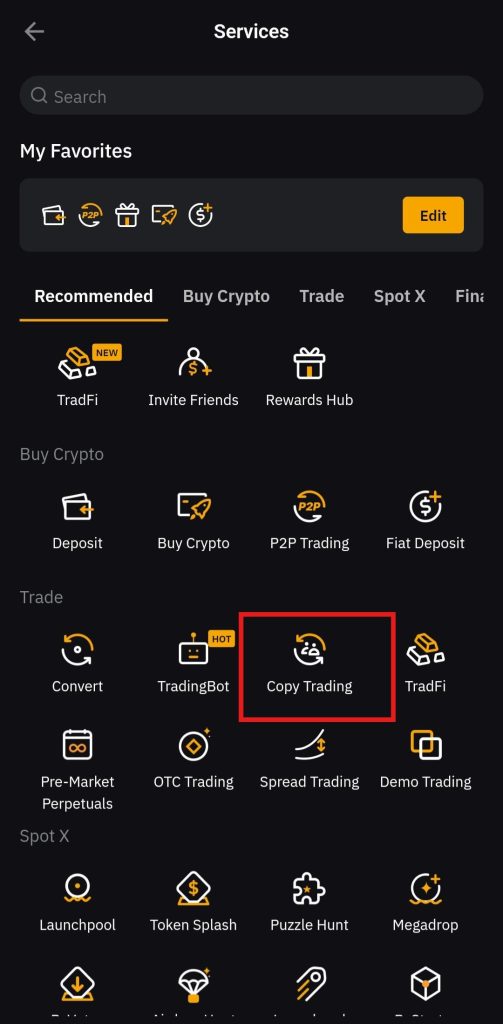
1. Head to the Copy trading page
On the home screen, click Copy Trading.
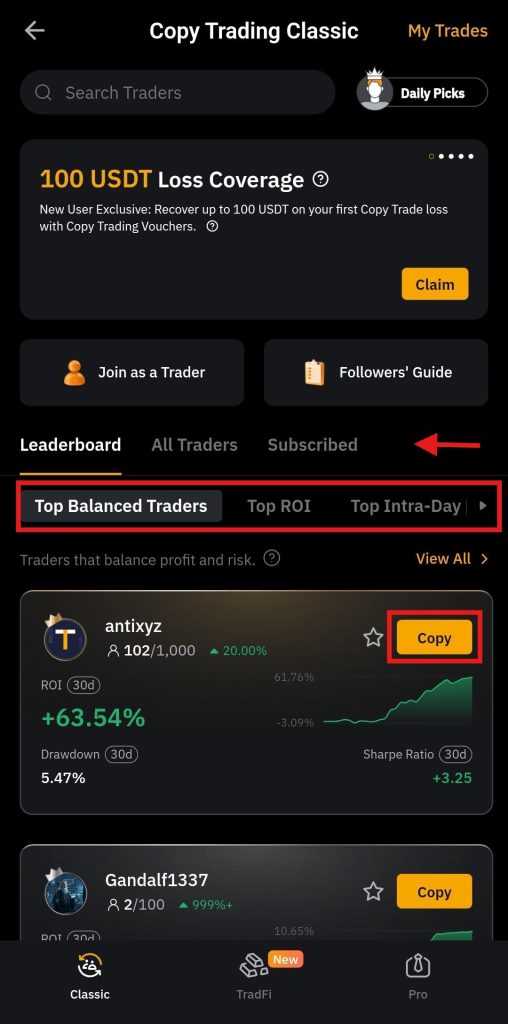
2. Select the trader
On the Copy trading page, you will see a list of lead traders that are categorized based on Top Balanced Traders, Top Intra-Day Traders, Top ROI (Return On Investment), and more. Select a copy trader and click on Copy.
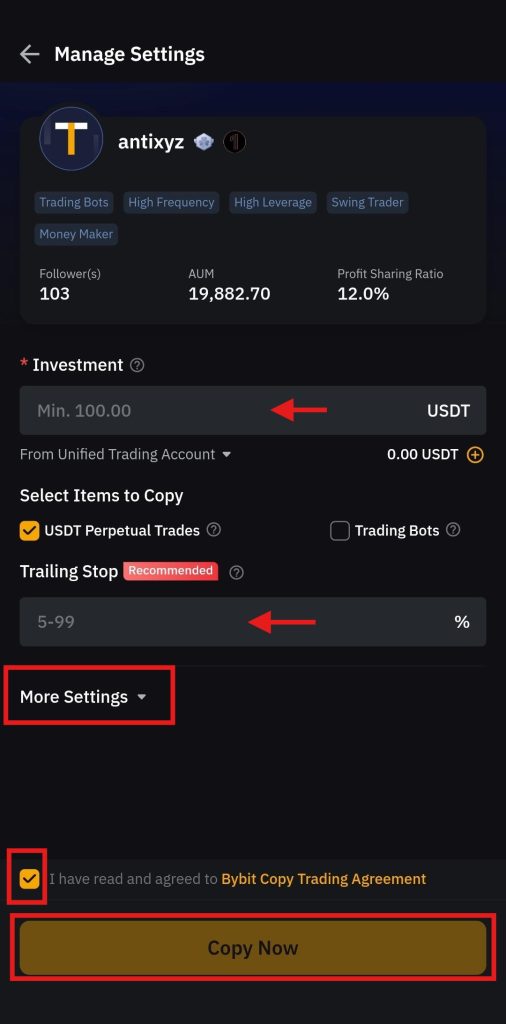
3. Fill the order
Enter the investment amount, set the trailing stop percentage, and agree to the trading agreement. You can also use the optional settings to add more details to the order. Review the order details and click on Copy Now to start copying the trader.
Bybit App Trading Fees
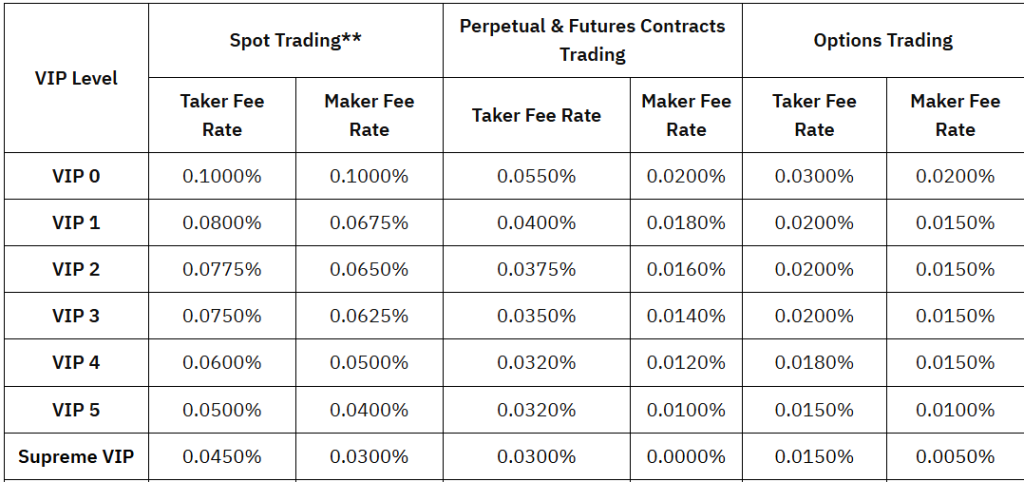
Bybit follows a maker-taker fee structure that users need to pay when trading cryptocurrencies on its mobile app. The fees are calculated based on the 30-day cumulative trading volume and the asset balance. Additionally, the fees are categorized into VIP and non-VIP user tiers.
The following fees are charged on the app:
- Spot trading: a 0.1.% maker and taker fee.
- Futures trading: a 0.02% maker and a 0.05% taker fee.
Furthermore, the following table shows the fee structure for VIP and non-VIP users on the app:
Bybit App Security
Bybit is an advanced cryptocurrency exchange that employs robust security measures for a safe trading environment on its mobile app. The platform is protected by a triple-layer asset protection approach to ensure maximum safety of users’ accounts. It uses Threshold Signature Schemes (TSS) and Trusted Execution Environment (TEE) to ensure enhanced safety.
Users are required to complete the Know Your Customer (KYC) procedure on the mobile app to comply with Bybit’s rules and regulations. The app uses strict security protocols, such as encrypted data transmission and two-factor authentication. In addition, it uses anti-phishing codes to minimize unauthorized access to your account.
Final Takeaways
The Bybit mobile phone app has been designed to offer a seamless trading experience to crypto traders. The app is easily accessible and provides a user-friendly interface with advanced functionality. It combines advanced trading tools and charts with an intuitive design to create a unique crypto trading experience for everyone.
The Bybit mobile app is your go-to platform to trade digital currencies. Whether you are a beginner or a professional trader, the app empowers users with confidence. For beginners, it enables the simple buying and selling of digital currencies, while for experienced traders, it offers advanced order types and charts to trade with confidence.
In addition to trading features, it allows users to copy trades of professional traders and generate passive income. The Bybit mobile app is highly secure, featuring a wide range of security measures to ensure a safe trading environment. The app offers 24/7 customer support to help users navigate the complex world of digital assets with ease.
Your $30,000 bonus + 10% discount are waiting on Bybit! Sign up and claim these rewards before they're gone. Time's ticking!
Bybit App FAQs
The Bybit app is an advanced mobile phone application that has been designed to offer you a seamless trading experience.
Bybit is a centralized cryptocurrency exchange, and you need to complete the KYC procedure when registering for an account on its app.
Bybit offers Spot trading on its mobile app, where users can buy and sell digital currencies with ease.
The Bybit mobile app offers Futures trading to users with advanced technical tools and order types.
You can download the Bybit mobile app from the Google Play Store and App Store.
The headquarters of Bybit are in the United Arab Emirates (UAE).
Bybit offers demo trading on its app, allowing users to place trades without using real assets.
You can start copy trading on the Bybit app and generate passive income while learning from professional traders.
The maker and taker fee for spot trading on the Bybit app is 0.10%.
Bybit charges a 0.05% taker fee for Futures trading on the app.
The maker fee for Futures trading on the Bybit app is 0.02%.
Disclaimer: All content on The Moon Show is for informational and educational purposes only. The opinions expressed do not constitute financial advice or recommendations to buy, sell, or trade cryptocurrencies. Trading involves significant risk and may result in substantial losses. Always seek independent financial advice before making investment decisions. The Moon Show is not responsible for any financial losses or decisions made based on the information provided.
Please view the full disclaimer at: https://themoonshow.com/disclaimer

Binance App Tutorial – Everything You Need to Know
Cryptocurrency exchanges are platforms for trading digital currencies, such as Bitcoin (BTC), E...
MEXC App Tutorial – How to Trade Crypto on MEXC App?
MEXC is a full-featured cryptocurrency trading app that supports a wide range of tools, includi...
Bitget App Tutorial – How to Trade Crypto on Bitget App?
Bitget is a multi-functional crypto trading app that combines spot, futures, and margin trading...