Ledger Flex Wallet Review – A Premium Touchscreen Hardware Wallet
Ledger Flex is a premium hardware wallet that secures private keys from hacks, scams, and other online threats. It supports 15,000+ coins and tokens, features a secure E Ink touchscreen, supports Bluetooth and USB-C connectivity, and is powered by the latest Ledger OS. The device is built with a CC EAL6+ certified secure chip that guarantees the Ledger Flex keeps your digital assets secure from external threats. It uses a 4 – 8-digit PIN code and a Secure Element chip to protect your assets.
Who Should Purchase Ledger Flex?
You should buy Ledger Flex if you:
- Frequently send, receive, stake, or trade cryptocurrencies
- Use both mobile and desktop wallets
- Value design and usability
- Require robust security
Ledger Flex Pros and Cons
Pros
- Large, easy-to-use E Ink touchscreen
- Strong security with certified hardware
- Excellent mobile compatibility
- Supports 15,000+ coins and tokens
- Premium design and built quality
Cons
- Expensive
- Not air-gapped
- Limited app storage
- No backlight on display
- Firmware is not fully open source
What is Ledger Flex?
The Ledger Flex is the “world’s most intuitive hardware wallet” developed by Ledger, designed to combine strong security with an enhanced user experience. This cold storage wallet stores your private keys offline on a secure chip, protecting them from online threats. It supports 15,000+ coins and tokens, including Bitcoin (BTC), Ethereum (ETH), and XRP, and integrates with the Ledger Wallet application (formerly Ledger Live).
The device aims to make cryptocurrency management easier and more intuitive with its 2.8-inch Gorilla Glass E Ink touchscreen. With its advanced ecosystem, the wallet supports NFTs and DeFi. Users can send, receive, stake, and store cryptocurrencies effortlessly without compromising on security.
|
Security |
CC EAL6+ Certified Secure Element Chip |
|
Cryptocurrency |
15,000+ coins and tokens |
|
Ease of Use |
High |
|
Buy & Sell |
Yes |
|
Platforms |
Windows, macOS, Linux, iOS, and Android |
Important Reads: Top Crypto Wallets in 2026
Ledger Flex Design and Usability
Ledger refers to all of its hardware wallets as “signers.” The Ledger Flex has a sleek, modern design that looks and feels premium. It has an aluminum frame and a durable front display. The E Ink display offers a paper-like viewing experience, which is easy on the eyes and highly readable even in bright light. However, it does not have a backlight, meaning its visibility can suffer in low-light conditions.
Overall, the device is well-built with a Gorilla Glass display and minimal buttons to enhance both durability and simplicity.
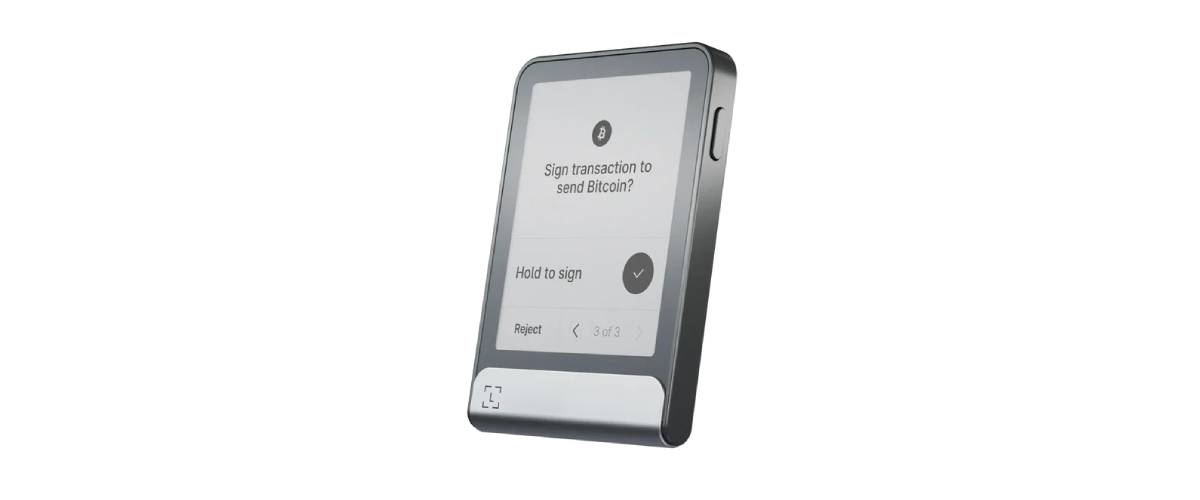
Its key specifications include:
- Dimensions: 78.4mm x 56.5mm x 7.7mm
- Weight: 57.5g
- Screen: 2.8-inch Gorilla Glass E Ink touchscreen with anti-glare coating
- Connectivity: USB-C and Bluetooth (BLE 5.2)
- Storage: Up to 100 applications (subject to the size of the application)
- Battery: 200mAh
Security
Ledger hardware wallets are known for their security, and the Ledger Flex continues that. Private keys are stored in a certified Secure Element chip (CC EAL 6+), a specialized tamper-resistant hardware. It acts as a “black box” within the device, designed to protect sensitive information such as cryptographic keys and PINs.
All transactions must be physically confirmed on the device with the Clear Signing feature. It allows users to review and confirm all details of the transaction directly on the E-Inch touchscreen in readable human language before it is signed and sent. The recovery phrase created during the setup process will ensure that users retain access to the device even if they forget the PIN code.
The Ledger Flex supports advanced features such as compatibility with BIP39 wallets, meaning users can recover funds using other wallets if needed. However, the device relies on a USB connection or Bluetooth. Its firmware is not fully open source, which may concern users who prioritize transparency.
Setup and User Experience
The Ledger Flex can be connected to a smartphone via Bluetooth, and it can be connected to a laptop or desktop device via USB. Ledger Flex works with Windows, macOS, Linux, iOS, and Android. Instead of buttons, users interact directly with the touch screen. This makes tasks such as confirming transactions or entering a PIN more intuitive and faster. The larger screen also reduces the risk of errors. Users can clearly see the full wallet addresses and transaction details before approving them.
Setting up Ledger Flex is easy and simple. All you need to do is:
- Download the Ledger Wallet application on your desktop computer or laptop from the official Ledger website. If you wish to use the mobile version, download the application from the Google Play Store or the App Store.
- Start the device by pressing the power button.
- Connect the Ledger Flex device with your phone via Bluetooth or via USB-C to your desktop.
- Set up a 4 – 8-digit security pin code.
- Write down the 24-word recovery phrase on the device. Write it down on paper and keep it safe.
- The Ledger Wallet application will confirm the phrase, so ensure that you write it correctly.
- Install applications for your desired cryptocurrencies or NFTs.
- Connect the device with the Ledger Wallet application.
Always test the applications by making a small test transaction to ensure everything is working perfectly before you make large transactions.
How to Set Up Ledger Wallet on Mobile?
Connecting the Ledger Flex to the Ledger Wallet application is a simple process. To do that, you will need to:
- Install the Ledger Wallet application from the Google Play Store or App Store.
- Turn Bluetooth on the device and your smartphone.
- Start the pairing process from the Ledger Wallet application.
- You will see a pairing code that will appear on both the Ledger Flex and your mobile phone.
- Confirm it, and your device is paired with your smartphone.
Supported Cryptocurrencies
Ledger Flex supports a vast ecosystem of cryptocurrencies, including but not limited to:
- Bitcoin (BTC)
- Ethereum (ETH)
- Solana (SOL)
- ERC-20 Tokens
- NFTs
Thanks to the Ledger Wallet application and third-party integrations, users can manage over 5,000 assets and interact with DeFi platforms, staking services, and NFT marketplaces.
Performance and Connectivity
The Ledger Flex is designed for both desktop and mobile users. It works seamlessly across multiple devices and for managing multiple cryptocurrencies. Its performance is optimized for fast transaction handling, clear verification, and reliable connectivity across devices.
- The device’s E Link touchscreen provides fast, glare-free readability while consuming minimal power, which helps maintain consistent performance over long periods.
- The interface responds quickly to touch inputs, allowing users to navigate menus and approve transactions without noticeable lag.
- Bluetooth connectivity enables seamless pairing with smartphones, allowing users to manage assets wirelessly.
- USB-C connectivity ensures a stable and fast connection to laptops and desktops, making it reliable for high-volume transactions.
- The wallet integrates smoothly with the Ledger Wallet application, where users can easily sync balances, send transactions, approve transactions, and manage assets seamlessly.
- The device supports Clear Signing, meaning transaction details are fully displayed and processed on-device, reducing the need for external devices.
What Is the Price of Ledger Flex?
The Ledger Flex has a price of €207.50 and is available in six colors and one limited edition. You can purchase the device in Graphite, BTC Orange, Solana Edition, Oxidate Green, Crimson Magenta, Ferro Fuchsia, and BONK! Limited Edition. The BONK! Limited Edition has the price of €215.83.
Where Can You Buy It?
You can buy the Ledger Flex wallet from Ledger’s official website. It delivers all over the world at a minimal shipping fee.
Final Takeaways
The Ledger Flex is one of the most user-friendly hardware wallets available in the market. This premium device is designed to offer a modernized hardware wallet experience with a touchscreen interface without compromising on the security associated with Ledger devices. The device offers improved mobile support and the Clear Signing feature to ensure your day-to-day crypto activities can happen smoothly.
FAQs
What is the Ledger Flex wallet used for?
The Ledger Flex wallet is used to securely store, manage, and use cryptocurrencies while keeping private keys offline and secure from threats.
Is Ledger Flex safe to use?
Yes, the wallet uses a Secure Element Chip and keeps your private keys offline, which significantly reduces the risk of hacking and malware.
Does Ledger Flex support Bluetooth?
Yes, the device supports Bluetooth connectivity, allowing users to connect it wirelessly to their smartphones for convenience.
Can I use Ledger Flex with a computer?
Yes, you can connect it to a desktop or laptop using a USB-C cable for a stable and reliable connection.
Can I recover my crypto if I lose the device?
Yes, you can recover your assets using the recovery phrase that you stored offline.
Is Ledger Flex good for beginners?
Yes, it is beginner-friendly due to its simple interface while still offering advanced features for experienced users.
Disclaimer: All content on The Moon Show is for informational and educational purposes only. The opinions expressed do not constitute financial advice or recommendations to buy, sell, or trade cryptocurrencies. Trading involves significant risk and may result in substantial losses. Always seek independent financial advice before making investment decisions. The Moon Show is not responsible for any financial losses or decisions made based on the information provided.
Please view the full disclaimer at: https://themoonshow.com/disclaimer
Ledger Wallet Review - Features, Models, and Security Explained
A cryptocurrency wallet is a software application or a physical device that enables users to st...

Exodus Wallet Review – Security, Fees, and Usability
Exodus is a non-custodial cryptocurrency wallet that lets you send, receive, store, and swap ov...
Trust Wallet Review - Features, Security, and Performance Explored
A cryptocurrency wallet is a tool that allows users to manage, store, send, and receive cryptoc...